
Back to Blog ai
ai ai
ai ai
ai ai
ai go
go playwright
 cli
cli
What Karpathy's LLM Wiki Is Missing (And How to Fix It)
Penfield April 13, 2026
0 views
Andrej Karpathy's LLM Wiki pattern went viral this month. 5,000+ stars, 3,700 forks, dozens of...
Andrej Karpathy's [LLM Wiki pattern](https://gist.github.com/karpathy/442a6bf555914893e9891c11519de94f) went viral this month. 5,000+ stars, 3,700 forks, dozens of implementations. The core insight is right: stop re-deriving knowledge on every query. Compile it once into a structured wiki. Let the LLM do the bookkeeping that makes humans abandon knowledge bases.
If you haven't read it, the pattern is: raw sources go into a directory, an LLM processes them into interlinked markdown pages, and Obsidian serves as the viewer. Three layers, three operations (ingest, query, lint), and the LLM maintains everything.
It's a good starting point. But if you've tried to run this pattern beyond a few hundred notes, you've likely already hit the wall. There are three structural gaps that break down at scale, and they aren't things you can fix with a better prompt or a fancier index file.
Here's what's missing and how to fix it.
## Gap 1: Your links don't mean anything
Open Obsidian's graph view on a Karpathy-style wiki. What do you see? A web of identical gray lines. Every connection looks the same because every `[[wikilink]]` carries exactly one bit of information: "these two notes are connected."
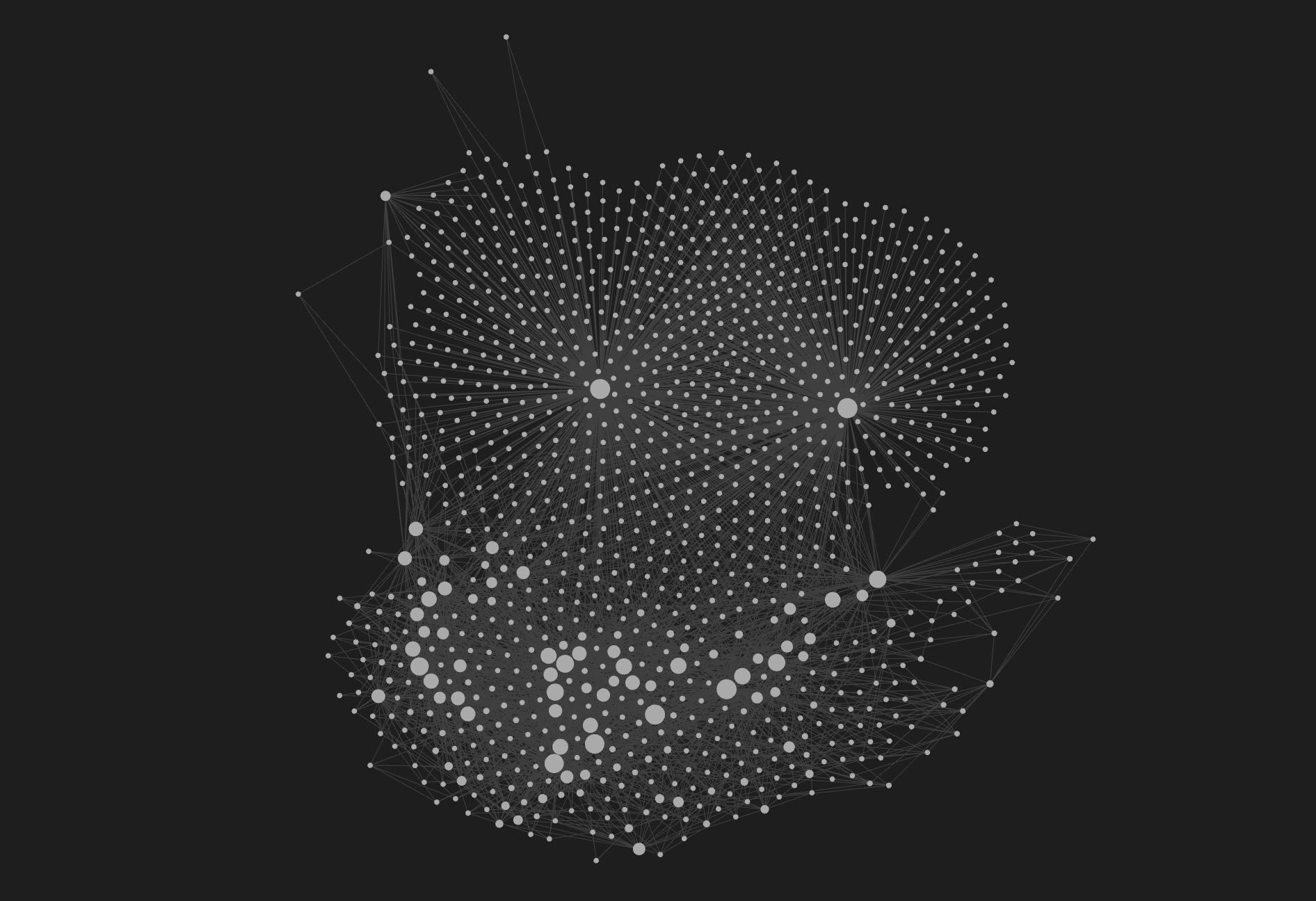
That's not enough.
When Karpathy talks about the LLM "noting where new data contradicts old claims" and "flagging contradictions," he's describing *semantic relationships*. But the underlying link format can't express any of them. `[[Note A]]` doesn't tell you whether Note A supports, contradicts, supersedes, or was caused by the current note. The meaning lives in the prose around the link, invisible to every tool in the Obsidian ecosystem.
This matters because the whole point of a compiled wiki is that the structure does work for you. If your graph can't distinguish "this supersedes that" from "this contradicts that," you're leaving some of the most valuable information trapped in unstructured text, which is exactly the problem you were trying to solve.
### The fix: typed relationships inside wikilinks
[obsidian-wikilink-types](https://github.com/penfieldlabs/obsidian-wikilink-types) adds semantic relationship types to standard Obsidian wikilinks using `@` syntax:
```markdown
[[Previous Analysis|The new research @supersedes the previous analysis]]
[[Redis Paper|This @supports the caching architecture in @references the Redis paper]]
```
Type `@` inside a wikilink alias and you get an autocomplete dropdown of 24 relationship types: `supersedes`, `contradicts`, `causes`, `supports`, `evolution_of`, `prerequisite_for`, and more.
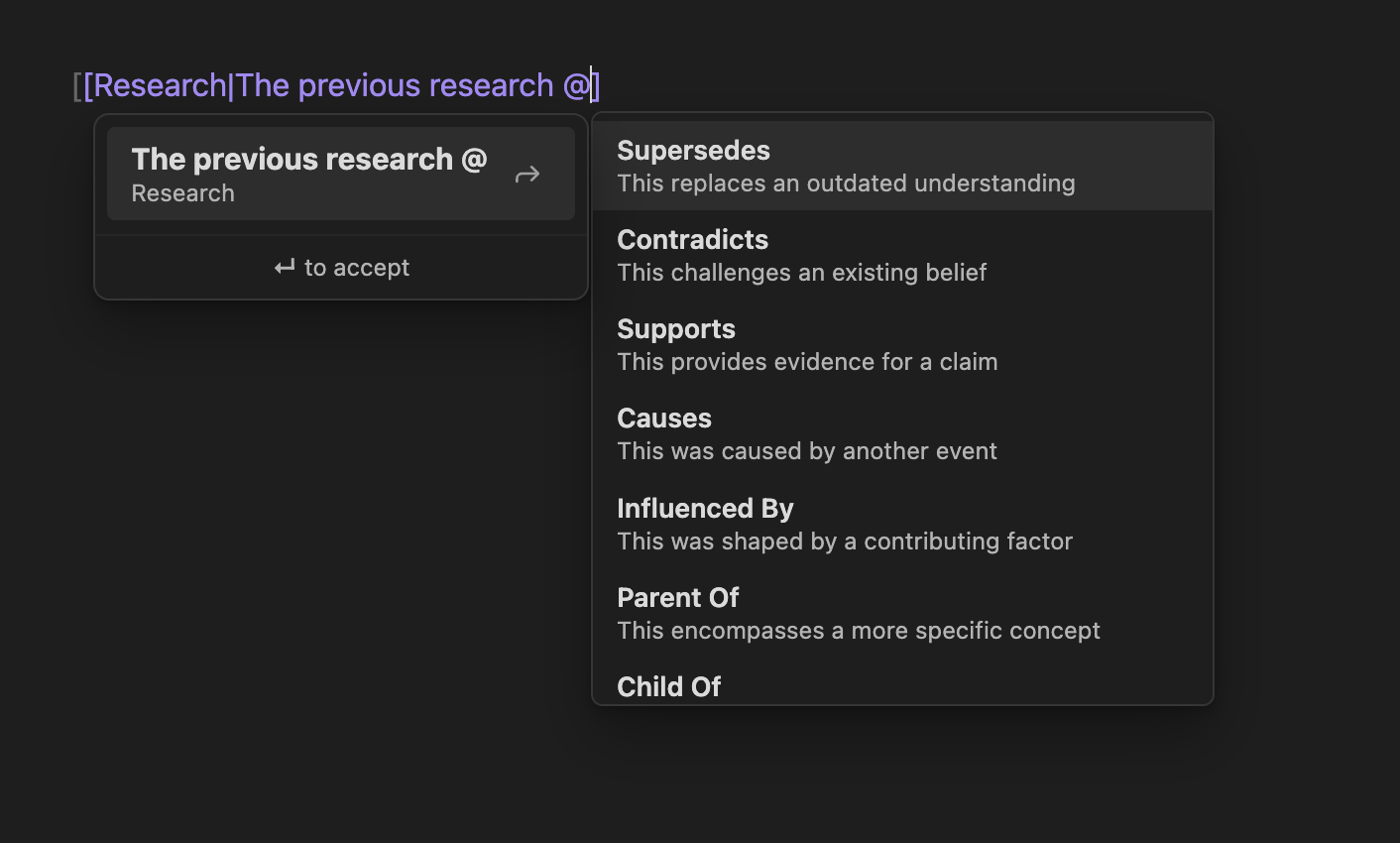
On save, the plugin syncs matched types to YAML frontmatter automatically:
```yaml
---
supersedes:
- "[[Previous Analysis]]"
supports:
- "[[Redis Paper]]"
references:
- "[[Redis Paper]]"
---
```
That's it. Standard YAML frontmatter. [Dataview](https://github.com/blacksmithgu/obsidian-dataview) can query it. Nothing breaks.
The `@` syntax was deliberately chosen: it doesn't conflict with any existing Obsidian syntax (`^` is block references, `::` is Dataview inline fields), and it triggers autocomplete only when preceded by a space or appearing right after the `|` pipe. `[email protected]` in your display text is left alone. Only configured relationship types generate frontmatter. `@monkeyballs` is just display text.
Install it via [BRAT](https://github.com/TfTHacker/obsidian42-brat) with `penfieldlabs/obsidian-wikilink-types`.
### What this changes
With typed links, your vault goes from a tangle of identical connections to a queryable knowledge graph. You can write Dataview queries like "show me everything that contradicts my current hypothesis." You can trace causation chains. You can see at a glance which notes have been superseded and which are current.
This is what Karpathy's pattern needs but doesn't have: links that carry meaning.
## Gap 2: You shouldn't have to type every relationship yourself
A wiki with typed links is more useful than one without. But manually typing `@supersedes` and `@contradicts` on every note is tedious, and you'll miss connections that aren't obvious.
The whole premise of the LLM Wiki is that the LLM does the bookkeeping. So let it discover the relationships too.
### The fix: AI-discovered typed relationships
The [Vault Linker skill](https://github.com/penfieldlabs/obsidian-wikilink-types/tree/main/skill) ships in the same repo as the plugin. It's a skill specification for AI agents (Claude Code, OpenClaw, or anything that can read and write files) that analyzes your vault and discovers relationships between notes.
The workflow:
1. Point your AI agent at your vault with the Vault Linker skill loaded
2. The agent reads your notes and identifies connections: "This note supersedes that one. This note contradicts that claim. This was caused by that decision."
3. The agent writes the relationships in Wikilink Types format: adding `@supersedes`, `@contradicts`, etc. to the wikilinks and syncing the frontmatter
4. You review and approve
The human stays in the loop for judgment. The AI does the grunt work of reading hundreds of notes and spotting connections you'd never find manually.
The LLM Wiki pattern says the LLM should do all the "summarizing, cross-referencing, filing, and bookkeeping." Typed links give the LLM a vocabulary for those cross-references. The Vault Linker skill gives it the workflow to actually do it.
### Autonomous mode: link an entire vault overnight
The skill above is interactive: the agent discovers, you approve. But what if you have 500 notes and want to link the whole thing in one pass?
The repo includes two prompts designed to work as a pipeline:
**[Autonomous Vault Linking](https://github.com/penfieldlabs/obsidian-wikilink-types/blob/main/prompts/autonomous-vault-linking.md)** is the build phase. You give it to your agent with a vault path and walk away. The agent creates a git branch, surveys the vault, classifies notes as hubs or spokes, then works through them in priority order: hub-to-hub relationships first (the highest-value connections), then spoke-to-hub (the bulk of the work), then lateral spoke-to-spoke connections. It commits every 20-50 notes, writes a linking log with stats and confidence levels, and never touches your main branch. If you're running multiple agents in parallel (one per folder, say), the prompt includes coordination rules: each agent only writes to its assigned notes, verifies target files exist before linking, and logs anything it had to skip.
**[Verify and Repair](https://github.com/penfieldlabs/obsidian-wikilink-types/blob/main/prompts/verify-and-repair.md)** is the cleanup phase. You run it on the same branch after the build completes. It builds a complete file index, scans every note for broken links (correctly excluding code blocks and callouts), repairs what it can (near-match resolution, parallel-agent artifact removal), checks that frontmatter and inline `@type` links are consistent, removes duplicates, classifies orphan notes, and validates all YAML. The output is a verification report telling you exactly what was fixed and what still needs human judgment. Only after verify passes do you merge.
The two-phase design is deliberate: the build phase is optimized for throughput, the verify phase is optimized for correctness. Both are idempotent. Re-running on an already-linked vault produces zero changes.
## Gap 3: Your knowledge is trapped on one machine
This is the gap most implementations aren't solving.
The LLM Wiki stores everything as plain markdown. You can sync those files with git, point multiple tools at the same directory, access them from anywhere. The files aren't the problem.
The agent's understanding is.
Every time you start a new session, the LLM reads your index file, re-parses the wiki structure, and rediscovers what it already knew last session. There's no persistent graph in memory. No way to query "what contradicts my hypothesis about X?" without the LLM re-reading every relevant page. No graph traversal that can walk typed relationships across hundreds of notes. The `index.md` catalog works at small scale, but it's a flat file, not a query engine.
Git gives you file portability. What it doesn't give you is agent-level memory, relationship-aware search, or a persistent knowledge graph that any tool can query without re-parsing everything from scratch.
### The fix: a persistent knowledge graph backend
[Penfield](https://penfield.app) is a persistent memory and knowledge graph system for AI agents. It stores memories, artifacts, and typed relationships in a backend accessible via MCP (Model Context Protocol) from any compatible client.
The relevant capabilities:
- **Hybrid search**: BM25 (keyword) + vector (semantic) + graph traversal, fused together. Not "pick one." All three, weighted and merged.
- **Typed relationships**: The same 24 relationship types from wikilink-types are native to Penfield's graph. `supersedes`, `contradicts`, `causes`, all of them. The vocabulary matches exactly.
- **Cross-platform access**: Connect from Claude Code, Claude.ai, OpenClaw, Cursor, Gemini CLI, or anything else that speaks MCP. Same knowledge graph, same relationships, regardless of which tool you're using.
- **Persistence across sessions**: The graph doesn't disappear when you close a tab. Memories, relationships, and artifacts survive indefinitely. Start a new session and pick up where you left off.
### The pipeline: Obsidian to Penfield
[penfield-import](https://github.com/penfieldlabs/penfield-import) is the bridge. It reads an Obsidian vault (or any collection of markdown files) and imports everything into Penfield as memories, relationships, and artifacts.
The tool runs in seven phases with crash-safe checkpointing:
1. **Parse**: Reads all `.md` and `.txt` files, extracts YAML frontmatter and typed relationships
2. **Memories**: Creates one Penfield memory per note
3. **Artifacts**: Uploads full content for notes exceeding the 10K character memory limit
4. **Exported Artifacts**: Uploads pre-existing artifact files
5. **Documents**: Uploads documents (PDFs, code files, etc.)
6. **Relationships**: Bulk-creates relationships between memories in batches of 100
7. **Verify**: Confirms import counts match
Quick start:
```bash
# Install
pip install .
# Authenticate (opens browser, takes 2 seconds)
penfield-import --login
# Preview what will be imported
penfield-import /path/to/your/vault --dry-run
# Run the import
penfield-import /path/to/your/vault
```
If your vault has typed relationships from obsidian-wikilink-types, they come through as graph edges in Penfield. If it doesn't, you still get all your notes as searchable memories. Typed links make the import richer, but they aren't required.
We've run this at scale with over 4,000 notes and over 20,000 relationships imported in a single autonomous run. The checkpoint system means if something crashes at phase 5, it resumes from phase 5, not from scratch.
## The complete pipeline
Here's what the full workflow looks like, whether you're upgrading an existing vault or starting fresh:
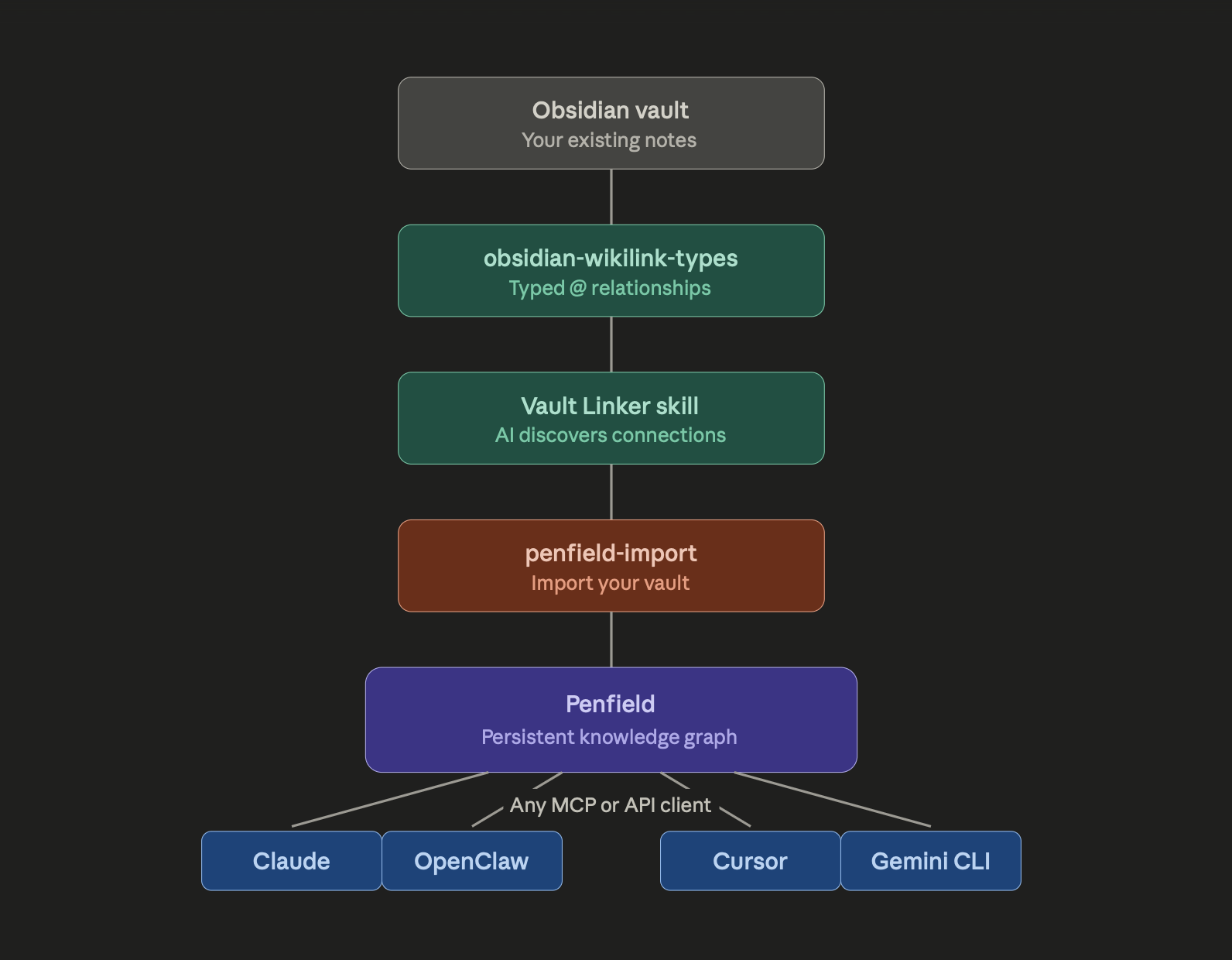
### Path A: You already have an Obsidian vault
1. **Install obsidian-wikilink-types** in your vault
2. **Run the Vault Linker skill** with Claude Code or OpenClaw to discover relationships across your existing notes
3. **Review and approve** the AI-suggested relationships
4. **Run penfield-import** to push everything into Penfield
5. **Access your knowledge** from any MCP-compatible AI tool, on any device
### Path B: Starting fresh with the LLM Wiki pattern
1. Follow Karpathy's pattern: collect sources, have the LLM compile a wiki
2. But use **obsidian-wikilink-types from day one**. When the LLM creates cross-references, have it use `@` syntax so the relationships are typed from the start
3. Periodically run the **Vault Linker skill** to catch relationships the LLM missed
4. When your wiki is rich enough, **import to Penfield** for persistent, cross-platform access
### What you get vs. what you had
| | Karpathy's LLM Wiki | With typed links + Penfield |
|---|---|---|
| Link semantics | [[Note]] - connected, no type | [[Note @supersedes]] - 24 relationship types |
| Search | index.md flat file, breaks at scale | Hybrid: BM25 + vector + graph traversal |
| Persistence | None - LLM forgets between sessions | Full - knowledge graph persists indefinitely |
| Device access | One laptop, one directory | Any device, any MCP or API client |
| Agent compatibility | One agent at a time | Claude, OpenClaw, Cursor, Gemini CLI, etc. |
| Relationship discovery | Manual, in prose | AI-discovered via Vault Linker, human approval |
## The tools
Everything mentioned in this article is available now:
- **[obsidian-wikilink-types](https://github.com/penfieldlabs/obsidian-wikilink-types)**: The Obsidian plugin. Typed `@` relationships in wikilinks, auto-synced to YAML frontmatter. Includes the Vault Linker skill for AI-discovered relationships. AGPL-3.0.
- **[penfield-import](https://github.com/penfieldlabs/penfield-import)**: Import tool for Obsidian vaults and other markdown collections. Seven-phase pipeline with crash-safe checkpointing. AGPL-3.0.
- **[Penfield](https://penfield.app)**: Persistent memory and knowledge graph for AI agents. Free trial at [portal.penfield.app/sign-up](https://portal.penfield.app/sign-up). MCP server setup at [github.com/penfieldlabs/penfield-mcp](https://github.com/penfieldlabs/penfield-mcp).
Karpathy's LLM Wiki pattern is a solid foundation. Typed relationships, AI-discovered connections, and a persistent backend are what turn it from a clever note-taking hack into a knowledge system that actually compounds.
---
*If you have questions or want to contribute, open an issue on any of the repos above or find us at [@penfieldlabs](https://github.com/penfieldlabs).*
Comments
More Blog
View allaiHow I'm using ASTs and Gemini to solve the "Codebase Onboarding" problem 🧠
Hi everyone! 👋 I’m Tara, a Senior Software Engineer and Consultant. Over the years, I've jumped...
T
tworrellaiLocal AI Will Save Us All (The Math Says So, Trust Me)
Every few weeks a take goes viral in tech circles making the case for ditching cloud AI and running...
S
Sebastian SchürmannaiLost in the AI Hype, I Started Small
And it helped me get back into tech without drowning TL;DR at the end Coming back to...
R
Rohini GaonkargoBuilding a Replay-Tested Interactive Brokers Client in Go
I wanted an IBKR library that felt like Go and had testing I could trust. So I wrote one.
T
Thomas MarcelisplaywrightPlaywright in Pictures: Fully Parallel Mode
Playwright’s fullyParallel mode is often treated as a simple performance switch. In practice, it...
V
Vitaliy PotapovcliDesigning a CLI for Both Humans and Agents
Learn how Alpic designed its CLI for both human developers and AI agents — covering tradeoffs like polling, context windows, interactivity, and statelessness.
J
Julien Vallini