
Back to Blog ios
ios
A subtle gotcha:
 gemma
gemma community
 ai
ai ai
ai githubactions
 ai
ai
Our SwiftUI snapshot tests passed locally but failed on CI. Here's the actual fix.
Daksh Gargas April 16, 2026
0 views
500+ snapshot tests, all green on every developer's Mac, all red on GitHub Actions. Sound...
title: Our SwiftUI snapshot tests passed locally but failed on CI. Here's the actual fix. published: true tags: ios, swiftui, testing, cicd
500+ snapshot tests, all green on every developer's Mac, all red on GitHub Actions. Sound familiar?
The common advice is "record your reference images on CI" or "lower your precision threshold." We tried both. Neither felt right.
Recording on CI means you can't verify snapshots locally anymore. Every UI change becomes a multi-step ritual: push a commit, wait for CI to fail, download the new reference PNGs from the artifacts, commit them, push again, wait for CI to pass. If you touch 10 views, that's 10 PNGs you need to pull down and commit blind — you're trusting CI's rendering as ground truth without ever seeing the images on your own screen. And if two people change UI on separate branches, you get merge conflicts in binary PNG files.
Lowering precision thresholds is worse. Drop to 85% and you're not really testing the UI anymore — real regressions hide in the noise.
It took us three wrong hypotheses and a lot of diff images to find the real cause. Sharing in case it saves someone else the same journey.
Why we moved from iOS Simulator to macOS
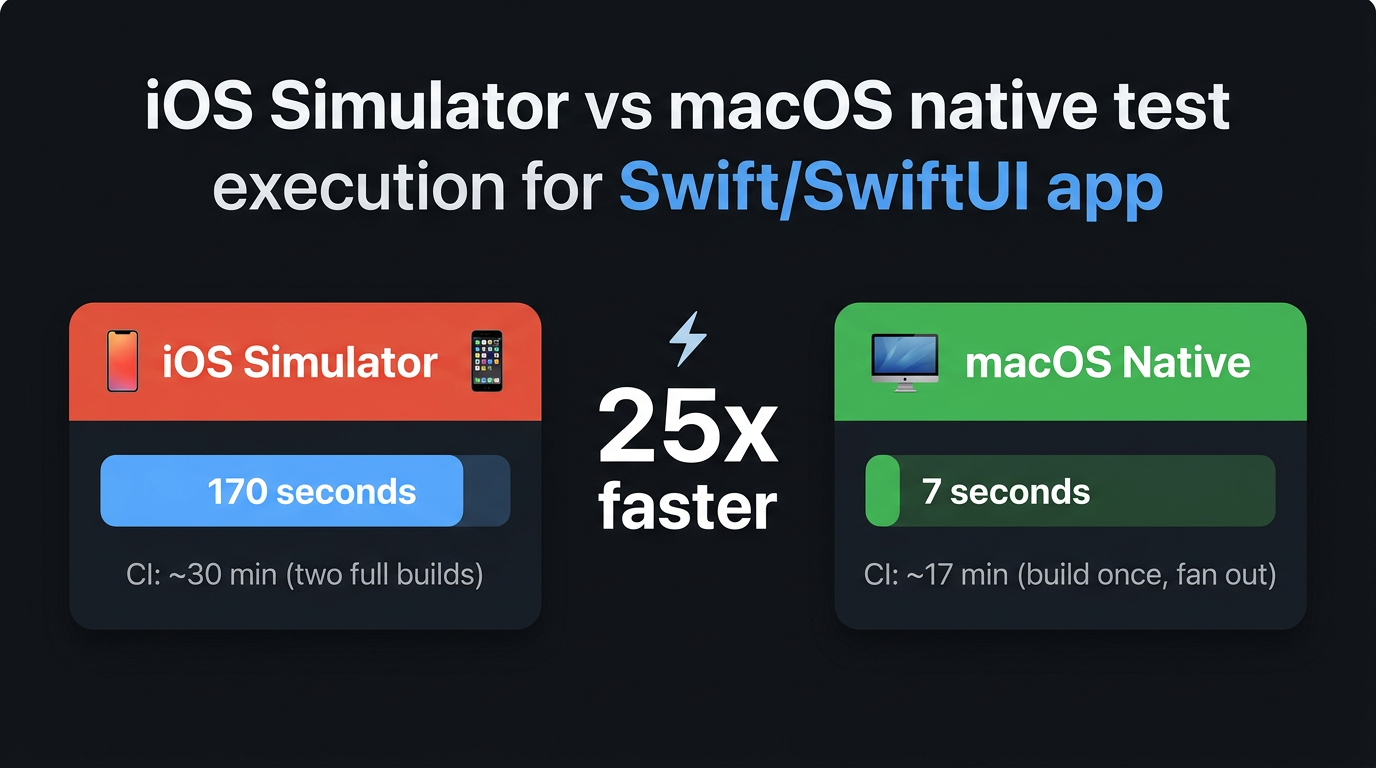
TL;DR: Tests went from 170s to 7s locally (25x), CI from ~30 min to ~17 min.
Before the snapshot story, some context on how we got here — because the move to macOS is what made this problem (and the fix) possible.
Our test suite ran on the iOS Simulator. Every xcodebuild test invocation booted a simulator, waited for it to become ready, deployed the test bundle, and ran. 170 seconds for a full run. Locally that's annoying; on CI it's brutal — you're paying for a macOS runner to sit idle while a virtual iPhone boots.
We started asking: how many of these tests actually need a simulator? We audited the suite and the answer was almost none. Our app logic — state management, data parsing, network handling, navigation — is pure Swift. It doesn't call UIKit. And SwiftUI views? They render just fine on macOS through NSHostingView. Apple's own framework handles the translation.
So we flipped the destination from platform=iOS Simulator to platform=macOS and ran the suite. Most tests passed immediately. A handful needed #if os(iOS) guards — things like UIImage processing or CLAuthorizationStatus that genuinely require iOS APIs. We kept those on the simulator and moved everything else to macOS.
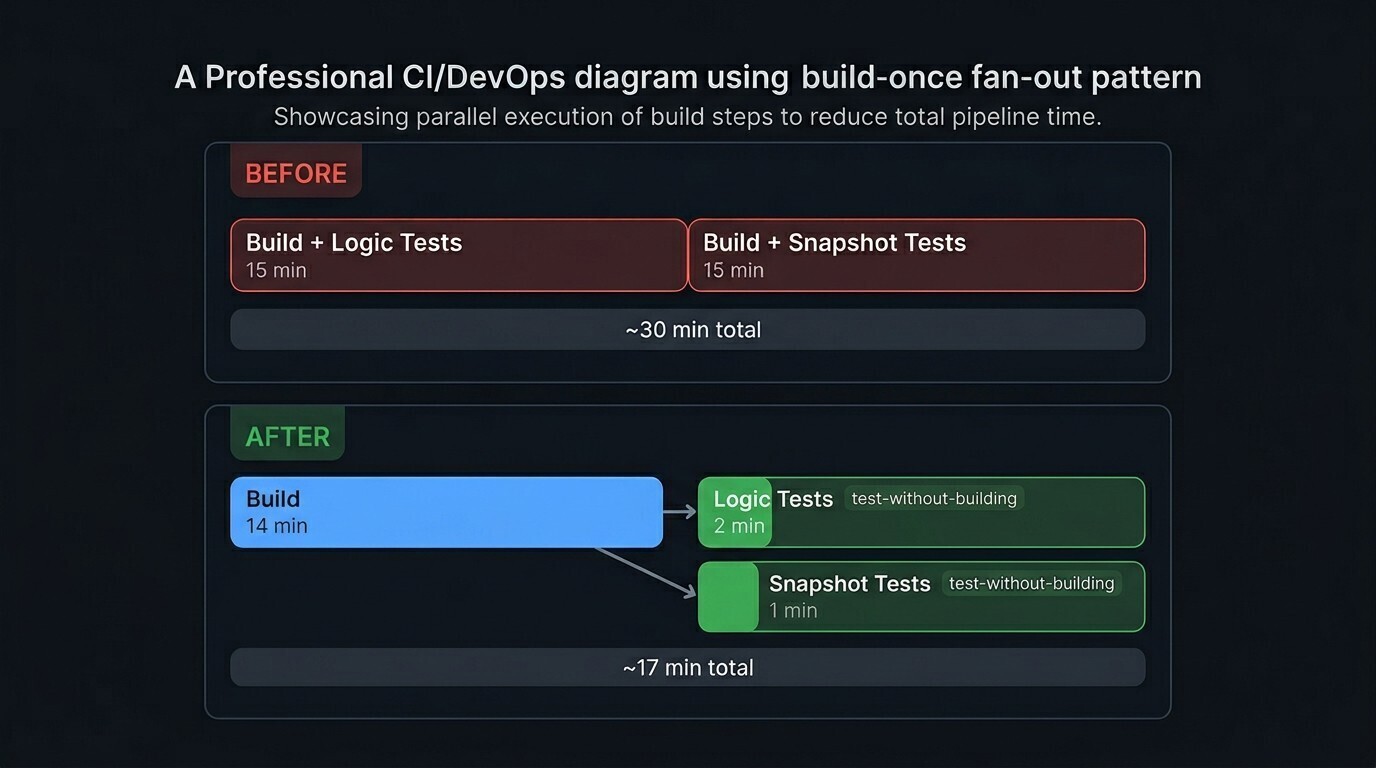
The result: 7 seconds. Same tests, same assertions, 25x faster. The CI improvement was even more dramatic — we switched to a build-once pattern (build the test target, upload the build artifact, then fan out parallel test jobs using xcodebuild test-without-building). Total CI time dropped from ~30 minutes to ~17 minutes.
The logic tests worked perfectly on macOS. The snapshot tests did not.
What we tried (and why it didn't work)
Hypothesis 1: "It's the resolution"
Retina Macs render at 2x. CI VMs (GitHub Actions macOS runners) render at 1x. We built a custom rendering strategy that pins the bitmap to a fixed size — 390x844 at 1x scale. This fixed the dimension mismatch, but tests still failed.
Hypothesis 2: "It's font rendering"
Physical Macs and CI VMs do render fonts slightly differently — roughly a 95% pixel match for identical views. We lowered precision thresholds: from 99.5% to 93% to 85%. Some tests still failed, and the threshold was getting uncomfortably low. At 85% precision, you're not really testing the UI anymore.
Hypothesis 3: "It's non-deterministic animations"
We disabled all SwiftUI animations via .transaction { $0.animation = nil }. This helped with a few chart-related tests but didn't solve the core problem.
What actually worked: measuring the images
Each of those fixes solved a real problem — resolution normalization, font tolerance, animation disabling — and they all stayed in the final solution. But tests were still failing after all three. Something else was going on.
We opened the .xcresult bundle and looked at the reference and failure images side by side. The content was clearly the same — but the images weren't aligned. The CI renders looked shorter, like something was clipping the bottom of the view. That was the clue.
To confirm, we exported the failure attachments:
xcrun xcresulttool export attachments --path result.xcresult --output-path /tmp/ci-snapshot-compare
Then ran sips — macOS's built-in image property tool — on the reference and failure PNGs:
sips -g pixelWidth -g pixelHeight reference.png failure.png
The output was immediately conclusive:
weakSignal ref:    390 x 812
weakSignal fail:   390 x 645

disconnected ref:  390 x 812
disconnected fail: 390 x 645

noPulse ref:       390 x 812
noPulse fail:      390 x 645
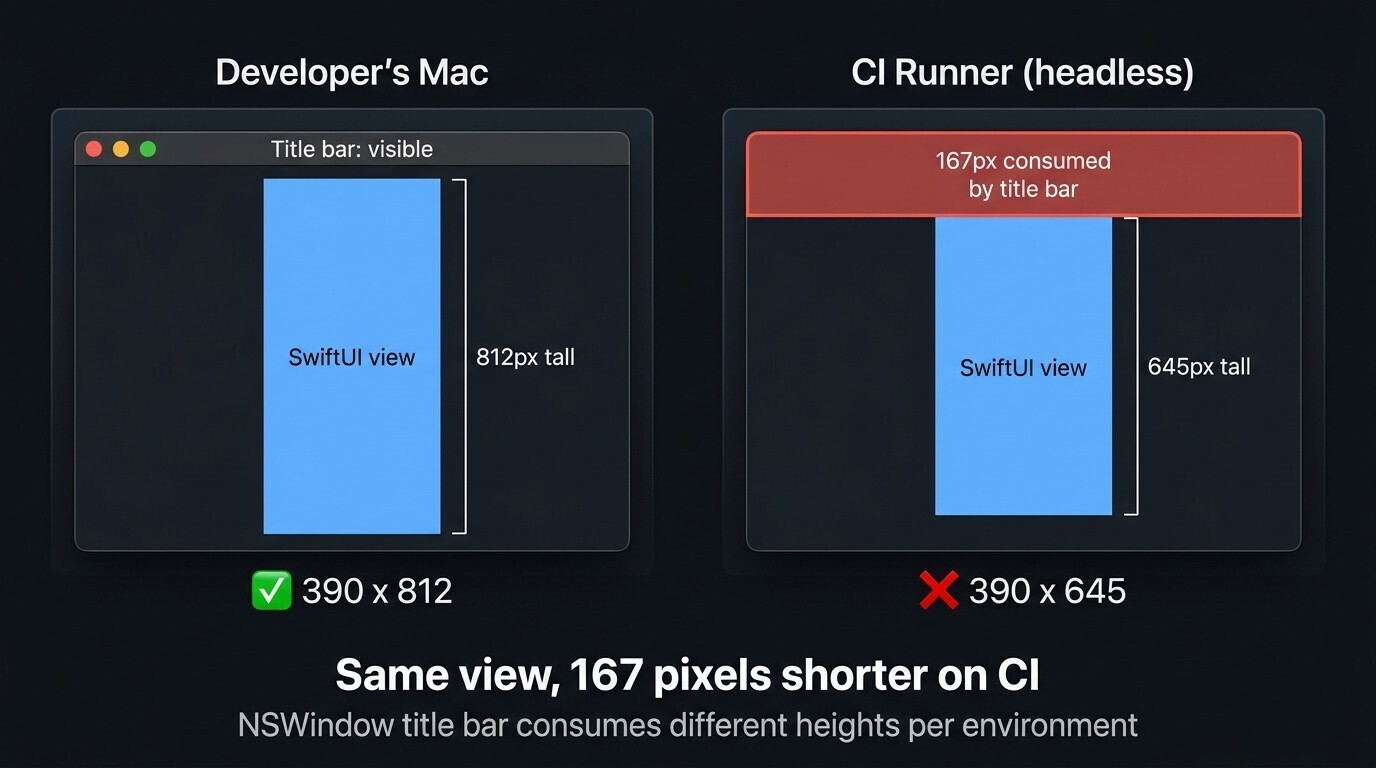
Same width, but the CI images were 167 pixels shorter. Every single test showed the exact same pattern — that's not a rendering fluke, that's structural.
The root cause
swift-snapshot-testing renders views inside an NSWindow. The window's title bar consumes part of the rendering area, and its height differs between a physical Mac and a headless CI VM. On CI, the title bar was eating 167 pixels out of the view's height — producing a shorter bitmap, not just a shifted one.
That's it. Not fonts, not resolution, not animations. An NSWindow title bar stealing pixels from the rendering.
The fix
Remove the window entirely. Render directly to an NSHostingView and capture it with cacheDisplay(in:to:) into a 1x NSBitmapImageRep:
// Before: view inside NSWindow (title bar offset varies by environment)
let window = NSWindow(contentViewController: hostingController)
SnapshotTesting.assertSnapshot(of: hostingController, as: .image(...))

// After: standalone view, no window
let hostingView = NSHostingView(rootView: view)
hostingView.frame = CGRect(origin: .zero, size: CGSize(width: 390, height: 844))

let bitmapRep = NSBitmapImageRep(/* 390x844, 1x, deviceRGB */)
hostingView.layoutSubtreeIfNeeded()
hostingView.cacheDisplay(in: hostingView.bounds, to: bitmapRep)

// Compare the resulting NSImage against the reference PNG
No window = no title bar = no environment-dependent offset.
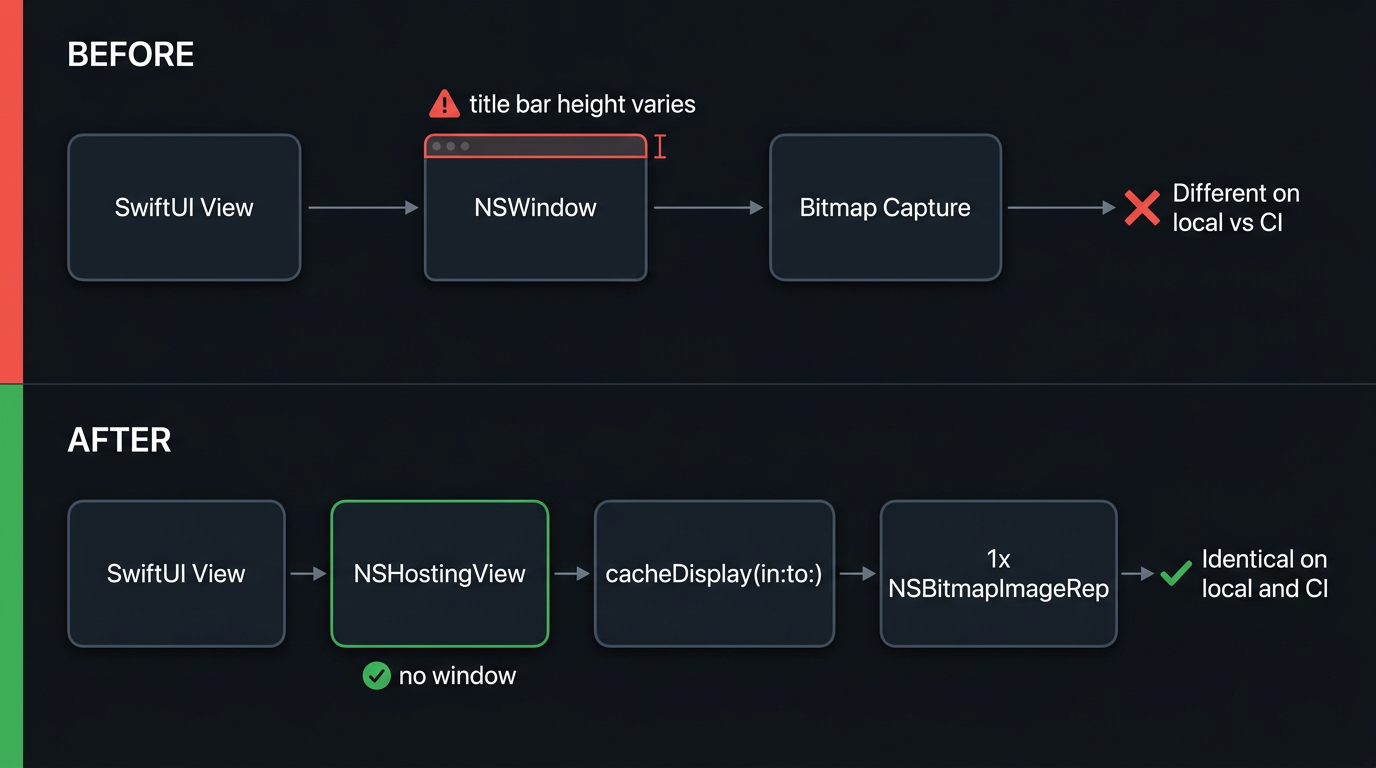
Reference images recorded on any developer's MacBook now pass on CI with no special setup.
A subtle gotcha: cacheDisplay vs displayIgnoringOpacity
If you search for "NSView to image" you'll find suggestions to use bitmapImageRepForCachingDisplay + displayIgnoringOpacity. That method doesn't render SwiftUI text content — labels come out invisible. cacheDisplay(in:to:) renders the full view hierarchy correctly, including Text views.
The takeaway
Error messages like "95.3% of pixels match" tell you something is wrong but not what. We spent days tuning thresholds and disabling animations based on that number alone.
A single sips command told us more than days of threshold tuning.
If your snapshot tests fail on CI:
- Don't lower precision thresholds below ~95% — you're hiding real regressions
- Don't record on CI unless you have no alternative — it makes local iteration slow
- Extract the failure attachments (
xcrun xcresulttool export attachments) and runsips -g pixelWidth -g pixelHeighton reference vs actual — if the dimensions don't match, it's not a rendering difference, it's structural - If the images are shorter or offset, check whether you're rendering inside a window
Relevant links
Comments
More Blog
View allgemmaFive Gemma-4 models, one accelerator: what porting E2B 31B to AWS Inferentia2 taught me
I ported the whole Gemma-4 family — E2B, E4B, 12B, 31B, and the 26B-A4B MoE — to run on...
X
xbillcommunityHey DEV, I'm Tobore. Let's actually connect.
Hey DEV, I'm Tobore. Let's actually connect. I've been on here for a while now, mostly writing and...
L
Laurina AyarahaiI burned through thousands of AI tokens. Then a friend did it for free
(yep, kinda clickbait, just for the funsies 😊) At the beginning of the year, I relaunched my...
P
Paulo HenriqueaiClaude might be saturating your machine
My laptop was sitting idle with the fan at full tilt. Nothing was running that I knew of. The culprit...
S
Sidhant PandagithubactionsAutomated GitHub Code Reviews Using Google Gemini
I Built a Thing! TL;DR — Google Gemini-based Pull Request reviews and Issue Triaging for...
D
Darren "Dazbo" LesteraiWhat is an "agentic harness," actually?
I've been hearing the word "harness" thrown around a lot lately. I assumed it just meant "the IDE" or...
T
Tilde A. ThuriumReady-made automations for this
Workflows from the Neura Market marketplace related to this DeepSeek resource
- Automate Blog Content Creation with Notion MCP, DeepSeek AI, and WordPressn8n · $9.99 · Related topic
- Generate AI Videos from Scripts with DeepSeek, Synthesia, and Together.ain8n · $24.99 · Related topic
- Compare Multi-Period Financial Data from Google Sheets with DeepSeek AI Analysisn8n · $14.99 · Related topic
- PostgreSQL Conversational Agent with Claude & DeepSeek (Multi-KPI, Secure)n8n · $14.99 · Related topic