
Back to Blog aws
aws gemma
gemma community
 ai
ai ai
ai githubactions
 ai
ai
Processing long running events on AWS API Gateway
Evertson Croes April 17, 2026
0 views
Processing long running events on AWS API Gateway AWS API Gateway is a managed HTTP/REST...
Processing long running events on AWS API Gateway
AWS API Gateway is a managed HTTP/REST service provided by AWS. It provides a relatively simple way to host an API and offers rich functionality when it comes to customizability, security and integration. AWS API Gateway enforces a maximum integration timeout of 29 seconds. For most APIs this is perfectly reasonable.
However, problems arise when an API must trigger operations that take minutes to complete, such as generating large exports or running complex background jobs. In our case, we needed to generate large database exports that could take several minutes. A synchronous API request was therefore not an option. One example is the generation of large exports from a database. This became a challenge with the default setup we had with API Gateway.
AWS provides some guidance on this in their documentation. However, in this blog article I want to share how we solved this problem in our project in more detail and also provide a working CDK project as an example.
The problem
As mentioned in the intro, we have a time limit of 29 seconds on requests on API Gateway. But the problem is also that we want to run functionality that could potentially run for many minutes. In this case, we do not want to run a synchronous call, but an asynchronous call. Meaning that even if API Gateway would allow us to keep a request open for 30 minutes, it would not be beneficial for a frontend application to keep one blocking request open for that long since it takes up resources.
So we also need a mechanism to handle asynchronous requests while still using API Gateway.
The TaskManager
We ended up calling the solution to this problem the “TaskManager”. It can be seen as one Microservice with the sole responsibility of keeping track of tasks. It does not actually process the tasks. The following diagram provides a high-level overview:
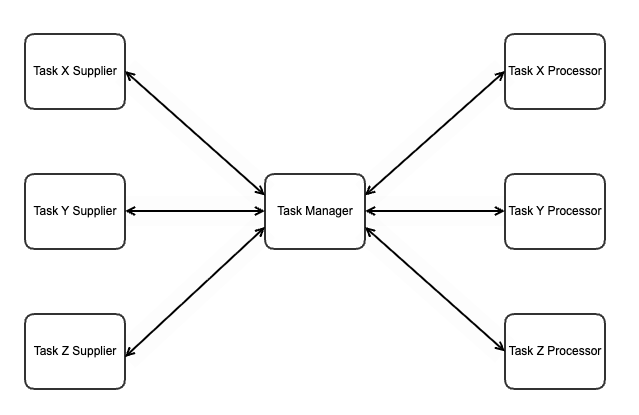
In this overview, there are Task Suppliers, Task Processors and the TaskManager itself. It is important to note that in our use cases, we have not yet found a scenario where there are multiple suppliers of the same task and multiple processors for the same type of task. However, the pattern introduced in this blog could be expanded to include this if necessary.
If we zoom in to the TaskManager, we have the following components:
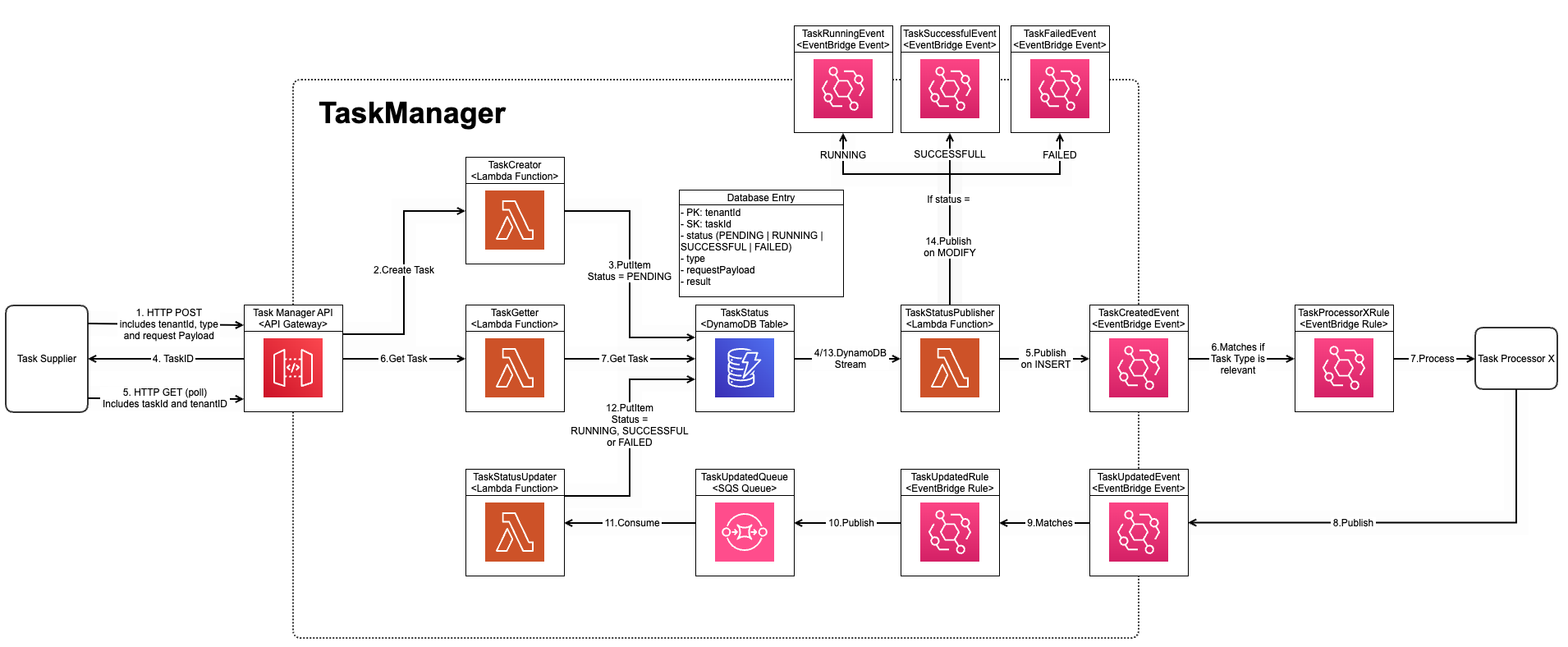 (Click here to see diagram better)
This diagram depicts the deployment and the flow at the same time. On the left side, we can see a Task Supplier. For this example, it does not matter what this is. It could be any component that can do a HTTP request. In our example, it was a Backend-for-Frontend API Gateway.
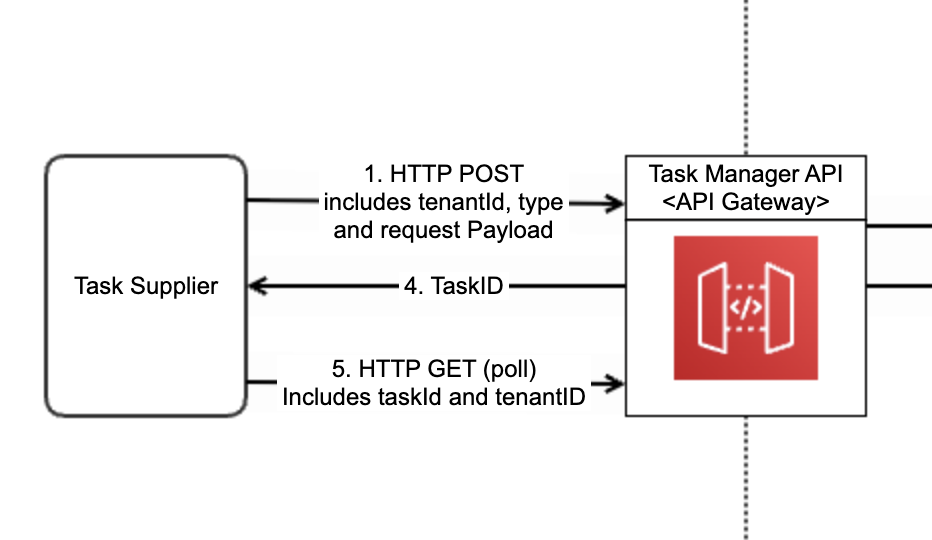
This Task Supplier calls one of the two endpoints available in the TaskManager API, which itself is an API Gateway, that allows the creation of a Task via a HTTP POST request. This triggers a Lambda function that will create the task in the TaskStatus DynamoDB Table.
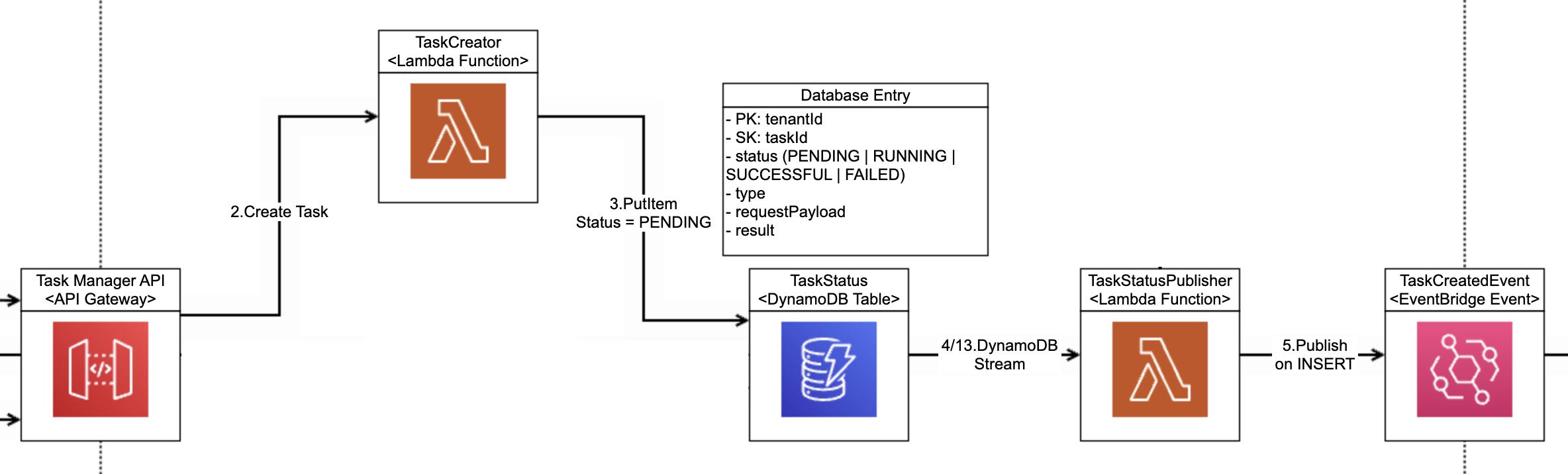
When an entry is created in this Table, a DynamoDB Stream will trigger the TaskStatusPublisher Lambda. This Lambda will check if this is a new entry (indicated by the INSERT) and in this case will publish a “TaskCreatedEvent”. It is important to note that this event also contains the Task Type. This is important as the type determines which processor needs to process it.
This is essentially where the first flow of the TaskManager ends. It is the responsibility of the Task Processor to create an EventBridge rule to consume this event and process the event.
The TaskManager expects to be regularly updated by the TaskProcessor via the TaskUpdatedEvent. The status of the event can be updated to RUNNING, SUCCESSFUL and FAILED. In the case of SUCCESSFUL, a payload can also be added. This could be the result of the task or in our case for the large exports, a signed S3 bucket URL to download it.
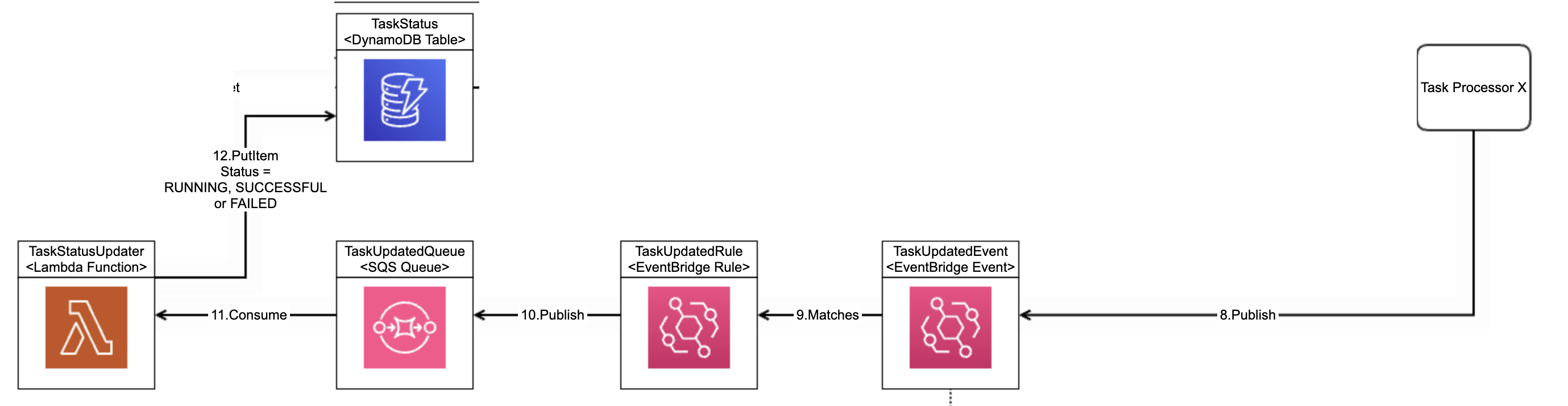
The Task Supplier can poll for the task regularly and get the status. Based on this status it can decide how to react.

Notice that the TaskStatusPublisher also publishes TaskRunningEvent, TaskSuccessfulEvent and TaskFailedEvent. This could be used in combination with a WebSocket mechanism to receive live updates instead of polling. However, this is out-of-scope for this blog.
This setup benefits from being completely serverless, meaning we can scale up on higher loads but also scale down to zero if there are no tasks. For this reason, in our case, we have only created one instance of this TaskManager that is shared by all tasks in our system. However, you could create multiple TaskManagers for different bounded contexts or even for each type of task.
CDK Project
The example CDK project of this setup can be found in this GitHub repository. There is a README file which explains how to build and deploy the project to your own AWS environment.
Final Thoughts
This pattern is a simple but powerful way to:
- Work around API Gateway limitations
- Build scalable async workflows
- Keep your frontend responsive
If you're dealing with long-running operations in AWS, this approach is definitely worth considering.
Comments
More Blog
View allgemmaFive Gemma-4 models, one accelerator: what porting E2B 31B to AWS Inferentia2 taught me
I ported the whole Gemma-4 family — E2B, E4B, 12B, 31B, and the 26B-A4B MoE — to run on...
X
xbillcommunityHey DEV, I'm Tobore. Let's actually connect.
Hey DEV, I'm Tobore. Let's actually connect. I've been on here for a while now, mostly writing and...
L
Laurina AyarahaiI burned through thousands of AI tokens. Then a friend did it for free
(yep, kinda clickbait, just for the funsies 😊) At the beginning of the year, I relaunched my...
P
Paulo HenriqueaiClaude might be saturating your machine
My laptop was sitting idle with the fan at full tilt. Nothing was running that I knew of. The culprit...
S
Sidhant PandagithubactionsAutomated GitHub Code Reviews Using Google Gemini
I Built a Thing! TL;DR — Google Gemini-based Pull Request reviews and Issue Triaging for...
D
Darren "Dazbo" LesteraiWhat is an "agentic harness," actually?
I've been hearing the word "harness" thrown around a lot lately. I assumed it just meant "the IDE" or...
T
Tilde A. ThuriumReady-made automations for this
Workflows from the Neura Market marketplace related to this DeepSeek resource
- State Management System for Long-Running Workflows with Wait Nodesn8n · $24.99 · Related topic
- Automate Blog Content Creation with Notion MCP, DeepSeek AI, and WordPressn8n · $9.99 · Related topic
- Payment Processing and Order Tracking with YooKassa and Google Sheetsn8n · $24.99 · Related topic
- Generate AI Videos from Scripts with DeepSeek, Synthesia, and Together.ain8n · $24.99 · Related topic