
Back to Blog vllm
vllm ai
ai hermesagentchallenge
 midsommar
 ai
ai devchallenge
 antigravity
Self-hosted Gemma 4 on TPU with vLLM, MCP, ADK, and Gemini CLI
xbill April 28, 2026
0 views
This article provides a step by step deployment guide for Gemma 4 to v6e Trillium TPUs in an 8 core...
---
title: Self-hosted Gemma 4 on TPU with vLLM, MCP, ADK, and Gemini CLI
published: true
series: Gemma4
date: 2026-04-28 01:48:30 UTC
tags: vllm,googleadk,tpu,geminicli
canonical_url: https://medium.com/google-cloud/self-hosted-gemma-4-on-tpu-with-mcp-adk-and-gemini-cli-7f646458a3c3
---
This article provides a step by step deployment guide for Gemma 4 to v6e Trillium TPUs in an 8 core 2x4 setup. A suite of Python MCP tools is built to simplify management of the vLLM hosted Gemma 4 deployment with Gemini CLI. Finally- this deployed Gemma model is used as the main LLM from sample ADK agents.

#### What is this project trying to Do?
This project is a DevOps/SRE assistant that uses a Gemma 4 model self-hosted on Google Cloud TPUs to analyze infrastructure issues. It provides tools to provision the TPU and deploy the model, as well as for observability and performance testing.
#### Just the facts, ma’am
This project includes an active GCP infrastructure (V6E TPU, 2x4 topology, created 2026–04–26), compute (gemma4-vllm-stack-node, internal IP 10.128.0.18, external IP 35.193.100.125), and online vLLM inference with google/gemma-4–31B-it. Optimization standards include BF16/FP8 precision, TP=8 parallelism, 16384 max sequence length, and Flax/JAX (OpenXLA) engine.
#### AI-Driven Troubleshooting
The agent connects to Google Cloud Logging to identify errors in your environment. It uses a self-hosted vLLM inference server to summarize logs.
#### Infrastructure Automation
The project includes a full “Inference Stack” manager. It can:
- Deploy Gemma with vLLM : Automatically generate and execute commands to deploy a 4x2 Trillium v6e
- Generate Configs: Create Kubernetes (GKE) manifests for running vLLM on TPU v6e chips.
#### Gemini CLI
If not pre-installed you can download the Gemini CLI to interact with the source files and provide real-time assistance:
```shell
npm install -g @google/gemini-cli
```
#### Testing the Gemini CLI Environment
Once you have all the tools and the correct Node.js version in place- you can test the startup of Gemini CLI. You will need to authenticate with a Key or your Google Account:
```console
xbill@penguin:~/aisprintapr2026/tpu-vllm-devops-agent$ gemini
▝▜▄ Gemini CLI v0.39.1
▝▜▄
▗▟▀ Signed in with Google /auth
▝▀ Plan: Gemini Code Assist Standard /upgrade
```
#### Node Version Management
Gemini CLI needs a consistent, up to date version of Node. The **nvm** command can be used to get a standard Node environment:
[GitHub - nvm-sh/nvm: Node Version Manager - POSIX-compliant bash script to manage multiple active node.js versions](https://github.com/nvm-sh/nvm)
#### Python MCP Documentation
The official GitHub Repo provides samples and documentation for getting started:
[GitHub - modelcontextprotocol/python-sdk: The official Python SDK for Model Context Protocol servers and clients](https://github.com/modelcontextprotocol/python-sdk)
#### Where do I start?
The strategy for starting MCP development for vLLM management is a incremental step by step approach.
First, the basic development environment is setup with the required system variables, and a working Gemini CLI configuration.
Then, a minimal Python MCP Server is built with stdio transport. This server is validated with Gemini CLI in the local environment.
This setup validates the connection from Gemini CLI to the local server via MCP. The MCP client (Gemini CLI) and the Python MCP server both run in the same local environment.
#### Setup the Basic Environment
At this point you should have a working Python environment and a working Gemini CLI installation. The next step is to clone the GitHub samples repository with support scripts:
```shell
cd ~
git clone https://github.com/xbill9/aisprintapr2026
```
Then run **init.sh** from the cloned directory.
The script will attempt to determine your shell environment and set the correct variables:
```shell
cd tpu-vllm-devops-agent
source init.sh
```
If your session times out or you need to re-authenticate- you can run the **set\_env.sh** script to reset your environment variables:
```shell
cd tpu-vllm-devops-agent
source set_env.sh
```
Variables like PROJECT\_ID need to be setup for use in the various build scripts- so the set\_env script can be used to reset the environment if you time-out.
#### vLLM Management Tool with MCP Stdio Transport
One of the key features that the standard MCP libraries provide is abstracting various transport methods.
The high level MCP tool implementation is the same no matter what low level transport channel/method that the MCP Client uses to connect to a MCP Server.
The simplest transport that the SDK supports is the stdio (stdio/stdout) transport — which connects a locally running process. Both the MCP client and MCP Server must be running in the same environment.
The connection over stdio will look similar to this:
```python
# Initialize FastMCP server
mcp = FastMCP("Self-Hosted vLLM DevOps Agent")
```
#### Running the Python Code
First- switch the directory with the Python version of the MCP sample code:
```plaintext
~/aisprintapr2026/tpu-vllm-devops-agent
```
Run the release version on the local system:
```console
xbill@penguin:~/aisprintapr2026/tpu-vllm-devops-agent$ make install
Processing ./.
```
The project can also be linted:
```console
xbill@penguin:~/aisprintapr2026/tpu-vllm-devops-agent$ make lint
ruff check .
All checks passed!
ruff format --check .
5 files already formatted
mypy .
Success: no issues found in 5 source files
```
And a test run:
```console
xbill@penguin:~/aisprintapr2026/tpu-vllm-devops-agent$ make test
python test_agent.py
......
----------------------------------------------------------------------
Ran 6 tests in 0.055s
OK
```
#### vLLM Interaction with MCP stdio Transport
One of the key features that the MCP protocol provides is abstracting various transport methods.
The high level tool MCP implementation is the same no matter what low level transport channel/method that the MCP Client uses to connect to a MCP Server.
The simplest transport that the SDK supports is the stdio (stdio/stdout) transport — which connects a locally running process. Both the MCP client and MCP Server must be running in the same environment.
In this project Gemini CLI is used as the MCP client to interact with the Python MCP server code.
#### Gemini CLI settings.json
Replace the default Gemini CLI configuration file — **settings.json** with a pre-configured sample:
```json
{
"mcpServers": {
"vllm-tpu-agent": {
"command": "python3",
"args": [
"/home/xbill/aisprintapr2026/tpu-vllm-devops-agent/server.py"
],
"env": {
"GOOGLE_CLOUD_PROJECT": "aisprint-491218",
"MODEL_NAME": "google/gemma-4-31B-it"
}
}
}
}
```
#### Validation with Gemini CLI
The final connection test uses Gemini CLI as a MCP client with the Python code providing the MCP server:
```console
xbill@penguin:~/aisprintapr2026/tpu-vllm-devops-agent$ gemini
▝▜▄ Gemini CLI v0.39.1
▝▜▄
▗▟▀ Signed in with Google /auth
▝▀ Plan: Gemini Code Assist Standard /upgrade
> /mcp list
Configured MCP servers:
ent
- mcp_vllm-tpu-agent_verify_model_health
```
#### Getting Started with Gemma 4 on TPU
The GitHub Repo provinces a starter recipe:
[tpu-recipes/inference/trillium/vLLM/Gemma4 at main · AI-Hypercomputer/tpu-recipes](https://github.com/AI-Hypercomputer/tpu-recipes/tree/main/inference/trillium/vLLM/Gemma4)
The Official vLLM repo also has Gemma4 specific information:
[Release v0.19.1 · vllm-project/vllm](https://github.com/vllm-project/vllm/releases/tag/v0.19.1)
#### TPU Deployment
A lower cost entry point for TPU deployment is Queued Resources. This approach allows TPU reservations to be requested in real-time and provides an easy path to allocate TPU — with some additional complexity:
[Manage queued resources | Cloud TPU | Google Cloud Documentation](https://docs.cloud.google.com/tpu/docs/queued-resources)
There are a few options to deploy vLLM on TPU- but the simplest is to use the generated docker instance:
[tpu-recipes/inference/trillium/vLLM/Gemma4/docker-compose-gemma4-31B.yml at main · AI-Hypercomputer/tpu-recipes](https://github.com/AI-Hypercomputer/tpu-recipes/blob/main/inference/trillium/vLLM/Gemma4/docker-compose-gemma4-31B.yml)
#### vLLM Lifecycle Management via MCP
The MCP tools provide a complete suite of agent-oriented operations for managing vLLM deployment on Cloud Run or a TPU.
Overview of MCP tools :
```plaintext
🟢 vllm-tpu-agent - Ready (21 tools)
Tools:
- mcp_vllm-tpu-agent_check_tpu_availability
- mcp_vllm-tpu-agent_describe_queued_resource
- mcp_vllm-tpu-agent_destroy_queued_resource
- mcp_vllm-tpu-agent_estimate_deployment_cost
- mcp_vllm-tpu-agent_get_cloud_logging_logs
- mcp_vllm-tpu-agent_get_deployed_endpoint
- mcp_vllm-tpu-agent_get_model_details
- mcp_vllm-tpu-agent_get_reservation_status
- mcp_vllm-tpu-agent_get_system_status
- mcp_vllm-tpu-agent_get_tpu_system_logs
- mcp_vllm-tpu-agent_get_vllm_deployment_config
- mcp_vllm-tpu-agent_get_vllm_docker_logs
- mcp_vllm-tpu-agent_get_vllm_endpoint
- mcp_vllm-tpu-agent_list_queued_resources
- mcp_vllm-tpu-agent_manage_queued_resource
- mcp_vllm-tpu-agent_manage_vllm_docker
- mcp_vllm-tpu-agent_query_queued_gemma4
- mcp_vllm-tpu-agent_query_queued_gemma4_with_stats
- mcp_vllm-tpu-agent_run_vllm_benchmark
- mcp_vllm-tpu-agent_save_hf_token
- mcp_vllm-tpu-agent_verify_model_health
```
#### Request Queued TPU Resources
First — use the MCP tool to request TPU resources:
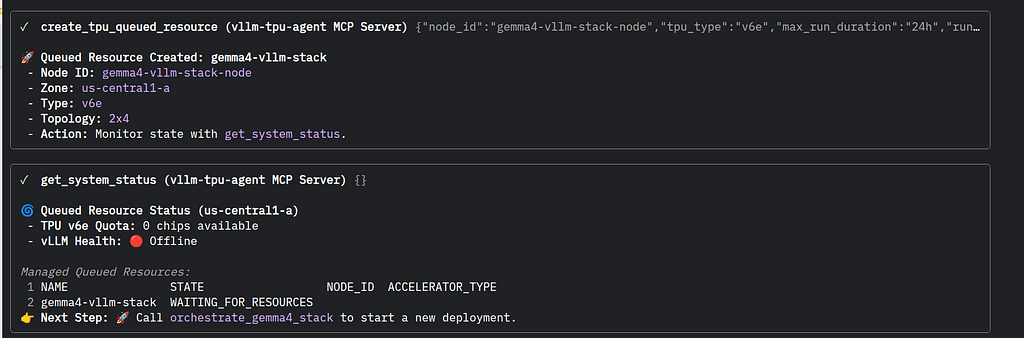
The status can be checked on the TPU status page on the Google Cloud Console:
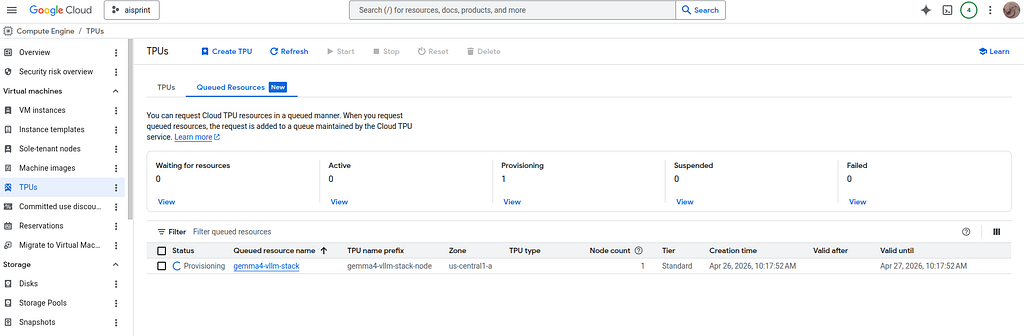
with detailed information:
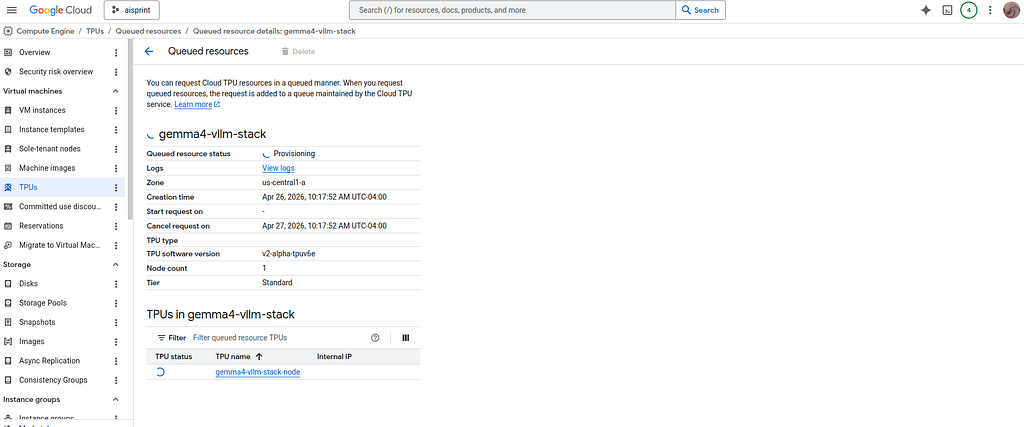
#### vLLM Deployment to Docker
Once the TPU has been activated- the MCP tools can check the Gemma deployment status:
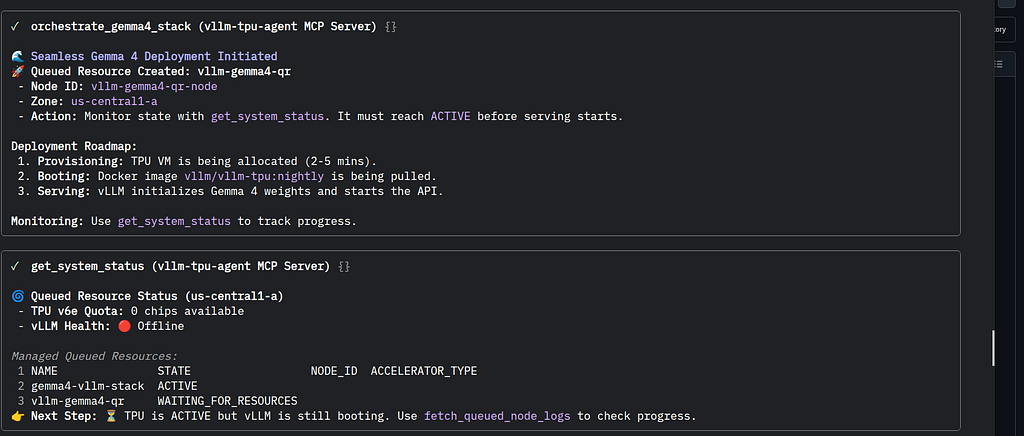
Then the status can be checked:
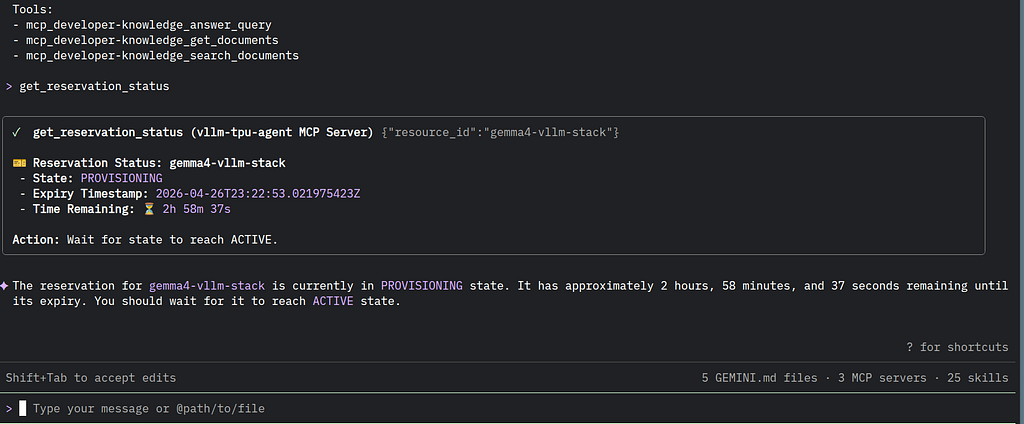
And active:
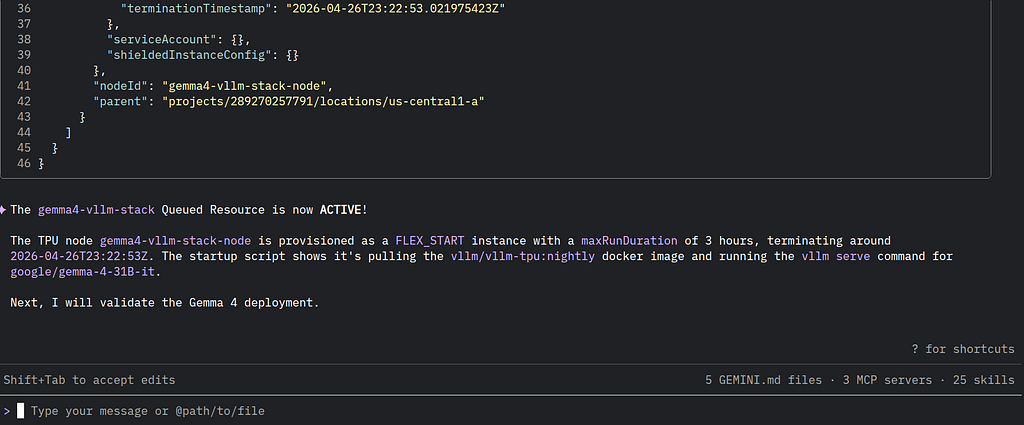
#### Checking vLLM status
The status can be checked with an MCP tool:
```plaintext
> get_system_status
╭────────────────────────────────────────────────────────────────────────────────────────────────────────────────────────────────────────────╮
│ ✓ get_system_status (vllm-tpu-agent MCP Server) {} │
│ │
│ 🌀 System Status (southamerica-east1-c) │
│ - vLLM Health: 🟢 Online (http://34.39.230.66:8000) │
│ 📋 Queued Resources in southamerica-east1-c │
│ 1 NAME STATE NODE_ID ACCELERATOR_TYPE CREATE_TIME │
│ 2 vllm-gemma4-qr ACTIVE 2026-04-27T16:35:53.683050645Z │
│ 👉 Next Step: Use query_queued_gemma4 to interact with the model. │
╰────────────────────────────────────────────────────────────────────────────────────────────────────────────────────────────────────────────╯
✦ I've received the system status. The vLLM service is online and a queued resource is active.
```
#### Query the Model with Stats
Once everything is online — you can send queries to the Model:
```plaintext
> queued_gemma4_with_stats the battle of hastings
╭────────────────────────────────────────────────────────────────────────────────────────────────────────────────────────────────────────────╮
│ ✓ query_queued_gemma4_with_stats (vllm-tpu-agent MCP Server) {"prompt":"the battle of hastings"} │
│ │
│ 📊 Performance Stats │
│ - Time to First Token (TTFT): 0.764s │
│ - Total Generation Time: 15.709s │
│ - Tokens per Second: 68.19 tokens/s │
│ - Total Tokens (approx.): 1019 │
│ │
│ 💬 Model Response │
│ The Battle of Hastings was one of the most consequential events in European history. Fought on October 14, 1066, it marked the beginning │
│ of the Norman Conquest of England, fundamentally altering the English language, culture, and political structure. │
│ │
│ Here is a detailed breakdown of the battle: │
│ │
│ --- │
│ │
│ 1. The Cause: A Crisis of Succession │
│ The battle was the result of a power struggle following the death of Edward the Confessor, the King of England, who died childless in │
│ January 1066. Three main contenders claimed the throne: │
│ │
│ * Harold Godwinson: The most powerful earl in England and Edward’s brother-in-law. He was crowned king immediately after Edward's death. │
│ * William, Duke of Normandy: A distant cousin of Edward. He claimed that Edward had promised him the throne years earlier and that Harold │
│ had sworn an oath to support him. │
│ * Harald Hardrada: The King of Norway, who believed he had a hereditary right to the throne through his ancestors. │
│ │
│ 2. The Prelude: A Year of Two Invasions │
│ Before facing William, King Harold had to deal with the Vikings. In September 1066, Harald Hardrada invaded Northern England. Harold │
│ Godwinson marched his army 185 miles in just a few days and defeated the Vikings at the Battle of Stamford Bridge. │
│ │
│ However, while Harold was celebrating in the north, the wind changed in the English Channel. William of Normandy landed his invasion force │
│ at Pevensey on the south coast. Harold had to march his exhausted army all the way back down south to meet the new threat. │
│ │
│ 3. The Battle (October 14, 1066) │
│ The two armies met at Senlac Hill, about seven miles from Hastings. │
│ │
│ The Opposing Forces: │
│ * The English (Anglo-Saxons): Comprised mostly of infantry. Their primary tactic was the "Shield Wall"—soldiers stood │
│ shoulder-to-shoulder with overlapping shields, creating an almost impenetrable barrier of wood and steel. │
│ * The Normans: A more diverse army consisting of archers, infantry, and—most crucially—heavy cavalry (knights on horseback). │
│ │
│ The Course of the Fight: │
│ * The Stalemate: For most of the day, the English shield wall held firm atop the ridge. The Norman archers fired upward, but their arrows │
│ mostly flew over the English heads or bounced off the shields. The Norman cavalry charges failed to break the line. │
│ * The Turning Point (The Feigned Retreat): Seeing that the shield wall was unbreakable, William ordered his troops to pretend to panic │
│ and retreat. Some English soldiers, thinking they had won, broke formation and chased the Normans down the hill. Once the English were │
│ out in the open and disorganized, the Norman cavalry wheeled around and slaughtered them. │
│ * The End: By late afternoon, the English line was thinned and exhausted. King Harold was killed—traditionally believed to have been hit │
│ in the eye with an arrow, though some sources suggest he was hacked to death by Norman knights. │
│ │
│ 4. The Outcome and Aftermath │
│ With the death of King Harold and much of the English nobility, organized resistance collapsed. │
│ │
│ * Coronation: William marched to London and was crowned King of England on Christmas Day, 1066, at Westminster Abbey. He became known as │
│ William the Conqueror. │
│ * The Feudal System: William replaced the English nobility with Norman lords, introducing a rigid feudal system. │
│ * Language: French became the language of the court, administration, and law for centuries. This is why Modern English is a hybrid of Old │
│ English (Germanic) and French (Latinate). │
│ * Architecture: To secure his hold on the land, William built massive stone castles across England, including the Tower of London. │
│ │
│ 5. Historical Legacy: The Bayeux Tapestry │
│ Much of what we know about the battle comes from the Bayeux Tapestry. This 70-meter-long embroidered cloth depicts the events leading up │
│ to the battle and the battle itself. While created from a Norman perspective (and thus biased), it remains one of the most important │
│ visual records of the Middle Ages. │
│ │
│ Summary Table │
│ ┌────────────┬─────────────────────────────┬────────────────────────────────┐ │
│ │ Feature │ Anglo-Saxons │ Normans │ │
│ ├────────────┼─────────────────────────────┼────────────────────────────────┤ │
│ │ Leader │ King Harold Godwinson │ William, Duke of Normandy │ │
│ │ Key Tactic │ Shield Wall │ Cavalry & Archers │ │
│ │ Terrain │ Defensive (Top of the hill) │ Offensive (Bottom of the hill) │ │
│ │ Outcome │ Defeat / Death of King │ Victory / Conquest of England │ │
│ └────────────┴─────────────────────────────┴────────────────────────────────┘ │
╰────────────────────────────────────────────────────────────────────────────────────────────────────────────────────────────────────────────╯
✦ The model has provided a detailed response about the Battle of Hastings, including performance statistics for the query.
```
#### Deploying MCP Server to Cloud Run
Once the local stdio MCP server has been tested- it can be deployed to Google Cloud Run.
First switch to the MCP server directory and deploy:
```console
xbill@penguin:~/aisprintapr2026/tpu-vllm-devops-agent/mcp-https-python$ make deploy
Submitting build to Google Cloud Build...
Creating temporary archive of 13 file(s) totalling 36.7 KiB before compression.
Some files were not included in the source upload.
Check the gcloud log [/home/xbill/.config/gcloud/logs/2026.04.27/20.26.23.215852.log] to see which files and the contents of the
default gcloudignore file used (see `$ gcloud topic gcloudignore` to learn
more).
```
After the build- the MCP server will be on a well known endpoint. The settings.json will have an entry:
```json
{
"mcpServers": {
"gemma4": {
"httpUrl": "https://mcp-https-python-wgcq55zbfq-rj.a.run.app/mcp"
}
}
}
```
The MCP tools are available from the Cloud Run service:
```console
> /mcp list
Configured MCP servers:
🟢 gemma4 - Ready (20 tools)
Tools:
- mcp_gemma4_check_tpu_availability
- mcp_gemma4_describe_queued_resource
- mcp_gemma4_destroy_queued_resource
- mcp_gemma4_estimate_deployment_cost
- mcp_gemma4_get_cloud_logging_logs
- mcp_gemma4_get_deployed_endpoint
- mcp_gemma4_get_model_details
```
To test the MCP Tool:
```plaintext
> get model details
✦ I will retrieve the detailed information for the currently running Gemma 4 model and vLLM engine.
╭────────────────────────────────────────────────────────────────────────────────────────────────────────────────────────────────────────────────╮
│ Action Required │
│ │
│ ? get_model_details (gemma4 MCP Server) {} │
│ │
│ MCP Server: gemma4 │
│ Tool: get_model_details │
│ │
│ MCP Tool Details: │
│ (press Ctrl+O to expand MCP tool details) │
│ Allow execution of MCP tool "get_model_details" from server "gemma4"? │
│ │
│ 1. Allow once │
│ 2. Allow tool for this session │
│ ● 3. Allow all server tools for this session │
│ 4. Allow tool for all future sessions ~/.gemini/policies/auto-saved.toml │
│ 5. No, suggest changes (esc) │
╰────────────────────────────────────────────────────────────────────────────────────────────────────────────────────────────────────────────────╯
✦ I will retrieve the detailed information for the currently running Gemma 4 model and vLLM engine.
╭────────────────────────────────────────────────────────────────────────────────────────────────────────────────────────────────────────────╮
│ ✓ get_model_details (gemma4 MCP Server) {} │
│ │
│ 🧩 Model & vLLM Engine Details (http://34.39.243.194:8000) │
│ │
│ Model Information (/v1/models): │
│ 1 { │
│ 2 "object": "list", │
│ 3 "data": [ │
│ 4 { │
│ 5 "id": "google/gemma-4-31B-it", │
│ 6 "object": "model", │
│ 7 "created": 1777336641, │
│ 8 "owned_by": "vllm", │
│ 9 "root": "google/gemma-4-31B-it", │
│ 10 "parent": null, │
│ 11 "max_model_len": 16384, │
│ 12 "permission": [ │
│ 13 { │
│ 14 "id": "modelperm-aaefbddc518584d8", │
│ 15 "object": "model_permission", │
│ 16 "created": 1777336641, │
│ 17 "allow_create_engine": false, │
│ 18 "allow_sampling": true, │
│ 19 "allow_logprobs": true, │
│ 20 "allow_search_indices": false, │
│ 21 "allow_view": true, │
│ 22 "allow_fine_tuning": false, │
│ 23 "organization": "*", │
│ 24 "group": null, │
│ 25 "is_blocking": false │
│ 26 } │
│ 27 ] │
│ 28 } │
│ 29 ] │
│ 30 } │
│ vLLM Version (/version): │
│ - Version: 0.19.2rc1.dev215+g32e45636e │
│ │
│ Health Status (/health): │
│ - Status: Healthy ✅ │
│ │
│ Key vLLM Metrics (/metrics): │
│ 1 # HELP process_resident_memory_bytes Resident memory size in bytes. │
│ 2 # TYPE process_resident_memory_bytes gauge │
│ 3 process_resident_memory_bytes 2.460672e+09 │
│ │
╰────────────────────────────────────────────────────────────────────────────────────────────────────────────────────────────────────────────╯
✦ The system is currently running Gemma 4 (31B-it) via vLLM version 0.19.2rc1. The model is healthy and configured with a maximum sequence length
of 16,384 tokens.
```
#### But Wait! There’s More!
First — get the TPU deployed Gemma 4 URL:
```console
xbill@penguin:~/aisprintapr2026/tpu-vllm-devops-agent$ gemini
▝▜▄ Gemini CLI v0.39.1
▝▜▄
▗▟▀ Signed in with Google /auth
▝▀ Plan: Gemini Code Assist Standard /upgrade
> get model url
╭────────────────────────────────────────────────────────────────────────────────────────────────────────────────────────────────────────────╮
│ ✓ get_vllm_endpoint (vllm-tpu-agent MCP Server) {} │
│ │
│ 🟢 vLLM is Online at: http://34.39.243.194:8000 │
╰────────────────────────────────────────────────────────────────────────────────────────────────────────────────────────────────────────────╯
✦ I have found the vLLM endpoint. It is running at http://34.39.243.194:8000.
```
save the endpoint:
```shell
export MODEL_URL=http://34.39.243.194:8000
```
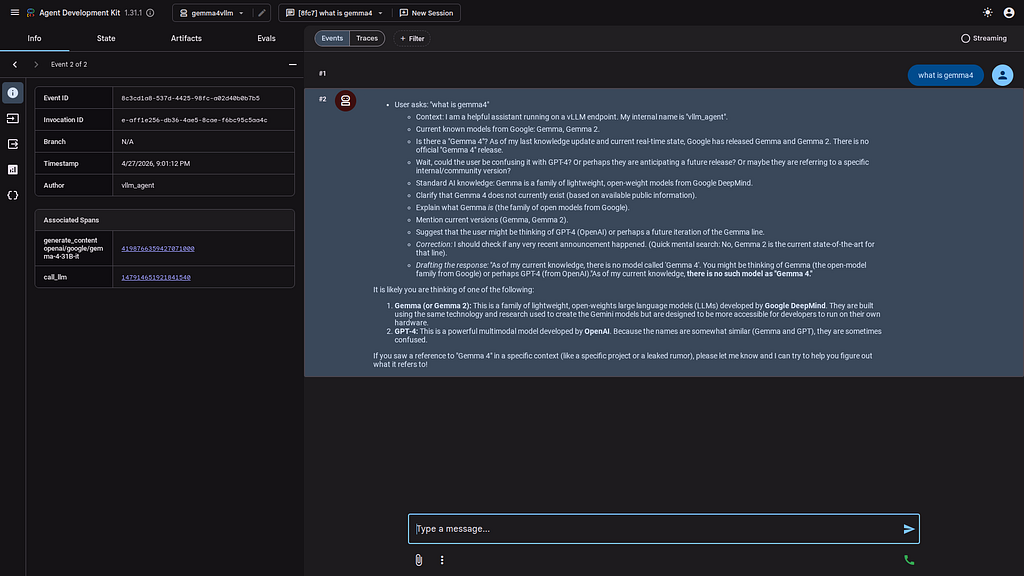
then test with the ADK CLI:
```console
xbill@penguin:~/aisprintapr2026/tpu-vllm-devops-agent/agents$ adk run gemma4vllm
/home/xbill/.pyenv/versions/3.13.13/lib/python3.13/site-packages/google/adk/features/_feature_decorator.py:72: UserWarning: [EXPERIMENTAL] feature FeatureName.PLUGGABLE_AUTH is enabled.
check_feature_enabled()
Log setup complete: /tmp/agents_log/agent.20260427_205922.log
To access latest log: tail -F /tmp/agents_log/agent.latest.log
/home/xbill/.pyenv/versions/3.13.13/lib/python3.13/site-packages/google/adk/cli/cli.py:204: UserWarning: [EXPERIMENTAL] InMemoryCredentialService: This feature is experimental and may change or be removed in future versions without notice. It may introduce breaking changes at any time.
credential_service = InMemoryCredentialService()
/home/xbill/.pyenv/versions/3.13.13/lib/python3.13/site-packages/google/adk/auth/credential_service/in_memory_credential_service.py:33: UserWarning: [EXPERIMENTAL] BaseCredentialService: This feature is experimental and may change or be removed in future versions without notice. It may introduce breaking changes at any time.
super(). __init__ ()
Running agent vllm_agent, type exit to exit.
[user]: what do you do
20:59:32 - LiteLLM:INFO: utils.py:3995 -
LiteLLM completion() model= google/gemma-4-31B-it; provider = openai
[vllm_agent]: * User asks: "what do you do"
* Context: I am a helpful assistant running on a self-hosted vLLM endpoint. My internal name is "vllm_agent".
* I am a Large Language Model (LLM).
* I process text inputs and generate text outputs.
* I can perform various tasks: answering questions, writing code, summarizing text, creative writing, analysis, etc.
* I am hosted via vLLM (an inference engine for LLMs).
* *Who am I?* A helpful AI assistant (internally known as `vllm_agent`).
* *What are my capabilities?*
* Answering questions (knowledge retrieval).
* Writing and debugging code.
* Summarization and analysis.
* Content creation (emails, stories, essays).
* Translation.
* General conversation.
* *How do I operate?* I process patterns in data to provide coherent and useful responses based on the prompts I receive.
* Keep it helpful, clear, and concise.
* Acknowledge the "agent" persona if appropriate, but focus on the functional utility.I am a helpful AI assistant (internally known as `vllm_agent`) designed to process information and generate human-like text. Because I am powered by a large language model running on a vLLM endpoint, I can help you with a wide variety of tasks, including:
**1. Information & Learning**
* **Answering questions:** From general knowledge to complex technical explanations.
* **Summarization:** Taking long articles or documents and condensing them into key points.
* **Research:** Helping you explore a topic or brainstorming ideas.
**2. Writing & Content Creation**
* **Drafting:** Writing emails, essays, blog posts, or reports.
* **Creative Writing:** Creating stories, poems, or scripts.
* **Editing:** Checking grammar, improving tone, or rewriting text for clarity.
**3. Technical & Analytical Tasks**
* **Coding:** Writing code in various programming languages, debugging errors, and explaining how a piece of code works.
* **Data Analysis:** Helping you organize information or interpret complex data.
* **Translation:** Translating text between dozens of different languages.
**4. Problem Solving & Brainstorming**
* **Planning:** Creating itineraries, study plans, or project outlines.
* **Ideation:** Generating names for a business, gift ideas, or marketing slogans.
* **Logic:** Solving puzzles or working through mathematical problems.
**In short: If it involves processing, generating, or analyzing text and code, I can likely help you with it! How can I assist you today?**
[user]:
```
and the ADK Web interface:
#### MCP Operations from an ADK Agent with Gemma 4 TPU
The final validation uses an ADK Agent to call the Cloud Run MCP endpoint to allow model operations over MCP calls from an agentic perspective:
```console
xbill@penguin:~/aisprintapr2026/tpu-vllm-devops-agent/agents$ adk run gemma4mcp
/home/xbill/.pyenv/versions/3.13.13/lib/python3.13/site-packages/google/adk/features/_feature_decorator.py:72: UserWarning: [EXPERIMENTAL] feature FeatureName.PLUGGABLE_AUTH is enabled.
check_feature_enabled()
Log setup complete: /tmp/agents_log/agent.20260427_210657.log
To access latest log: tail -F /tmp/agents_log/agent.latest.log
/home/xbill/.pyenv/versions/3.13.13/lib/python3.13/site-packages/google/adk/cli/cli.py:204: UserWarning: [EXPERIMENTAL] InMemoryCredentialService: This feature is experimental and may change or be removed in future versions without notice. It may introduce breaking changes at any time.
credential_service = InMemoryCredentialService()
/home/xbill/.pyenv/versions/3.13.13/lib/python3.13/site-packages/google/adk/auth/credential_service/in_memory_credential_service.py:33: UserWarning: [EXPERIMENTAL] BaseCredentialService: This feature is experimental and may change or be removed in future versions without notice. It may introduce breaking changes at any time.
super(). __init__ ()
Running agent devops, type exit to exit.
[user]: get model stats
/home/xbill/.pyenv/versions/3.13.13/lib/python3.13/site-packages/google/adk/features/_feature_decorator.py:72: UserWarning: [EXPERIMENTAL] feature FeatureName.BASE_AUTHENTICATED_TOOL is enabled.
check_feature_enabled()
[devops]: The model currently deployed is `google/gemma-4-31B-it`. The vLLM version is `0.19.2rc1.dev215+g32e45636e` and its health status is `Healthy` ✅. The process resident memory is `2.46 GB`.
[user]:
```
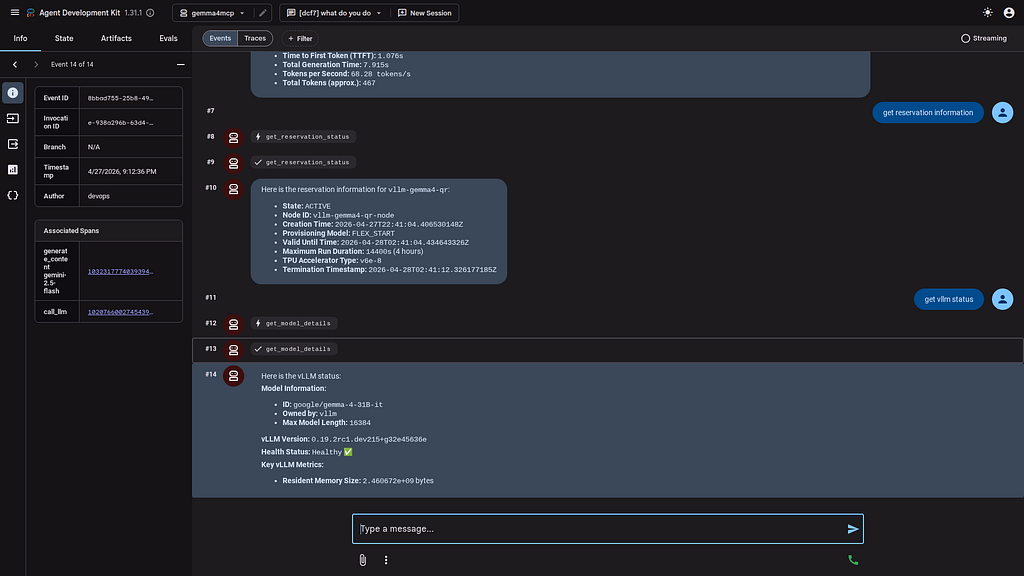
and from the ADK Web interface:
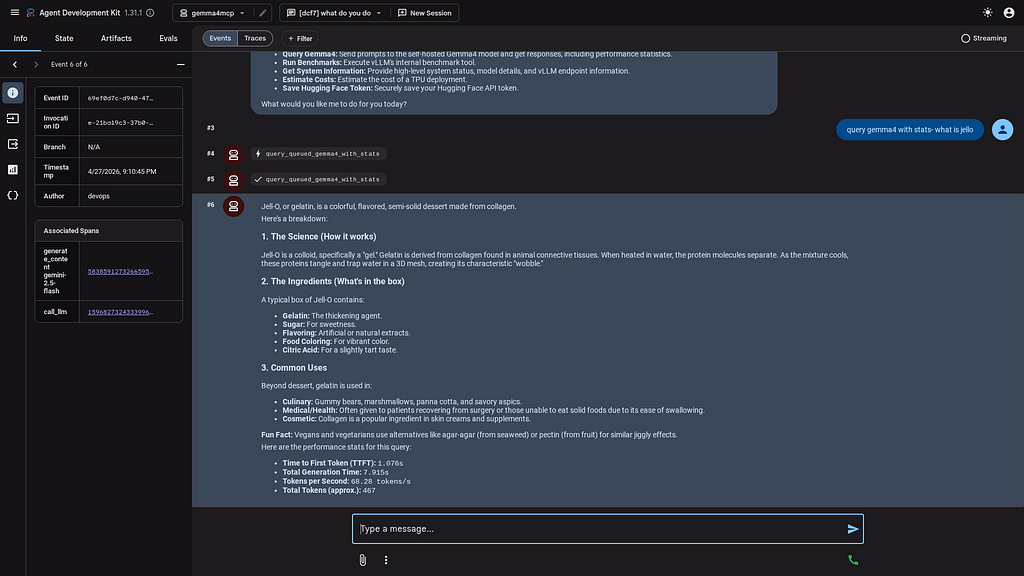
Detailed information can pulled directly into the Agent:
#### One Last Code Review with Gemini CLI
Gemini CLI was used to summarize the project:
```plaintext
✦ This project is a TPU vLLM DevOps Agent, designed to function as an expert Site Reliability Engineer (SRE) for managing a self-hosted Gemma 4 AI
model running on Google's Tensor Processing Units (TPUs).
In simple terms, it's a control panel and automation layer for running your own powerful AI model, making it easier to deploy, monitor, and
interact with.
Here’s a breakdown of its key functionalities:
Core Components
1. Inference Stack: The project is built to manage a specific AI setup: the google/gemma-4-31B-it model running on a vLLM/vllm-tpu container,
which is a specialized environment for serving models on TPUs. It's designed for high-performance inference on TPU v6e hardware.
2. MCP Server (server.py): This is the heart of the project. It's an agent that exposes a set of tools (as an API) to manage the inference stack.
These tools allow you to:
* Deploy and Manage Infrastructure: Programmatically create, delete, and inspect the status of TPU resources (Queued Resources) needed to run
the model.
* Monitor and Observe: Check the health of the vLLM service, monitor TPU utilization (like HBM and Tensor Core usage), and fetch logs.
* Benchmark Performance: Run load tests and benchmarks to measure the model's throughput and latency.
* Interact with the Model: Query the self-hosted Gemma 4 model.
Key Features
* Turnkey Deployment: The orchestrate_gemma4_stack tool simplifies the entire process of provisioning a TPU and deploying the Gemma 4 model with
all the necessary optimizations.
* Cost Efficiency: It's designed to use Google Cloud's Flex-start VMs, which are lower-cost, preemptible TPUs, making it more affordable to run a
large model.
* Gemini CLI Integration: The project includes instructions for setting up a LiteLLM proxy. This proxy translates requests from the standard
Gemini CLI, so you can use the gemini command on your terminal, and have the requests be served by your private, self-hosted Gemma 4 model
instead of the public Google API.
* Benchmarking and Testing: The project includes scripts (benchmarking_suite.py and load_test.py) to systematically measure the performance of
your self-hosted model under various conditions.
In summary, this project provides the automation and tooling necessary for a DevOps engineer or researcher to run, manage, and analyze a powerful,
private instance of the Gemma 4 model on Google's TPU infrastructure.
```
#### Summary
The strategy for using MCP for vLLM Gemma 4 deployment on TPU with Gemini CLI was validated with a incremental step by step approach.
A minimal stdio transport MCP Server was started from Python source code and validated with Gemini CLI running as a MCP client in the same local environment. This Python server provided all of the management tools to deploy and troubleshoot vLLM deployments.
Then this MCP server was deployed to Cloud Run.
Finally ADK agents were configured to use the MCP server and TPU deployed Gemma4 vLLM server.
* * *
Comments
More Blog
View allaiSkills over System Prompts: Building an Anki Tutor with the Antigravity SDK
AI has made me a little lazier. Not dramatically lazy. Not "the robots will do everything" lazy....
E
Ertuğrul DemirhermesagentchallengeCongrats to the Hermes Agent Challenge Winners!
We are thrilled to announce the winners of the Hermes Agent Challenge! Over the past few weeks, the...
J
Jess LeemidsommarFirebase Midsommer Madnesss with Antigravity CLI
This is a submission for the June Solstice Game Jam This installment brings a Firebase build to...
X
xbillaiI'm not a developer, but I built a calendar app to fix my most annoying work task
I’m not a developer! I’ve never coded anything in my life. As far as I’m concerned, a Cloudtop is...
A
Aria HellerdevchallengeCongrats to the Gemma 4 Challenge Winners!
We are so excited to announce the winners of the Gemma 4 Challenge! This is officially our most...
J
Jess LeeantigravityBuilding an agentic PR reviewer with Antigravity SDK
As announced in this blog post on June 18, 2026, Gemini CLI and Gemini Code Assist IDE extensions...
R
Remigiusz Samborski