
Back to Blog gemma
gemma ai
ai hermesagentchallenge
 midsommar
 ai
ai devchallenge
 antigravity
Build a Socratic Study Buddy with Gemma 4: A Beginner’s Guide to Running AI Locally
leslysandra May 14, 2026
0 views
The landscape of AI has shifted from "bigger is better" to "smarter is better." We are entering the...
The landscape of AI has shifted from "bigger is better" to "smarter is better." We are entering the era of **intelligence-per-parameter**—a metric of how much reasoning power is packed into a compact model. Gemma 4, built on the latest research from Google DeepMind, brings high-level, multi-step reasoning directly to your own hardware.
This guide will show you how to build a Socratic Study Buddy—a tutor that doesn't just give you answers but helps you think through problems—while keeping your data 100% private using a custom local web interface.
## What I Built
I built a local **Socratic Study Buddy** application. It pairs the localized inference engine of LM Studio with a custom-built **Streamlit Web UI** frontend. Instead of acting as a lazy "answer engine" that does a student's homework for them, this tool forces the underlying Gemma 4 model to plan pedagogical strategies and use structured dialogue to guide critical thinking.
## Why Gemma 4 Matters for Learning
Gemma 4 is a "Thinking Model." Older AI models functioned like advanced autocomplete, predicting the next word based on patterns. Gemma 4 has the capacity for a native **Chain-of-Reasoning** process.
Instead of jumping straight to an answer, Gemma 4 works through logical steps internally before it speaks. This makes it a perfect mentor. While other models might just do your homework, Gemma 4 is trained to identify where you are stuck and nudge you toward the solution.
## Choosing Your Brain: The Official Model Sizes
To run this locally, you need to pick the right "size" for your computer. Gemma 4 comes in four official variants:
- **Effective 2B (E2B)**: Tiny and lightning-fast. Optimized for high-end phones or older laptops with 4GB–8GB of RAM.
- **Effective 4B (E4B)**: The "Sweet Spot" for most modern laptops with 8GB–12GB of RAM. This is the entry point for high-quality image and audio understanding.
- **26B A4B (Mixture-of-Experts)**: The speed demon. It has 26 billion parameters but only uses 4 billion at a time to answer. You get high-quality reasoning with fast speeds. Requires 16GB–24GB of RAM.
- **31B Dense**: The flagship. This is the smartest model in the family, providing maximum reasoning quality for complex math. Use this if you have a powerful workstation with 32GB+ of RAM.
## Setup: Bringing the Brain to Your Frontend
Instead of staying restricted to standard desktop setups, we bridge the model into a lightweight web dashboard.
### Step 1. Weight Retrieval & Backend Hosting
**1. Search for Gemma 4**: Open [LM Studio](https://lmstudio.ai/) and click the Magnifying Glass. Type `"Gemma 4"`.
**2. Select a GGUF**: Look for files labeled **GGUF** (a compressed file format that lets heavy models run on consumer hardware).
**3. Choose Your Quantization**: Look for **Q4_K_M** (a version that balances intelligence with low memory usage).
**4. Start the Local Server:**: Head to the Local Server tab in LM Studio, load your downloaded model, ensure your `system prompts` are injected, and start the service on port `1234`. Turn **GPU Offload** to "Max" to leverage your graphics card.
### Step 2. Running the Custom Web UI
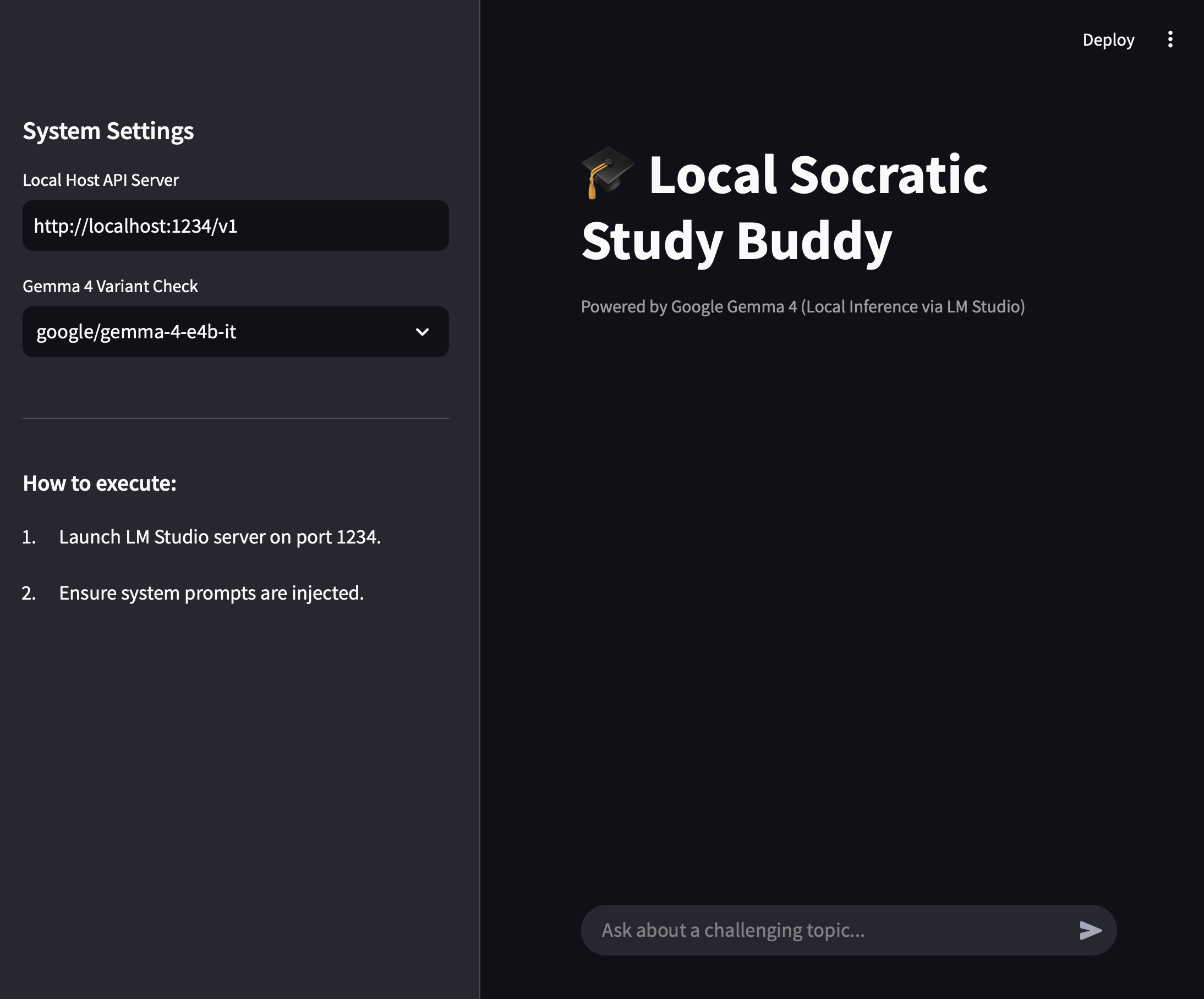
To spin up the clean web chat interface shown below, clone the repository, install the dependencies, and launch the frontend file:
```shell
pip install streamlit openai
streamlit run app.py
```
## Demo
Here is how the complete architecture interacts within the custom Python frontend workspace:
### The UI Environment Overview
The implementation splits backend configuration details directly away from the active learning space, allowing seamless swaps between running models:
#### The Project: The Socratic Study Buddy Prompt
In your local configuration workspace or the core application prompt files, we pass this instruction using the official `<|think|>` control token sequence to isolate the reasoning channel:
```plaintext
<|think|>
You are an expert academic tutor. You are forbidden from giving the final answer. Instead, use your internal reasoning to identify the core concept the student is struggling with and ask guiding questions.
```
#### The "Thinking" Advantage in Action
When you ask the web component: _"I don't understand how recursion works in coding."_
Gemma 4 enters its **Internal Thought Channel**. Within your local terminal execution or dashboard view, you will see it process its strategy before printing its output:
> **Gemma 4 (Internal Reasoning)**: The user wants to know recursion. Giving code directly violates the Socratic constraint. I will use a structural stack analogy, like a line of people or nesting boxes, to force them to identify the concept of a terminating condition.
#### Tutor Output Response:
> "To understand recursion, we first need to understand a 'base case.' If you were standing in a line of people, how would you know your position without counting everyone yourself?"
### Beyond Chat: Real-World Visuals
One of the best ways to study is to visualize logic. You can ask your Study Buddy to `"Draw the logic of this concept."` It will generate clean **Mermaid.js** code directly in the conversation panel:
> **User:** "Show me the logic of the Socratic method we just used."
> **Gemma 4:** "Here is the flowchart of our session:"
```plaintext
graph TD
A[Student Asks Question] --> B{Model Thinks}
B --> C[Identify Missing Concept]
C --> D[Ask Guiding Question]
D --> E[Student Responds]
E -->|Correct| F[Nudge to Next Step]
E -->|Incorrect| G[Simplify Analogy]
```
## Code
The entire layout—including the Python automation scripts, system prompt templates, configurations, and the Streamlit frontend architecture—is completely open-source:
👉 Check out the GitHub Repository [Here](https://github.com/leslysandra/socratic-study-buddy-gemma4)
## Digital Sovereignty & Ethical AI Safety
Building with open-source models like Gemma 4 is a foundational ethical choice:
- **Privacy (Digital Sovereignty)**: Every question you ask stays on your machine. Your learning struggles aren't being used to train a corporate model.
- **The Trade-off**: Unlike cloud models, a local model is your responsibility. You must verify its facts, as it doesn't have an external "safety filter" monitoring the conversation.
#### Advantages:
- Transparency: You can inspect the weights and the "thinking" process, which is impossible with closed-source models.
- Privacy: Since it runs locally in LM Studio or on your private GKE cluster, your data never leaves your environment.
#### Disadvantages:
- Resource Intensity: High-reasoning models still require significant compute power compared to lightweight "dumb" bots.
- Guardrail Responsibility: Unlike a managed API that filters every word, an open-source model places the "Safety Filter" responsibility on you. You must implement your own output classifiers to ensure the model stays within educational boundaries.
## Conclusion
You’ve gone from raw local model files to running a custom, world-class educational reasoning platform directly on your laptop. You’ve built an app that doesn't just echo stored training text—it actively fosters critical thinking.
**Your Challenge:** Use your newly built Web UI Study Buddy to tackle a topic you’ve always found intimidating—maybe organic chemistry or financial engineering. How does having an interface powered by a "Thinking Model" change the way you interact with complex documentation?
---
**Next Steps:** Ready to scale from a chat interface to fully autonomous pipelines? Check out the [Pi Coding Agent by Patrick Loeber](https://patloeber.com/gemma-4-pi-agent/)—a minimal terminal client that bridges local Gemma 4 instances straight to your terminal environment so it can write, debug, and run code directly for you!
Comments
More Blog
View allaiSkills over System Prompts: Building an Anki Tutor with the Antigravity SDK
AI has made me a little lazier. Not dramatically lazy. Not "the robots will do everything" lazy....
E
Ertuğrul DemirhermesagentchallengeCongrats to the Hermes Agent Challenge Winners!
We are thrilled to announce the winners of the Hermes Agent Challenge! Over the past few weeks, the...
J
Jess LeemidsommarFirebase Midsommer Madnesss with Antigravity CLI
This is a submission for the June Solstice Game Jam This installment brings a Firebase build to...
X
xbillaiI'm not a developer, but I built a calendar app to fix my most annoying work task
I’m not a developer! I’ve never coded anything in my life. As far as I’m concerned, a Cloudtop is...
A
Aria HellerdevchallengeCongrats to the Gemma 4 Challenge Winners!
We are so excited to announce the winners of the Gemma 4 Challenge! This is officially our most...
J
Jess LeeantigravityBuilding an agentic PR reviewer with Antigravity SDK
As announced in this blog post on June 18, 2026, Gemini CLI and Gemini Code Assist IDE extensions...
R
Remigiusz Samborski