
Back to Blog ollama
 gemma
gemma community
 ai
ai ai
ai githubactions
 ai
ai
Local Gemma 4 Deployment with MCP and Antigravity CLI
xbill May 28, 2026
0 views
This article provides a step by step deployment guide for Gemma 4 to a 13th Gen Intel i7–1360P...
title: Local Gemma 4 Deployment with MCP and Antigravity CLI published: true series: Gemma4 date: 2026-05-28 15:53:51 UTC tags: ollama,gemma4,antigravitycli,mcps canonical_url: https://xbill999.medium.com/local-gemma-4-deployment-with-mcp-and-antigravity-cli-7e4614813f21
This article provides a step by step deployment guide for Gemma 4 to a 13th Gen Intel i7–1360P running Chrome OS Flex. A suite of Python MCP tools is built to simplify management of the Ollama hosted Gemma 4 deployment with Antigravity CLI.

What is this project trying to Do?
This project is a DevOps/SRE assistant that uses a Gemma 4 model self-hosted locally. It provides tools to provision the Docker container and deploy the model, as well as for observability and performance testing.
This project is similar to a previous project that targeted TPU hosted Gemma4 instances on GCP:
Self-hosted Gemma 4 on TPU with vLLM, MCP, ADK, and Gemini CLI
Antigravity CLI
Antigravity CLI is the follow-on successor to Gemini CLI- the terminal driven, agent assisted coding tool.
Full details on installing Antigravity CLI are here:
Getting Started with Antigravity CLI
Testing the Antigravity CLI Environment
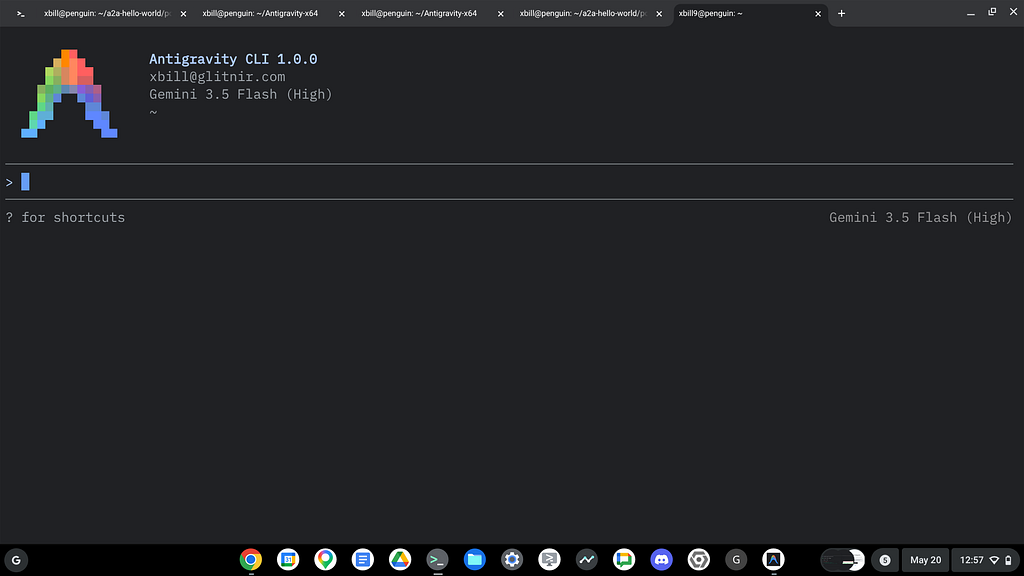
Once you have all the tools in place- you can test the startup of Antigravity CLI.
You will need to authenticate with a Google Cloud Project or your Google Account:
agy
This will start the interface:
Full Installation Instructions
The detailed installation instructions for Antigravity CLI are here:
Getting Started with Antigravity CLI
Python MCP Documentation
The official GitHub Repo provides samples and documentation for getting started:
Where do I start?
The strategy for starting MCP development for model management is a incremental step by step approach.
First, the basic development environment is setup with the required system variables, and a working Antigravity CLI configuration.
Then, a minimal Python MCP Server is built with stdio transport. This server is validated with Antigravity CLI in the local environment.
This setup validates the connection from Antigravity CLI to the local server via MCP. The MCP client (Gemini CLI) and the Python MCP server both run in the same local environment.
Setup the Basic Environment
At this point you should have a working Python environment and a working Gemini CLI installation. The next step is to clone the GitHub samples repository with support scripts:
cd ~
git clone https://github.com/xbill9/gemma4-tips
Then run init.sh from the cloned directory.
The script will attempt to determine your shell environment and set the correct variables:
local-devops-agent
source init.sh
If your session times out or you need to re-authenticate- you can run the set_env.sh script to reset your environment variables:
cd local-devops-agent
source set_env.sh
Variables like PROJECT_ID need to be setup for use in the various build scripts- so the set_env script can be used to reset the environment if you time-out.
Model Management Tool with MCP Stdio Transport
One of the key features that the standard MCP libraries provide is abstracting various transport methods.
The high level MCP tool implementation is the same no matter what low level transport channel/method that the MCP Client uses to connect to a MCP Server.
The simplest transport that the SDK supports is the stdio (stdio/stdout) transport — which connects a locally running process. Both the MCP client and MCP Server must be running in the same environment.
The connection over stdio will look similar to this:
# Initialize FastMCP server
mcp = FastMCP("Self-Hosted vLLM DevOps Agent")
Running the Python Code
First- switch the directory with the Python version of the MCP sample code:
~/gemma4-tips/local-devops-agent
Run the release version on the local system:
make install
Processing ./.
The project can also be linted:
xbill@penguin:~/gemma4-tips/local-devops-agent$ make lint
ruff check .
All checks passed!
ruff format --check .
9 files already formatted
mypy .
Success: no issues found in 9 source files
And a test run:
xbill@penguin:~/gemma4-tips/local-devops-agent$ make test
python test_agent.py
.......2026-05-28 10:41:49,403 - vllm-devops-agent - INFO - Querying model with stats with prompt: 'Hi...'
2026-05-28 10:41:49,404 - vllm-devops-agent - INFO - Model response with stats: TTFT=0.000s, TotalTime=0.000s
.....
----------------------------------------------------------------------
Ran 12 tests in 0.038s

OK
Docker Interaction with MCP stdio Transport
One of the key features that the MCP protocol provides is abstracting various transport methods.
The high level tool MCP implementation is the same no matter what low level transport channel/method that the MCP Client uses to connect to a MCP Server.
The simplest transport that the SDK supports is the stdio (stdio/stdout) transport — which connects a locally running process. Both the MCP client and MCP Server must be running in the same environment.
In this project Gemini CLI is used as the MCP client to interact with the Python MCP server code.
Antigravity CLI mcp_config.json
A sample MCP server file is provided in the .agents directory:
{
  "mcpServers": {
    "local-devops-agent": {
      "command": "python3",
      "args": [
        "/home/xbill/gemma4-tips/local-devops-agent/server.py"
      ],
      "env": {
        "GOOGLE_CLOUD_PROJECT": "aisprint-491218",
        "MODEL_NAME": "google/gemma-4-E2B-it"
      }
    }
  }
}
Validation with Antigravity CLI
The final connection test uses Antigravity CLI as a MCP client with the Python code providing the MCP server:
agy
/mcp list
>
──────────────────────────────────────────────────────────────────────────────────────────────────────────────────────────
MCP Servers

Plugins (~/.gemini/antigravity-cli/plugins)
> ✓ google-dev-knowledge Tools: search_documents, answer_query, get_documents
   ✓ local-devops-agent Tools: verify_model_health, save_hf_token, manage_docker, get_system_status, get_endpoint, +9
                         more
Getting Started with Gemma 4 Locally
As most local deployments are constrained- the Ollama engine is used in a Docker container:
The Official vLLM repo also has Gemma4 specific information:
Release v0.19.1 · vllm-project/vllm
Model Lifecycle Management via MCP
The MCP tools provide a complete suite of agent-oriented operations for managing vLLM deployment on Cloud Run or a TPU.
Overview of MCP tools :
> print out mcp tools

  Here is the updated list of available MCP tools for the local Gemma 4 agent:

   Tool Name | Description | Code Location
  ---------------------------|-----------------------------------------------------------------------|-----------------
    analyze_local_logs | Analyzes the local container logs using Gemma 4 to find SRE/DevOps | server.py
                             | errors. |
    get_active_models | Gets the currently loaded models in Ollama's memory. | server.py
    get_docker_logs | Retrieves startup and execution logs from the Docker container. | server.py
    get_endpoint | Checks endpoint connectivity and returns the service URL. | server.py
    get_help | Provides help text and summarizes the configuration options. | server.py
    get_model_show_details | Gets parameters, architecture, license, and config for a model. | server.py
    get_system_details | Retrieves detailed information about the running local model, engine, | server.py
                             | and versions. |
    get_system_status | Displays a dashboard of container and serving health status. | server.py
    manage_docker | Starts, stops, restarts, or removes the container. | server.py
    query_gemma4 | Standard prompt query interface for the local model. | server.py
    query_gemma4_with_stats | Prompt interface returning performance metrics (latency, TTFT). | server.py
    run_benchmark | Runs the benchmark suite or vLLM benchmarking script. | server.py
    save_hf_token | Securely caches a Hugging Face API token. | server.py
    verify_model_health | Runs a deep health check verifying latency and response correctness. | server.py
Checking System status
The status can be checked with an MCP tool:
  ### 1. High-Level Dashboard: get_system_status

  • Purpose: Checks the container status (via docker ps ) and model server availability to present a dashboard.
  • Function: server.py
  • Current Status:
      • vLLM Health: 🟢 Online (http://localhost:8000)
      • Docker Container Status: 🟢 Running

  ### 2. Service Connectivity Endpoint: get_endpoint

  • Purpose: Verifies model service endpoint connectivity and reports the URL.
  • Function: server.py
  • Current Output:
  │ 🟢 Local vLLM/Ollama is Online at: http://localhost:8000

  ### 3. Active Models in Memory: get_active_models
  • Purpose: Checks which models are currently loaded in RAM/VRAM, along with context size and processor status (Ollama
  backend only).
  • Function: server.py
  • Current Output:
    NAME ID SIZE PROCESSOR CONTEXT UNTIL
  (Note: The active model list is currently empty, meaning no models are loaded in memory yet)

  ### 4. Deep Model Properties: get_model_show_details

  • Purpose: Queries parameter details, license, system prompt templates, and architecture layers for a specific model
  (Ollama backend only).
  • Function: server.py
Deploy The Model Locally
Once the base Docker environment has been checked- the Gemma model can be deployed:
> deploy gemma4

● Read(/home/xbill/gemma4-tips/local-devops-agent/server.py)
● Read(/home/xbill/.gemini/antigravity-cli/mcp/local-devops-agent/manage_docker.json)
● local-devops-agent/manage_docker(Start Docker container)
● local-devops-agent/get_system_status(System status check)
● Read(/home/xbill/.gemini/antigravity-cli/mcp/local-devops-agent/verify_model_health.json)
● local-devops-agent/verify_model_health(Model health check) (ctrl+o to expand)

  The Gemma 4 local container stack has been successfully started and verified:

  1. Docker Container Start: Called server.py with action="start" to run or start the gemma4 container and
  pull the model.
  2. Status Check: Verified that the container status via server.py is 🟢 Running and online.
  3. Health Validation: Executed server.py, which passed with the following metrics:
      • Response: "Hello. Yes, I am working and ready to assist you."
      • Latency: 39.10 seconds

  The inference service is fully online at http://localhost:8000 and ready to serve requests.

  ### Summary of Work

  • Started the gemma4 Docker container using the server.py tool.
  • Verified status and deep endpoint health using server.py and server.py.
Cross Check The Deployed Model
Once the model starts locally- the MCP tool allows for model verification:
> Performs a deep health check by querying the model with a simple prompt and measuring response
    latency.

● local-devops-agent/verify_model_health(Model health check) (ctrl+o to expand)

  The health check has completed:

  • Status: ✅ Model health check PASSED
  • Response: "Hello! Yes, I am working and ready to assist you."
  • Latency: 17.51 seconds

  You can inspect the definition of this check in server.py within server.py.

  ### Summary of Work

  • Ran the server.py tool.
  • Verified the local Gemma 4 endpoint response latency and output.
and model details:
> get_active_models

● local-devops-agent/get_active_models(Active models check)
● Read(/home/xbill/.gemini/antigravity-cli/mcp/local-devops-agent/query_gemma4.json)
● local-devops-agent/query_gemma4(Query local model)
● local-devops-agent/get_active_models(Active models check) (ctrl+o to expand)

  The local model has been loaded, and the resource details from server.py are shown below:

  ### 📊 Active Loaded Models:

    NAME ID SIZE PROCESSOR CONTEXT UNTIL
    gemma4:e2b 7fbdbf8f5e45 7.6 GB 100% CPU 4096 4 minutes from now
and the endpoint:
> get_endpoint

● local-devops-agent/get_endpoint(Local agent endpoint check) (ctrl+o to expand)

  The local Gemma 4 model server endpoint checked by server.py is active:

  │ 🟢 Local vLLM/Ollama is Online at: http://localhost:8000
and status:
> get_system_details

● Read(/home/xbill/.gemini/antigravity-cli/mcp/local-devops-agent/get_system_details.json)
● local-devops-agent/get_system_details(System details check) (ctrl+o to expand)

  Here is the output from the renamed server.py tool:

  ### 🧩 Model Details (http://localhost:8000)

  Model Information ( /v1/models ):

    {
      "object": "list",
      "data": [
        {
          "id": "gemma4:e2b",
          "object": "model",
          "created": 1779979910,
          "owned_by": "library"
        }
      ]
    }

  Health Status ( /v1/models ):

  • Status: Healthy ✅
Check the Docker status:
> manage_docker status
● local-devops-agent/manage_docker(Check Docker status) (ctrl+o to expand)
  Here is the status of the local Docker container as returned by server.py with action="status" :
    CONTAINER ID IMAGE COMMAND CREATED STATUS PORTS
  NAMES
    5b5917a97e98 ollama/ollama:latest "/bin/ollama serve" 53 minutes ago Up 53 minutes 0.0.0.0:8000-
  >11434/tcp, [::]:8000->11434/tcp gemma4
  ### Summary of Work
  • Invoked server.py with action="status" to query container metrics directly.
Review the Model
Check the model details:
  Here are the deep parameters and configurations for the loaded model retrieved by server.py:

  ### 🧩 Model Details for gemma4:e2b :

    Model
        architecture gemma4
        parameters 5.1B
        context length 131072
        embedding length 1536
        quantization Q4_K_M
        requires 0.20.0

      Capabilities
        completion
        vision
        audio
        tools
        thinking

      Parameters
        temperature 1
        top_k 64
        top_p 0.95

      License
        Apache License
        Version 2.0, January 2004
        ...
Once everything is online — you can send queries to the Model:
> query_gemma4_with_stats what is gemma4?

● Read(/home/xbill/.gemini/antigravity-cli/mcp/local-devops-agent/query_gemma4_with_stats.json)
● local-devops-agent/query_gemma4_with_stats(Query local model with stats) (ctrl+o to expand)

  Here is the response from querying the local model along with performance statistics, using server.py:

  ### 📊 Performance Stats

  • Time to First Token (TTFT): 10.262s
  • Total Generation Time: 96.890s
  • Tokens per Second: 2.53 tokens/s
  • Total Tokens (approx.): 219

  ### 💬 Model Response

  Gemma 4 is a family of large language models developed by Google DeepMind.

  Here are the key things to know about Gemma 4:

  1. Nature: It is a family of open-weights models, meaning the weights (the parameters that define the model) are
  publicly available, allowing researchers, developers, and the community to freely use, modify, and build upon the
  technology.
  2. Purpose: Like other large language models, Gemma 4 is designed to understand, generate, and process human language.
  3. Development: It is part of Google DeepMind's efforts to create powerful, responsible, and accessible AI models.
  4. Use Cases: It can be used for a wide variety of NLP tasks, including:
      • Text generation (writing stories, code, emails)
      • Translation
      • Summarization
      • Question answering
      • Code assistance

  In short, Gemma models represent an effort to make advanced large language model technology more accessible to the
  wider community.
Benchmark the Local Model
The local model was benchmarked:
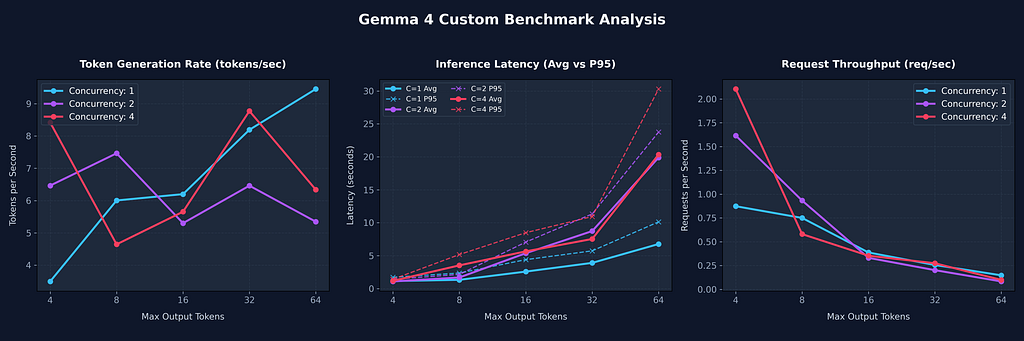
  I have started the custom benchmark sweep using the parameters you requested:

  • Tokens: 4 , 8 , 16 , 32 , 64
  • Concurrency (Concurrent Users): 1 , 2 , 4

  Analyzing Task Results
  The custom benchmark sweep has completed successfully! Here is the performance data generated across the requested
  token lengths ( 4 , 8 , 16 , 32 , 64 ) and concurrent user counts ( 1 , 2 , 4 ) using the server.py suite:

  ### 📈 Benchmark Results Table

   Concurrency | Max Tokens | Success Rate | Avg Latency (s) | P95 Latency (s) | Throughput (req/s) | Gen Speed (tokens
  -------------|------------|--------------|-----------------|-----------------|--------------------|------------------
        1 | 4 | 100% | 1.14s | 1.73s | 0.87 | 3.49
        2 | 4 | 100% | 1.09s | 1.42s | 1.62 | 6.46
        4 | 4 | 100% | 1.18s | 1.42s | 2.10 | 8.42
        1 | 8 | 100% | 1.33s | 2.36s | 0.75 | 6.00
        2 | 8 | 100% | 1.69s | 2.15s | 0.93 | 7.46
        4 | 8 | 100% | 3.53s | 5.17s | 0.58 | 4.64
        1 | 16 | 100% | 2.58s | 4.40s | 0.39 | 6.20
        2 | 16 | 100% | 5.37s | 7.06s | 0.33 | 5.30
        4 | 16 | 100% | 5.65s | 8.49s | 0.35 | 5.65
        1 | 32 | 100% | 3.91s | 5.73s | 0.26 | 8.19
        2 | 32 | 100% | 8.73s | 11.34s | 0.20 | 6.46
        4 | 32 | 100% | 7.53s | 10.94s | 0.27 | 8.77
        1 | 64 | 100% | 6.77s | 10.13s | 0.15 | 9.46
        2 | 64 | 100% | 19.89s | 23.76s | 0.08 | 5.34
        4 | 64 | 100% | 20.35s | 30.30s | 0.10 | 6.34

  ### 🔍 Key Takeaways:

  1. Concurrency Scaling for Short Tokens: At small token lengths (e.g., 4 tokens), increasing concurrency from 1 to 4
  improves throughput from 0.87 req/s to 2.10 req/s with negligible impact on average latency.
  2. Resource Contention on Larger Sweeps: For longer token generations (e.g., 64 tokens), higher concurrency causes
  severe queuing and latency spikes on CPU execution, with average latency jumping from 6.77s (concurrency 1) to 20.35s
  (concurrency 4).
  3. Generation Speed: The generation speed remains relatively stable across most tests, hovering between 3.5 tokens/s
  and 9.5 tokens/s.
This is visualized:
Summary
The strategy for using MCP for local Gemma 4 deployment with Antigravity CLI was validated with a incremental step by step approach.
A minimal stdio transport MCP Server was started from Python source code and validated with Antigravity CLI running as a MCP client in the same local environment. This Python server provided all of the management tools to deploy and troubleshoot local Model deployments.
Comments
More Blog
View allgemmaFive Gemma-4 models, one accelerator: what porting E2B 31B to AWS Inferentia2 taught me
I ported the whole Gemma-4 family — E2B, E4B, 12B, 31B, and the 26B-A4B MoE — to run on...
X
xbillcommunityHey DEV, I'm Tobore. Let's actually connect.
Hey DEV, I'm Tobore. Let's actually connect. I've been on here for a while now, mostly writing and...
L
Laurina AyarahaiI burned through thousands of AI tokens. Then a friend did it for free
(yep, kinda clickbait, just for the funsies 😊) At the beginning of the year, I relaunched my...
P
Paulo HenriqueaiClaude might be saturating your machine
My laptop was sitting idle with the fan at full tilt. Nothing was running that I knew of. The culprit...
S
Sidhant PandagithubactionsAutomated GitHub Code Reviews Using Google Gemini
I Built a Thing! TL;DR — Google Gemini-based Pull Request reviews and Issue Triaging for...
D
Darren "Dazbo" LesteraiWhat is an "agentic harness," actually?
I've been hearing the word "harness" thrown around a lot lately. I assumed it just meant "the IDE" or...
T
Tilde A. ThuriumReady-made automations for this
Workflows from the Neura Market marketplace related to this DeepSeek resource
- Automate Blog Content Creation with Notion MCP, DeepSeek AI, and WordPressn8n · $9.99 · Related topic
- Generate AI Videos from Scripts with DeepSeek, Synthesia, and Together.ain8n · $24.99 · Related topic
- Compare Multi-Period Financial Data from Google Sheets with DeepSeek AI Analysisn8n · $14.99 · Related topic
- PostgreSQL Conversational Agent with Claude & DeepSeek (Multi-KPI, Secure)n8n · $14.99 · Related topic