
Back to Blog devchallenge
<center> <b><i>Questions or Comments? I would love to hear your thoughts!</i></b> </center> ai
ai aie
aie gemini
 ai
ai aie
aie aie
aie
I used Google Gemini for the First Time. A Deep Analysis of my Experience so far! ✨
FrancisTRᴅᴇᴠ (っ◔◡◔)っ March 2, 2026
0 views
This is a submission for the Built with Google Gemini: Writing Challenge Front Cover is from...
This is a submission for the Built with Google Gemini: Writing Challenge
Front Cover is from Jujutsu Kaisen Season 3. This scene was used specifically: https://www.youtube.com/watch?v=EhXDEijkPhk
Challenge: There is an Easter Egg hidden in this post. Can you find it?
Background
Recently, I have been using AI to create MVP’s such as "I Vibe Coded a Multiplayer ASL Game using MQTT! 🌐" and "Built a Vibe Coded App where you can Style any Image you like! :D". I have used ChatGPT first, then moved on to Microsoft Copilot since it is much more robust in the ways it understands my needs and being able to debug in the process.
However, I haven’t gotten out of my comfort zone trying other AI models. The reason is that I wasn’t comfortable and my OCD which, without going into detail, prevented me from using other technologies due to severe irrational thoughts. Fortunately, it has gotten much better than it was in August, but I am still limited in some cases.
With that said, it got better to the point where I can try something new! One of the things I tried out is Google Gemini and I had a blast using it! I would like to share my experience with Gemini so far based on setting up my environment to contribute to Forem and using Gemini to participate in the DEV Weekend Challenge! I will be sharing Specific Examples I used for Google Gemini, What I Learned, and providing Feedback for Google Gemini!
Note: This post is unique in some way. By unique, it is not the traditional "I built this with Gemini and things I learn from it". It is more of "My experience of using Gemini and things I learned"

Specific Examples I used for Google Gemini
There are two cases where I used Gemini. The first case was assisting me in setting up the environment to contribute to "Forem" and coding the Weekend Challenge on Dev.to.
1. Google Gemini Role for Contributing to Forem!
When contributing to any Open-Source projects, it is common for contributors to experience technical difficulties when setting up the environment. Furthermore, it is also common that those errors tend to not be documented specifically. It can also be quite overwhelming to find the solution on the documentation or on the internet in general.
When I first started out, I used Gemini to help me set up my environment to contribute to Forem. I initially did not use Gemini when following the documentation of setting up the environment. I started using it after I received this error:
/usr/bin/env: ‘ruby\r’: No such file or directory
/usr/bin/env: use -[v]S to pass options in shebang lines
Note: This is after running the command on the WSL Terminal
bin/setup
After looking around and finding no solution to the problem, it gave me the opportunity to use Gemini. I started of using Copilot initially, but the solution it gave did not resolve my issue and it led to more errors than it started off with. I thought about giving Gemini a chance because:
-
It’s my first time using it and I only started to notice that I can use it for free without the need to sign up. (Not sure why it took me this long)
-
Overall, it’s good for me to learn and explore why people prefer the AI models they used. So far, I have used ChatGPT, Copilot, and now Gemini.
With that said, here is what I did! When I started to use Gemini, I gave Gemini the following prompt:
I am following the documentation to contribute to the Open-Source project called "Forem". I followed the documentation for Windows, and I ran into this error when I run
bin/setupon WSL:
/usr/bin/env: ‘ruby\r’: No such file or directory /usr/bin/env: use -[v]S to pass options in shebang lines
After running the prompt to Gemini, It gave me this solution:
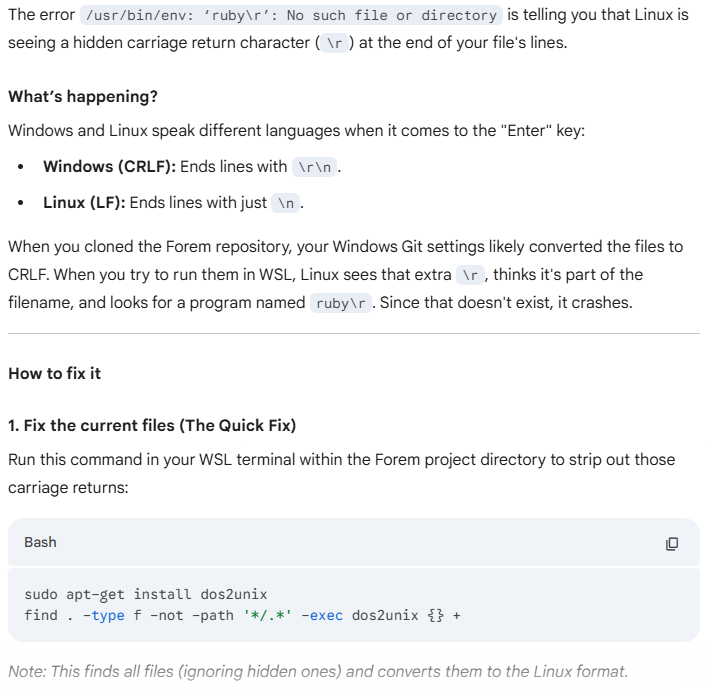
After following the instructions and running bin/setup, I got this warning:
== Removing old logs and tempfiles ==
warning: parser/current is loading parser/ruby33, which recognizes 3.3.1-compliant syntax, but you are running 3.3.0.
Please see https://github.com/whitequark/parser#compatibility-with-ruby-mri.
Note: It showed as a warning and it is something I could ignore. However, I prompted Gemini since I was curious
I followed up with another prompt to Gemini with the following:
I ran into this error after running the bin/setup.
== Removing old logs and tempfiles == warning: parser/current is loading parser/ruby33, which recognizes 3.3.1-compliant syntax, but you are running 3.3.0. Please see https://github.com/whitequark/parser#compatibility-with-ruby-mri.
It recommended me to install a specific version of rbenv. This is what I received:
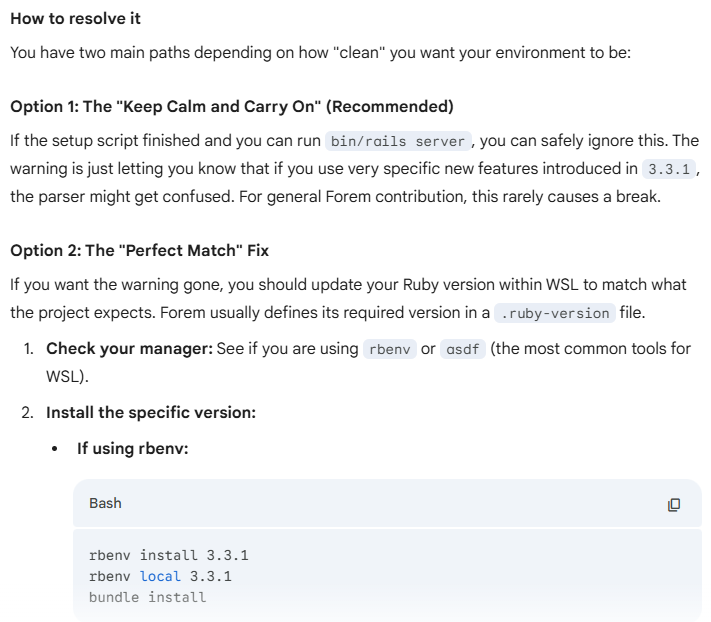
Once I installed the necessary version, I started "bin/setup" again and then "bin/startup" and it works! (As shown below)
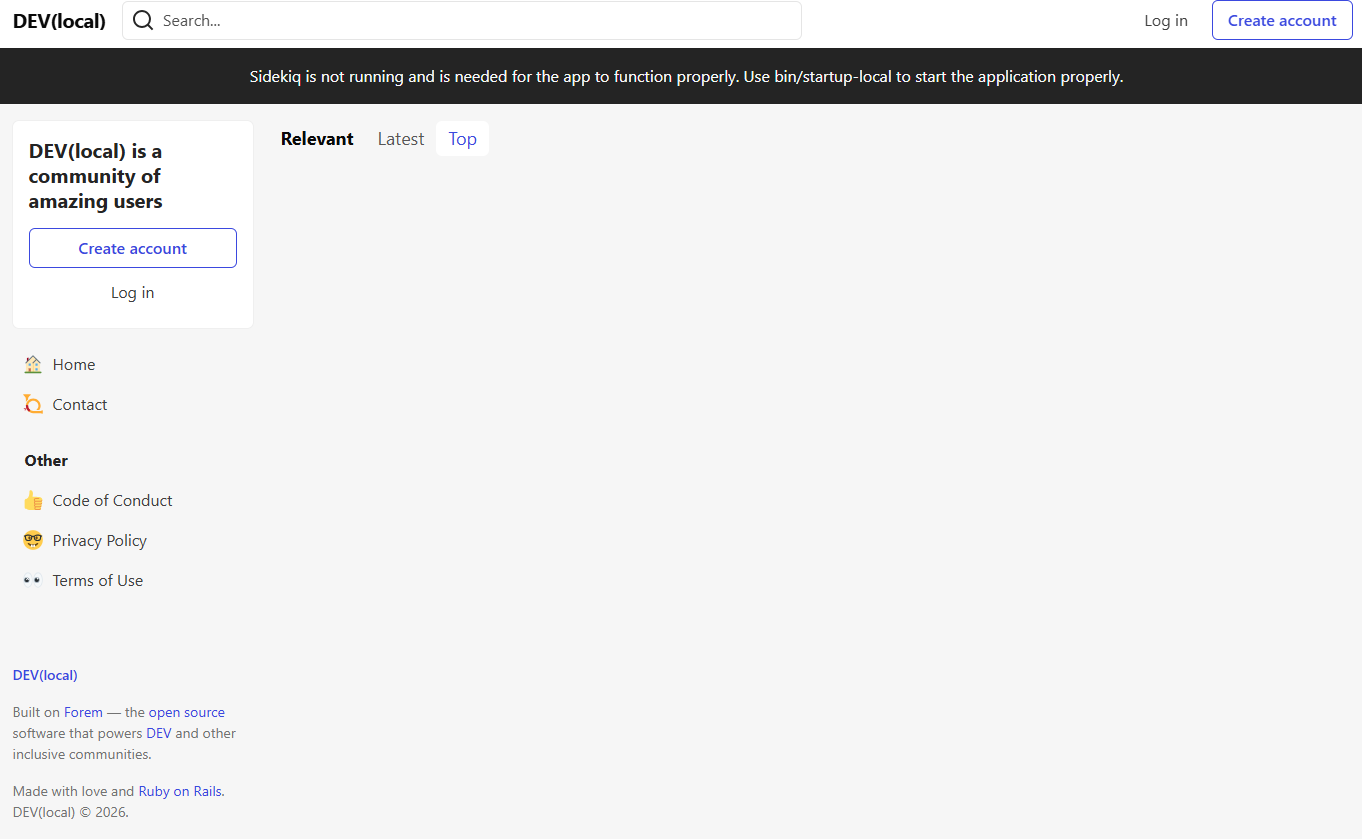
Note: There are a lot of things I need to do such as setting up the database, etc. The use of Gemini I have shown here demonstrated the process I follow and how it outputted. I will explain more in detail on what I have learn later
I was relieved that the LocalHost of the Dev environment had worked since I was going in circles for a good hour or so! I am glad I was able to reach that milestone as well as my first step into contributing to Forem!
2. Google Gemini Role for DEV Weekend Challenge!
After seeing how useful Gemini was in my development process, I decided to tackle the First Dev Weekend Challenge they announced! I decided to use Gemini to Vibe code an application in a single day (since I am not available during the weekend). I read the required prompt and built out a small application. Unfortunately, I did not save a copy of the prompts I did with Gemini to share with the community, but I can say that it was a smooth process and quite straightforward!
Overall, I was able to submit the project for the Dev Weekend Challenge. For this project, I built a website app that allows you to train your own Hand Pose Machine Learning Model using ml5.js and allows you to download your trained model (from your own dataset) to import it to your personal projects. If you would like to see more, feel free to check it out!
{% embed https://dev.to/francistrdev/an-app-where-you-can-train-your-own-hand-pose-model-for-your-project-58ib %}
Nevertheless, it was a great experience using Gemini to code this project!

What I Learned
There is a lot to uncover in regards to what I learned, even though I only use Gemini for a day.
Note: I used Gemini to guide me into debugging my environment setup along with participating in the DEV Weekend Challenge...all in a day
I want to go over what I learned using Gemini and how it is different from other AI Models, as well as what stood out to me.
1. The Format it Outputs
I noticed that Gemini’s output is different from other AI tools I have used. I ran the prompts for Gemini, Copilot, and ChatGPT to see how it formats their outputs and here is what I saw.
I am following the documentation to contribute to the Open-Source project called "Forem". I followed the documentation for Windows, and I ran into this error when I run
bin/setupon WSL:
/usr/bin/env: ‘ruby\r’: No such file or directory /usr/bin/env: use -[v]S to pass options in shebang lines
Google Gemini
For Gemini, it gave a small summary of why the error persisted. This was quite useful for learning why the error appears and being able to explain to others if they encounter such errors. This is the snippet output highlighted below:
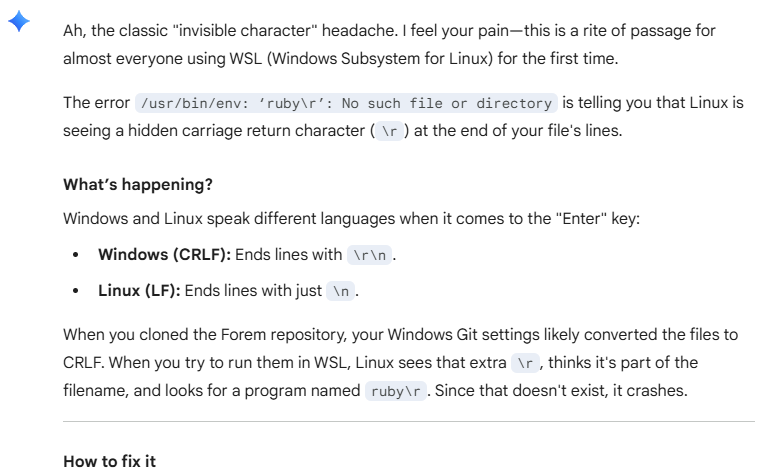
Microsoft Copilot and ChatGPT
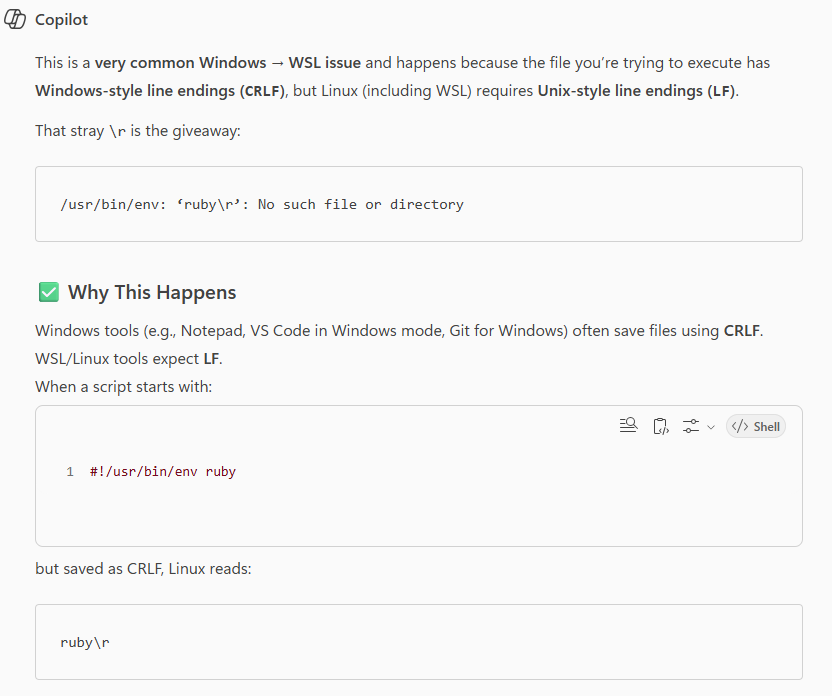
Although the reasoning is similar in a way, it is quite different. Their output response is more in chunks than a summary. It may not be a bad thing if you want a quick fix, but it can be problematic if you want to simply “learn” about why the errors was created in the first place.
Here is Copilot and ChatGPT giving their reasoning:
Copilot
ChatGPT
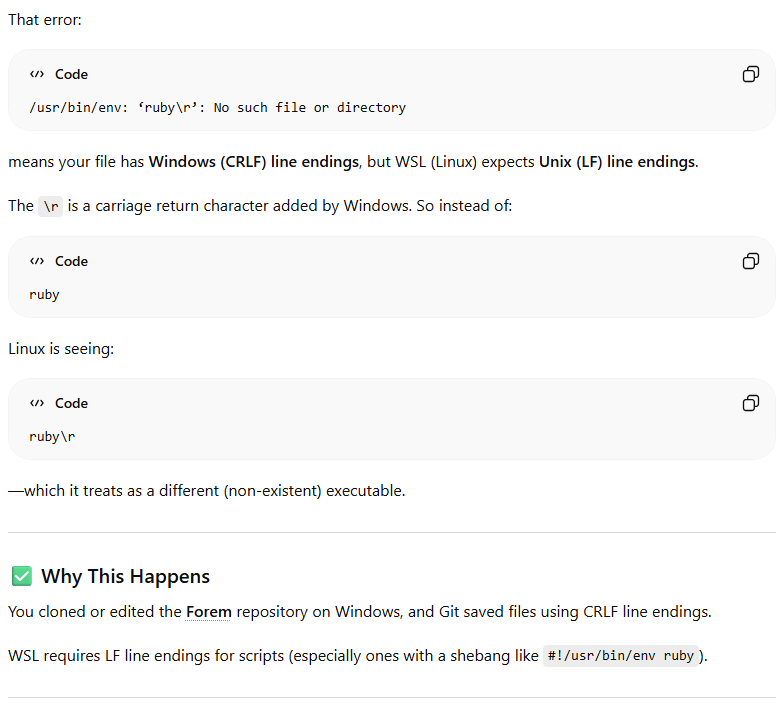
Of course, you could specify in the prompt to allow you to get a more detailed response. However, the main purpose is to showcase what I noticed from all 3 AI models based on how they structured their responses.
Overall, Gemini is structured as a summary compared to Copilot and ChatGPT. I enjoyed this format since it is cleaner and easier to read instead of seeing a lot of emojis and chunks. I prefer an AI that will allow me to "Learn why there was an error in the first place and fixing it" rather than simply "Fixing it".
2. Staying Minimal
When I started coding for the DEV Weekend Challenge, I noticed that the requests I gave outputted the requested features without adding fluff or extra features I did not ask for (such as extra CSS, which is quite common). It has been a problem in my use of ChatGPT and Copilot, but in this case, Gemini gave a simple answer and only did the requested features.
For example, if I asked to center a div, it will center a div and nothing more. It did not add extra CSS and make the website look pretty. It could be a prompting issue, but I am not 100% sure. Overall, it is nice that Gemini to stays minimal by default.
3. The Art of Prompting
Reference: aws.amazon.com/what-is/prompt-engineering/
Speaking of prompting, I noticed initially that whenever I requested a feature, it sometimes removed the feature I already had and integrated the feature I requested.
For example, let's say I have a website that has 5 buttons on the center of the page. If I were to request a feature to add a navigation bar, it would add the navigation bar AND move the 5 buttons around that are not centered.
I tend to not have that issue in Copilot, but for some reason it is happening in Gemini. As a result, I investigated the topic Prompt Engineer a bit more. Even though we tend to think that Prompt Engineer is a person simply prompting AI to create what they want, there is more to it. I read into Prompt Engineer from Amazon and here is what I learned that stood out:
- Clear and detailed Prompts: Make a clear, and detailed response that minimizes misinterpretation and get the results you wanted. Let say I prompt this to Gemini:
Add a Navigation bar to my website.
Of course, we know what we want, but does the AI know? The AI will add the feature, but it will add other things as well as sometimes removing something in your website that you don’t want to remove. The better prompt to Gemini would be:
Add a Navigation bar to my website. Ensure this feature is implemented with Minimum HTML and do not remove any functionality when adding the Navigation bar. Keep it simple.
This is much more detailed, and it gets to what the user wants!
-
Balance is key: I go with this philosophy: “Anything that is too much or too little is not good”. This goes the same here. A prompt with little context may not get you want you wanted and a prompt with very complex context confuses the AI and will give you things that you may not need. In other words:
-
If there is little context to your prompt, add a bit of context that is easier for you to read and understand. Read it out loud. If it makes sense, then it will most likely make sense to the AI.
-
If there is too much context, break it down into multiple prompts.
-
-
Keep Experimenting/Refining Prompts: Prompting is a skill. Keep experimenting and refining the prompt and understanding of why the AI outputs the result it gives you. It is good practice to learn and hone your prompting techniques since everyone has different techniques with prompting.
4. Main Highlight when using Google Gemini
I notice when I use Gemini, it doesn’t really hallucinate as often in terms of the output. To be fair, I only used Gemini for a day. For context, Copilot sometimes outputs the incorrect thing such as the code has an extra "<" in the HTML code or it provided me an empty space like this for example:
Here is the code to copy/paste:
Gemini doesn’t really hallucinate on paper, and it seems to do on Copilot. I am not sure if this is the same thing for ChatGPT, but it is something I want to highlight.

Google Gemini Feedback
After using Gemini, there are two big things I wish could change.
1. The Sign In Popup
There is no problem having a popup for users to sign in to get the full experience. However, when I was using Gemini, I encountered this popup:
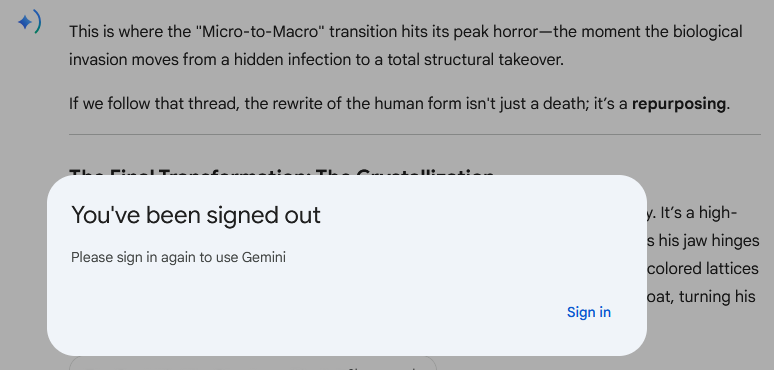
It didn’t give me the opportunity to click out of the popup in any shape or form. Usually, when I used ChatGPT for example, it shows the popup that tells me to sign in, but I can click “x” on the popup and continue using ChatGPT. For this case, I must create a new chat and start over. It would be nice to have the option to close the popup and continue using Gemini instead of refreshing the page and lose the progress you have made.
2. Limited Free Options
For context, without signing in, you get some free options for AI tool use. In order to get the full experience, you need to sign in. This makes sense.
However, I notice that Gemini has limited free options. Compared to Copilot, it has many free options without an account as shown below:
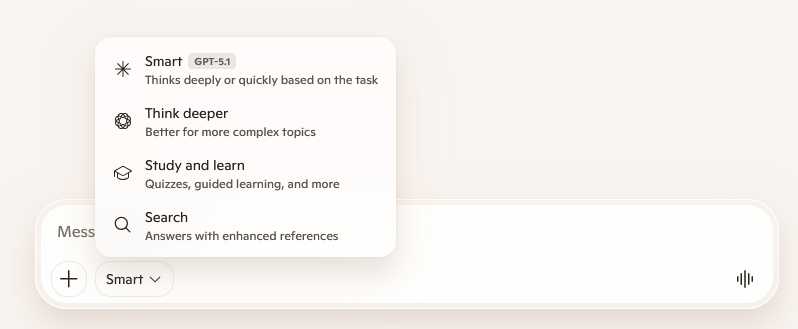
When using Copilot, they have the option to use either “Smart”, “Think Deeper”, “Study and Learn”, and “Search” functionality. This gives the user a wide range of features to test out and if they are satisfied, they can sign up!
For Gemini, the only thing they provide in the Free version is “Fast” and nothing more as shown below:
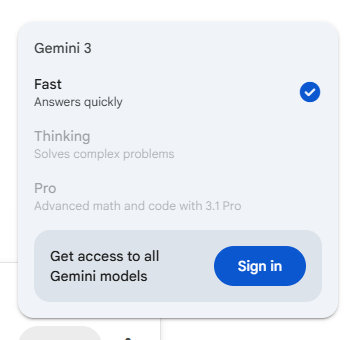
It would be nice if the Free version had more than the “Fast” response. I would recommend enabling the user to have access to “Thinking” mode and keep the “Pro” version locked unless they sign up. It makes much more sense to be able to compare Gemini's “Fast” and “Thinking” outputs. It gives a good range for the user to play around on.

Summary
Overall, this is my experience (so far) using Gemini and I had a great time using the tool! I would recommend using Gemini because of the simplicity and accessibility it has, as well as the fact they have a lot of good researchers that are developing Gemini.
Using Gemini reminded me of a paper by Vaswani et al., from 2017 that talks about an approach to make AI models smarter. I would recommend reading the paper "Attention is all you need" since I believe it is a great read and provide understand how it works behind the scenes.
Link to the Research paper: https://research.google/pubs/attention-is-all-you-need/
In the future, I am hoping to explore Gemini further as well as looking to other tools from Google to optimize my workflow and learn other interesting techniques in my development process! If you have any recommendation to start off after Gemini, feel free to leave some advice in the comments!
You have made it to the end! Thank you for taking the time to read about my experience using Google Gemini!

<center> <b><i>Questions or Comments? I would love to hear your thoughts!</i></b> </center>

Comments
More Blog
View allaiStop Your LLMs from Forgetting: How a 2016 String Algorithm Solves AI's Biggest Memory Loss Problem
Have you ever tried to read a massive pile of reports and summarize them in under 50 words? It’s...
T
TanaikeaieGoogle VP of Technology says he’s given up on coding
In his keynote on Wednesday, Benoit Schillings, vice president of Technology at Google DeepMind and...
I
Iain ThomsongeminiOmni Flash Preview with Kiro
This article covers the MCP setup and configuration for using Google Omni Preview and underlying...
X
xbillaiHow to Count Gemini Tokens Locally
✨ Overview This article explores how Gemini tokenizes data and demonstrates how to count...
L
Laurent PicardaiePlay today’s game from Issue #2 of The Daily Context!
Yesterday, we kicked off our physical newspaper, The Daily Context, at the AI Engineer World’s Fair...
J
Jess LeeaieNeed a break? Play today's game from The Daily Context.
We (at DEV and MLH) are covering AI Engineer's World Fair by printing a physical newspaper called...
J
Jess LeeReady-made automations for this
Workflows from the Neura Market marketplace related to this Gemini resource
- Compare Multi-Period Financial Data from Google Sheets with DeepSeek AI Analysisn8n · Free · Related topic
- YouTube Comment Sentiment Analysis with Google Gemini AI and Google Sheetsn8n · Free · Related topic
- Real-Time Forex Sentiment Analysis & Alerts with Gemini AI to Discordn8n · Free · Related topic
- SEO Keyword Difficulty & SERP Analysis with RapidAPI and Google Sheetsn8n · Free · Related topic