
Back to Blog api
api
 ai
ai aie
aie gemini
 ai
ai aie
aie aie
aie
Gemini API File Search: Enhanced Multimodal Capabilities with Embedding 2, Including Open-Source LINE Bot Implementation
Evan Lin May 11, 2026
0 views
(Image source: Google Blog - Gemini API File Search is now multimodal: build efficient, verifiable...
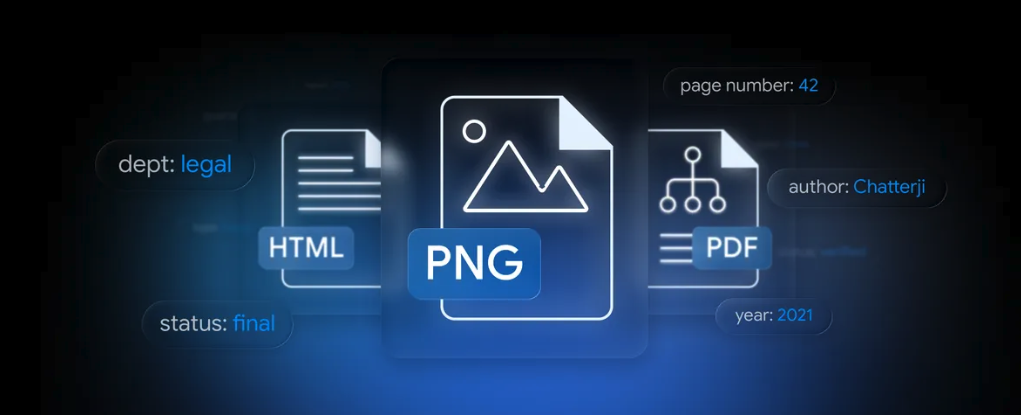
(Image source: Google Blog - Gemini API File Search is now multimodal: build efficient, verifiable RAG)
Recap: RAG Finally Doesn't Need to Build Legos
In the past few years, whenever developers thought about RAG (Retrieval-Augmented Generation), the component list that came to mind probably looked like this:
- A chunker (langchain? Write it yourself?)
- An embedding model (OpenAI text-embedding-3? Cohere? BGE?)
- A vector database (ChromaDB, FAISS, pgvector, Pinecone… which one to choose is a battle)
- A retrieval + rerank process
- And then the LLM
Not to mention that multimodal RAG needs another layer: How to embed images? Do you need to OCR first? Do you need to split two stores, one for text and one for images? How to calculate scores for mixed text and image search? Just these few questions can take up a sprint.
Recently, Google released Expanded Gemini API File Search for multimodal RAG on the developer blog, turning the long pipeline above into " calling a managed API ", and images are natively supported.
This article will do two things:
- Explain the new features clearly, including what Gemini Embedding 2 is doing behind the scenes.
- Use an open-source LINE Bot (
kkdai/linebot-multimodal-rag) as a live demonstration to see how the new features are combined in actual production code — and share the two typical pitfalls I encountered during debugging to help everyone avoid them.
Three Major Highlights of the New Features
According to the official blog, the core of this upgrade is three things:
1. True Multimodal File Search (Native Multimodal File Search)
In the past, File Search was pure text retrieval, and images could only be indexed by OCRing them into text.
“File Search now processes images and text together. Powered by the Gemini Embedding 2 model, the tool understands native image data.”
Now you can directly put images into the File Search Store, and index them together with text. The engine behind it is Gemini Embedding 2 — text, images, videos, audio, and documents share the same vector space, so you can "find text with images", "find images with text", or "find images with images" without having to align the spaces yourself.
For us product people, this means:
- Mixed text and image search is no longer a research topic, it's an API call.
- No need to maintain two stores (one for text chunks and one for CLIP-style image embeddings).
- Scientific charts, UI screenshots, reports, photo albums... these things that used to lose most of their meaning after OCR can now retain the original visual information for retrieval.
2. Custom Metadata and Server-side Filtering
Each file you put into the store can now be tagged with key-value labels:
{"key": "user_id", "string_value": "U1234abcd..."}
{"key": "department", "string_value": "Legal"}
{"key": "status", "string_value": "Final"}
Use the google.aip.dev/160 filter syntax (same format as most GCP list APIs) when querying:
metadata_filter='department="Legal" AND status="Final"'
Filtering is done first on Google's side, not retrieving a bunch and then discarding. After reducing the noise, the speed and accuracy will both increase, which is a lifesaver for multi-tenant SaaS — one store with metadata filters can separate tenants, without the need to isolate N stores.
My LINE Bot uses this directly to do per-user data isolation: each time a file is uploaded, it's tagged with the LINE user_id, and when querying, a filter is applied, so user A will never see user B's data in the Q&A.
3. Page-level Citations
Each cited snippet in the response will now include the page number.
“captures the page number for every piece of indexed information.”
This is super critical for enterprise customers. "AI says Y is mentioned on page X of the contract" vs. "AI says Y is mentioned in the contract" — the former can be directly accepted by legal/auditing, while the latter requires manual effort to flip through the book for verification. Page numbers unlock the final mile of "LLM answers cannot be traced back to the source".
The Multimodal Engine: Gemini Embedding 2
The core of the new feature is this Gemini Embedding 2 model. Quote its specifications for your selection decisions:
| Item | Specification |
|---|---|
| Supported Input | Text, images, videos, audio, documents (same embedding space) |
| Input token limit | 8,192 tokens |
| Output dimensions | 128 ~ 3,072 (using Matryoshka Representation Learning, small dimensions can also maintain similar accuracy) |
| Multilingual support | 100+ languages |
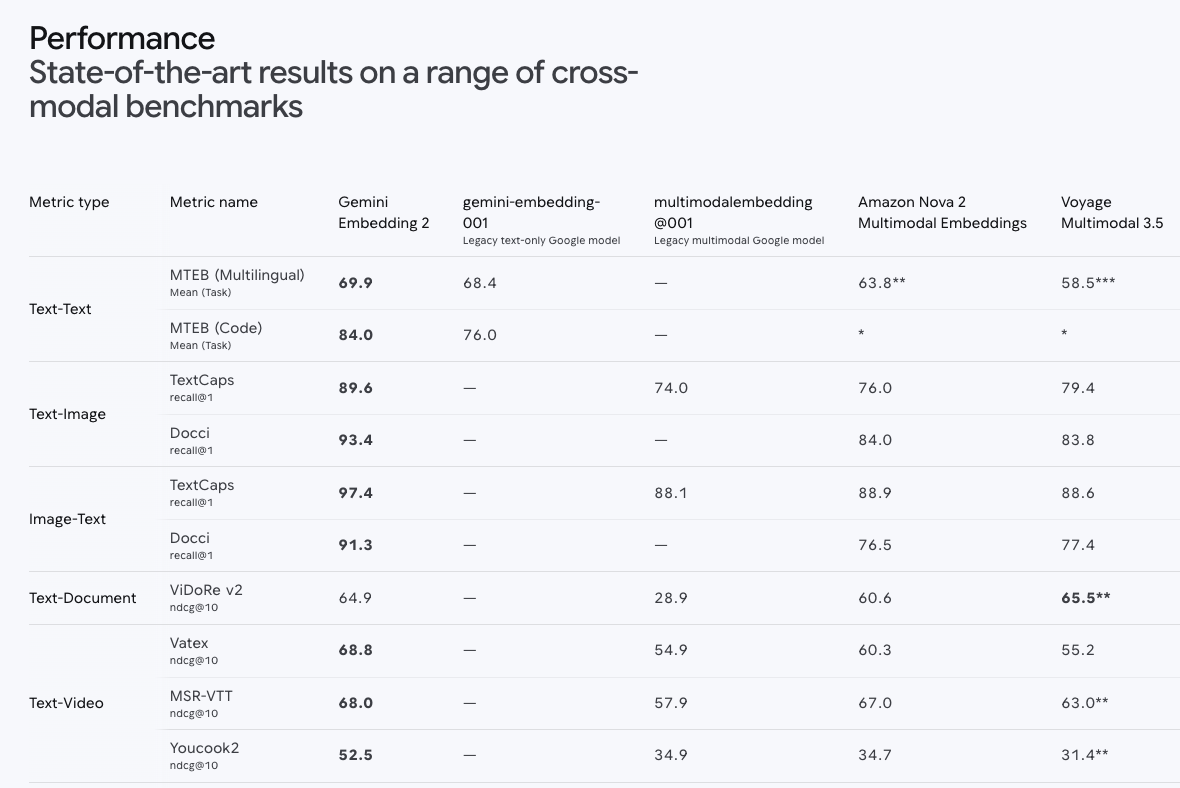
Several key benchmarks (recall@1):
- Text-to-Image Search: TextCaps 89.6 / Docci 93.4
- Image-to-Text Search: TextCaps 97.4
- Multilingual (MTEB): mean 69.9
- Video-Text Matching: Vatex ndcg@10 68.8
- Speech-Text Retrieval: MSEB mrr@10 73.9
Several key observations:
- Matryoshka is not a buzzword: You can store it with 3072 dimensions first, and when running retrieval, switch to 768 dimensions to run faster and maintain quality. Storage/scoring costs can be optimized in stages.
- Cross-modal scores are very real: 97.4% recall@1 (image→text) means that if you have an image and want to find the corresponding descriptive text, you'll find it almost immediately. This can be directly implemented for use cases like "take a picture of a product label and find the corresponding page of the user manual".
- 100+ languages: This is a very real difference for the Taiwan/Japan/Korea/Southeast Asia markets.
What Developers Really Care About: Price and Access Cost
From the official tutorial article Multimodal RAG with the Gemini API File Search tool: a developer guide, there are two sections that developers sensitive to cost should highlight:
“Fully managed, with no vector database overhead.”
“Storage and query-time embeddings are free. You only pay for indexing and tokens.”
In plain English:
- You don't pay for the vector database, nor do you pay for the monthly salary of the people maintaining it.
- Storage is free, and embedding calculations at query time are also free.
- You only have two things to pay for: the embedding fee for the initial indexing and the LLM tokens consumed when generating the answer.
This is a friendly cost curve for personal side projects and early startups — you don't need to decide on day one "can I afford the baseline of the vector DB".
Standard Workflow: 4 SDK calls to complete a RAG
Organized from the dev.to guide, the minimum viable workflow:
from google import genai
from google.genai import types

client = genai.Client()

# 1. Create a store (specify the multimodal embedding model)
store = client.file_search_stores.create(config={
    "display_name": "my-multimodal-rag",
    "embedding_model": "models/gemini-embedding-2",
})

# 2. Upload files + custom metadata
operation = client.file_search_stores.upload_to_file_search_store(
    file_search_store_name=store.name,
    file="report-q1.pdf",
    config={
        "display_name": "Q1 Report",
        "custom_metadata": [
            {"key": "department", "string_value": "Finance"},
            {"key": "year", "string_value": "2026"},
        ],
    },
)
# Upload is a long-running operation, needs to poll:
# operation = client.operations.get(operation)

# 3. Feed file_search as a tool to generate_content
response = client.models.generate_content(
    model="gemini-3-flash-preview",
    contents="What was the revenue growth rate in the first quarter of last year?",
    config=types.GenerateContentConfig(
        tools=[types.Tool(file_search=types.FileSearch(
            file_search_store_names=[store.name],
            metadata_filter='department="Finance" AND year="2026"',
        ))],
    ),
)

# 4. Get citations (including page numbers)
for citation in response.candidates[0].grounding_metadata.grounding_chunks:
    print(citation.web.uri, citation.web.title) # or the corresponding file/page fields
To provide citations with images to the user, there is also client.file_search_stores.download_media() that can be called.
It's no exaggeration, the entire multimodal RAG is less than 30 lines of code.
Demo Case: Putting These New Features into a LINE Bot
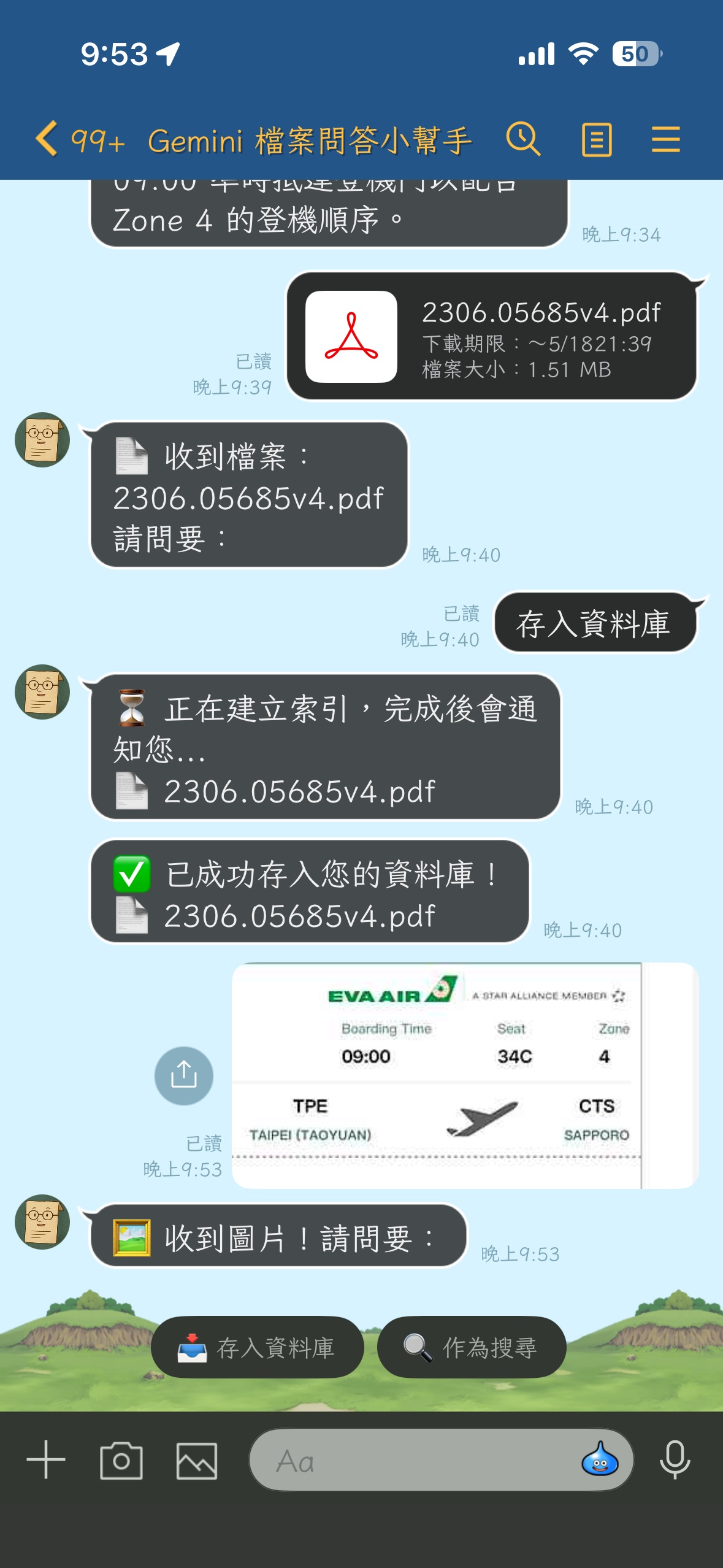
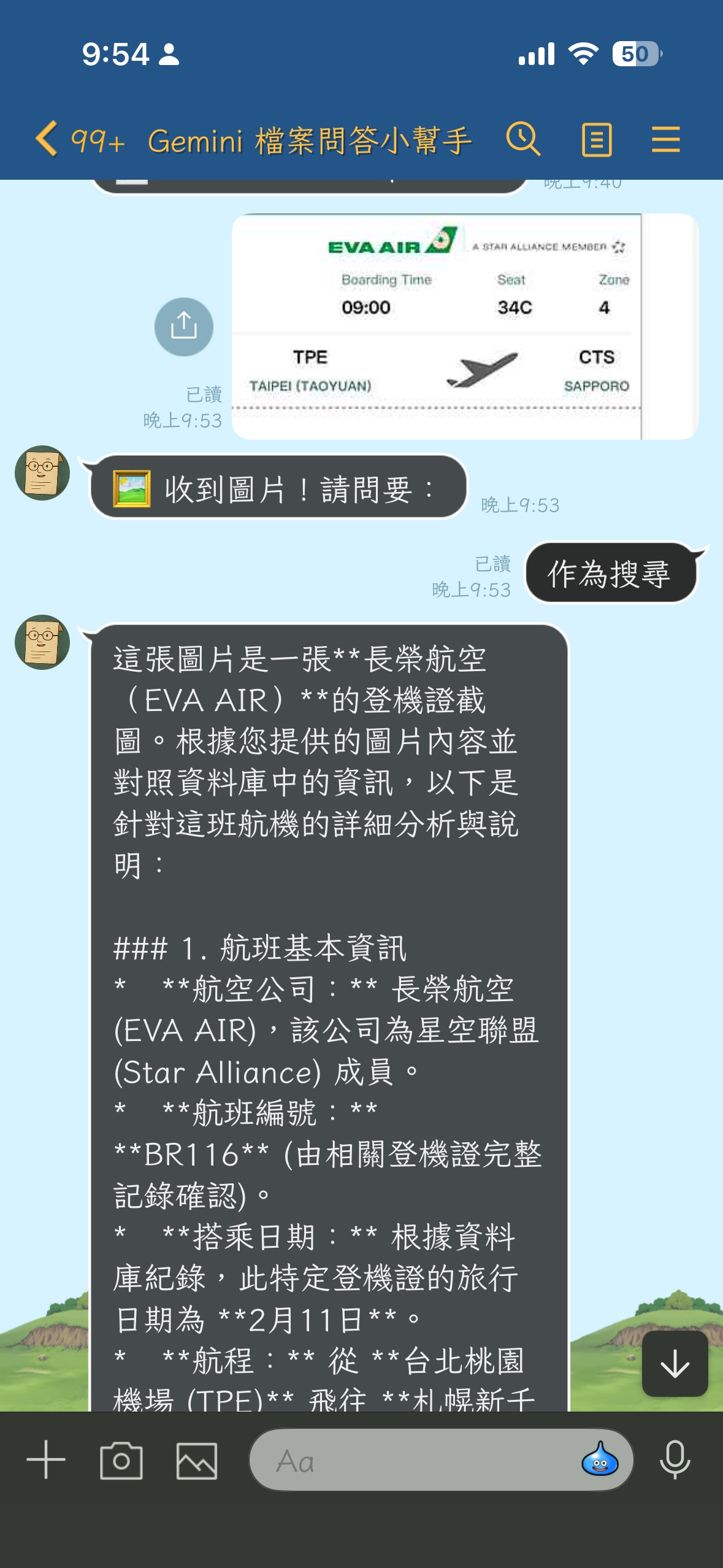
It's abstract just looking at the SDK examples, so I made it into a LINE Bot that can be put to work, open-sourced at kkdai/linebot-multimodal-rag:
- Users drop PDFs / images / text files into the LINE chat box → Bot indexes into the File Search Store.
- Users type questions → Gemini finds answers from the data uploaded by the user themselves.
- Users drop an image and ask a question → The same can be done for image-to-text retrieval.
- Deployment target: GCP Cloud Run + Cloud Build automatic deployment.
The architecture is very intuitive (key fields):
| Component | Role |
|---|---|
| LINE Webhook | FastAPI receives message events |
| GCS | Persists original files (uploads/{user_id}/{message_id}.{ext}) |
| Gemini File Search Store | The only index layer (managed) |
Custom metadata user_id | Multi-tenant isolation |
| FastAPI BackgroundTasks | Avoid the LINE reply token 30-second limit |
Comparing to the three major new features mentioned earlier:
- Multimodal: Users drop images, drop PDFs, all go into the same store, and all consume the same pipeline during search.
- Custom metadata: Files for each LINE user are tagged with
user_id, filtered during queries, achieving server-side forced isolation. - Page-level citations: In the future, to display "the answer comes from XX.pdf page 5" in LINE messages, directly consume
grounding_metadata.
The entire repo is about 600 lines of Python, and it completes a " your own private multimodal knowledge base chat Bot ".
Deployment Battle: commit → automatic online
It's not enough for the open-source example to just run; to demonstrate it at the workshop, it needs to be at the level of "code changes, push to GitHub, and automatically deploy". This time, I asked Claude Code to be my co-pilot to help me connect CI/CD.
I only dropped one sentence:
"Help me create a Cloud Build connection to GitHub, and trigger a build to deploy to Cloud Run after committing to main."
Claude Code first scanned cloudbuild.yaml, existing Cloud Run settings, Secret Manager, and Artifact Registry, and listed a "current problem", and then stopped to ask me a key decision: Should I keep the existing service name or change the yaml? Does GitHub need authorization? After I answered, it built the missing resources in one go:
# Build Artifact Registry repo
gcloud artifacts repositories create linebot \
  --repository-format=docker --location=asia-east1

# Secret migration: move from the current service to Secret Manager (via stdin, don't leave shell history)
gcloud run services describe linebot-gemini-file-search --region=asia-east1 \
  --format='value(...)' \
  | gcloud secrets create LINE_CHANNEL_SECRET --data-file=-

# Give Cloud Build / Compute SA the roles needed for deployment
for role in run.admin iam.serviceAccountUser artifactregistry.writer \
            secretmanager.secretAccessor storage.objectAdmin logging.logWriter; do
  gcloud projects add-iam-policy-binding your-cool-project-id \
    --member="serviceAccount:[email protected]" \
    --role="roles/$role" --condition=None
done

# Build trigger
gcloud builds triggers create github \
  --name=linebot-multimodal-rag-main \
  --repo-owner=kkdai --repo-name=linebot-multimodal-rag \
  --branch-pattern="^main$" --build-config=cloudbuild.yaml
The only thing that couldn't be automated was GitHub OAuth authorization — Claude Code directly admitted to me that "this step can only be done by clicking in the Console", and provided the URL and step-by-step instructions. After finishing the one-minute click, the trigger ran through.
Pitfalls Record: Two Traps Directly Related to the New Features
Pitfall 1: Hardcoded Model ID is Outdated
The default values in cloudbuild.yaml and code both write gemini-3.1-flash, but after looking at the Gemini API's current model id list: there's no such model at all. The correct ID for Gemini 3 Flash is gemini-3-flash-preview.
Why this happened: multimodal RAG is a very new feature, and related documents, tutorials, and examples are still being created in large numbers, and the naming has also been slightly adjusted. The initial version of the Repo can easily write an id that "looks like it but doesn't actually exist".
Solution: Change the entire repo to gemini-3-flash-preview, and also confirm that the embedding model is models/gemini-embedding-2 (correct, didn't step on the trap). After pushing, Cloud Build automatically triggered, and a new revision went online in three minutes.
Pitfall 2: Mysterious "Upload has already been terminated"
This trap was directly stepped on the " image upload " path newly supported by File Search Store — it's also the most worth sharing, because it demonstrates that "the error messages of new APIs are sometimes very euphemistic".
I sent a JPG from LINE to the Bot and clicked "store in database", and the result:
❌ Failed to store: 400 Bad Request. {'message': 'Upload has already been terminated.', 'status': 'Bad Request'}
Couldn't see the reason at all. Cloud Logging only had the same error, no stack trace. After looking around on the Google AI Developers Forum, I found that several file types (.md / .xlsx / large CSV) had encountered similar reports.
The real culprit is hidden in this seemingly innocent code:
# app/gemini_service.py (before modification)
suffix = mimetypes.guess_extension(mime_type) or ".bin"
with tempfile.NamedTemporaryFile(suffix=suffix, delete=False) as tmp:
    tmp.write(file_bytes)
    tmp_path = tmp.name
Before Python 3.13, mimetypes.guess_extension("image/jpeg") returns .jpe, not .jpg. The reason is that in the MIME table of the standard library, .jpe is lexicographically before .jpg, and this quirk has existed for nearly twenty years.
Gemini File Search Store doesn't recognize the file extension .jpe, but the API's message uses "Upload has already been terminated" in a way that is very easy to mislead — at first, I thought it was because the upload size exceeded, or it was choked by concurrency, or there was a race inside the SDK.
Solution: Take the file extension directly from display_name (handlers have already been correctly set to image_<id>.jpg), and use an explicit MIME comparison table as a backup:
# app/gemini_service.py (after modification)
_MIME_TO_EXT = {
    "image/jpeg": ".jpg",
    "image/png": ".png",
    "image/webp": ".webp",
    "application/pdf": ".pdf",
    # ...
}

if "." in display_name:
    suffix = "." + display_name.rsplit(".", 1)[-1].lower()
else:
    suffix = _MIME_TO_EXT.get(mime_type) or mimetypes.guess_extension(mime_type) or ".bin"

print(f"[BG Store] uploading display_name={display_name!r} mime={mime_type} "
      f"size={len(file_bytes)} tmp_suffix={suffix}")
Also, add traceback.format_exc() to the except part, so that the next time something goes wrong, Cloud Logging will have the full stack.
The takeaway from this story: When you're running on a new modality on a "newly GA'd API", please be sure to:
- First confirm on the client side that the filename / file extension you generate is the format expected by the API, don't trust the
mimetypesstandard library to guess for you. - Write the stack trace into the log, otherwise you can't save yourself from the esoteric discussions on the forum like "just change a file".
- Compare the file extension you generate with the Gemini File Search official supported format list.
Summary: The Entry Fee for Multimodal RAG, the Lowest in History
This time's Gemini API File Search upgrade compresses a feature line that used to take 3 months to go online into " dozens of lines of code + a managed API " to run:
- Native multimodal support: Text, images, videos, audio, and documents share the same embedding space, goodbye to the OCR transition layer.
- Custom metadata + server-side filter: Multi-tenant SaaS doesn't need to struggle with how many stores to split.
- Page-level citations: Enterprise compliance scenarios finally have native grounding.
- Friendly to money: Storage / query embedding are both free, only pay for indexing + LLM tokens.
- Cross-modal scores of Embedding 2: 97.4% recall@1 is not a demo number, it's the level that can directly support the product.
If you want to directly see a production-shaped end-to-end example: kkdai/linebot-multimodal-rag the entire repo PR welcome, and you're also welcome to use it to modify it into your own domain's RAG application — Notion knowledge base, employee manual Q&A machine, photo album manager, research paper index... probably only imagination will limit you.
If you want to get started, the recommended reading order:
- Google official blog: Expanded Gemini API File Search for multimodal RAG
- Gemini Embedding 2 specification page: deepmind.google/models/gemini/embedding
- Developer implementation guide: Multimodal RAG with the Gemini API File Search tool: a developer guide
- My open-source example: github.com/kkdai/linebot-multimodal-rag
Welcome everyone to try out this very powerful Multimodal RAG support!
Comments
More Blog
View allaiStop Your LLMs from Forgetting: How a 2016 String Algorithm Solves AI's Biggest Memory Loss Problem
Have you ever tried to read a massive pile of reports and summarize them in under 50 words? It’s...
T
TanaikeaieGoogle VP of Technology says he’s given up on coding
In his keynote on Wednesday, Benoit Schillings, vice president of Technology at Google DeepMind and...
I
Iain ThomsongeminiOmni Flash Preview with Kiro
This article covers the MCP setup and configuration for using Google Omni Preview and underlying...
X
xbillaiHow to Count Gemini Tokens Locally
✨ Overview This article explores how Gemini tokenizes data and demonstrates how to count...
L
Laurent PicardaiePlay today’s game from Issue #2 of The Daily Context!
Yesterday, we kicked off our physical newspaper, The Daily Context, at the AI Engineer World’s Fair...
J
Jess LeeaieNeed a break? Play today's game from The Daily Context.
We (at DEV and MLH) are covering AI Engineer's World Fair by printing a physical newspaper called...
J
Jess LeeReady-made automations for this
Workflows from the Neura Market marketplace related to this Gemini resource
- AI Chatbot with Web Search Capabilities for Enhanced User Interactionn8n · $7.13 · Related topic
- Integrate Proxmox with n8n for Enhanced AI Capabilitiesn8n · $14.57 · Related topic
- Automate Video Narration with Multimodal AI Integrationn8n · $19.99 · Related topic
- Seamlessly Narrate Videos with Multimodal AI and OpenAIn8n · $16.29 · Related topic