Integrate Proxmox with n8n for Enhanced AI Capabilities
Seamlessly connect Proxmox with n8n using generative AI to automate workflows and enhance chatbot interactions.
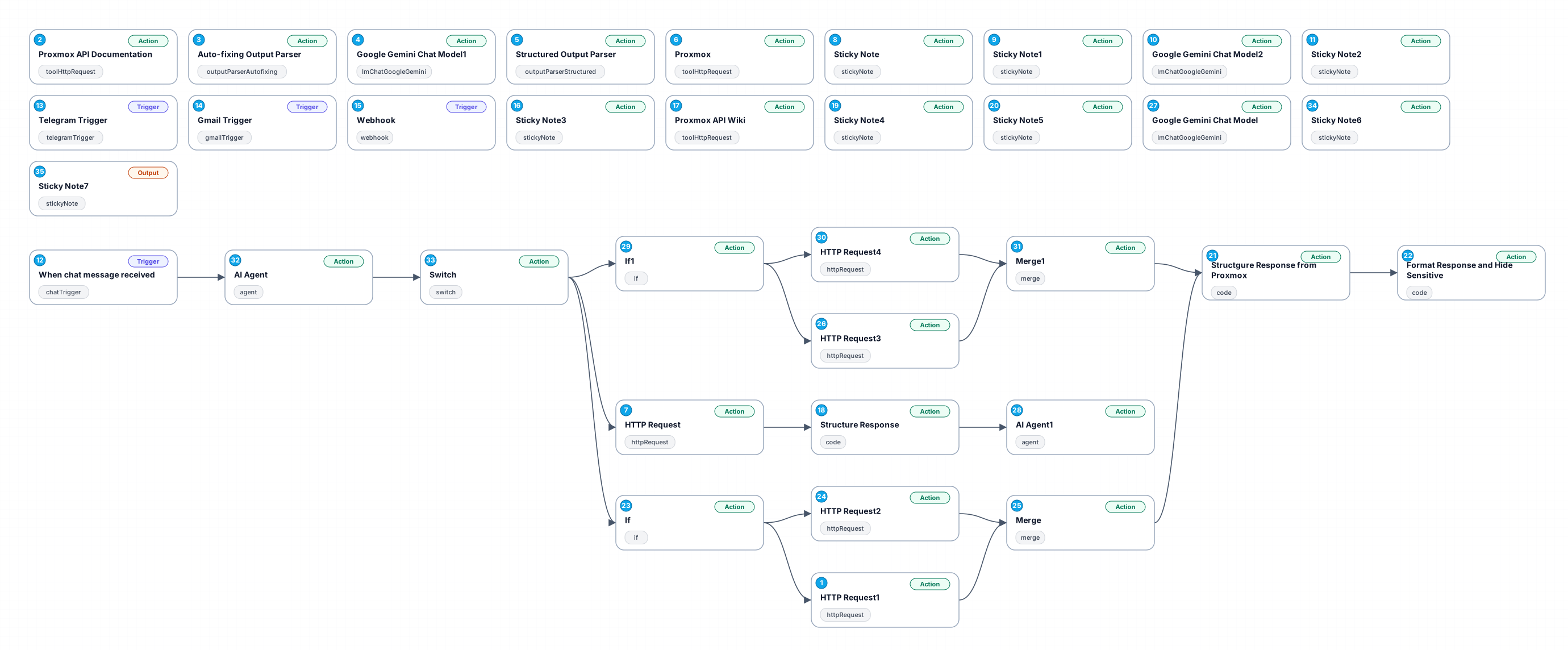
This workflow integrates Proxmox with n8n, leveraging cutting-edge generative AI technologies to streamline automation processes. By utilizing HTTP requests and specialized output parsers, it efficiently interacts with Proxmox's API, enabling users to automate tasks and manage virtual environments effortlessly.
The workflow begins by making HTTP requests to the Proxmox API, allowing for the retrieval and manipulation of virtual machine data. This is further enhanced by integrating Google Gemini's chat model, which can facilitate dynamic conversations and intelligent responses, making it an excellent fit for chatbot applications.
Users benefit from this workflow by gaining the ability to automate repetitive tasks, such as resource allocation, monitoring system performance, and executing commands through a user-friendly interface. The structured output parser ensures that the responses are well-formed and adhere to specified guidelines, improving the reliability and accuracy of the automation.
This workflow is ideal for IT professionals, system administrators, and developers looking to enhance their Proxmox management capabilities while incorporating AI-driven interactions. With its comprehensive API documentation integration and auto-fixing output parser, this workflow promises not only efficiency but also adaptability in various use cases.
New buyers can create an account from the cart to unlock a controlled $10 first-purchase credit on eligible orders of $25+.
Related bundle
Content Repurposing Engine
8 hand-picked workflows for $29.00.
That is $3.63 each, vs $14.57 for this one alone.
View bundleSecure checkout powered by Stripe
Support
How to import this workflow into n8n
- 1Purchase or download the workflow to get the n8n workflow JSON file.
- 2In your n8n instance, open Workflows and choose "Import from File" (or paste the JSON with Ctrl+V on the canvas).
- 3Open each node marked with a credential warning and connect your own accounts and API keys.
- 4Run the workflow once manually to verify the data flow, then toggle it to Active.
Related AI workflows
- Launch Your First AI-Powered Chatbot with Actionable Tools$9.99
- Automate AI Video Creation and YouTube Upload with Google Sheets$14.99
- Build a WhatsApp Assistant with Memory, Google Suite, Multi-AI, Research, and Imaging$24.99
- Automate Blog Post Creation and Publishing with GPT, Leonardo AI, and WordPress$14.99
- Automate SEO Keyword Generation with ChatGPT from Google Sheets$3.99
- Email Agent$500.99
More from Jose Maurino
Need this deployed? We'll set it up for you.
Our automation experts deploy this workflow in your stack, connect your accounts, and verify it works — or build a custom solution from scratch.