 Gemini
Back to Blog typescript
 General
![[AI in Practice] Gemini 3.5 Transcribe: Real-time Transcription and Speaker Diarization in a macOS Meeting Translation App](https://media2.dev.to/dynamic/image/width=1200,height=627,fit=cover,gravity=auto,format=auto/https%3A%2F%2Fdev-to-uploads.s3.us-east-2.amazonaws.com%2Fuploads%2Farticles%2Fudgovtjbiaczdi0uthl3.png) ai
ai googlecloud
 ai
ai googlecloud
 sideprojects
Building AI Agents with the TypeScript Agent Development Kit (ADK)
xbill July 27, 2026
0 views
Build, test, and deploy AI agents using Google's native TypeScript Agent Development Kit (ADK), Gemini 2.5 Flash, and Cloud Run.
title: Building AI Agents with the TypeScript Agent Development Kit (ADK) published: true series: ADK description: Build, test, and deploy AI agents using Google's native TypeScript Agent Development Kit (ADK), Gemini 2.5 Flash, and Cloud Run. tags: typescript, ai, gemini, webdev cover_image: https://raw.githubusercontent.com/xbill9/adk-hello-world-typescript/main/cover.jpg

This tutorial builds a starter "Hello World" style agent using TypeScript and the native TypeScript version of the Agent Development Kit (ADK).
The full sample project is available on GitHub:
{% github xbill9/adk-hello-world-typescript %}
What Is TypeScript?
TypeScript is a strongly typed programming language built on top of JavaScript, maintained by Microsoft. It compiles to plain JavaScript and runs anywhere JavaScript runs — including Node.js, which is what the ADK for TypeScript targets. The static type system pairs naturally with agent development: tool parameters, tool results, and agent configuration are all checked at compile time, before the model ever sees them.
Installing Node.js
The ADK for TypeScript requires Node.js 20 or newer. If Node.js is not installed in your environment, the Node Version Manager (nvm) is the easiest way to install and manage versions:
{% github nvm-sh/nvm %}
Install and activate a current Node.js release:
nvm install --lts
nvm use --lts
You can validate the installation with the version command:
node --version
# v22.x
What is the Agent Development Kit?
The Agent Development Kit (ADK) is a flexible and modular framework for developing and deploying AI agents. While optimized for Gemini and the Google ecosystem, ADK is model-agnostic, deployment-agnostic, and built for compatibility with other frameworks.
Google provides full documentation on the ADK here:
{% embed https://google.github.io/adk-docs/ %}
Google provides the source to the complete TypeScript version of the ADK project:
{% github google/adk-js %}
The ADK is published to npm as @google/adk, with the development tooling in @google/adk-devtools. This tutorial uses ADK 1.4.0.
Gemini API Key
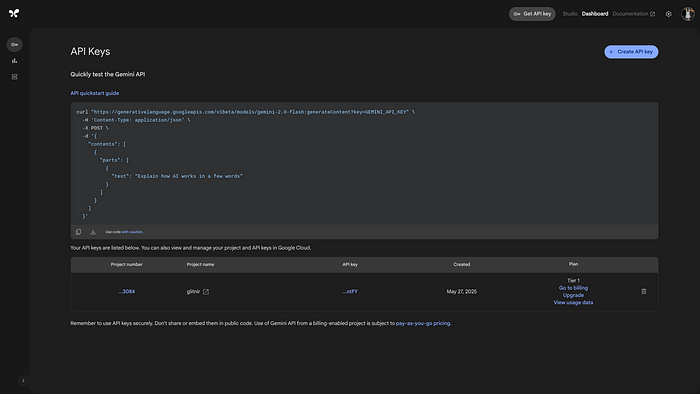
If not using Application Default Credentials (ADC), you will need a Gemini API key. You can get a Gemini key from Google AI Studio:
Checking the Developer Environment
Once Node.js is installed, clone the sample repo and run the init.sh script. It installs the npm dependencies and creates a starter .env file:
git clone https://github.com/xbill9/adk-hello-world-typescript
cd adk-hello-world-typescript
source init.sh
Output:
Created .env from .env.example. Add your credentials before running the agent.
Setup complete. Run: npm start
Edit .env and choose one authentication method:
- Gemini Developer API: set
GOOGLE_API_KEY - Vertex AI: set
GOOGLE_GENAI_USE_VERTEXAI=TRUE,GOOGLE_CLOUD_PROJECT, andGOOGLE_CLOUD_LOCATION, then authenticate with ADC:
gcloud auth login
gcloud auth application-default login
Note: Never commit
.env— it is already listed in.gitignore.
Debugging API Permission Errors
If your Application Default Credentials expire or your Google Cloud authentication expires, re-authenticate with:
gcloud auth login
gcloud auth application-default login
Another common issue is missing environment variables. The agent loads .env automatically via dotenv, and the set_env.sh script is provided for shell commands that need the same values:
source set_env.sh
The TypeScript ADK Agent
The entire agent lives in a single file — src/agent.ts. It defines two local tools (weather and current time) and wires them into an LlmAgent running on Gemini 2.5 Flash.
Tool parameters are declared with Zod schemas, so the ADK derives the function-calling declarations directly from the types:
import {FunctionTool, LlmAgent} from '@google/adk';
import {z} from 'zod';

const cityParameters = z.object({
  city: z.string().min(1).describe('The city to look up.'),
});

const weatherTool = new FunctionTool({
  name: 'get_weather',
  description: 'Retrieves the current weather report for a specified city.',
  parameters: cityParameters,
  execute: ({city}) => getWeather(city),
});

export const rootAgent = new LlmAgent({
  name: 'weather_time_agent',
  model: 'gemini-2.5-flash',
  description: 'Answers questions about the time and weather in a city.',
  instruction:
    'You are a helpful assistant. Use the available tools to answer ' +
    'questions about time and weather. Clearly explain when a city is ' +
    'unsupported.',
  tools: [weatherTool, currentTimeTool],
});
The tools return a discriminated union — a success result with a report, or an error result with a message — which gives the model a consistent shape to reason about:
export type ToolResult =
  | {status: 'success'; report: string}
  | {status: 'error'; errorMessage: string};
Weather and local time are available for New York; other cities return a clear unsupported-city result.
Type-Checking and Unit Tests
Unlike earlier Go and Python versions of this sample, the TypeScript project ships with a unit test suite built on the Node.js native test runner. A single command type-checks the project and runs the tests:
npm run check
Example test output:
> adk-hello-world-typescript@1.0.0 build
> tsc --noEmit

> adk-hello-world-typescript@1.0.0 test
> tsx --test test/**/*.test.ts

▶ weather and time agent
  ✔ exports the ADK root agent (0.43ms)
  ✔ returns the configured New York weather (0.16ms)
  ✔ rejects unsupported cities (0.45ms)
  ✔ formats New York time deterministically (12.27ms)
✔ weather and time agent (14.06ms)
ℹ tests 4
ℹ pass 4
ℹ fail 0
Because the tools are plain exported functions, they can be tested deterministically without calling the model at all.
Running the ADK from the CLI
The agent can be debugged locally from the terminal. Use cli.sh or run the npm script directly:
npm start # runs: adk run src/agent.ts
The ADK CLI can also be called directly:
npx adk run src/agent.ts
Sample interaction with the agent:
User -> what can you do?

Agent -> I can answer questions about the time and weather in a city using my
tools. Currently I support New York — for other cities I will let you know
that information is not available.

User -> what is the weather in New York?

Agent -> The weather in New York is sunny with a temperature of 25 degrees
Celsius (77 degrees Fahrenheit).
Interacting with the ADK Web UI
The agent can be debugged from the web GUI running in the local development environment:
npm run web # runs: adk web
If developing on a remote VM or container and needing the UI reachable from outside, bind the server to all interfaces:
npx adk web --host=0.0.0.0
The UI is the same development interface presented for Python, Java, and Go ADK agents — select agent from the dropdown and chat with full tool-calling tracing.
Expose the agent as a plain HTTP API without the UI:
npx adk api_server
Deploying to Cloud Run with the ADK CLI
For deployment options, check the official documentation:
{% embed https://google.github.io/adk-docs/deploy/cloud-run/ %}
The TypeScript ADK CLI has deployment built right in. The cloudrun.sh script loads .env and calls the deploy command:
npx adk deploy cloud_run \
  --project "$GOOGLE_CLOUD_PROJECT" \
  --region "$GOOGLE_CLOUD_LOCATION" \
  --service_name "$SERVICE_NAME" \
  --with_ui true \
  src/agent.ts
The --with_ui true flag bundles the development UI into the deployed Cloud Run service.
Check Google Cloud Console
Once deployed, validate your Cloud Run service from the Google Cloud Console, or fetch the service URL from the CLI:
gcloud run services describe hello-world-agent-service \
  --region us-central1 --format 'value(status.url)'
Summary
The TypeScript Agent Development Kit (ADK) enables fast agent development using standard TypeScript and Node.js features:
- Clean Tooling: Define typed tools using Zod schemas.
- Deterministic Testing: Fast unit testing with Node's native test runner (
node:test). - Local Tracing: Interactive CLI and Web UI (
adk web). - Direct Cloud Deployment: One-command Cloud Run deployment (
adk deploy cloud_run).
Comments
More Blog
View allGeneralHearing the Mountain's Roar: How Antigravity CLI's AI Agents & IoT Data Track Volcanic Shockwaves
Turning 29k home weather stations and Gemini AI agents into a 15-minute volcanic warning...
T
Tanaikeai[AI in Practice] Gemini 3.5 Transcribe: Real-time Transcription and Speaker Diarization in a macOS Meeting Translation App
Previously I have a macOS App I use myself, gemini-live-translate-macos. It uses...
E
Evan LingooglecloudMix and Match: Serving an ADK Agent to AWS and Azure
A Google ADK agent on Cloud Run, serving A2A to clients that are not ADK — a Strands agent on Bedrock AgentCore and an Agent Framework agent on Container Apps. The card that advertises your bind address, the reply that arrives twice, the event stream once a tool exists, and what Cloud Run brings to the mesh.
X
xbillaiRedefining the Role of Google Apps Script in the Era of Generative AI
Abstract Generative AI and autonomous agents do not obsolete Google Apps Script (GAS);...
T
Tanaike 3
googlecloudADK Beyond Its Own Tests: What Happens When Your Agent Answers a Client That Is Not ADK
One ADK agent on Cloud Run, serving A2A to clients built on Strands and Microsoft Agent Framework, next to two agents that are not Google's. The ADK-specific findings — to_a2a() and the agent card, the reply that arrives twice, the event stream once a tool exists, and what Cloud Run brings to the mesh.
X
xbill 3
sideprojectsGemini, tell me a story
A French version is available here. Vacation time 🌴 We are at the end of July, it's my...
J
Jean-Phi Baconnais 3
Ready-made automations for this
Workflows from the Neura Market marketplace related to this Gemini resource
- Build AI Agents with Think-Plan-Act Architecture Using Llama-4 Reasoningn8n · $24.99 · Related topic
- Build Advanced AI Agents with Multi-Step Reasoning Using GPT-4n8n · $9.99 · Related topic
- End-to-End Blog Generation for WordPress with LLM Agents & Image - GPT-5 Optimizedn8n · $24.99 · Related topic
- Complete Lyft API Integration for AI Agents with 16 Operations Using MCPn8n · $14.99 · Related topic