 Gemini
Back to Blog ai
ai
3. Serverless Web API Endpoints via Web Apps (
Deployment & Verification via
1. Backend Server Script (
2. Frontend Interface (
1. Backend Script (
2. Frontend Interface (
Concrete Example:
GitHub Actions CI/CD Pipeline (
Concrete Example 2: Safe Execution of Vibe-Coded GAS via
 ai
ai gemini
 deved
deved![[AI in Practice] Upgrading from Gemini 3.5/3.6 to Gemini 4 Argon: Migration Notes and Pitfalls for LINE Bot Developers](https://media2.dev.to/dynamic/image/width=1200,height=627,fit=cover,gravity=auto,format=auto/https%3A%2F%2Fdev-to-uploads.s3.us-east-2.amazonaws.com%2Fuploads%2Farticles%2Fe3j23dy7fqvu09aob4ob.png) ai
ai googlecloud
 gemini4argon
Redefining the Role of Google Apps Script in the Era of Generative AI
Tanaike August 21, 2026
7 views
Abstract Generative AI and autonomous agents do not obsolete Google Apps Script (GAS);...
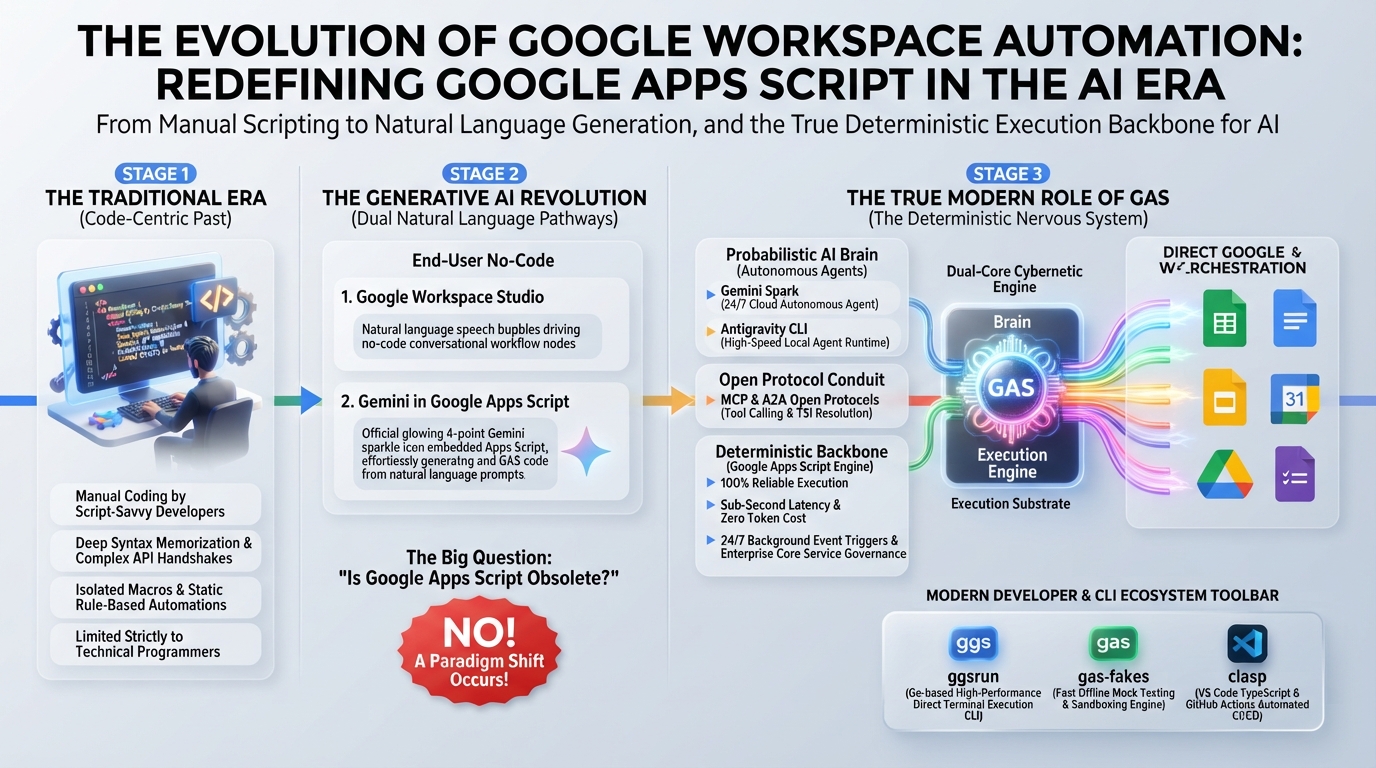
Abstract
Generative AI and autonomous agents do not obsolete Google Apps Script (GAS); they elevate it into an indispensable deterministic execution substrate. This article establishes an enterprise hybrid architecture dividing responsibilities between AI's probabilistic reasoning (the brain) and GAS's secure, zero-cost, event-driven execution (the nervous system). Through 12 production use cases—spanning MCP servers, deterministic guardrails, and hybrid batching—we formalize four foundational principles for engineering resilient, scalable Google Workspace automations.
Introduction
Google Workspace is a cloud-native groupware suite provided by Google for enterprise organizations, educational institutions, and individuals alike. By seamlessly integrating essential productivity tools—including Gmail, Google Drive, Calendar, Docs, and Sheets—it enables secure real-time collaboration and streamlined workflows worldwide.
For over a decade, the backbone of automation across this ecosystem has been Google Apps Script (GAS). Ref
As a serverless JavaScript runtime, GAS internally encapsulates Google's robust OAuth 2.0 authentication machinery. Developers can orchestrate cross-service workflows spanning Sheets, Docs, Drive, and Gmail with zero infrastructure provisioning, zero credential leakage, and zero server maintenance costs. Furthermore, GAS's integration capabilities extend far beyond Google Workspace; through Advanced Google Services and REST APIs, it seamlessly interfaces with the broader Google APIs ecosystem—including Google Analytics (GA4), BigQuery, YouTube Data API, Google Maps, and Cloud Translation.
The recent exponential surge in Generative AI has brought the Workspace automation paradigm to a historic turning point. Intuitive prompt-based solutions and autonomous agents are emerging that promise end-to-end task execution without traditional coding:
- Google Workspace Studio: Intuitive natural-language AI workflow orchestration Ref
- Gemini Spark: Autonomous AI agents managing 24/7 background tasks and tool execution Ref
- Google Workspace MCP Server and Gemini Integration: Protocol-driven, context-aware autonomous tool invocation Ref
Faced with these capabilities, engineers and IT leaders frequently ask: Has Google Apps Script been made redundant by Generative AI? Is writing script code a thing of the past?
The answer is an unequivocal "No."
In fact, the rise of flexible AI agents has brought the distinct technical advantages and irreplaceable domain of GAS into sharper focus than ever before.
Compared to pure natural-language agents and LLM-centric automations, GAS retains fundamental architectural strengths:
- Deterministic Reproducibility, Sub-Second Latency, and Zero Inference Cost
GAS eliminates hallucination risks, enforcing strict mathematical rules, financial transactions, and rigid business logic with 100% deterministic precision. It incurs zero token costs and zero model inference latency for pure computational tasks. - True Background Event Triggers and Deep UI Integration (Custom Functions)
Through time-driven triggers (cron schedules) and event triggers (form submissions, spreadsheet edits, file uploads), GAS operates completely autonomously in the background without requiring continuous human presence or active browser sessions. Furthermore, features like Spreadsheet Custom Functions execute computational logic directly inside spreadsheet formula cells. - Flexible External API Orchestration via
UrlFetchApp
WithUrlFetchApp, GAS provides fine-grained control over HTTP headers, authentication payloads, and REST methods (GET, POST, PUT, DELETE, PATCH). ThroughdoGetanddoPostWeb Apps, GAS functions simultaneously as a secure webhook listener and a serverless API gateway. - Enterprise-Grade Governance as a Core Service
Google Apps Script has been promoted to a Google Workspace Core Service under General Availability (GA). It inherits enterprise data protection agreements, administrator policy controls, and standard technical support guarantees. Ref - Accelerated Development via Native Gemini in the Script Editor
Gemini is now natively integrated into the Apps Script editor sidebar, enabling context-aware code generation, automated refactoring, and inline debugging. Ref This drastically lowers the entry barrier while accelerating delivery for both professional engineers and citizen developers.
Workflow Comparison: Direct Natural-Language Execution vs. Deterministic Script Execution
When comparing direct natural-language Workspace execution (via Google Workspace Studio or Gemini Spark) with the Gemini-assisted Google Apps Script paradigm, distinct workflow topologies emerge:
Approach 1: Direct Natural-Language Workspace Execution (Workspace Studio / Gemini Spark)
- User provides natural-language prompt
- LLM dynamically interprets prompt, reasons about API execution order, and sequentially calls Google Workspace APIs
- System returns output
Approach 2: Script-Fixed Execution (Google Apps Script with Gemini)
- User provides natural-language prompt
- Gemini synthesizes and verifies Google Apps Script code (e.g., via the built-in Gemini side panel in the Script Editor)
- Google Apps Script engine executes the fixed script directly
- System returns output
In Approach 1, because the LLM performs probabilistic reasoning on every single execution, subtle interpretation fluctuations can introduce non-deterministic behavior and inference latency overhead. In Approach 2, because natural-language instructions are compiled once into concrete GAS code, 100% deterministic reproducibility is guaranteed on every subsequent run, barring external network anomalies. Furthermore, because runtime execution bypasses LLM inference entirely, execution latency is dramatically lower than direct natural-language API dispatching. Additionally, human engineers can seamlessly write, inspect, or modify the code directly, preserving full developer control.
The contemporary imperative is not an "AI vs. Code" dichotomy, but the systematic engineering of Hybrid Architectures:
- Development Phase: Leveraging generative LLMs to synthesize, lint, and test GAS code at lightning speed.
- Runtime Phase: Pairing the unstructured comprehension and reasoning of AI models with the deterministic validation, state persistence, event dispatching, and secure API execution of GAS.
This article delivers an exhaustive guide to the strategic positioning, architectural taxonomy, and 12 highly practical use cases of Google Apps Script in the generative AI era.
Google Apps Script Architecture and Project Design
To architect resilient systems, developers must first master the architectural differences between Standalone Scripts and Container-bound Scripts. These project types differ not only in storage location but also in security boundaries, permission scopes, and lifecycle management.
1. Standalone Scripts
A Standalone Script is an independent project stored directly in Google Drive, decoupled from any specific Workspace document. Ref
- Creation: Created via Google Drive: [New] > [More] > [Google Apps Script].
- Cross-Service Orchestration: Coordinates data pipelines spanning multiple files, folders, and domains.
- Autonomous Cron Automation: Executes scheduled background jobs via time-driven installable triggers.
- REST Endpoints & MCP Servers: Hosts serverless Web Apps (
doGet/doPost), webhook receivers, and Model Context Protocol (MCP) servers. - Enterprise SaaS Integration: Acts as a secure integration hub connecting platforms like Slack, GitHub, Stripe, and Jira.
- Shared Code Libraries: Encapsulates reusable business logic and utility modules across an organization.
- Security & Access Control: Because it has no parent document, the script's access permissions are managed independently. Source code, Script Properties, and sensitive credentials remain completely hidden from end users, making it the ideal architecture for background administrative tasks and public API endpoints.
2. Container-bound Scripts
A Container-bound Script is embedded directly within a specific Google Workspace host file (Sheets, Docs, Slides, or Forms). Ref
- Creation: Opened from the host file menu: [Extensions] > [Apps Script].
- In-Document Data Processing: Executes sheet macros, custom formatting, and batch cell transformations.
- Spreadsheet Custom Functions: Defines bespoke calculation formulas callable directly inside spreadsheet cells.
- Document UI Extensions: Builds custom menu bars, modal dialogs, and interactive sidebars.
- Immediate Local Event Handlers: Responds instantly to user interactions via
onEdit,onOpen, andonFormSubmit. - Security & Operational Model: Access permissions are strictly inherited from the parent file. Users with edit access to the document can view and execute the script. The script can bind directly to active document instances (e.g.,
SpreadsheetApp.getActiveSpreadsheet()) without requiring explicit resource IDs, making it exceptionally convenient for document-centric workflows.
3. Project Type Comparison Matrix
| Evaluation Dimension | Standalone Script | Container-bound Script |
|---|---|---|
| Primary Use Cases | Web Apps, REST endpoints, MCP servers, cross-file batch jobs, SaaS integration hubs | Custom Functions, sheet macros, document UI extensions (sidebars/menus) |
| Permission Management | Managed independently per script (optimal for hiding source code and API keys) | Inherited directly from the parent host document |
| Resource Binding | Explicit ID or URL required (e.g., SpreadsheetApp.openById(id)) | Direct contextual access (e.g., SpreadsheetApp.getActiveSpreadsheet()) |
| Public API / Web Apps | Highly recommended (clean separation of concerns for API hosting) | Possible, but tightly coupled to the host document |
Diverse Execution Triggers and Modalities in GAS
GAS is far more than a simple macro engine; it is a full-fledged serverless execution runtime with diverse invocation mechanisms:
- Script Editor (Manual / Debug Execution): Interactive testing, profiling, and Gemini-assisted code authoring.
- Simple & Installable Triggers: Fully autonomous, zero-touch execution triggered by time schedules (cron), form submissions, spreadsheet edits, or calendar events.
- Custom Functions: Direct formula-level computation and inference within Google Sheets cells.
- Custom Menus & Document Buttons: On-demand interactive macros triggered by end users via sheet buttons or top menu bars.
- Sidebars & Modal Dialogs (HTML Service): Embedded interactive web interfaces within Workspace applications for guided human-in-the-loop workflows.
- Web Apps (
doGet/doPost): Public or organization-restricted REST API endpoints, webhook receivers, and MCP servers. - Google Apps Script API: Remote invocation and deployment from external CI/CD pipelines (GitHub Actions) or local developer tooling (
clasp,ggsrun). - Google Workspace Add-ons: Enterprise-wide or global distribution through the Google Workspace Marketplace.
For an exhaustive breakdown of execution mechanisms, see Report: How to Run Google Apps Script.
💡 Configuration Note: Centralized Gemini API Key
In accordance with security best practices, the scripts in this guide retrieve API credentials dynamically viaPropertiesServicerather than hardcoding keys. Before executing the examples, open the Apps Script editor, navigate to [Project Settings] (gear icon) > [Script Properties], and add a property namedGEMINI_API_KEYcontaining your valid Gemini API key.
12 Highly Practical Use Cases of Google Apps Script in the AI Era
The following 12 categories detail the definitive, battle-tested roles of GAS in the generative AI landscape, complete with official references, production-ready code samples, architecture diagrams, security analyses, and advanced extension patterns.
1. Deterministic Custom Functions with External API Integration and In-Memory Caching
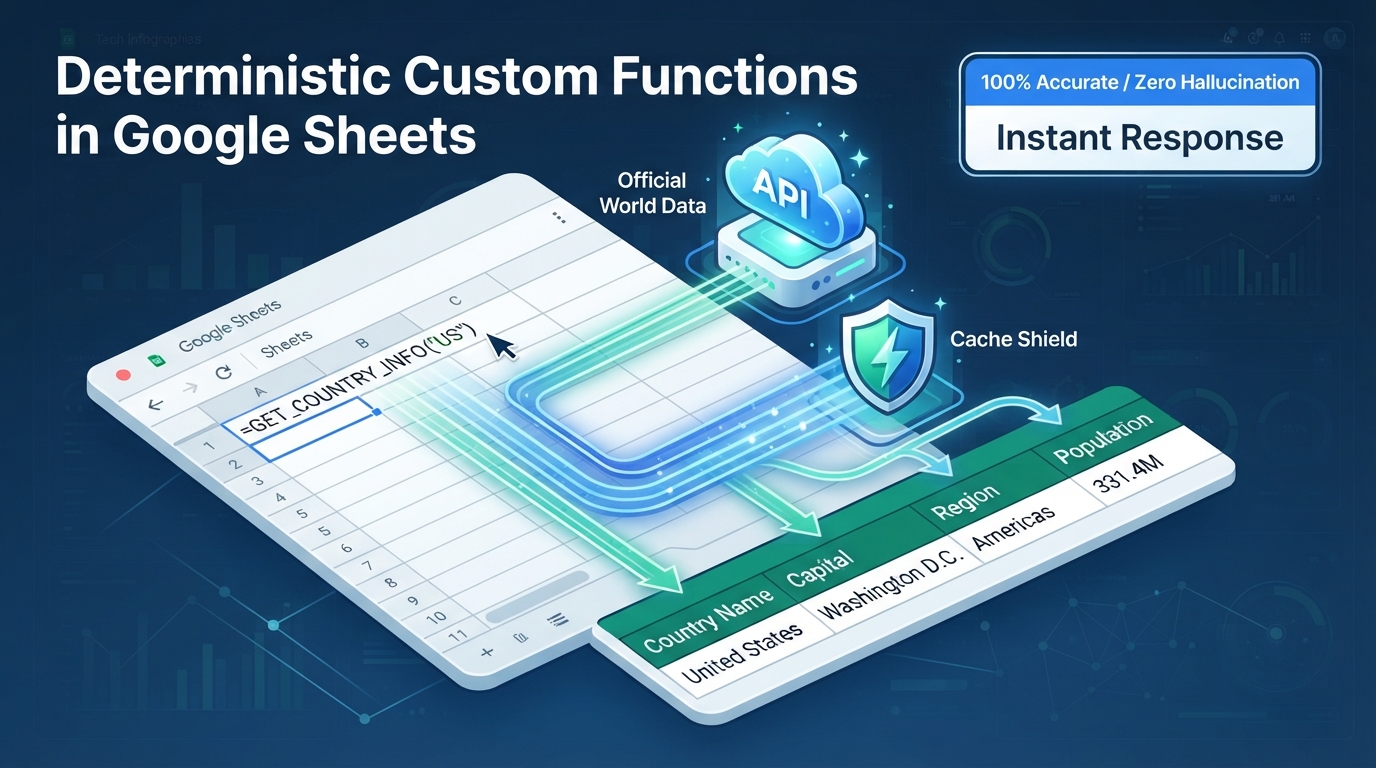
Figure 1: Deterministic custom function data flow integrating external APIs with CacheService — Illustrates cell input ingestion, sub-millisecond in-memory cache lookup, open API execution via UrlFetchApp on cache miss, and deterministic multi-column spill array propagation.
Technical Overview and Official References
Google Sheets Custom Functions enable developers to define JavaScript functions in Apps Script that can be called directly within spreadsheet cells just like standard functions (SUM, VLOOKUP). They execute custom computational logic, fetch real-time data from external REST APIs via UrlFetchApp, and populate calculations seamlessly across cells.
- Official Reference: Custom Functions in Google Sheets
Concrete Example: Fetching Authoritative Country Data with Array Spilling and CacheService
While LLM-powered spreadsheet formulas excel at freeform text generation and fuzzy summarization, they are unsuited for authoritative factual lookups (statistical data, ISO codes, master catalogs) where zero hallucination is required.
As illustrated in Figure 1, the deterministic data flow executes through five coordinated steps:
- User enters a custom formula (e.g.,
=GET_COUNTRY_INFO("US")) in a Google Sheets cell. - GAS checks
CacheServiceto immediately return cached results without consuming network bandwidth if available. - On a cache miss,
UrlFetchAppexecutes a secure HTTPS GET request to the public REST Countries API. - GAS parses and structures the JSON payload into a clean 2D array and stores it in
CacheService(6-hour TTL). - The function deterministically spills "Country Name," "Capital," "Region," and "Population" across four adjacent columns.
Production Script
Paste the following script into your container-bound editor. In any spreadsheet cell, enter =GET_COUNTRY_INFO("US") or =GET_COUNTRY_INFO(A2) to dynamically populate four columns without requiring an API key:
/**
 * Custom function to fetch authoritative country metadata by ISO code and spill across 4 columns.
 * @param {string|number} countryCode 2-letter or 3-letter ISO country code (e.g., "US", "JP", "FR", "DE").
 * @return {Array<Array<string|number>>} 2D array: [[Name, Capital, Region, Population]]
 * @customfunction
 */
function GET_COUNTRY_INFO(countryCode) {
  if (!countryCode) return [["", "", "", ""]];

  const code = String(countryCode).trim().toLowerCase();
  const cache = CacheService.getScriptCache();
  const cacheKey = `country_info_${code}`;

  // 1. Retrieve from in-memory cache if available (6-hour TTL)
  const cachedData = cache.get(cacheKey);
  if (cachedData) {
    try {
      return JSON.parse(cachedData);
    } catch (e) {
      cache.remove(cacheKey);
    }
  }

  // 2. Fetch authoritative data from public REST API
  const url = `https://restcountries.com/v3.1/alpha/${encodeURIComponent(code)}`;
  try {
    const response = UrlFetchApp.fetch(url, {
      muteHttpExceptions: true,
      headers: { Accept: "application/json" },
    });

    if (response.getResponseCode() !== 200) {
      return [["Error: Not Found", "-", "-", "-"]];
    }

    const data = JSON.parse(response.getContentText());
    if (!Array.isArray(data) || data.length === 0) {
      return [["Error: Invalid Response", "-", "-", "-"]];
    }

    const country = data[0];
    const name = country.name?.common || "-";
    const capital = country.capital ? country.capital[0] : "-";
    const region = country.region || "-";
    const population = country.population || 0;

    const result = [[name, capital, region, population]];

    // 3. Cache the structured result for 6 hours (21,600 seconds)
    cache.put(cacheKey, JSON.stringify(result), 21600);
    return result;
  } catch (error) {
    return [[`Error: ${error.message}`, "-", "-", "-"]];
  }
}
Key Advantages
- 100% Deterministic Accuracy: Relies exclusively on authoritative REST APIs, eliminating hallucination risks inherent in LLM-generated facts.
- Zero API Cost & Sub-Second Latency:
CacheServicecaches identical queries in memory for up to 6 hours, preventing redundant quota consumption. - Dynamic 2D Array Spilling: Automatically populates multiple adjacent columns from a single cell formula without manual dragging.
Limitations and Operational Considerations
- 30-Second Execution Limit: Custom functions must return within 30 seconds, or Google Sheets will throw a
#ERROR!timeout. - Read-Only Restrictions: Custom functions cannot modify other cells, alter sheet formatting, or invoke services requiring sensitive OAuth write scopes.
Advanced Patterns and Extensions
- Financial Master Sync: Fetch real-time foreign exchange rates or stock quotes from financial APIs and spill price, volume, and moving averages.
- Postal Code Geocoding: Resolve postal codes to standardized prefecture, city, and street addresses with multi-tier caching.
Related Articles and References
2. Event-Driven Zero-Touch Autonomous AI Pipelines
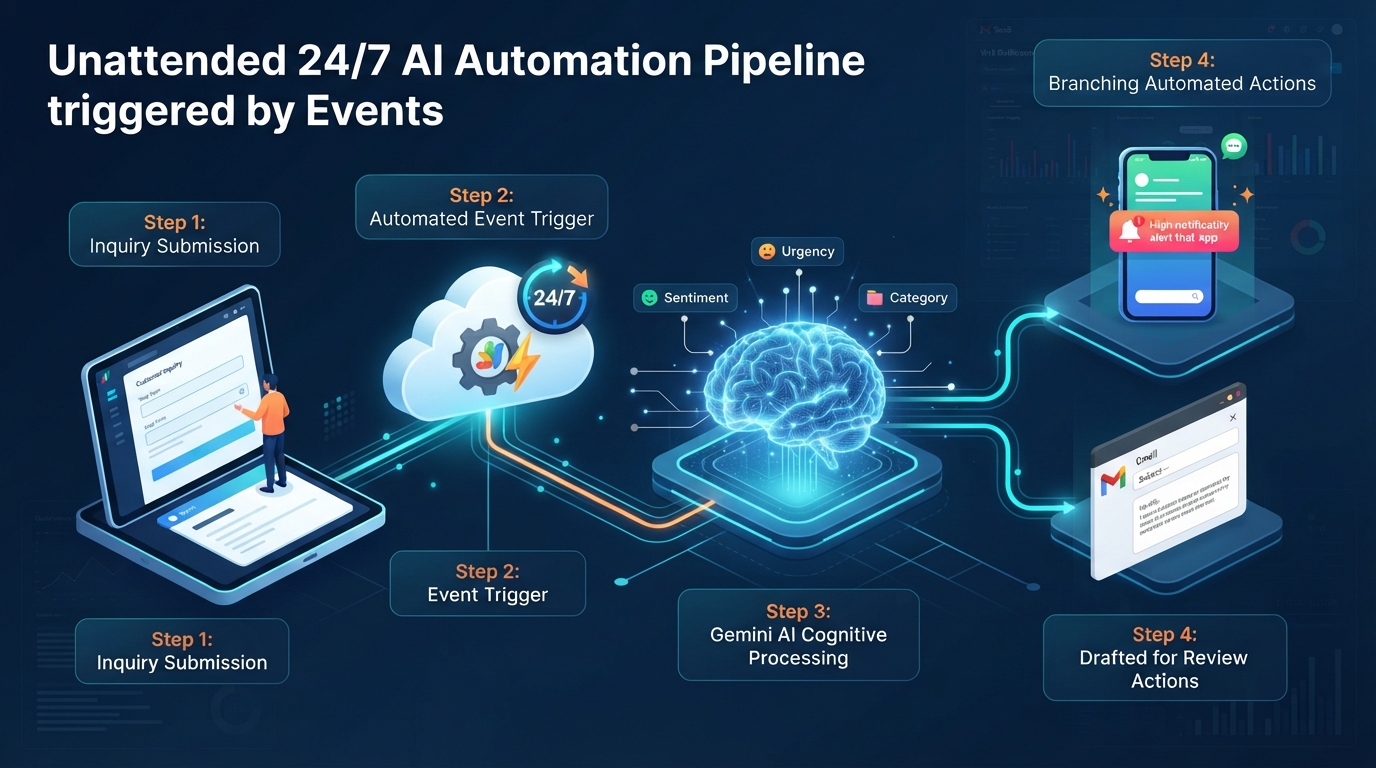
Figure 2: Autonomous AI event pipeline triggered by Google Forms submission — Illustrates end-to-end autonomous execution from Form submission (onFormSubmit) to Gemini priority classification, real-time Sheets logging, and automatic Gmail response draft creation.
Technical Overview and Official References
GAS Installable Triggers monitor Workspace state changes—such as Google Forms submissions (onFormSubmit), spreadsheet cell edits (onEdit), time intervals, and Calendar updates—executing background logic with elevated user authorization without requiring manual intervention.
- Official Reference: Installable Triggers in Google Apps Script
Concrete Example 1: Form Ingestion, Sentiment & Urgency Classification, and Gmail Draft Synthesis
As shown in Figure 2, the end-to-end autonomous event pipeline operates through five zero-touch stages:
- Customer submits an inquiry through a public Google Form.
- An installable
onFormSubmittrigger automatically wakes up in the background. - GAS dispatches inquiry text via
UrlFetchAppto Gemini 3.6 Flash for urgency classification, sentiment analysis, and response drafting. - Structured classification metadata is appended in real time to the centralized Google Sheet.
GmailAppautomatically generates a contextual reply draft in the support mailbox or dispatches urgent notifications to team channels.
Production Script 1 (Form Text Ingestion)
/**
 * Installable trigger executed upon Google Forms submission.
 * Extracts inquiry text, classifies urgency via Gemini, and generates a Gmail draft.
 */
function onFormSubmitTrigger(e) {
  if (!e || !e.namedValues) {
    Logger.log("Execution bypassed: Trigger event object (e.namedValues) is undefined.");
    return;
  }

  const userEmail = e.namedValues["Email Address"] ? e.namedValues["Email Address"][0] : "";
  const userName = e.namedValues["Name"] ? e.namedValues["Name"][0] : "Customer";
  const inquiry = e.namedValues["Inquiry Details"] ? e.namedValues["Inquiry Details"][0] : "";

  if (!userEmail || !inquiry) return;

  const apiKey = PropertiesService.getScriptProperties().getProperty("GEMINI_API_KEY");
  const prompt = `You are a professional enterprise customer support specialist.
Analyze the following customer inquiry, evaluate its urgency, and compose a polite, professional reply.

Output requirements:
Return strictly a valid JSON object matching this schema:
{"urgency": "High" | "Medium" | "Low", "replySubject": "Subject line", "replyBody": "Full email body"}

Customer Name: ${userName}
Inquiry Details:
${inquiry}
`;

  const url = `https://generativelanguage.googleapis.com/v1beta/models/gemini-3.6-flash:generateContent?key=${apiKey}`;
  const response = UrlFetchApp.fetch(url, {
    method: "post",
    contentType: "application/json",
    payload: JSON.stringify({
      contents: [{ parts: [{ text: prompt }] }],
      generationConfig: { responseMimeType: "application/json" },
    }),
    muteHttpExceptions: true,
  });

  if (response.getResponseCode() !== 200) {
    Logger.log(`Gemini API error: ${response.getContentText()}`);
    return;
  }

  const json = JSON.parse(response.getContentText());
  const aiOutput = JSON.parse(json.candidates[0].content.parts[0].text);

  // Synthesize Gmail draft for human agent review
  const draftBody = `${aiOutput.replyBody}

---
[AI Evaluation: Urgency ${aiOutput.urgency}]`;
  GmailApp.createDraft(userEmail, aiOutput.replySubject, draftBody);

  Logger.log(`Draft synthesized successfully for: ${userEmail} (Urgency: ${aiOutput.urgency})`);
}
Concrete Example 2: Multimodal Invoice Extraction from Gmail PDF Attachments
Expanding beyond plain text, GAS can ingest binary PDF and image attachments from unread emails, convert their raw bytes to Base64, and pass them as inlineData directly to Gemini 3.6 Flash for structured financial extraction and ledger recording.
Production Script 2 (Multimodal Attachment Processing)
/**
 * Autonomous pipeline to scan unread emails for PDF invoices,
 * extract line items via Gemini Multimodal API, and log to Google Sheets.
 */
function processInvoicePdfMultimodal() {
  const apiKey = PropertiesService.getScriptProperties().getProperty("GEMINI_API_KEY");
  const ss = SpreadsheetApp.getActiveSpreadsheet();
  let sheet = ss.getSheetByName("InvoiceLedger");
  if (!sheet) {
    sheet = ss.insertSheet("InvoiceLedger");
    sheet.appendRow(["IssueDate", "Vendor", "InvoiceNumber", "TotalAmount", "Items", "LoggedAt"]);
  }
  const threads = GmailApp.search('label:inbox is:unread has:attachment filename:pdf "Invoice"');

  for (const thread of threads) {
    const messages = thread.getMessages();
    for (const msg of messages) {
      if (!msg.isUnread()) continue;

      const attachments = msg.getAttachments();
      for (const att of attachments) {
        if (att.getContentType() === "application/pdf") {
          // 1. Convert file Blob to Base64 encoding
          const base64Data = Utilities.base64Encode(att.getBytes());

          // 2. Dispatch multimodal payload to Gemini 3.6 Flash
          const url = `https://generativelanguage.googleapis.com/v1beta/models/gemini-3.6-flash:generateContent?key=${apiKey}`;
          const prompt = `Extract all invoice details from this document and return strictly a JSON object:
Keys: invoiceNumber (string), vendor (string), issueDate (YYYY-MM-DD), totalAmount (number), items (array of strings)`;

          const payload = {
            contents: [
              {
                parts: [
                  { text: prompt },
                  {
                    inlineData: {
                      mimeType: "application/pdf",
                      data: base64Data,
                    },
                  },
                ],
              },
            ],
            generationConfig: { responseMimeType: "application/json" },
          };

          const res = UrlFetchApp.fetch(url, {
            method: "post",
            contentType: "application/json",
            payload: JSON.stringify(payload),
            muteHttpExceptions: true,
          });

          if (res.getResponseCode() === 200) {
            const result = JSON.parse(
              JSON.parse(res.getContentText()).candidates[0].content.parts[0].text
            );

            // 3. Record structured metadata directly into the ledger
            sheet.appendRow([
              result.issueDate,
              result.vendor,
              result.invoiceNumber,
              result.totalAmount,
              JSON.stringify(result.items),
              new Date(),
            ]);
          }
        }
      }
      msg.markRead();
    }
  }
}
Key Advantages
- Zero-Touch Automation: Operates 24/7 in the cloud without requiring active browser tabs, local daemons, or server hosting.
- Multimodal Binary Ingestion: Direct conversion of PDFs and images (
Blob➔Base64) allows seamless OCR and structured reasoning in a single pass.
Limitations and Operational Considerations
- Installable Trigger Authorization: When configuring triggers programmatically, ensure execution scope grants are verified.
- File Size Boundaries:
UrlFetchApprequest payloads are limited to 50 MB, which easily accommodates standard documents but requires chunking for massive media files.
Advanced Patterns and Extensions
- Customer Feedback Escalation: Automatically classify Google Form feedback into categories (Bug, Feature Request, Praise), sending immediate Slack alerts to engineering leads for high-priority bugs.
- Automated Resume Screening: Parse candidate resumes submitted via Form, extract skills and years of experience via Gemini, and compile structured applicant rankings in Sheets.
Related Articles and References
- Unlock Smart Invoice Management: Gemini, Gmail, and Google Apps Script Integration
- Streamlining Gmail Processing Including Attachment Files Using Gemini with Google Apps Script
- Flexible Labeling for Gmail using Gemini API with Google Apps Script Part 3
3. Serverless Web API Endpoints via Web Apps (doGet / doPost)
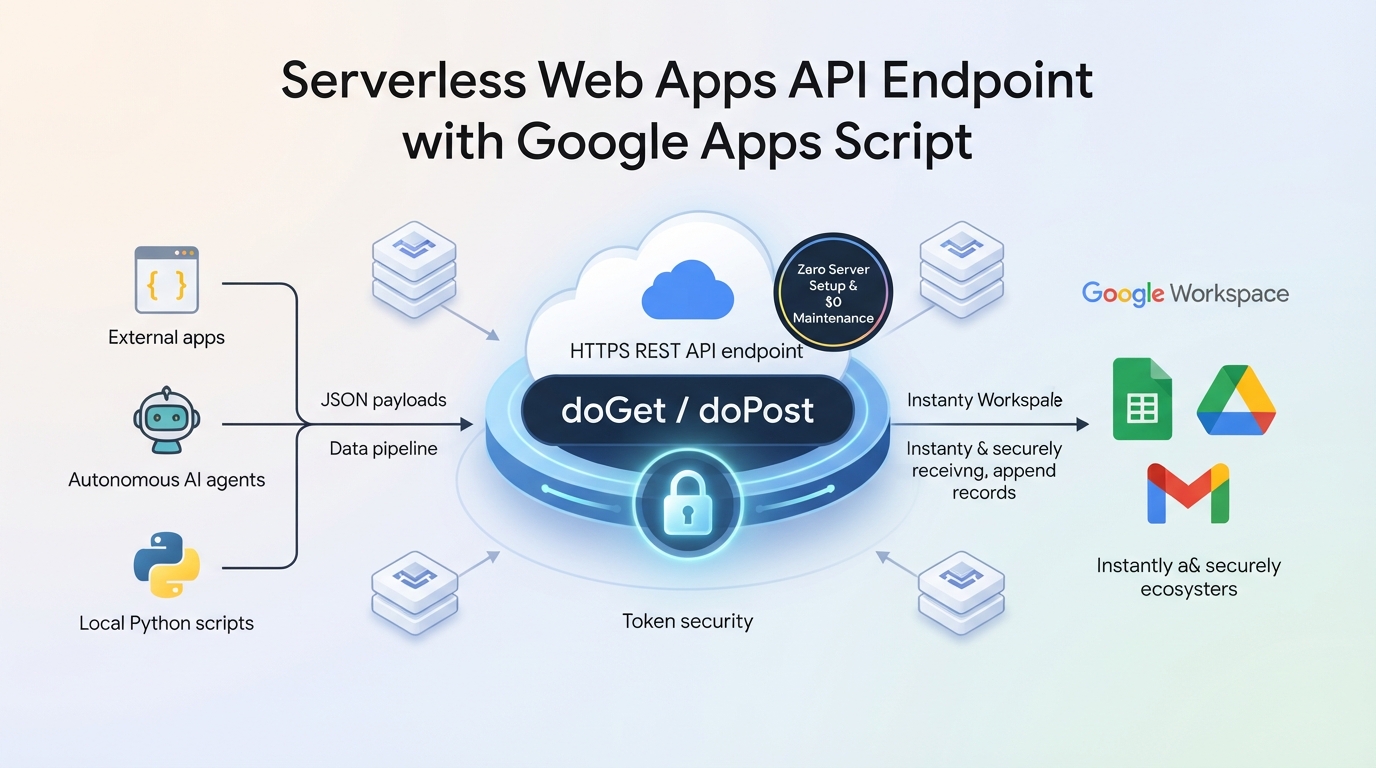
Figure 3: Serverless REST API endpoint architecture powered by GAS Web Apps — Illustrates secure ingestion of external HTTPS requests, Bearer token verification, Gemini background processing, and deterministic JSON response generation via ContentService.
Technical Overview and Official References
By implementing doGet(e) or doPost(e) handlers and deploying a project as a Web App, GAS functions as an enterprise-grade, serverless REST API endpoint. It parses incoming query parameters, headers, and JSON payloads, processes internal Workspace resources, and returns structured ContentService.MimeType.JSON responses.
- Official Reference: Web Apps Guide in Google Apps Script
Concrete Example: RESTful Ingestion Gateway for External Microservices and AI Agents
As illustrated in Figure 3, the serverless Web API endpoint architecture operates through four structured steps:
- External clients, autonomous agents, or third-party SaaS platforms dispatch HTTPS
doGetordoPostrequests to the public Web App URL. - GAS intercepts incoming requests, verifying the Bearer token or authorization header to block unauthorized traffic.
- Upon validation, the script executes business logic, queries Workspace databases, or triggers Gemini API calls.
- GAS packages data into
ContentService.createTextOutputwithMimeType.JSON, returning deterministic responses with zero server maintenance.
Production Script
/**
 * HTTP POST Handler for GAS Web App.
 * Ingests external JSON payloads, validates bearer tokens, and persists records.
 */
function doPost(e) {
  try {
    if (!e || !e.postData || !e.postData.contents) {
      return createJsonResponse({ status: "error", message: "Empty request payload." }, 400);
    }

    // 1. Validate custom authorization token
    const expectedToken = PropertiesService.getScriptProperties().getProperty("API_AUTH_TOKEN");
    const incomingToken = e.parameter.token;

    if (expectedToken && incomingToken !== expectedToken) {
      return createJsonResponse({ status: "error", message: "Unauthorized access: Invalid token." }, 401);
    }

    // 2. Parse and validate JSON body
    const body = JSON.parse(e.postData.contents);
    const { category, summary, details } = body;

    if (!category || !summary) {
      return createJsonResponse({ status: "error", message: "Missing required fields: category and summary." }, 400);
    }

    // 3. Persist record into spreadsheet database
    const sheet = SpreadsheetApp.getActiveSpreadsheet().getSheetByName("IncomingLogs");
    sheet.appendRow([new Date(), category, summary, details || "", "SUCCESS"]);

    return createJsonResponse({
      status: "success",
      message: "Payload logged and processed successfully.",
      timestamp: new Date().toISOString(),
    }, 200);
  } catch (err) {
    return createJsonResponse({ status: "error", message: err.message }, 500);
  }
}

/**
 * Utility helper to construct standard ContentService JSON output
 */
function createJsonResponse(dataObject) {
  return ContentService.createTextOutput(JSON.stringify(dataObject)).setMimeType(
    ContentService.MimeType.JSON
  );
}
Deployment & Verification via curl
Deploy via [Deploy] > [New deployment] > [Web app] with access set to "Anyone". Test the endpoint from your local terminal:
curl -L -X POST "https://script.google.com/macros/s/{DEPLOYMENT_ID}/exec?token=YOUR_API_AUTH_TOKEN" -H "Content-Type: application/json" -d '{"category":"SecurityAlert","summary":"Unauthorized access attempt detected","details":"IP: 192.168.1.1"}'
(Note: The -L flag is mandatory to follow Google's HTTP 302 authentication redirect).
Key Advantages
- Zero Infrastructure Serverless: Provides a permanent HTTPS REST endpoint without provisioning virtual machines, configuring load balancers, or managing SSL certificates.
- Native Workspace Bridge: Ingested data is immediately available to Google Sheets, Drive, and BigQuery connectors.
Limitations and Operational Considerations
- Concurrent Execution Limits: Standard Google accounts allow up to 30 concurrent Web App executions (Google Workspace accounts allow more), making it ideal for webhook ingestion rather than massive high-frequency streaming.
- HTTP 302 Redirection: Clients must be configured to follow redirects (
curl -Lor standard HTTP client redirect followers).
Advanced Patterns and Extensions
- Webhook Ingestion Hub for Stripe / GitHub: Receive payment confirmations or Git push events, summarize commit messages with Gemini, and update project tracking sheets.
- Autonomous Agent Tool API: Expose specific business functions (e.g.,
createCalendarEvent,searchDrive) as REST endpoints for external agent frameworks.
Related Articles and References
4. Augmenting Autonomous Agents (Gemini Spark, Antigravity CLI) via MCP & A2A Multi-Agent Protocol
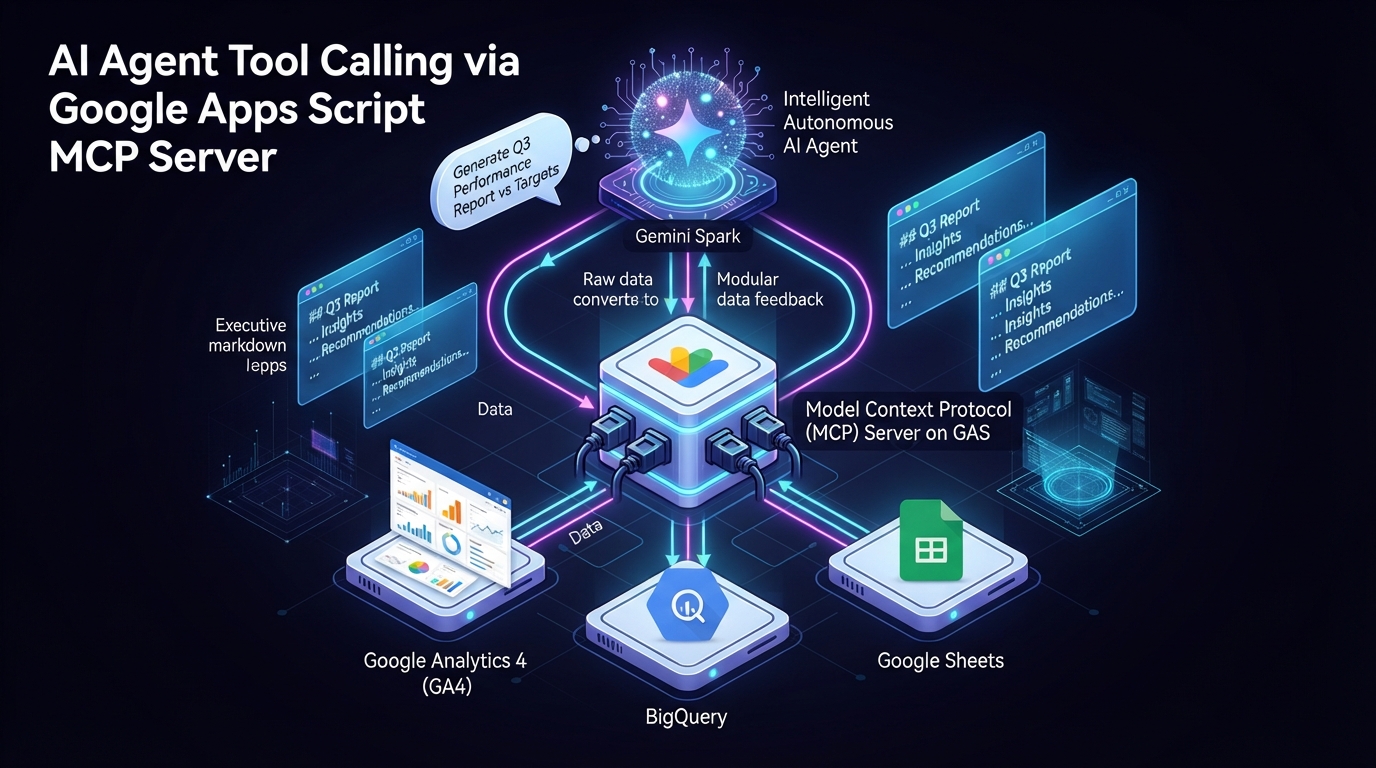
Figure 4: Autonomous agent tool execution via GAS Web App and Model Context Protocol (MCP) — Illustrates autonomous agents (Gemini Spark / Antigravity CLI) invoking serverless GAS tools with encapsulated credentials to manipulate Workspace resources.
Technical Overview and Official References
Autonomous agents interact with enterprise environments through emerging open protocols: the Model Context Protocol (MCP) for granular tool invocation and the Agent-to-Agent (A2A) protocol for hierarchical multi-agent collaboration. By deploying MCP and A2A servers directly on Google Apps Script (GAS) Web Apps, organizations transform GAS into an enterprise-grade execution substrate that encapsulates OAuth tokens, manages complex business rules, and exposes deterministic Workspace capabilities to autonomous agents (e.g., Gemini Spark, Gemini CLI, Antigravity CLI).
Crucially, in large-scale enterprise automation, loading dozens of disparate tools directly into a single primary agent causes Tool Space Interference (TSI)—a failure mode where the LLM misinterprets parameters, suffers tool selection degradation, and exhausts context token limits.
Hosting an A2A Server on GAS resolves TSI through Hierarchical Task Delegation: the primary agent (such as the Gemini CLI or an agentic framework) delegates high-level sub-goals (e.g., "Audit last month's financial spreadsheets and compile an executive summary document") to a dedicated GAS subagent. The GAS subagent orchestrates internal Workspace tools within its own isolated execution context, returning only the synthesized, deterministic outcome to the primary agent.
Protocol Connectivity & Future Roadmap Note
Under current specifications, Antigravity CLI and Gemini Spark connect directly to external MCP (Model Context Protocol) servers for tool execution. While direct connection to external A2A servers is not supported at present, this limitation may be resolved in future framework updates as the multi-agent ecosystem matures. Currently, hierarchical subagent delegation via the A2A Protocol is leveraged by the Gemini CLI and custom A2A clients communicating with the GAS A2A Server.
- Google Workspace MCP Server Overview: Official Guide
- GASADK (Agent Development Kit for GAS): GitHub (Kanshi Tanaike)
- ggsrun CLI Repository: GitHub (Kanshi Tanaike)
- GoogleApiApp Library: GitHub (Kanshi Tanaike)
- gas-fakes Offline Mock Engine: GitHub (Bruce McPherson)
- GASADK MCP/A2A Server Samples: GitHub (Kanshi Tanaike)
Concrete Example 1: Gemini Spark & GASADK MCP Server for GA4 Analytics & Gmail Ingestion
As illustrated in Figure 4, the autonomous agent tool-execution architecture operates across four synchronized stages:
- Cloud-native agents (Gemini Spark) or local terminal agents (Antigravity CLI) receive high-level natural language goals from users.
- Agents dispatch tool-invocation requests to the GAS Web App endpoint (MCP server) via the Model Context Protocol (MCP).
- GAS internally encapsulates OAuth 2.0 tokens and API keys, securely manipulating Google Workspace applications (Sheets, Docs, Gmail) and GA4 datasets.
- Deterministic results are returned to the agent as clean JSON, ensuring reliable task fulfillment without prompt bloat.
Gemini Spark MCP Architecture
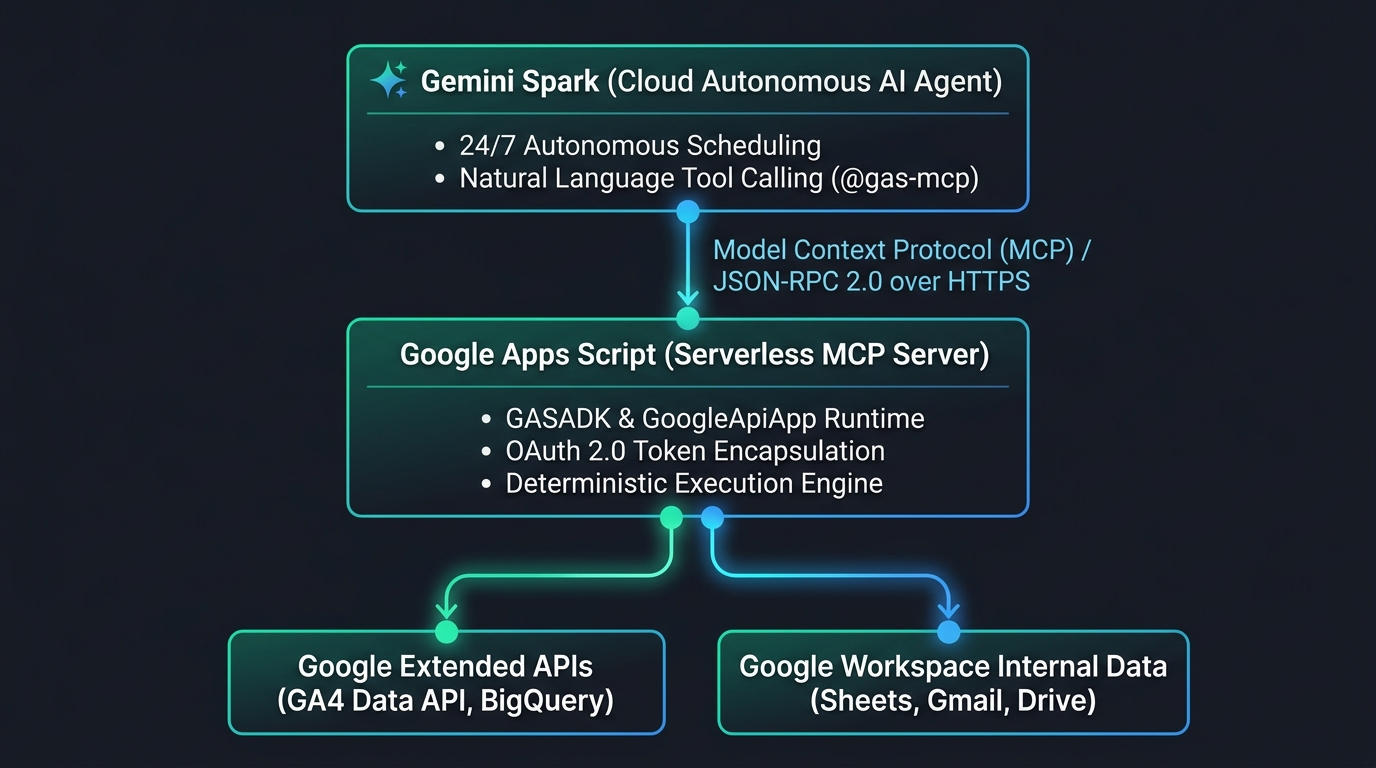
Figure 4-1: Gemini Spark and GASADK MCP Server Architecture — Illustrates cloud-native agent orchestration invoking GAS-hosted tools over JSON-RPC 2.0 to perform GA4 analysis and Gmail monitoring.
Deployment Workflow
- Configure Manifest (
appsscript.json): RegisterGASADK,GoogleApiApp, and required Advanced Services (AnalyticsData). - Deploy MCP/A2A Endpoint: Include
DeployMcpServer.jsand publish as a Web App accessible to "Anyone". - Register in Gemini Spark: Add the Web App URL (
https://script.google.com/macros/s/{DEPLOYMENT_ID}/exec?accessKey=sample) as a Custom Extension. - Autonomous Execution: Prompt Gemini Spark naturally: "@gas-mcp Extract yesterday's GA4 bounce rates and generate a summary report in Google Docs."
Concrete Example 2: Antigravity CLI and the 3-Tier Workspace Orchestration Matrix
The Antigravity CLI (agy) provides a Go-based, sub-millisecond local agent runtime. Operating within a local sandbox (--sandbox), it orchestrates Google Workspace across three distinct operational tiers:
3-Tier Orchestration Architecture
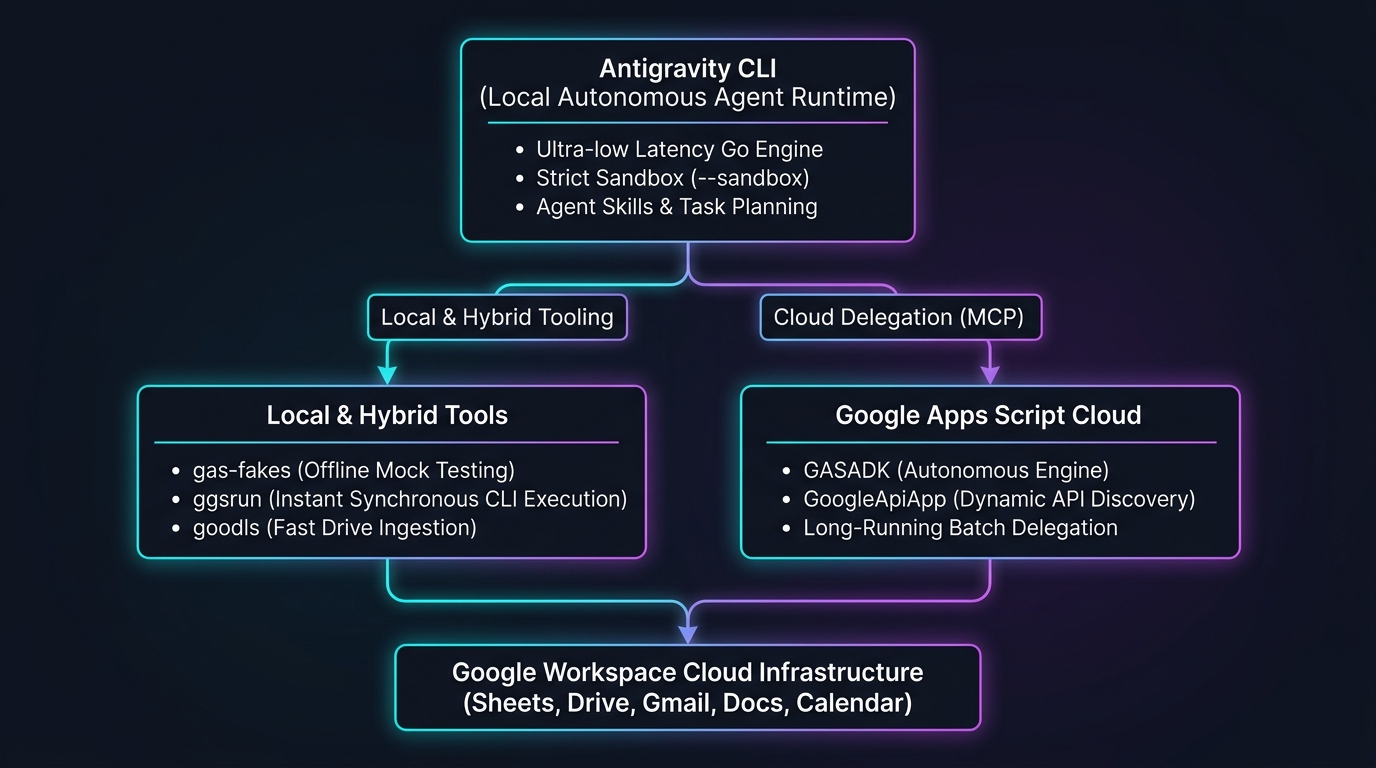
Figure 4-2: Antigravity CLI 3-Tier (Local/Hybrid/Cloud) Workspace Orchestration Architecture — Illustrates local dry-run testing with gas-fakes, rapid terminal execution with ggsrun, and long-running cloud task delegation with GASADK.
Execution Flow
- Local Tier (Offline Dry-Run): AI-generated logic is executed locally against
gas-fakesto verify syntax and types with zero cloud quota cost. - Hybrid Tier (Synchronous CLI Execution): Rapid queries and single-function executions invoke GAS directly from the terminal via
ggsrunwith immediate stdout feedback. - Cloud Tier (Long-Running Delegation): Massive data processing and scheduled batch tasks are delegated to
GASADKrunning cloud-natively on GAS.
# Example of sandboxed autonomous orchestration via Antigravity CLI
agy --sandbox "Fetch last month's sales sheet via ggsrun, identify outliers, and draft an executive briefing document."
Concrete Example 3: A2A Protocol for Remote GAS Subagent Collaboration
Primary orchestrator agents (such as Gemini CLI or multi-agent frameworks) deploy an A2A Server on GAS to delegate complex document processing tasks to remote specialized subagents (while Antigravity CLI interacts via external MCP servers).
A2A Protocol and TSI Resolution Architecture
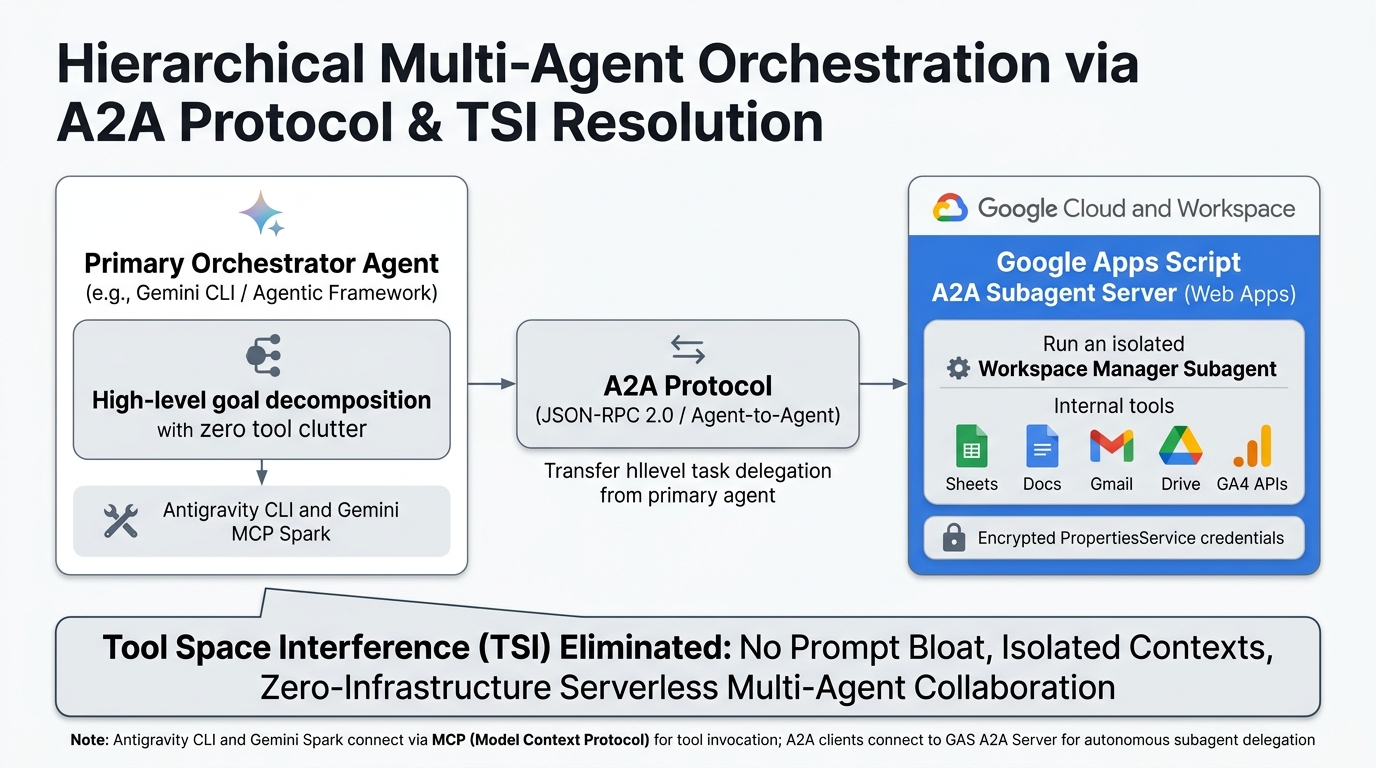
Figure 4-3: A2A Protocol and Tool Space Interference (TSI) Resolution Architecture — Illustrates hierarchical task delegation from primary agents to remote GAS subagents, eliminating tool collision and prompt bloating (clarifying protocol differentiation between MCP-enabled tools and A2A subagent delegation).
- TSI Elimination and Context Isolation: The primary agent does not need to load dozens of individual Sheet/Doc manipulation tools into its prompt context. Instead, it dispatches a single high-level JSON-RPC 2.0 task to the remote GAS subagent (
Workspace Manager Agent). - Serverless Multi-Agent Infrastructure: Hosting A2A communication on GAS Web Apps eliminates the need to provision and maintain 24/7 Node.js or Python backend servers.
Key Advantages
- Zero-Infrastructure Multi-Agent & Tool Hosting: Deploy production MCP and A2A servers directly on Google Cloud infrastructure without server provisioning.
- Root-Level TSI Resolution: Offloading sub-tasks to remote GAS subagents prevents prompt bloat and tool confusion in primary agents.
- Complete Credential Encapsulation: OAuth 2.0 scopes and API secrets remain strictly isolated inside GAS, never exposed to agent prompt contexts.
- Natural Language Task Delegation: End-to-end multi-step tasks (reporting, auditing, alerting) are orchestrated autonomously through plain natural language.
- Seamless Local-to-Cloud Flexibility: Developers fluidly balance instant terminal execution (
ggsrun) with scalable serverless delegation (GASADK).
Limitations and Operational Considerations
- 6-Minute Execution Limit: Long-running cloud agent executions must complete within the 6-minute window, using trigger continuation patterns for massive datasets.
- Concurrent Web App Quotas: Coordinate simultaneous agent calls to respect standard concurrency limits (typically 30 concurrent executions).
Advanced Patterns and Extensions
- Natural Language BigQuery Visualizer: Autonomous agents query enterprise datasets via GAS and automatically render interactive charts in Sheets.
- Cross-Drive Semantic Research Agent: An agent searches Drive folders via GAS MCP/A2A, compiles cross-document findings, and synthesizes executive briefings.
- Autonomous Multi-Calendar Scheduler: Agents coordinate meeting schedules across organizational boundaries with deterministic availability checks.
Related Articles and References
- Unlocking Infinite Automation: Integrating Google Apps Script with Gemini Spark (Blog Edition)
- Orchestrating Google Workspace with Antigravity CLI: A High-Performance Agentic Framework (Blog Edition)
- Building Model Context Protocol (MCP) Server with Google Apps Script
- Agent Development Kit for Google Apps Script (GASADK)
- Streamlining Web Page Insights with Natural Language using Gemini CLI, Google Analytics, and MCP
5. Secure Internal AI Portals via Web Apps + HTML Service & A2UI
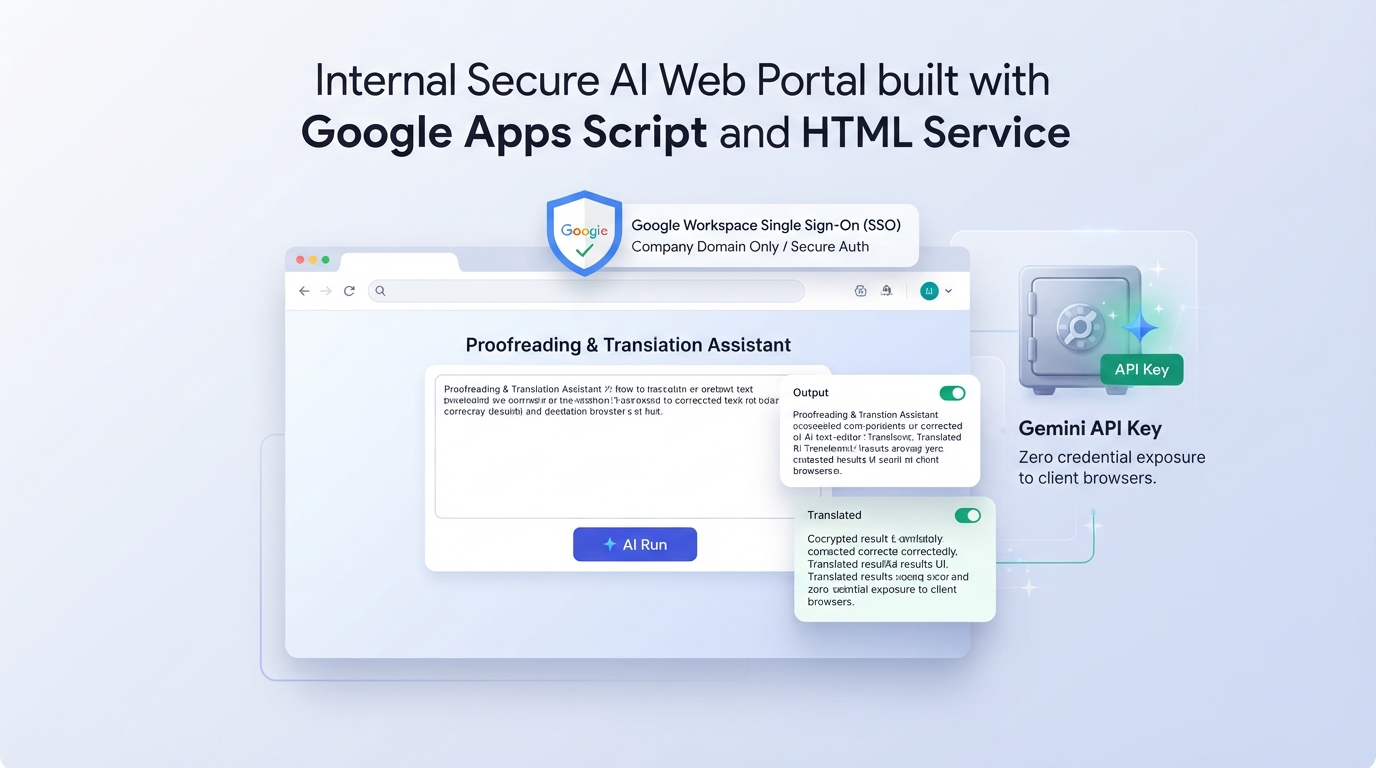
Figure 5: Secure enterprise AI portal powered by HTML Service and organizational authentication — Illustrates single sign-on (SSO) protected web UI communicating asynchronously with backend GAS and Gemini via google.script.run.
Technical Overview and Official References
GAS HTML Service allows developers to build full-stack web applications hosted directly inside Google Workspace. By combining frontend HTML/CSS/JS with backend GAS functions via google.script.run, organizations can deliver internal AI tools protected by Google Workspace SSO without managing external authentication providers.
Furthermore, adopting the Agent-to-User Interface (A2UI) paradigm allows AI models to dynamically return UI cards, interactive action buttons, and dynamic input forms rather than static text.
- HTML Service Official Guide: Create and Serve HTML
- A2UI with Gemini: Bringing A2UI to Google Workspace with Gemini
- Task-Driven Agentic Interfaces: Building Interfaces with A2UI
- A2UI for Google Apps Script: Architecture Guide
Concrete Example: Enterprise AI Proofreading and Translation Portal
As illustrated in Figure 5, the enterprise AI portal architecture functions through five integrated steps:
- Internal employees access the GAS Web App URL via desktop browsers.
- Google Workspace Single Sign-On (SSO) automatically enforces organization-level access control, blocking external unauthorized requests.
- The HTML Service frontend asynchronously triggers server-side GAS functions using
google.script.run. - GAS securely retrieves the Gemini API key from
PropertiesServiceand checks in-memoryCacheServiceto prevent duplicate API billing. - Adhering to the A2UI framework, dynamic UI feedback and action cards render instantly on the client browser.
Full-Stack Implementation
1. Backend Server Script (Code.gs)
function doGet() {
  return HtmlService.createHtmlOutputFromFile("Index")
    .setTitle("Corporate AI Proofreading Portal")
    .setXFrameOptionsMode(HtmlService.XFrameOptionsMode.ALLOWALL);
}

/**
 * Server-side AI execution function invoked via google.script.run
 */
function callGeminiProofread(inputText) {
  if (!inputText || !inputText.trim()) {
    throw new Error("Input text cannot be empty.");
  }

  // 1. Check in-memory cache using MD5 hash
  const rawHash = Utilities.computeDigest(
    Utilities.DigestAlgorithm.MD5,
    inputText,
    Utilities.Charset.UTF_8
  );
  const hashKey = rawHash.map((b) => (b < 0 ? b + 256 : b).toString(16).padStart(2, "0")).join("");
  const cacheKey = `proof_${hashKey}`;

  const cached = CacheService.getScriptCache().get(cacheKey);
  if (cached) return cached;

  const apiKey = PropertiesService.getScriptProperties().getProperty("GEMINI_API_KEY");
  const url = `https://generativelanguage.googleapis.com/v1beta/models/gemini-3.6-flash:generateContent?key=${apiKey}`;
  const prompt = `You are an expert enterprise editor. Proofread and refine the following business text for clarity, grammatical precision, and professional tone. Provide bulleted improvement notes at the end.

Source Text:
${inputText}`;

  const payload = {
    contents: [{ parts: [{ text: prompt }] }],
    generationConfig: { temperature: 0.3 },
  };

  const response = UrlFetchApp.fetch(url, {
    method: "post",
    contentType: "application/json",
    payload: JSON.stringify(payload),
    muteHttpExceptions: true,
  });

  if (response.getResponseCode() !== 200) {
    throw new Error(`Gemini API Error: ${response.getResponseCode()} - ${response.getContentText()}`);
  }

  const json = JSON.parse(response.getContentText());
  const outputText = json.candidates[0].content.parts[0].text;

  // Cache result for 2 hours (7,200 seconds)
  CacheService.getScriptCache().put(cacheKey, outputText, 7200);
  return outputText;
}
2. Frontend Interface (Index.html)
<!DOCTYPE html>
<html>
  <head>
    <base target="_top" />
    <meta charset="utf-8" />
    <style>
      body {
        font-family: -apple-system, BlinkMacSystemFont, "Segoe UI", Roboto, sans-serif;
        background: #f8f9fa;
        padding: 30px;
        color: #202124;
      }
      .card {
        max-width: 800px;
        margin: 0 auto;
        background: #ffffff;
        padding: 30px;
        border-radius: 12px;
        box-shadow: 0 4px 16px rgba(0, 0, 0, 0.08);
      }
      h2 {
        color: #1a73e8;
        margin-top: 0;
      }
      textarea {
        width: 100%;
        height: 180px;
        box-sizing: border-box;
        border: 1px solid #dadce0;
        border-radius: 8px;
        padding: 12px;
        font-size: 14px;
        font-family: inherit;
        resize: vertical;
      }
      button {
        background: #1a73e8;
        color: #fff;
        border: none;
        padding: 12px 24px;
        font-size: 15px;
        font-weight: 500;
        border-radius: 6px;
        cursor: pointer;
        margin-top: 15px;
      }
      button:hover {
        background: #1557b0;
      }
      button:disabled {
        background: #dadce0;
        cursor: not-allowed;
      }
      #output {
        margin-top: 20px;
        padding: 16px;
        background: #e8f0fe;
        border-left: 4px solid #1a73e8;
        border-radius: 4px;
        white-space: pre-wrap;
        display: none;
      }
      .error {
        background: #fce8e6 !important;
        border-left-color: #d93025 !important;
        color: #c5221f;
      }
    </style>
  </head>
  <body>
    <div class="card">
      <h2>✨ Enterprise AI Proofreading Portal</h2>
      <textarea id="inputText" placeholder="Enter text to proofread..."></textarea>
      <button id="submitBtn" onclick="runProofread()">Execute AI Proofreading</button>
      <div id="output"></div>
    </div>
    <script>
      function runProofread() {
        const text = document.getElementById("inputText").value;
        if (!text.trim()) return alert("Please enter text.");
        const btn = document.getElementById("submitBtn");
        const output = document.getElementById("output");
        btn.disabled = true;
        btn.innerText = "Analyzing text...";
        output.style.display = "block";
        output.className = "";
        output.innerText = "Gemini is reviewing your content...";

        google.script.run
          .withSuccessHandler(function (result) {
            output.innerText = result;
            btn.disabled = false;
            btn.innerText = "Execute AI Proofreading";
          })
          .withFailureHandler(function (err) {
            output.className = "error";
            output.innerText = "Error: " + err.message;
            btn.disabled = false;
            btn.innerText = "Execute AI Proofreading";
          })
          .callGeminiProofread(text);
      }
    </script>
  </body>
</html>
Key Advantages
- Zero-Infrastructure Organizational SSO: Restrict access to internal Workspace accounts with a single configuration toggle—no Auth0 or Firebase Auth setup required.
- A2UI Extensibility: Seamlessly upgrade from static text responses to dynamic adaptive forms and task cards generated on the fly by AI.
Limitations and Operational Considerations
- Iframe Sandbox Constraints: HTML Service operates inside an
iframe, which limits certain low-level browser APIs. - Initial Load Latency: Initial page loads require 1–2 seconds to establish the Google Workspace authentication wrapper.
Advanced Patterns and Extensions
- Adaptive Task Execution Portals via A2UI: AI dynamically generates input forms based on vague user requests, guiding employees step-by-step through complex workflows.
- Corporate Policy Q&A Bot: An internal portal that parses PDF manuals stored in Google Drive, providing authoritative answers with exact page citations.
Related Articles and References
- Bringing A2UI to Google Workspace with Gemini
- Beyond Chatbots: Building Task-Driven Agentic Interfaces in Google Workspace with A2UI and Gemini
- A2UI for Google Apps Script
6. Context-Aware AI Assistant Panels via Sidebars and Dialogs
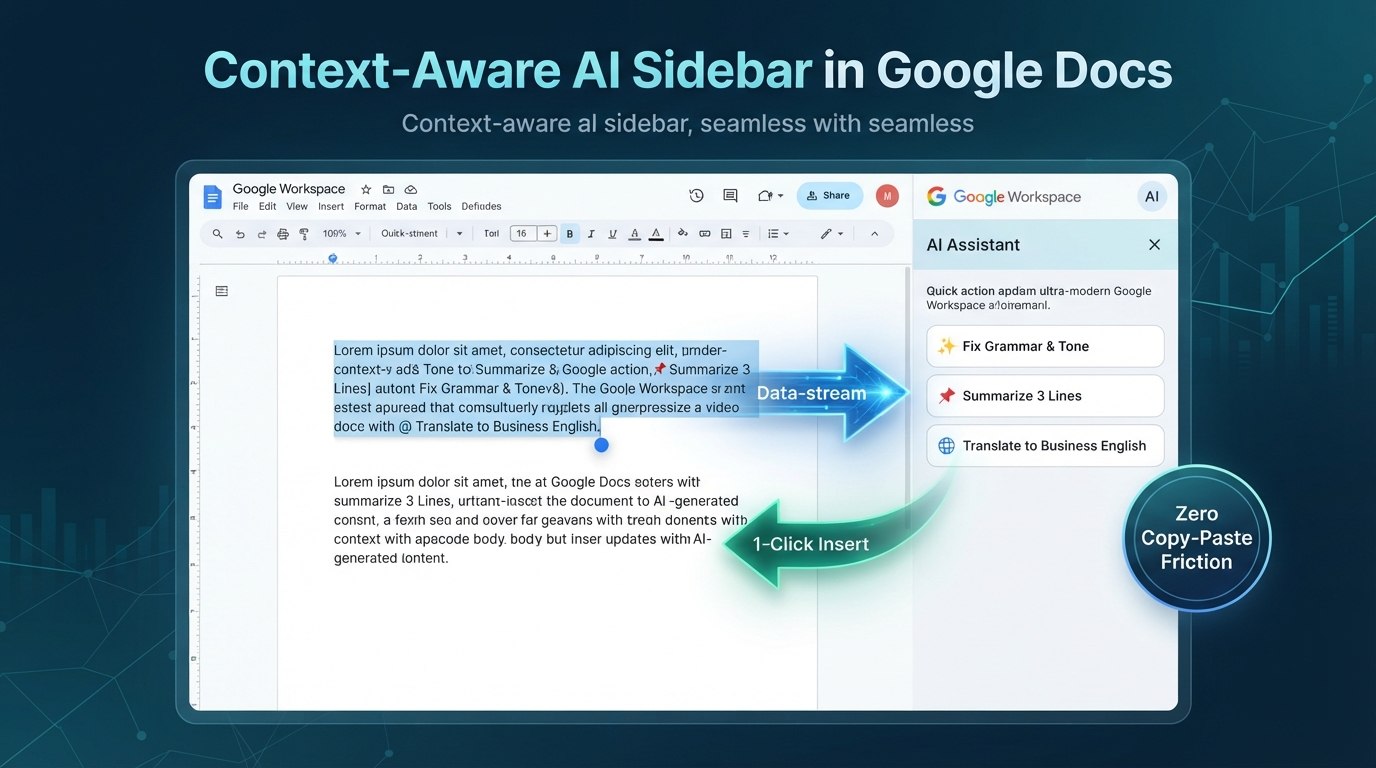
Figure 6: Context-aware AI assistant panel integrated as a Google Docs sidebar — Illustrates bidirectional UI workflow capturing partial document selections, querying Gemini, and streaming proofread text directly back into the editor.
Concrete Example: In-Editor Text Summarization, Proofreading, and Insertion
As shown in Figure 6, the context-aware sidebar workflow executes seamlessly within the document workspace:
- User highlights any text passage in Google Docs.
- User clicks a pre-configured AI action (Honorific Polish, 3-Line Summary, Business English Translation) in the custom sidebar.
DocumentApp.getSelection()accurately extracts the highlighted text elements, preserving partial selections.- Backend GAS transmits the payload to Gemini 3.6 Flash.
- The synthesized text is previewed in the sidebar and directly inserted at the active cursor position upon clicking "Insert into Document".
Production Script (Google Docs In-Editor Assistant)
1. Backend Script (Code.gs)
function onOpen() {
  DocumentApp.getUi()
    .createMenu("🤖 AI Assistant")
    .addItem("Open AI Sidebar", "showSidebar")
    .addToUi();
}

function showSidebar() {
  const html = HtmlService.createHtmlOutputFromFile("Sidebar")
    .setTitle("Context AI Editor");
  DocumentApp.getUi().showSidebar(html);
}

/**
 * Extracts selected text, executes prompt instruction, and returns result
 */
function processSelectedText(instruction) {
  const doc = DocumentApp.getActiveDocument();
  const selection = doc.getSelection();
  if (!selection) throw new Error("Please highlight text in the document first.");

  let selectedText = "";
  const elements = selection.getSelectedElements();
  for (const el of elements) {
    const textElement = el.getElement().asText();
    if (el.isPartial()) {
      selectedText += textElement.getText().substring(
        el.getStartOffset(),
        el.getEndOffsetInclusive() + 1
      ) + "
";
    } else {
      selectedText += textElement.getText() + "
";
    }
  }

  const apiKey = PropertiesService.getScriptProperties().getProperty("GEMINI_API_KEY");
  const url = `https://generativelanguage.googleapis.com/v1beta/models/gemini-3.6-flash:generateContent?key=${apiKey}`;

  const payload = {
    contents: [
      {
        parts: [
          {
            text: `Instruction: ${instruction}

Target Text:
${selectedText}`,
          },
        ],
      },
    ],
  };

  const res = UrlFetchApp.fetch(url, {
    method: "post",
    contentType: "application/json",
    payload: JSON.stringify(payload),
    muteHttpExceptions: true,
  });

  if (res.getResponseCode() !== 200) {
    throw new Error(`Gemini Error: ${res.getContentText()}`);
  }

  const json = JSON.parse(res.getContentText());
  return json.candidates[0].content.parts[0].text;
}

/**
 * Inserts AI-generated content directly at current cursor position
 */
function insertTextToDoc(textToInsert) {
  const doc = DocumentApp.getActiveDocument();
  const cursor = doc.getCursor();
  if (cursor) {
    cursor.insertText(textToInsert);
  } else {
    doc.getBody().appendParagraph(textToInsert);
  }
}
2. Frontend Interface (Sidebar.html)
<!DOCTYPE html>
<html>
  <head>
    <base target="_top" />
    <style>
      body { font-family: Roboto, sans-serif; padding: 12px; font-size: 13px; }
      button { width: 100%; margin-bottom: 8px; padding: 8px; background: #1a73e8; color: #fff; border: none; border-radius: 4px; cursor: pointer; }
      #result { margin-top: 12px; padding: 10px; background: #f1f3f4; border-radius: 4px; white-space: pre-wrap; font-size: 12px; }
      .insert-btn { background: #34a853; display: none; margin-top: 8px; }
    </style>
  </head>
  <body>
    <h3>📝 AI Document Editor</h3>
    <button onclick="executeAction('Summarize in 3 bullet points')">📌 3-Line Summary</button>
    <button onclick="executeAction('Translate into natural business English')">🌐 Translate to English</button>
    <div id="result">Highlight text in the document and click an action above.</div>
    <button class="insert-btn" id="insertBtn" onclick="insertResult()">📥 Insert into Document</button>
    <script>
      let latestResult = "";
      function executeAction(instruction) {
        document.getElementById("result").innerText = "Analyzing highlighted text...";
        google.script.run
          .withSuccessHandler((res) => {
            latestResult = res;
            document.getElementById("result").innerText = res;
            document.getElementById("insertBtn").style.display = "block";
          })
          .withFailureHandler((err) => alert("Error: " + err.message))
          .processSelectedText(instruction);
      }
      function insertResult() {
        if (!latestResult) return;
        google.script.run
          .withSuccessHandler(() => alert("Inserted successfully into document."))
          .insertTextToDoc(latestResult);
      }
    </script>
  </body>
</html>
Key Advantages
- Zero Context Switching: Users analyze and revise content directly within their active editing workflow without copying text back and forth to external chat windows.
- Standardized Quality across Teams: All team members sharing the file have instant access to identical, pre-configured AI prompts.
Limitations and Operational Considerations
- Desktop Browser Exclusivity: Sidebars are supported on desktop web browsers and do not render on mobile Workspace applications.
Advanced Patterns and Extensions
- Spreadsheet Categorization Sidebar: Classifies freeform survey responses in selected rows and inserts category tags into adjacent columns.
- Slide Speaker Notes Generator: Reads slide text elements and synthesizes natural presentation scripts directly into the Speaker Notes panel.
Related Articles and References
7. Modern Local Development, CLI Tooling, and Local LLM Integration
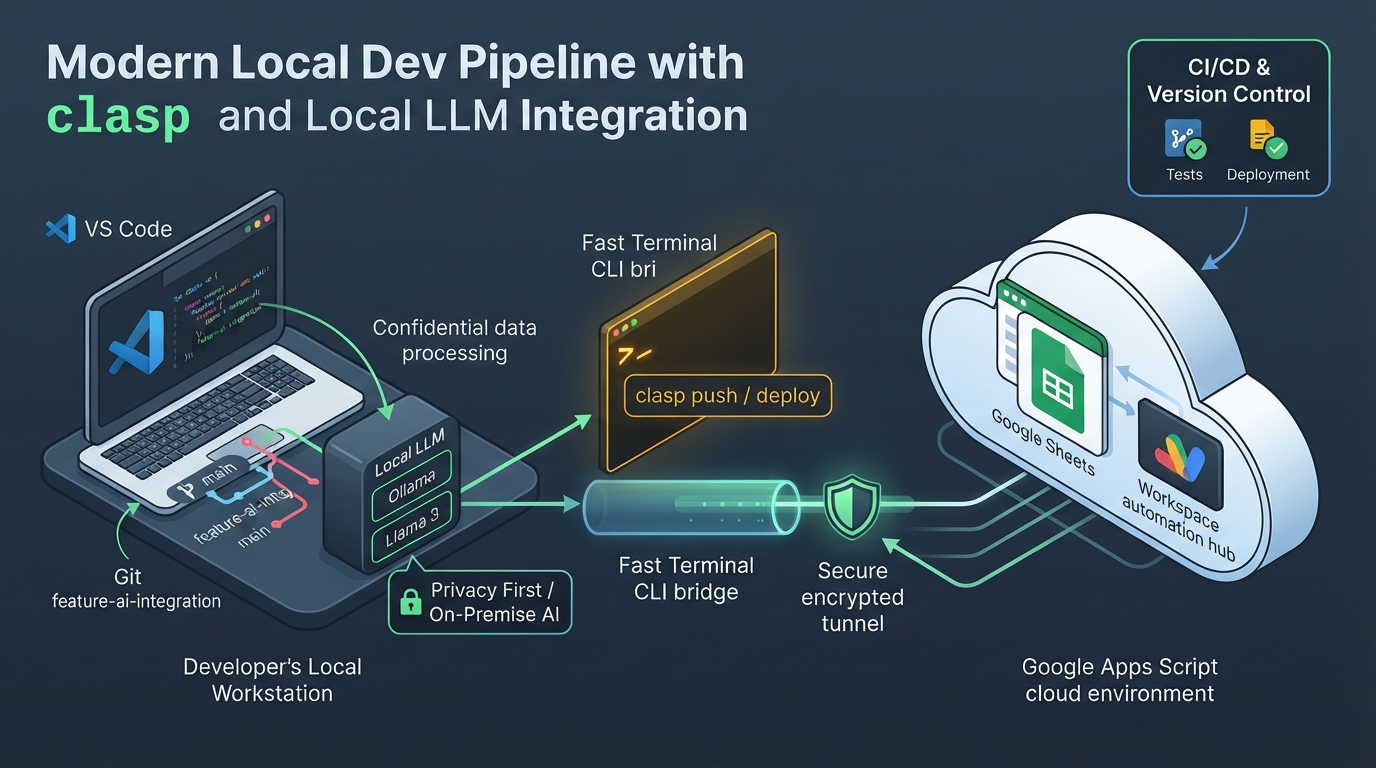
Figure 7: Modern local development environment (clasp/VS Code) integrating local LLMs and GAS — Illustrates local TypeScript development, offline testing with gas-fakes, automated CI/CD deployment with clasp, and terminal execution with ggsrun.
Technical Overview and Official References
Integrating Google's official CLI (@google/clasp), the offline mocking engine gas-fakes, and the synchronous execution CLI ggsrun brings professional software engineering practices (VS Code, Git, TypeScript, GitHub Actions) directly to GAS projects.
- Command-line Interface using clasp: Official Guide
- Google Apps Script API Overview: API Documentation
- gas-fakes Repository: GitHub (Bruce McPherson)
- ggsrun Repository: GitHub (Kanshi Tanaike)
Concrete Example: clasp ✕ gas-fakes Automated CI/CD and ggsrun Interactive CLI Control
As shown in Figure 7, developers engineer TypeScript code locally and operate across three synchronized development layers:
- Local Tier (CI/CD Unit Testing): Fast offline unit tests execute in Node.js via
gas-fakes($0 quota cost). - Deploy Tier (GitHub Actions Push): Merges to
maintrigger automated deployments viaclasp push. - Local CLI Tier (
ggsrunDirect Execution): Developers useggsrun(requiring manual OAuth) from their local terminal to execute cloud GAS functions instantly without browser interaction.
Architecture Overview
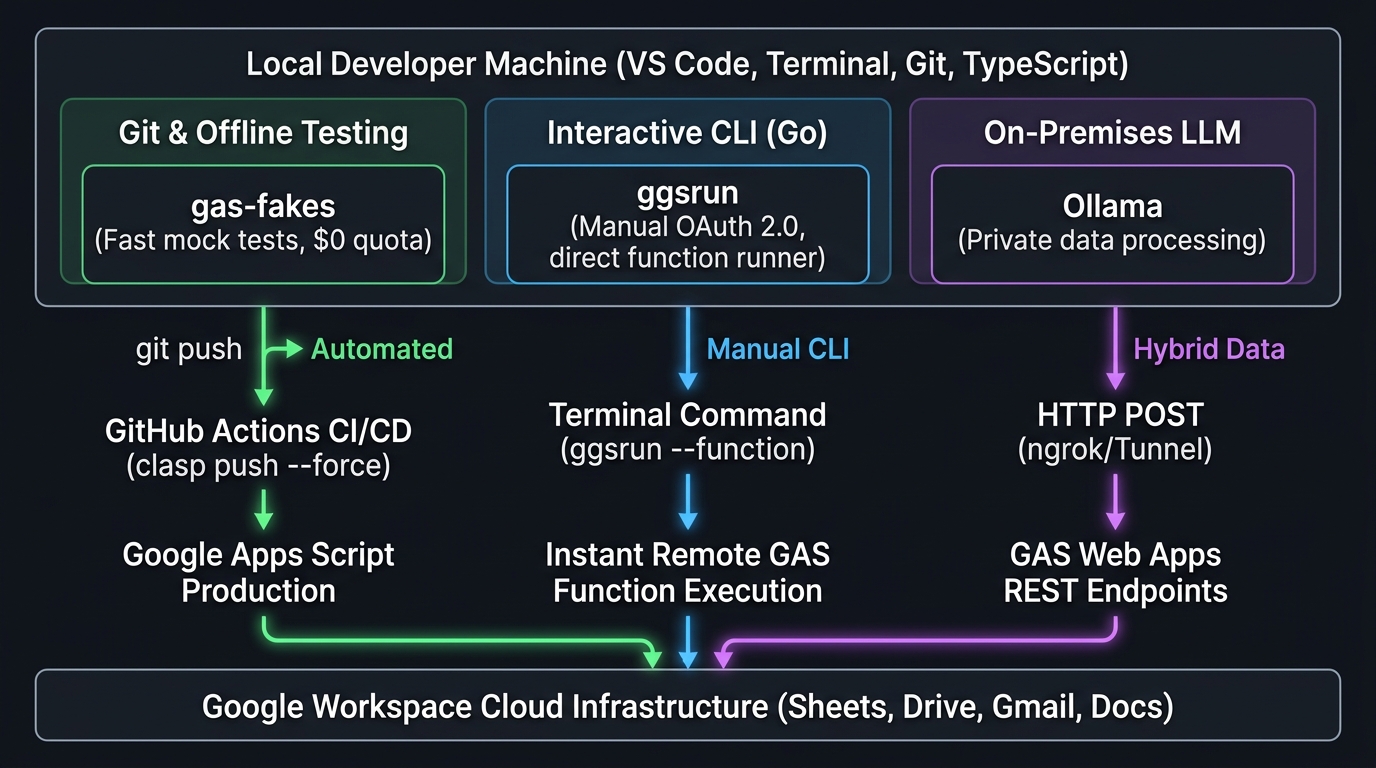
Figure 7-1: GitHub Actions CI/CD Pipeline Architecture with gas-fakes and clasp — Illustrates automated push-triggered workflow executing offline unit tests and deploying verified code to GAS cloud environments.
GitHub Actions CI/CD Pipeline (.github/workflows/deploy.yml)
name: Deploy Google Apps Script
on:
  push:
    branches: [ main ]

jobs:
  test_and_deploy:
    runs-on: ubuntu-latest
    steps:
      - uses: actions/checkout@v4
      - uses: actions/setup-node@v4
        with:
          node-version: 20

      - name: Install dependencies & gas-fakes
        run: npm ci

      # 1. Execute fast offline unit tests with gas-fakes
      - name: Run offline unit tests with gas-fakes
        run: npm test

      # 2. Deploy to GAS via clasp
      - name: Deploy to GAS via clasp
        env:
          CLASPRC_JSON: ${{ secrets.CLASPRC_JSON }}
        run: |
          echo "$CLASPRC_JSON" > ~/.clasprc.json
          npx clasp push --force
💡 Operational Note: Separation between
ggsrunandclasp
ggsrunis a high-performance Go CLI designed for interactive developer control requiring manual OAuth 2.0 browser authorization. Consequently, headless GitHub Actions CI/CD pipelines rely ongas-fakesandclasp, whileggsrunserves as the developer's direct terminal bridge for rapid post-deployment testing and batch execution.
Key Advantages
- Modern Software Engineering Standards: Git branching, TypeScript type safety, instant offline mock testing, and automated GitHub Actions deployments fully integrated.
- Direct Terminal Control via
ggsrun: Execute and debug cloud GAS functions directly from the terminal without opening the web editor. - On-Premises Data Privacy: Process confidential enterprise data locally with Ollama (Llama 3) and sync only sanitized summaries to Google Workspace via GAS Web Apps.
Limitations and Operational Considerations
- Inbound Communication Setup: Pushing from local machines to GAS Web Apps is straightforward; sending requests from GAS back to local environments requires secure tunnels (Cloudflare Tunnel or ngrok).
Advanced Patterns and Extensions
- Local Batch Automation via
ggsrun: Python or Node.js data processing scripts invokeggsrunto write aggregated metrics directly into Sheets and Docs. - Confidential Contract Review with Local LLMs: Legal teams analyze proprietary NDAs locally using Ollama and log review status to Sheets via GAS.
Related Articles and References
- Mastering Google Apps Script CI/CD: Seamless GitHub Actions Integration with gas-fakes
- Orchestrating Google Workspace with Antigravity CLI: A High-Performance Agentic Framework
- From Data Silos to Unified RAG: Gemini CLI Extensions Unify Local and Google Workspace for a Powerful File Search
- Bridging the Gap: Seamless Integration for Local Google Apps Script Development
- Streamlining Google Apps Script Development with Gemini CLI Extensions and VSCode
8. Deterministic Output Guardrails & Sandboxing for AI Outputs
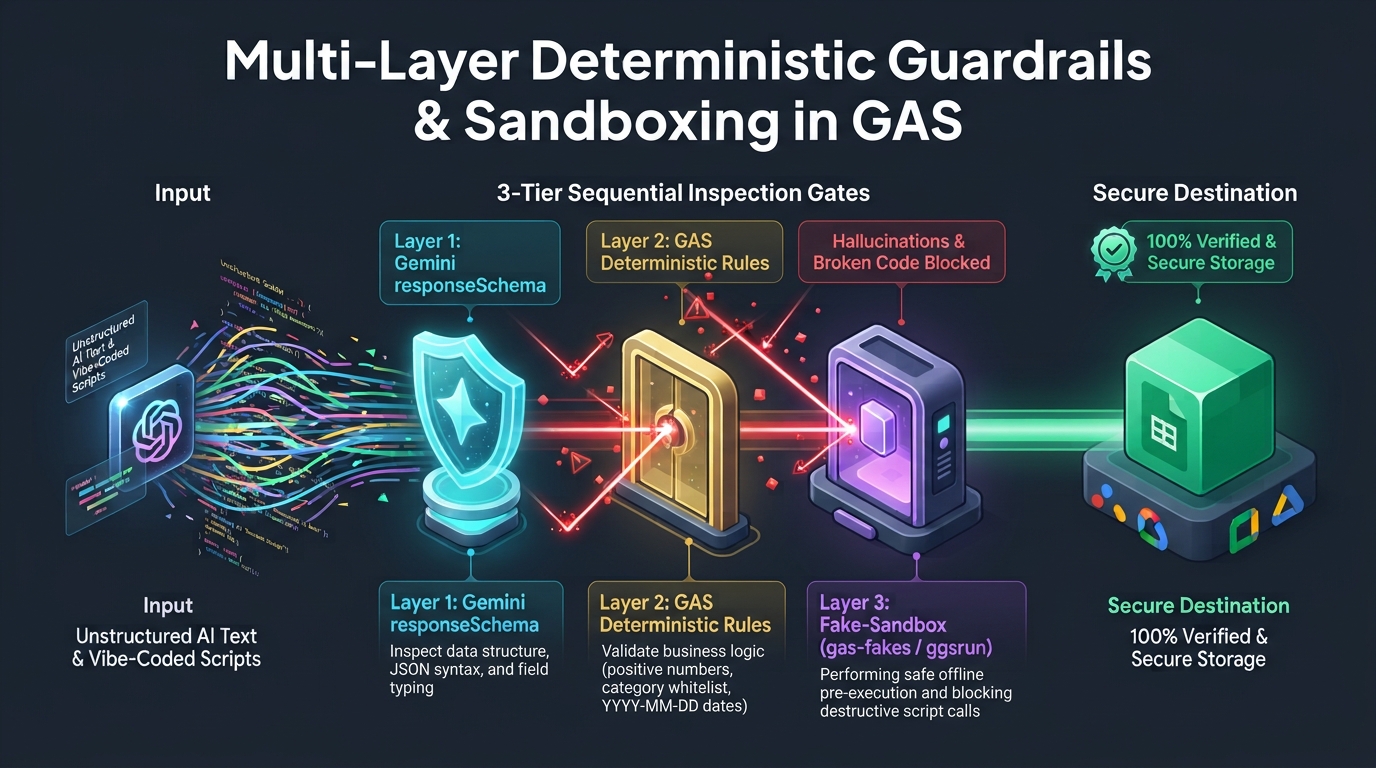
Figure 8: Multi-layer deterministic validation guardrails inspecting AI outputs — Illustrates 4-tier inspection gates encompassing Gemini responseSchema syntax enforcement, GAS business rule verification, and sandboxed pre-execution validation.
Technical Overview and Official References
While Generative AI provides unmatched flexibility with unstructured text, it carries intrinsic hallucination risks. In the emerging era of Vibe Coding—where developers and business users prompt LLMs to generate and execute code spontaneously on the fly—running unverified AI-generated script logic directly in production Workspace environments poses severe security and data-corruption vulnerabilities.
By combining Gemini's responseSchema (native JSON Schema enforcement) at Layer 1 and GAS JavaScript logic at Layer 2 with sandboxed pre-execution validation (gas-fakes and ggsrun) at Layer 3 via the Model Context Protocol (MCP), developers establish multi-layer defense gates ensuring vibe-coded scripts run safely in isolated sandboxes before ever touching production data.
- Official Reference: Gemini API: Structured Outputs
- Antigravity CLI Orchestration Framework: Orchestrating Google Workspace with Antigravity CLI
- Sandboxing Guide: Exploring Sandboxing for AI-Generated Google Apps Script
- Fake-Sandbox Guide: A Fake-Sandbox for Google Apps Script
- Schema Enforcement Guide: Taming the Wild Output: Effective Control of Gemini API Response Formats
Concrete Example 1: Schema Enforcement and Deterministic Guardrails for Expense Claims
As illustrated in Figure 8, multi-layer defense guardrails validate structured AI data outputs across sequential stages:
- Input Ingestion: Receipt notes or expense claims submitted as unstructured natural language.
- Layer 1 (Gemini
responseSchema): Native model-level schema enforcement guarantees structural JSON syntax, required fields, and enumerated types. - Layer 2 (GAS Deterministic Validation): JavaScript logic strictly verifies business rules (positive integer amounts, approved expense categories, valid YYYY-MM-DD dates).
- Deterministic Storage: Only verified, fully compliant data is committed to production Google Sheets.
Execution Instructions
- Open the Apps Script editor attached to your Google Sheet.
- Navigate to [Project Settings] (gear icon) > [Script Properties] and add
GEMINI_API_KEY. - Paste the script below into
Code.gs. - Select
testExecuteAiWithGuardrailfrom the top function menu and click [Run]. - Check the execution log and observe the verified record securely appended to the "ExpenseClaims" sheet.
Production Script (Data Extraction & Validation Implementation)
/**
 * Test function: execute from Apps Script editor with 1 click
 */
function testExecuteAiWithGuardrail() {
  const sampleInput = "Yesterday on 2026-08-20, I paid $35 for an Uber ride to visit a prospective client.";
  const result = executeAiWithGuardrail(sampleInput);
  Logger.log("Guardrail validation succeeded: " + JSON.stringify(result));
}

/**
 * Validates AI output across multiple guardrails and records to Sheets
 * @param {string} userInput Unstructured user expense description
 * @return {object} Verified structured expense record
 */
function executeAiWithGuardrail(userInput) {
  const apiKey = PropertiesService.getScriptProperties().getProperty("GEMINI_API_KEY");
  if (!apiKey) {
    throw new Error("GEMINI_API_KEY is not set. Configure it in Script Properties.");
  }

  // Layer 1: Native JSON Schema Enforcement via responseSchema
  const responseSchema = {
    type: "OBJECT",
    properties: {
      amount: { type: "INTEGER", description: "Expense amount as a positive integer" },
      category: {
        type: "STRING",
        enum: ["Travel", "Entertainment", "Office Supplies"],
        description: "Standard expense category",
      },
      date: { type: "STRING", description: "Transaction date in YYYY-MM-DD format" },
    },
    required: ["amount", "category", "date"],
  };

  const url = `https://generativelanguage.googleapis.com/v1beta/models/gemini-3.6-flash:generateContent?key=${apiKey}`;
  const res = UrlFetchApp.fetch(url, {
    method: "post",
    contentType: "application/json",
    payload: JSON.stringify({
      contents: [
        {
          parts: [{ text: `Extract expense details from the following request.
Input: ${userInput}` }],
        },
      ],
      generationConfig: {
        responseMimeType: "application/json",
        responseSchema: responseSchema,
      },
    }),
    muteHttpExceptions: true,
  });

  if (res.getResponseCode() !== 200) {
    throw new Error(`Gemini API Error: ${res.getResponseCode()} - ${res.getContentText()}`);
  }

  const jsonResponse = JSON.parse(res.getContentText());
  const rawJson = jsonResponse?.candidates?.[0]?.content?.parts?.[0]?.text;
  if (!rawJson) throw new Error("No response payload received from AI.");

  let parsed;
  try {
    parsed = JSON.parse(rawJson);
  } catch (e) {
    throw new Error(`JSON Parse Failure: ${e.message}`);
  }

  // Layer 2: Deterministic Business Rule Validation in GAS
  if (typeof parsed.amount !== "number" || parsed.amount <= 0 || !Number.isInteger(parsed.amount)) {
    throw new Error(`Invalid expense amount: ${parsed.amount}`);
  }
  const validCategories = ["Travel", "Entertainment", "Office Supplies"];
  if (!validCategories.includes(parsed.category)) {
    throw new Error(`Invalid expense category: ${parsed.category}`);
  }
  if (!/^\d{4}-\d{2}-\d{2}$/.test(parsed.date) || isNaN(Date.parse(parsed.date))) {
    throw new Error(`Invalid date format: ${parsed.date}`);
  }

  // Persist only clean, fully compliant data to Google Sheets
  const ss = SpreadsheetApp.getActiveSpreadsheet();
  let sheet = ss.getSheetByName("ExpenseClaims");
  if (!sheet) {
    sheet = ss.insertSheet("ExpenseClaims");
    sheet.appendRow(["Date", "Category", "Amount", "LoggedAt"]);
  }
  sheet.appendRow([parsed.date, parsed.category, parsed.amount, new Date()]);

  return parsed;
}
Concrete Example 2: Safe Execution of Vibe-Coded GAS via gas-fakes and ggsrun Sandboxes
In local terminal workflows (VS Code / terminal) or cloud-hosted agent environments where users practice "Vibe Coding"—generating and running GAS scripts on the fly from natural language prompts—Layer 3: Fake-Sandbox Pre-Execution serves as a vital safety mechanism:
- Dynamic Code Synthesis: An autonomous agent or developer prompts Gemini to generate a GAS script (e.g., "Clean up unorganized files across my project folder").
- Sandboxed Dry-Run: Before executing against production Workspace infrastructure, the unverified script is executed inside a local or virtual Fake-Sandbox powered by
gas-fakesorggsrun. - Pre-Execution Threat Neutralization: Sandboxes intercept and block destructive operations (such as
DriveApp.getFileById().setTrashed(true)or unauthorizedGmailApp.sendEmail()broadcasts), infinite loops, and scope violations. - Verified Production Deployment: Only scripts that pass all sandbox safety assertions are pushed to production Google Workspace environments via MCP or
clasp/ggsrun.
For a comprehensive architectural breakdown, refer to Orchestrating Google Workspace with Antigravity CLI: A High-Performance Agentic Framework.
Key Advantages
- Zero Contamination of Production Databases: Strict 2-tier validation completely eliminates broken schemas, type errors, and hallucinated fields.
- Safe Execution of Vibe-Coded Scripts:
gas-fakesandggsrunsandboxing engines ensure dynamically synthesized code cannot corrupt enterprise files or trigger unintended operations. - Early Detection and Automated Retry: Self-correcting retry loops feed validation errors back to Gemini prompts for automatic query adjustment.
Limitations and Operational Considerations
- Schema Synchronization: When business rules evolve, both the
responseSchemadefinition and GAS validation arrays must be updated in sync.
Advanced Patterns and Extensions
- AI-Generated SQL Sanitization: Regex filters scan AI-generated SQL queries for destructive commands (
DROP,DELETE) before execution. - Template Placeholder Verification: Ensures AI translations preserve required template tokens (e.g.,
{userName},{orderId}). - Master Data Cross-Referencing: Validates that AI-extracted customer names or product IDs exist in master spreadsheets using fast
Set/Maplookups.
Related Articles and References
- Orchestrating Google Workspace with Antigravity CLI: A High-Performance Agentic Framework
- Exploring Sandboxing for AI-Generated Google Apps Script
- A Fake-Sandbox for Google Apps Script
- Taming the Wild Output: Effective Control of Gemini API Response Formats with response_schema
- Gemini API with JSON schema
9. Human-in-the-Loop (HITL) Interactive Approval Workflows
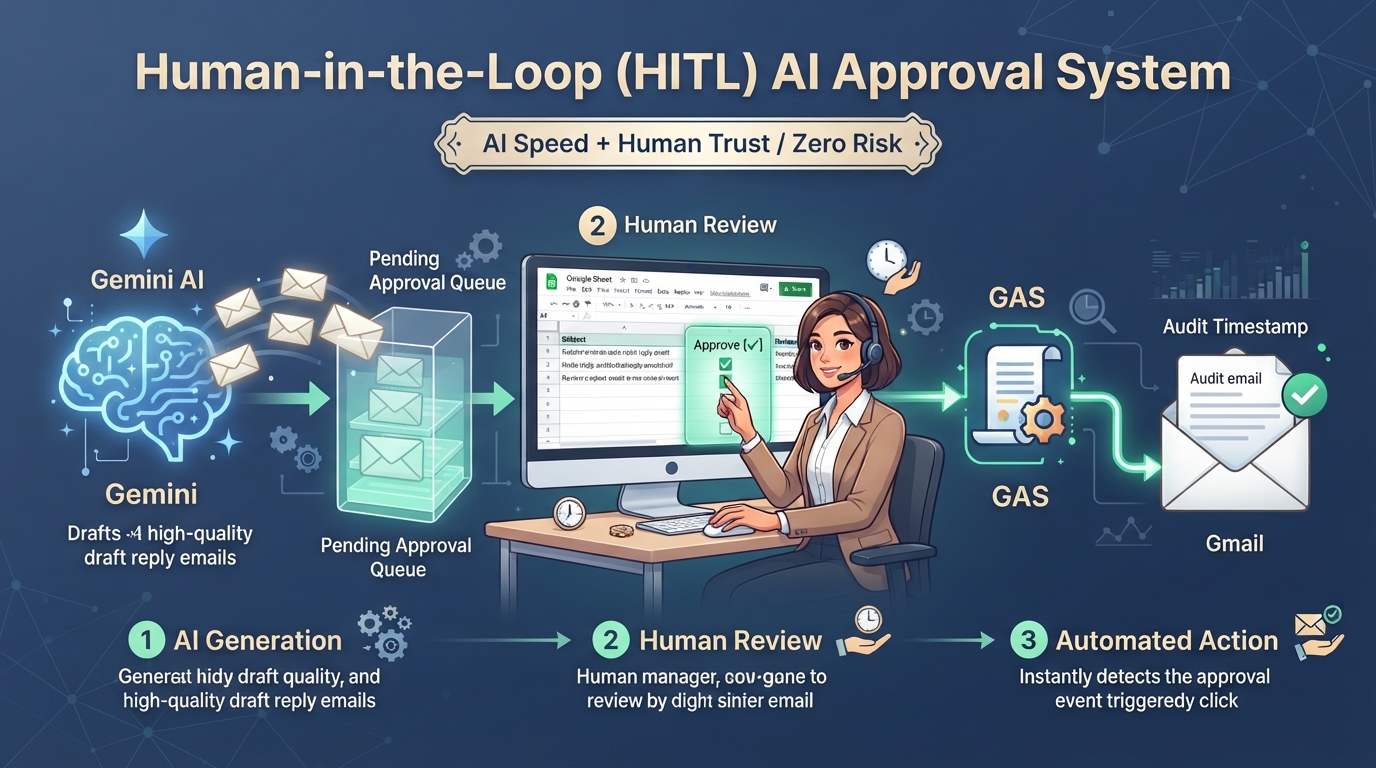
Figure 9: Human-in-the-Loop interactive approval workflow architecture — Illustrates AI drafting followed by mandatory spreadsheet checkbox authorization (onEdit) before irreversible email dispatch.
Concrete Example: AI Response Drafting and Spreadsheet-Based One-Click Approval
As illustrated in Figure 9, the Human-in-the-Loop (HITL) approval workflow executes through five secure stages:
- Customer submits an inquiry email; Gemini analyzes the context and drafts a suggested response.
- The draft is staged in the "ApprovalQueue" sheet or saved in Gmail's "Drafts" folder.
- A support manager reviews the draft and clicks the "Approve" checkbox in column E.
- An installable
onEdittrigger immediately detects the approval event. - GAS executes the finalized email dispatch, records timestamped completion, and clears the checkbox.
Execution Instructions
- Open the Apps Script editor attached to your Google Sheet.
- Paste the script below into
Code.gs. - Select
setupTestApprovalQueuefrom the function dropdown and click [Run] to automatically scaffold the "ApprovalQueue" sheet with sample records and checkboxes. - Navigate to [Triggers] (clock icon) > [Add Trigger], select
onEditTrigger, and set the event type to "On edit". - Return to the sheet and check the box in column E to trigger the live email dispatch.
Production Script (Interactive Checkbox Approval Gate)
/**
 * Test setup function: scaffolds the approval sheet and sample records
 */
function setupTestApprovalQueue() {
  const ss = SpreadsheetApp.getActiveSpreadsheet();
  let sheet = ss.getSheetByName("ApprovalQueue");
  if (!sheet) {
    sheet = ss.insertSheet("ApprovalQueue");
  }
  sheet.clear();
  sheet.appendRow(["CustomerEmail", "DraftID", "Subject", "BodyDraft", "Approve", "Status", "Timestamp"]);

  sheet.appendRow([
    Session.getActiveUser().getEmail() || "test@example.com",
    "draft_001",
    "Customer Support Response",
    "Thank you for contacting enterprise support. Regarding your inquiry...",
    false,
    "PENDING_REVIEW",
    ""
  ]);
  sheet.getRange("E2").insertCheckboxes();
  SpreadsheetApp.flush();
  Logger.log("Approval queue scaffolded. Check box E2 to test live dispatch.");
}

/**
 * Installable onEdit trigger monitoring human approval checkboxes.
 * Dispatches customer communications only when explicitly approved.
 */
function onEditTrigger(e) {
  if (!e || !e.range) return;

  const sheet = e.range.getSheet();
  if (sheet.getName() !== "ApprovalQueue") return;

  const row = e.range.getRow();
  const col = e.range.getColumn();

  // Column 5: Approval Checkbox (TRUE / FALSE)
  // Column 6: Execution Status
  if (col === 5 && e.value === "TRUE") {
    const status = sheet.getRange(row, 6).getValue();
    if (status === "APPROVED_AND_SENT") return;

    const customerEmail = sheet.getRange(row, 1).getValue();
    const emailSubject = sheet.getRange(row, 3).getValue();
    const aiDraftBody = sheet.getRange(row, 4).getValue();

    if (!customerEmail || !aiDraftBody) {
      sheet.getRange(row, 6).setValue("ERROR: Missing Fields");
      return;
    }

    // 1. Dispatch finalized email
    GmailApp.sendEmail(customerEmail, emailSubject, aiDraftBody);

    // 2. Lock row status to prevent duplicate dispatches
    sheet.getRange(row, 6).setValue("APPROVED_AND_SENT");
    sheet.getRange(row, 5).clearContent(); // Clear checkbox
    sheet.getRange(row, 7).setValue(new Date());

    SpreadsheetApp.getActiveSpreadsheet().toast(
      `Email dispatched to ${customerEmail}`,
      "Approval Complete"
    );
  }
}
⚠️ Important Trigger Requirement
SimpleonEdit(e)triggers run in restricted read-only authorization mode and cannot invokeGmailApp.sendEmail(). You must configure an Installable Trigger via [Triggers] (clock icon) > [Add Trigger] > [On edit].
Key Advantages
- Zero Accidental Dispatches: AI drafts emails and classifies tickets, but irreversible actions require human approval.
- Intuitive Collaborative Console: Operational managers approve tasks directly within familiar spreadsheet interfaces.
Limitations and Operational Considerations
- Rapid Clicking Race Conditions: When users check multiple boxes rapidly, use LockService to prevent race conditions.
Advanced Patterns and Extensions
- Executive Expense Authorization: Department heads check approval boxes on expense reports, triggering automated bank CSV export and accounting notifications.
- Applicant Screening Gates: HR reviewers inspect AI-screened candidate profiles and check boxes to trigger automated interview invitation emails.
Related Articles and References
- Protecting Cells of Spreadsheet by Clicking Checkbox using Google Apps Script
- Detecting Quickly Checked Checkboxes on Google Spreadsheet using Google Apps Script
10. External SaaS Webhook Ingestion & Secure Proxy Gateways
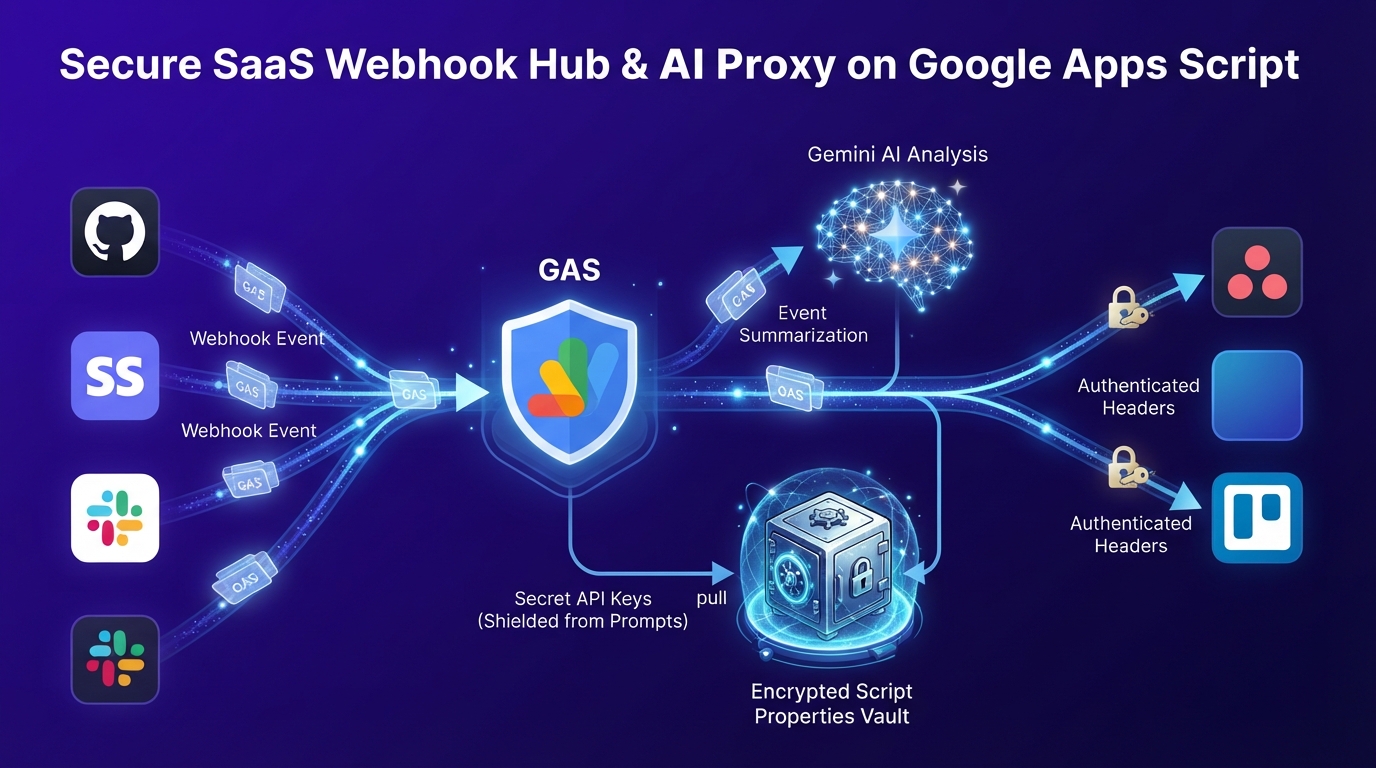
Figure 10: Secure proxy gateway ingesting external SaaS webhooks and shielding API keys — Illustrates zero-trust webhook ingestion, server-side secret encapsulation via PropertiesService, and downstream API forwarding.
Concrete Example: External SaaS Webhook Ingestion & Secure Proxy Gateways
As illustrated in Figure 10, the secure proxy gateway operates across four zero-trust stages:
- External SaaS platforms (GitHub, Stripe, Slack) transmit event webhooks to the GAS Web App endpoint.
- GAS validates HMAC request signatures or Bearer tokens to eliminate unauthorized traffic.
- GAS retrieves sensitive third-party API credentials from
PropertiesService, keeping secrets completely hidden from AI prompts and client contexts. - Gemini analyzes the payload for task priority, and GAS posts structured tasks downstream while synchronizing Workspace records.
Execution Instructions
- Open [Project Settings] > [Script Properties] and add property
SAAS_API_SECRET_KEYwith your SaaS API token. - Paste the script below and run
testSecurePostTaskToExternalSaaSto verify that external payloads are dispatched with server-side injected credentials.
Production Script (Credential-Shielded Task Forwarding)
/**
 * Test function: execute from Apps Script editor
 */
function testSecurePostTaskToExternalSaaS() {
  securePostTaskToExternalSaaS(
    "Q3 Financial Report Synthesis",
    "AI-summarized task: Aggregate multi-currency ledgers and compile summary slide deck."
  );
}

/**
 * Forward AI-summarized tasks securely to an external SaaS project management tool.
 */
function securePostTaskToExternalSaaS(taskTitle, taskDetail) {
  // Retrieve SaaS secrets from encrypted Script Properties
  // Secrets are NEVER exposed to client browsers or LLM prompts
  const saasApiKey = PropertiesService.getScriptProperties().getProperty("SAAS_API_SECRET_KEY");
  const endpoint = "https://api.example-saas.com/v1/tasks";

  const payload = {
    title: taskTitle,
    description: taskDetail,
    createdAt: new Date().toISOString(),
  };

  const options = {
    method: "post",
    headers: {
      Authorization: `Bearer ${saasApiKey}`,
      "X-Custom-Header": "GAS-Secure-Proxy",
      "Content-Type": "application/json",
    },
    payload: JSON.stringify(payload),
    muteHttpExceptions: true,
  };

  const response = UrlFetchApp.fetch(endpoint, options);
  Logger.log(`External API Response Status: ${response.getResponseCode()}`);
}
Key Advantages
- Prompt Injection Resilience: Even if an LLM is manipulated via adversarial inputs, it cannot leak corporate API keys because authentication headers are injected server-side by GAS.
- Centralized SaaS Routing: Consolidates authentication flows (Bearer tokens, Basic auth, HMAC signatures) across multiple SaaS vendors.
Limitations and Operational Considerations
- Payload Size Limits: Standard
UrlFetchApprequests support payloads up to 50 MB.
Advanced Patterns and Extensions
- Customer Support Router: Classifies incoming Zendesk/Intercom webhooks with Gemini and routes urgent tickets to Jira and VIP notices to Slack.
- Payment Dispute Orchestrator: Ingests Stripe dispute webhooks, retrieves customer transaction logs from Drive, and prepares an audit dossier.
Related Articles and References
- Unlocking Infinite Automation: Integrating Google Apps Script with Gemini Spark
- Understanding Flow of Request to Web Apps Created by Google Apps Script
- Uploading Image Files to Slack Using Incoming Webhooks by Google Apps Script
11. High-Throughput Hybrid Batch Processing & Prompt Request Packing
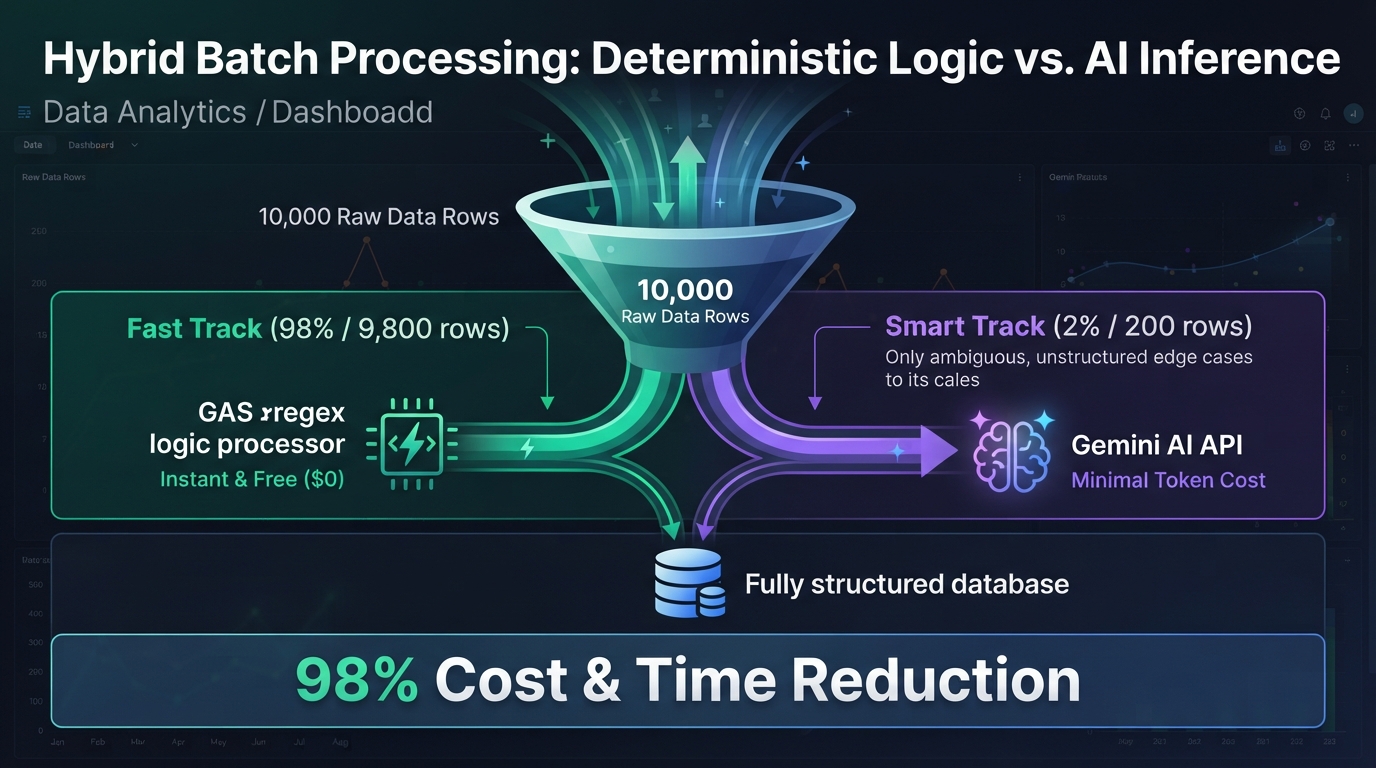
Figure 11: Hybrid batch processing architecture combining deterministic logic and packed AI inference — Illustrates zero-cost in-memory pre-screening for 98% of rows and chunked request packing for the remaining 2% edge cases.
Technical Overview and Official References
Processing tens of thousands of spreadsheet rows with LLMs incurs prohibitive latency and cost. As illustrated in Figure 11, applying Deterministic Screening (filtering 98% of standard rows using in-memory JavaScript regexes at $0 cost) and Prompt Request Packing (chunking 20 unstructured rows into a single batched JSON array payload) reduces API invocations by up to 95% while staying well within the GAS 6-minute execution window.
- Batch Operations Best Practices: Google Sheets Best Practices
- Time-driven Triggers Guide: Installable Triggers
Concrete Example: Cleansing 10,000 Customer Records with Request Packing
As illustrated in Figure 11 and Figure 11-1, high-throughput hybrid batch processing combines two optimization stages:
- The script ingests thousands of raw spreadsheet rows into memory in a single read operation.
- Deterministic Pre-Screening: In-memory JavaScript regexes cleanse 98% of standard rows in milliseconds at zero API cost.
- Chunked Request Packing: The remaining 2% of unstructured edge cases are packed into chunks of 20 items per JSON array prompt, requiring only 10 API requests instead of 200.
- Parsed results are written back to Google Sheets in a single batch, avoiding platform timeouts and slashing API costs by 98%.
Batch Packing Architecture Overview
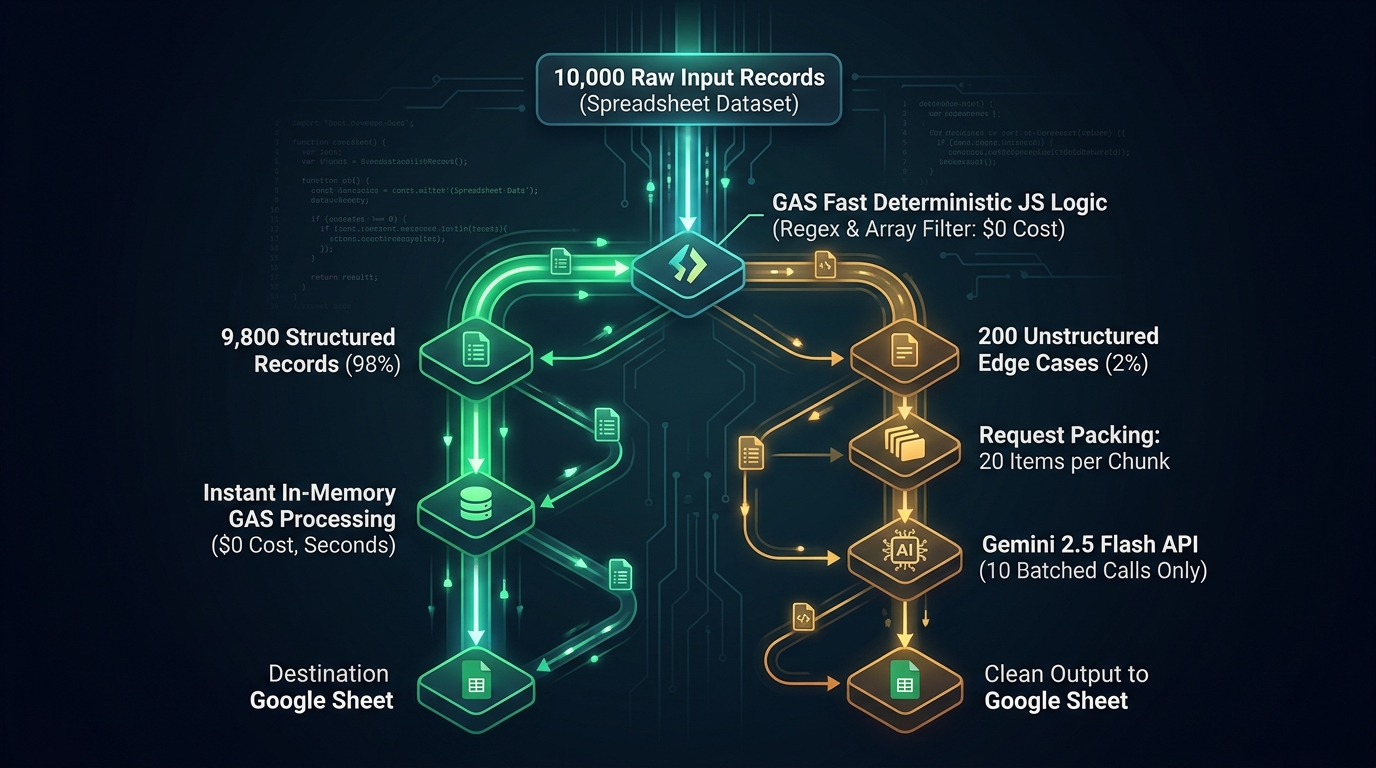
Figure 11-1: High-Throughput Hybrid Batch Processing & Prompt Request Packing Architecture — Illustrates the multi-stage pipeline combining zero-cost in-memory pre-screening for 98% of rows and chunked request packing for the remaining 2% edge cases.
Execution Instructions
- Open your Apps Script project and register
GEMINI_API_KEYunder Script Properties. - Paste the script below into
Code.gs. - Run
setupSampleDataAndRunBatchfrom the function dropdown to scaffold sample customer rows and execute the hybrid batch pipeline with request packing.
Production Script (Chunked Request Packing)
/**
 * Test setup function: scaffolds sample dataset and triggers batch execution
 */
function setupSampleDataAndRunBatch() {
  const ss = SpreadsheetApp.getActiveSpreadsheet();
  let sheet = ss.getSheetByName("RawCustomerData");
  if (!sheet) {
    sheet = ss.insertSheet("RawCustomerData");
  }
  sheet.clear();
  sheet.appendRow(["PhoneNumber (Raw)"]);

  const sampleRows = [
    ["090-1234-5678"],
    ["03-1234-5678"],
    ["09012345678"],      // Irregular (Routed to AI packing queue)
    ["080 9876 5432"],    // Irregular (Routed to AI packing queue)
    ["0120-111-222"]
  ];
  sheet.getRange(2, 1, sampleRows.length, 1).setValues(sampleRows);
  SpreadsheetApp.flush();

  processHybridBatch();
}

function processHybridBatch() {
  const sheet = SpreadsheetApp.getActiveSpreadsheet().getSheetByName("RawCustomerData");
  const data = sheet.getDataRange().getValues();
  const results = [];
  const aiQueue = [];

  const phoneRegex = /^0\d{1,4}-\d{1,4}-\d{4}$/; // Standard format checker

  // Step 1: Fast deterministic screening in GAS memory ($0 cost)
  for (let i = 1; i < data.length; i++) {
    const rawPhone = String(data[i][0]).trim();
    if (phoneRegex.test(rawPhone)) {
      results.push([i + 1, data[i][0], "Deterministic_Cleansed", rawPhone]);
    } else {
      aiQueue.push({ rowIndex: i + 1, rawText: rawPhone });
    }
  }

  // Step 2: Pack edge cases into chunks of 20 items per API request
  if (aiQueue.length > 0) {
    const apiKey = PropertiesService.getScriptProperties().getProperty("GEMINI_API_KEY");
    const chunkSize = 20;

    for (let c = 0; c < aiQueue.length; c += chunkSize) {
      const chunk = aiQueue.slice(c, c + chunkSize);
      const prompt = `Normalize the following irregular phone number records into standard format (e.g., 090-1234-5678).
Return strictly a JSON array preserving the original item order.
Input List: ${JSON.stringify(chunk)}`;

      const url = `https://generativelanguage.googleapis.com/v1beta/models/gemini-3.6-flash:generateContent?key=${apiKey}`;
      const res = UrlFetchApp.fetch(url, {
        method: "post",
        contentType: "application/json",
        payload: JSON.stringify({
          contents: [{ parts: [{ text: prompt }] }],
          generationConfig: { responseMimeType: "application/json" },
        }),
        muteHttpExceptions: true,
      });

      if (res.getResponseCode() === 200) {
        const parsedResults = JSON.parse(
          JSON.parse(res.getContentText()).candidates[0].content.parts[0].text
        );
        parsedResults.forEach((item) => {
          results.push([
            item.rowIndex,
            item.rawText,
            "AI_Cleansed",
            item.normalized || item.rawText,
          ]);
        });
      }
    }
  }

  Logger.log(`Batch execution complete. Total records processed: ${results.length}`);
}
Key Advantages
- 95% Call Reduction via Packing: Compacting 200 edge cases into chunks of 20 reduces round-trip HTTP overhead from 200 requests to 10.
- Zero-Cost Pre-Filtering: Deterministic JavaScript array operations filter thousands of items in memory in milliseconds.
- 6-Minute Platform Compliance: Dramatically minimized network round-trips guarantee execution finishes well within GAS limits.
Limitations and Operational Considerations
- 6-Minute Execution Limit: For datasets exceeding 50,000 items, implement continuation patterns using time-driven triggers.
Advanced Patterns and Extensions
- Accounting Account Classification: Match 90% of known vendors via master dictionary lookups ($0) and pack the remaining 10% for AI inference.
- Mass Product Review Sentiment Analysis: Star 5 and Star 1 reviews are scored by numerical logic; ambiguous Star 2–4 reviews are batch-analyzed with Gemini.
Related Articles and References
- Batch Processing Powerhouse: Leverage Gemini API and Google Apps Script
- Replacing Multiple Values in Google Spreadsheet with Low Process Cost
12. Token & Cost Optimization via CacheService and PropertiesService
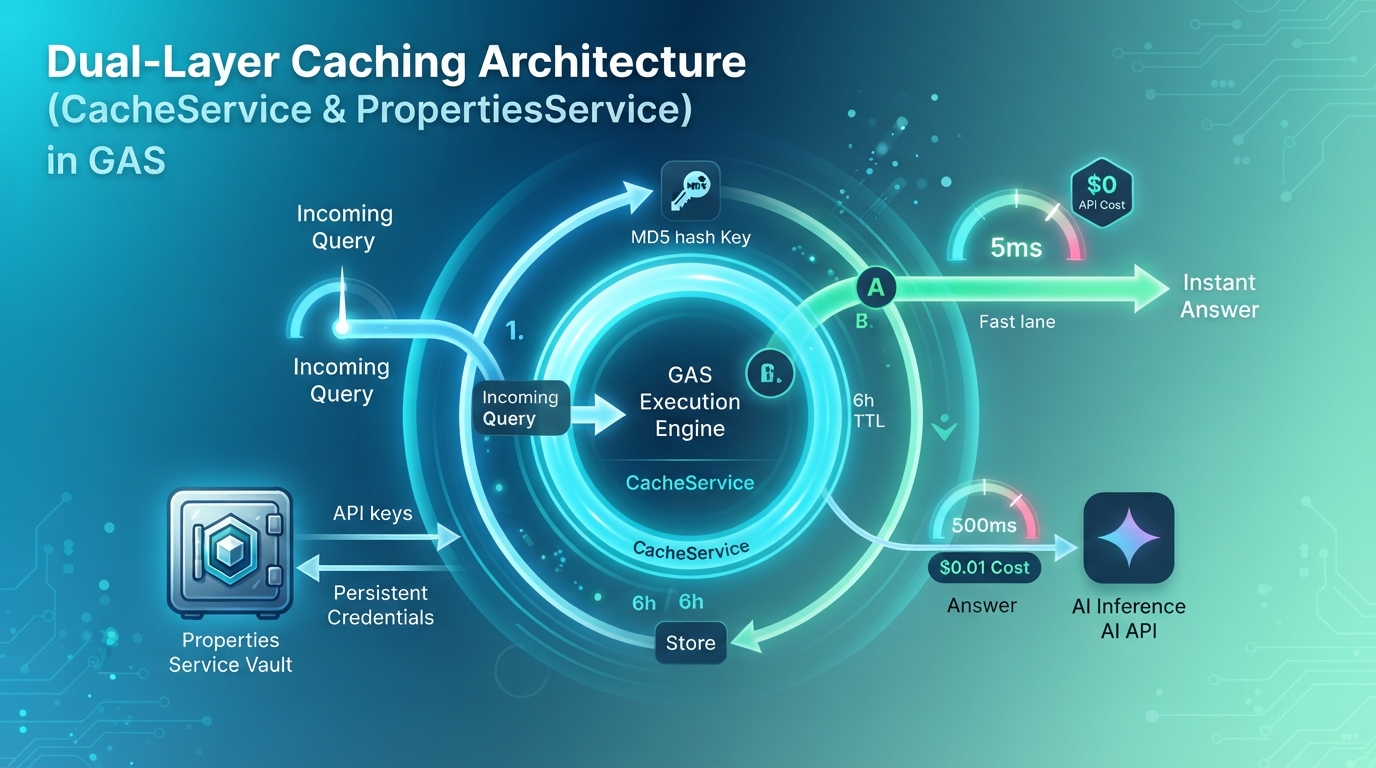
Figure 12: Multi-tier caching architecture with CacheService and PropertiesService — Illustrates cryptographic MD5 prompt hashing, sub-millisecond in-memory cache retrieval, and API bypass optimization.
Technical Overview and Official References
Google Apps Script provides two primary native storage services for state and data persistence across executions: CacheService, an ultra-fast in-memory transient key-value cache (retaining entries for up to 6 hours / 21,600 seconds), and PropertiesService, an encrypted persistent key-value store. Combining these services constructs a high-performance multi-tier caching layer that eliminates duplicate LLM inferences and achieves sub-millisecond response latencies.
- Cache Service Reference: Official Guide
- Properties Service Reference: Official Guide
Concrete Example: Semantic Response Caching via Prompt Hashing
As illustrated in Figure 12, multi-tier caching minimizes latency and duplicate costs through four sequential checks:
- The script computes a unique cryptographic MD5 hash key from the input prompt string.
- GAS queries
CacheService(in-memory cache); on a cache hit, the response returns instantly in sub-milliseconds with zero API cost. - On a cache miss, GAS dispatches the request to the Gemini API endpoint.
- The generated response is stored in
CacheService(up to 6 hours) andPropertiesServicefor future requests.
Execution Instructions
- Open [Project Settings] > [Script Properties] and configure
GEMINI_API_KEY. - Paste the script below into
Code.gs. - Run
testCallGeminiWithCachefrom the function dropdown twice consecutively. - Observe in the execution log that Run 1 invokes the live Gemini API, while Run 2 hits the sub-millisecond in-memory cache instantly.
Production Script (MD5 Hashed Prompt Caching)
/**
 * Test function: execute twice to observe cache hit behavior
 */
function testCallGeminiWithCache() {
  const prompt = "What is the single greatest advantage of Google Apps Script?";

  const start1 = new Date().getTime();
  const res1 = callGeminiWithCache(prompt);
  const elapsed1 = new Date().getTime() - start1;
  Logger.log(`[Run 1 (API Invocation)] Latency: ${elapsed1}ms | Response: ${res1.trim()}`);

  const start2 = new Date().getTime();
  const res2 = callGeminiWithCache(prompt);
  const elapsed2 = new Date().getTime() - start2;
  Logger.log(`[Run 2 (Cache Hit)] Latency: ${elapsed2}ms | Response: ${res2.trim()}`);
}

/**
 * Executes Gemini API requests with automatic multi-tier caching.
 */
function callGeminiWithCache(promptText) {
  // 1. Generate unique MD5 hash key for prompt
  const rawHash = Utilities.computeDigest(
    Utilities.DigestAlgorithm.MD5,
    promptText,
    Utilities.Charset.UTF_8
  );
  const hashKey = rawHash.map((b) => (b < 0 ? b + 256 : b).toString(16).padStart(2, "0")).join("");
  const cacheKey = `ai_cache_${hashKey}`;

  const cache = CacheService.getScriptCache();
  const ttlSeconds = 21600; // 6 hours

  // 2. Return cached response if available
  const cachedResponse = cache.get(cacheKey);
  if (cachedResponse) {
    Logger.log(`Cache Hit: ${cacheKey}`);
    return cachedResponse;
  }

  // 3. Dispatch to Gemini API on cache miss
  const apiKey = PropertiesService.getScriptProperties().getProperty("GEMINI_API_KEY");
  const url = `https://generativelanguage.googleapis.com/v1beta/models/gemini-3.6-flash:generateContent?key=${apiKey}`;

  const response = UrlFetchApp.fetch(url, {
    method: "post",
    contentType: "application/json",
    payload: JSON.stringify({ contents: [{ parts: [{ text: promptText }] }] }),
    muteHttpExceptions: true,
  });

  const json = JSON.parse(response.getContentText());
  const generatedText = json.candidates[0].content.parts[0].text;

  // 4. Cache response for 6 hours (21,600 seconds)
  cache.put(cacheKey, generatedText, ttlSeconds);
  return generatedText;
}
Key Advantages
- Zero Duplicate Inference Cost: Repetitive queries and re-evaluated formulas return instant cached results at $0 cost.
- Ultra-Low Latency: Network round-trips (1–3 seconds) drop to in-memory lookup times (sub-milliseconds).
- Rate Limit Resilience: Shields downstream APIs from 429 Too Many Requests errors during sudden traffic spikes.
Limitations and Operational Considerations
- Cache Capacity Boundaries:
CacheServicelimits individual cache entries to 100 KB. For large text corpora, store intermediate blobs in Drive orPropertiesService.
Advanced Patterns and Extensions
- OAuth Access Token Caching: Cache SaaS bearer tokens matching their expiration window (e.g., 3,600s), avoiding redundant token exchanges.
- Multi-Turn Session Context: Maintain recent conversation state in
CacheServiceacross Web App interactions for fluid multi-turn dialogues.
Related Articles and References
Conclusion: Architectural Blueprint for Google Workspace Automation in the AI Era
The exponential advancement of Generative AI has fundamentally reshaped the Google Workspace automation landscape. Far from signaling the demise of Google Apps Script, it establishes a crystal-clear Separation of Concerns: Generative AI serves as the probabilistic reasoning brain, while Google Apps Script acts as the deterministic execution hands, feet, and nervous system.
By combining generative reasoning with deterministic execution, enterprise teams achieve software quality and governance unreachable by either tool in isolation.
1. Separation of Concerns Matrix: Generative AI vs. Google Apps Script
| Architecture Dimension | Generative AI (Gemini / Workspace Studio / Spark) | Google Apps Script (GAS) |
|---|---|---|
| Optimal Data Types | Ambiguous natural language, unstructured text, media | Structured schemas, JSON, tabular numbers, master records |
| Execution Paradigm | Probabilistic & Flexible Reasoning (Context, summaries) | Deterministic & 100% Reproducible Execution (Math, validation) |
| Trigger Mechanisms | Prompt interaction, autonomous schedules, agent goals | Form submissions, cell edits (onEdit), cron timers, Webhooks |
| Security & Auth | Semantic interpretation (Unsuitable for holding raw secrets) | Encrypted storage (PropertiesService), secure proxy dispatch |
| Cost & Latency | Per-token pricing, inference latency (seconds) | Zero-cost serverless execution, in-memory caching (milliseconds) |
| UI Integration | Chat panels, prompt dialogs | Formula custom functions (spill), sidebars, modal dialogs, menus |
2. Four Practical Principles for Enterprise-Grade Automation
- Principle 1: Separate the Brain from the Nervous System and Fix Scripts for Determinism
Delegate fuzzy semantic understanding, creative synthesis, and unstructured extraction to AI models. Delegate mathematical calculations, rigid business rules, state persistence, and OAuth management to GAS. For routine workflows, compile natural-language instructions into fixed GAS scripts rather than repeatedly invoking runtime LLM API reasoning, thereby guaranteeing 100% deterministic reproducibility and sub-second execution latency. Never spend tokens where a deterministic JavaScript regex or array filter can execute for free in milliseconds. - Principle 2: Enforce Multi-Layered Guardrails and Sandboxing
Never pipe raw LLM text directly into mission-critical systems. Enforce strict JSON Schemas (responseSchema) at the model layer and validate types, boundaries, and foreign keys in GAS before committing writes. For dynamically generated script code, perform pre-execution dry-runs in sandboxed environments (gas-fakes). - Principle 3: Gate High-Stakes Actions with Human Authorization (HITL)
For operations involving external data transmission, destructive modifications, or monetary transactions, design systems that produce drafts or staging rows, requiring explicit human sign-off (via checkboxes or dialogs) before irreversible execution. - Principle 4: Optimize Throughput via Hybrid Batching and Request Packing
Maximize throughput and respect platform execution windows (e.g., the GAS 6-minute ceiling) by screening standard cases with deterministic code and packing residual unstructured items into batch prompts. Couple this with multi-tier in-memory caching to minimize operational costs.
3. To the Engineers Pioneering the Next Generation of Workspace Automation
Google Apps Script has matured into a fully recognized Google Workspace Core Service Ref. With Gemini embedded directly in the script editor Ref and professional CLI tooling (@google/clasp, ggsrun, gas-fakes) Ref, the developer experience has reached unprecedented heights.
In an era where AI writes code, the supreme value of the software engineer lies not in rote syntax memorization, but in holistic system architecture design and the elegant orchestration of probabilistic intelligence with deterministic cloud substrates.
By harmonizing the cognitive agility of Generative AI with the rock-solid execution foundation of Google Apps Script, developers can architect the resilient, intelligent, and scalable enterprise automations of tomorrow.
Comments
More Blog
View allaiBuilding a Multimodal, Suggestion-Based AI Writing Coach with Gemini and Google Docs
When we use generative AI to proofread our daily writing—whether technical reports, business...
T
TanaikegeminiBuilding a Cross-Model Collaborative Workflow with Google Antigravity
Orchestrating Multiple AI Agents in Parallel via Custom Skills Series 1/2: Multi-Model...
J
JimmyLiaodevedComic Studio AI: Turning Voice & Text Prompts into 4-Panel Comics with Google AI Studio, Gemini & Imagen
How I built a voice-and-text-to-4-panel comic generator with Google AI Studio, Gemini structured outputs, a teacher script-review gate, and Imagen 4.
R
Robina Mirbaharai[AI in Practice] Upgrading from Gemini 3.5/3.6 to Gemini 4 Argon: Migration Notes and Pitfalls for LINE Bot Developers
Background I have a LINE Bot that I use every day, linebot-helper-python. I use it daily...
E
Evan LingooglecloudSix Months After Cloud Next ‘26: A Builder’s Tour of the Gemini Enterprise Agent Platform
What actually shipped across Build, Scale, Govern, and Optimize — and what I'd tell a team starting...
J
Jonathan Zhuo 1
gemini4argonGenerating a Physics Lab in Minutes with Gemini 4 Argon and Antigravity
We have all faced a new concept or a textbook chapter that raised more questions than anything....
L
Laurent PicardReady-made automations for this
Workflows from the Neura Market marketplace related to this Gemini resource
- AI-Powered Upwork Cover Letter Generator - Pinecone, Groq, Google Gemini, SerpAPIn8n · $14.99 · Related topic
- Process Documents with Recursive Chunking Using Google Drive, OpenAI & Gemini RAGn8n · $14.99 · Related topic
- Automated Reservation System with Telegram, Google Gemini AI, and Google Sheetsn8n · $9.99 · Related topic
- Build AI Agents with Think-Plan-Act Architecture Using Llama-4 Reasoningn8n · $24.99 · Related topic