
Back to Blog cli
cli
 gemma
gemma community
 ai
ai ai
ai githubactions
 ai
ai
I Built a Terminal Dashboard to Keep Track of All My Local Projects
Roie Ambulo June 3, 2026
0 views
A terminal dashboard that scans your local projects and shows stack, git activity, and status at a glance. Open in editor, run scripts, or launch a terminal from one TUI.
title: I Built a Terminal Dashboard to Keep Track of All My Local Projects published: true description: A terminal dashboard that scans your local projects and shows stack, git activity, and status at a glance. Open in editor, run scripts, or launch a terminal from one TUI. tags: cli, tui, productivity, opensource
canonical_url:
cover_image:
ovw • a terminal overview for your local projects
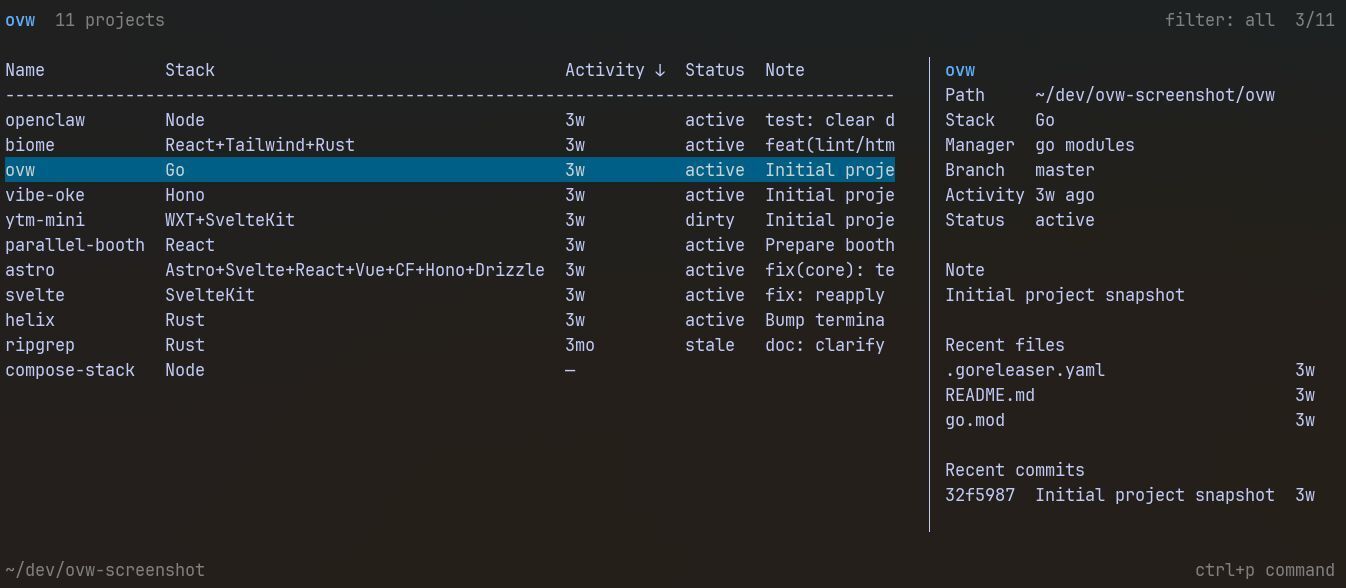
If you code a lot, you know how this goes. You have an idea, you spin up a project, ship it or park it, move on to the next one. Before long you've got a growing pile of repos spread across ~/dev, ~/Code, ~/Projects: each one a snapshot of a different idea. Some shipped, some abandoned after the first git commit, some you don't even remember writing.
Even with zoxide or aliases, you still have no idea what state a project is in until you're inside it. And I didn't want a separate app just to track that.
That's why I built ovw (short for "overview").
What is ovw?
ovw is a terminal dashboard for your local projects. Point it at a few directories and it scans everything: tech stacks, Git activity, running ports, scripts, and more. Shows it all in one table.
Your filesystem and Git history stay the source of truth. ovw just reads them and organizes the view.
What It Shows You
The default columns are name, stack, activity, status, and note. You can show, hide, and reorder any of these with c in the TUI, or set them in config:
columns = ["name", "stack", "manager", "scripts", "version", "ports", "branch", "updated", "activity", "status", "note"]
Here's what each one gives you:
| Column | What it means |
|---|---|
| Stack | Auto-detected from files: React, Go, Python, SvelteKit, Astro, and 18+ more |
| Manager | pnpm, cargo, uv, poetry, npm, bun, and more |
| Scripts | Available scripts without opening package.json |
| Version | From package.json, Cargo.toml, or pyproject.toml |
| Branch | Current Git branch |
| Activity | Last commit + unpushed count |
| Updated | Last file modification |
| Status | Auto-tags (dirty, stale, active) plus your own labels |
| Ports | Which local ports the project is running on |
| Note | Your notes, or falls back to last commit message |
Every column is sortable, filterable, and searchable.
One Place for Your Whole Dev Workflow
The goal was never just visibility: it's cutting down the friction of context-switching. From the TUI you can:
ropens the Runner and run any project script directlyoopens the project in your editortlaunches a terminal at the project rootctrl+pfor the command palette
No more cd project && npm run dev. Just select and go.
You can also use it without the TUI. Jump straight to a single project:
ovw my-project              # TUI filtered to that project
ovw my-project --json       # JSON output for that project
ovw my-project --open       # open it directly in your editor
ovw .                     # quick view of the current folder
Or use plain and JSON output for scripting:
ovw --plain      # plain text table
ovw --json       # JSON output for piping
ovw --dirty      # only dirty projects
ovw --stale      # only stale projects
Status and Notes
ovw automatically tags projects: dirty (uncommitted changes), stale (no activity in 30 days), active (committed today). You can also set your own:
ovw set my-project --status parked
ovw set my-project --note "fix check-in flow"
ovw set my-project --pin
ovw set my-project --script run="go run ."   # add a custom script
Notes never stay empty. If you haven't written one, the detail view falls back to the last commit message or the project description from its manifest.
Custom Fields
Want to track client, owner, or priority? Define custom fields in config and they become columns:
ovw set my-project --field owner=roie
Keyboard Shortcuts
All action shortcuts are customizable. In Settings > Keyboard shortcuts, or directly in config:
[keys.actions]
details = "d"
terminal = "enter"
Quick Start
# macOS / Linux
brew install --cask roie/tap/ovw

# or via curl
curl -fsSL https://raw.githubusercontent.com/roie/ovw/main/install.sh | sh

# Windows
powershell -c "irm https://raw.githubusercontent.com/roie/ovw/main/install.ps1 | iex"
First launch walks you through choosing which folders to scan. After that you get the full table.
Under the Hood
Your filesystem is the source of truth. ovw stores only user metadata (notes, statuses, pins) in a local config file. Everything else is read live from disk on every scan. No database, no daemon, no cloud. Fast even with dozens of projects.
Why I Built It
Even with zoxide getting me into projects fast, I still had no idea what state anything was in. And I didn't want to maintain a separate Notion or Obsidian doc just for that. ovw started as a quick script and grew into a proper tool as I kept using it. Every feature in v1.3 exists because I personally needed it.
It's MIT-licensed and open for ideas, issues, and contributions.
Links
- GitHub: github.com/roie/ovw
- Install:
brew install --cask roie/tap/ovwor the one-liner above
If your project folders have gotten out of hand, give it a try. And if it helps, a star on GitHub goes a long way.
Built with way too many weekend projects.
Comments
More Blog
View allgemmaFive Gemma-4 models, one accelerator: what porting E2B 31B to AWS Inferentia2 taught me
I ported the whole Gemma-4 family — E2B, E4B, 12B, 31B, and the 26B-A4B MoE — to run on...
X
xbillcommunityHey DEV, I'm Tobore. Let's actually connect.
Hey DEV, I'm Tobore. Let's actually connect. I've been on here for a while now, mostly writing and...
L
Laurina AyarahaiI burned through thousands of AI tokens. Then a friend did it for free
(yep, kinda clickbait, just for the funsies 😊) At the beginning of the year, I relaunched my...
P
Paulo HenriqueaiClaude might be saturating your machine
My laptop was sitting idle with the fan at full tilt. Nothing was running that I knew of. The culprit...
S
Sidhant PandagithubactionsAutomated GitHub Code Reviews Using Google Gemini
I Built a Thing! TL;DR — Google Gemini-based Pull Request reviews and Issue Triaging for...
D
Darren "Dazbo" LesteraiWhat is an "agentic harness," actually?
I've been hearing the word "harness" thrown around a lot lately. I assumed it just meant "the IDE" or...
T
Tilde A. ThuriumReady-made automations for this
Workflows from the Neura Market marketplace related to this Midjourney resource
- Get a Bird's-Eye View of Your n8n Instance with the Workflow Dashboard!n8n · $24.99 · Related topic
- Generate Interactive Quantity Reports from Revit and IFC Projects to HTMLn8n · $14.99 · Related topic
- Update Time-Tracking Projects Based on Syncro Status Changesn8n · $4.99 · Related topic
- Automate Data Display on Smashing Dashboard from GitHub, Docker, npm, and Product Huntn8n · $14.99 · Related topic