
Back to Blog webdev
 gemma
gemma community
 ai
ai ai
ai githubactions
 ai
ai
How to Develop Faster with LindenCMS
Kolodochka June 26, 2026
0 views
Why Another CMS? Every development tool shares one goal: development efficiency. LindenCMS...
Why Another CMS?
Every development tool shares one goal: development efficiency. LindenCMS is no exception. Its mission is to find the most efficient way to configure dynamic content.
When developing websites, you often encounter a typical task — adding a new section or page to your site.
If you use a traditional CMS, you manually create migrations, edit source files, or install additional plugins. If you write code manually, you're bouncing between migrations, validation rules, resources and views files. Scattered changes across your entire application.
Why can't a single class declaration handle everything — migrations, validation, admin UI, and API?
That's exactly the idea LindenCMS brings to life.
The Task: Adding Memberships to a Gym Website
We've built a gym website with LindenCMS. It's a demo project — not a real production site, but a fully functional showcase that you can explore in the demo repository.
Now the client wants a new page — Memberships — where visitors can see available plans.
Here's the design:
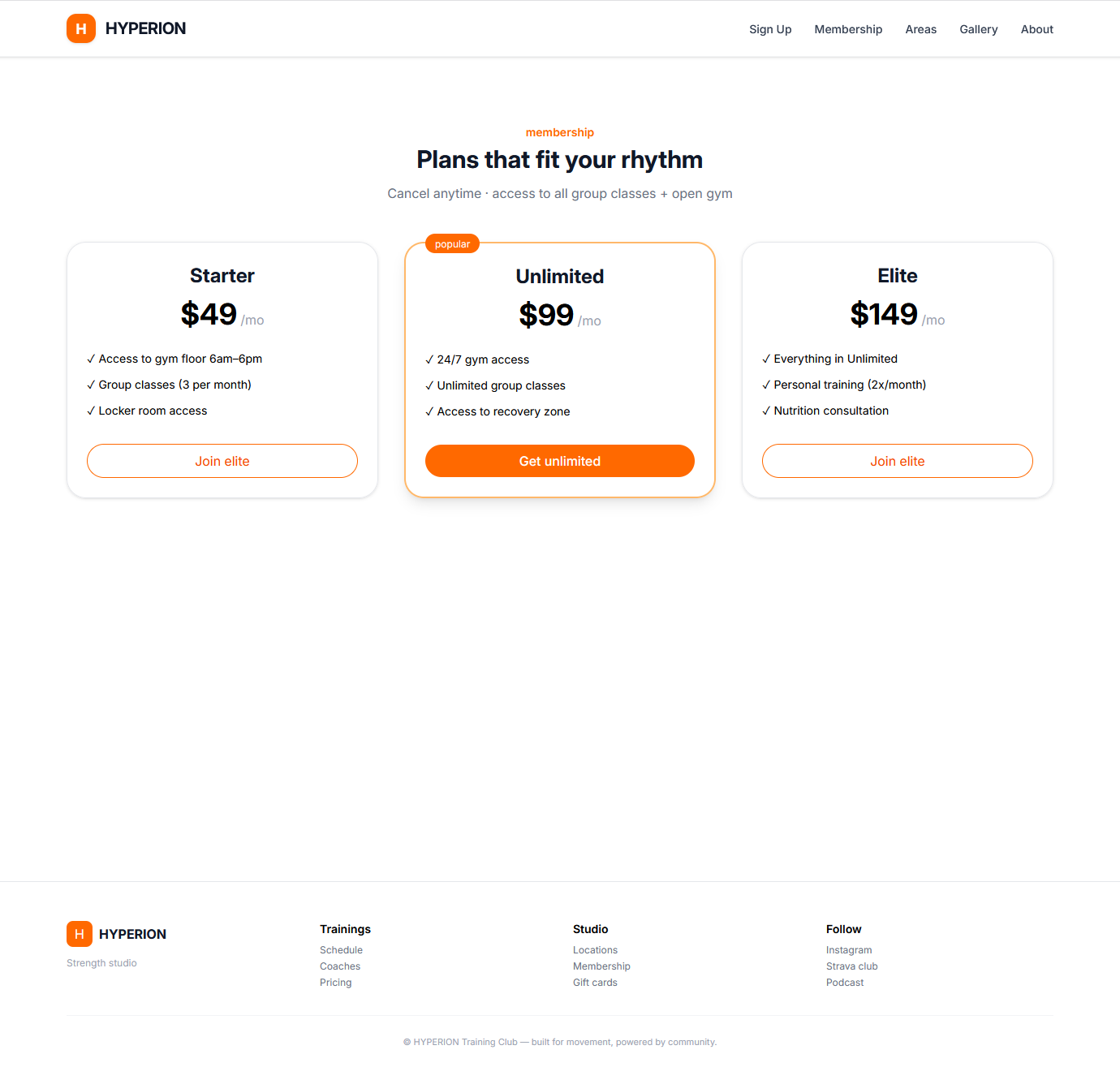
The data structure is simple:
- title (string)
- price (float)
- is popular flag (boolean)
- access list (string[])
The page should:
- List all active memberships
- Be manageable through the admin panel
The Workflow
Here's how LindenCMS handles this task from start to finish.
Step 1: Declare the Node
<?php

namespace App\Nodes;

use LindenCMS\Cms\Attributes\Validation;
use LindenCMS\Cms\Attributes\View;
use LindenCMS\Core\Attributes\Collection;
use LindenCMS\Cms\Nodes\_Bool;
use LindenCMS\Cms\Nodes\_Float;
use LindenCMS\Cms\Nodes\_String;
use LindenCMS\Cms\Nodes\AppNode;
use LindenCMS\Cms\Nodes\AppNodeCollection;

#[View(
    label: 'Membership',
    labelMany: 'Memberships',
    icon: 'mdi:wallet-membership',
    index: ['title', 'price', 'created_at', 'updated_at'],
    filterable: ['id', 'title', 'price', 'created_at'],
    sortable: ['id', 'title', 'price', 'created_at'],
)]
class Membership extends AppNode
{
    #[View(label: 'title', asOption: true)]
    #[Validation('required')]
    public _String $title;

    public _Float $price;

    public _Bool $is_popular;

    #[Collection(Access::class)]
    public AppNodeCollection $access;
}
What's happening here:
- AppNode — base class for all content entities
- _String, _Float, _Bool — typed properties that hold data
- AppNodeCollection - typed collection
- #[View] — tells the system how to display this in the admin
- #[Validation] — defines validation rules
Each membership can have multiple access items — like "24/7 Gym Access", "Pool Access", or "Personal Training". The Access class represents a single item in that list:
<?php

namespace App\Nodes;

use LindenCMS\Cms\Nodes\_String;
use LindenCMS\Cms\Nodes\AppNode;

class Access extends AppNode
{
    public _String $title;
}
Right now it's simple — just a title. But you can easily extend it later:
class Access extends AppNode
{
    public _String $title;
    public _String $icon;  // New field
    public _Bool $is_available; // Another field
}
Step 2: Register the Node
Add it to config/lindencms.php:
'nodes' => [
    'memberships' => App\Nodes\Membership::class,
],
Step 3: Run Sync
php artisan lindencms:sync
This command will migrate your database to the current nodes state.
Step 4: Admin Panel Ready
Visit /lindencms and you'll see the Memberships section with full CRUD functionality.
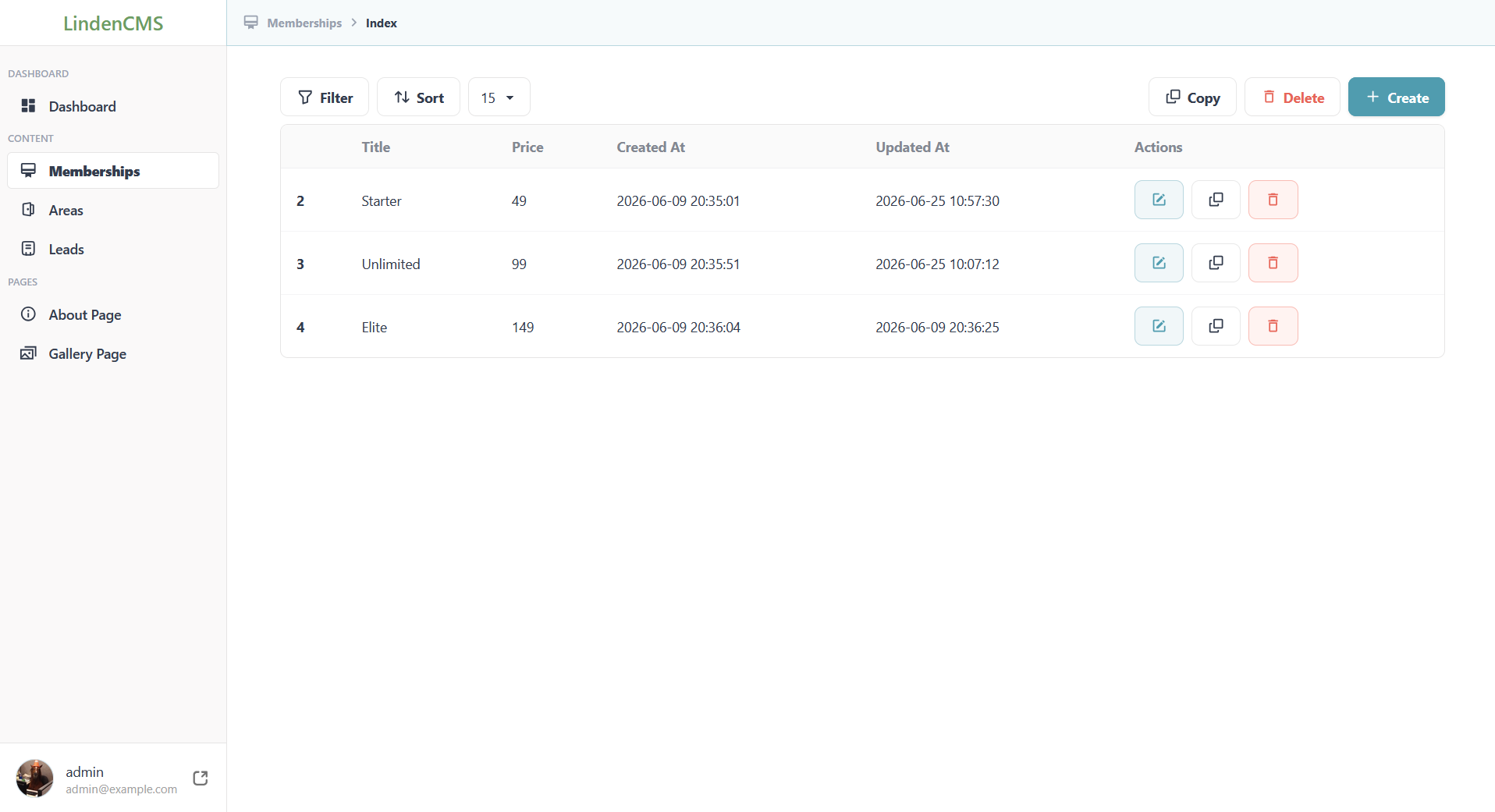
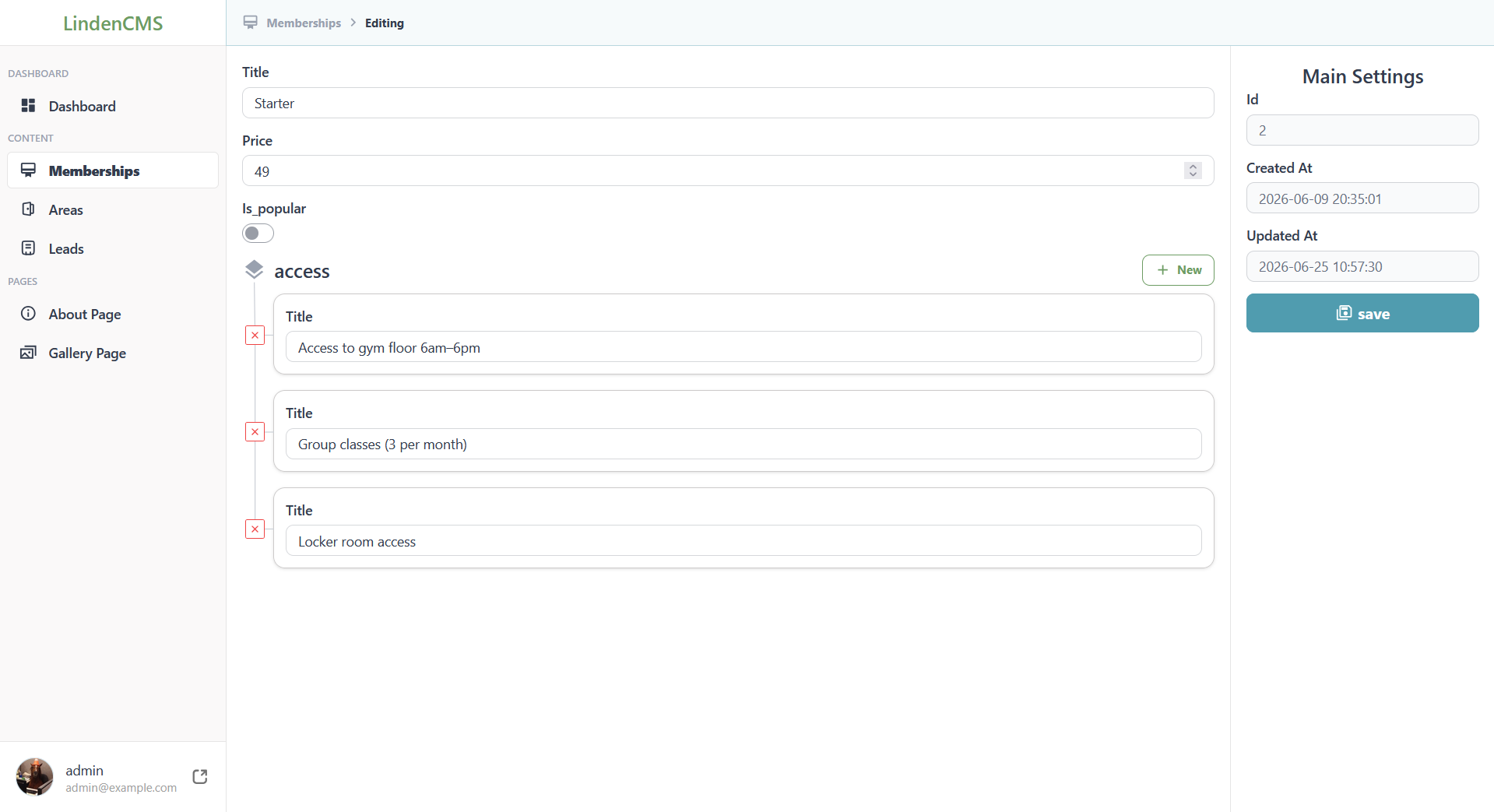
No additional code required.
Step 5: Public Page
Create app/Nodes/Pages/MembershipsPage.php:
<?php

namespace App\Nodes\Pages;

use App\Nodes\Membership;
use LindenCMS\Cms\Attributes\Load;
use LindenCMS\Core\Attributes\Collection;
use LindenCMS\Cms\Nodes\AppNodeCollection;
use LindenCMS\Cms\Nodes\Page;

class MembershipsPage extends Page
{
    #[Load(static function (AppNodeCollection $node) {
        $node->context('db.read')->read()
    })]
    #[Collection(type: Membership::class)]
    public AppNodeCollection $memberships;
}
Add the route in routes/web.php:
Route::get('/memberships', MembershipsPage::class);
Create the view — resources/views/pages/memberships-page.blade.php:
<div class="memberships">
    @foreach ($page->memberships as $membership)
        <div class="membership-card">
            <h3>{{ $membership->title }}</h3>
            <p>${{ $membership->price }}/month</p>
            @if ($membership->is_popular)
                <span class="badge">Popular</span>
            @endif
            <ul>
                @foreach ($membership->access as $item)
                    <li>{{ $item->title }}</li>
                @endforeach
            </ul>
        </div>
    @endforeach
</div>
the template is intentionally simplified and may differ from the repository version
MembershipsPage is holding list of Membership::class, but—just as with the Access collection we can easily add any other nodes from our project:
class MembershipsPage extends Page
{
    #[Load(static function (AppNodeCollection $node) {
        $node->context('db.read')->read()
    })]
    #[Collection(type: Membership::class)]
    public AppNodeCollection $memberships;

    #[Load(static function (About $node) {
        $node->context('db.read-first');
    })]
    public About $about;
}
Step 6: The Result
The page is now live. All memberships are displayed, popular plans are highlighted, and the admin can manage everything through the panel.
What LindenCMS Approach Gives Us
One Class, Full Control
The Membership Node is the single source of truth. Everything else is derived from it — the database schema, the admin panel, the API endpoints. No migrations to write. No controllers to build. No ADMIN views to design.
Code Reusability Through Composition
The Access class is a perfect example. A simple Node that can be reused across multiple contexts:
// In Memberships
#[Collection(Access::class)]
public AppNodeCollection $access;

// In another Node
#[Collection(Access::class)]
public AppNodeCollection $benefits;

// Or as a single relation
public Access $main_feature;
Trait-Based Organization
Group related fields and behaviors into traits for maximum reusability:
// app/Nodes/Traits/HasSeo.php
trait HasSeo
{
    #[View(label: 'Meta Title')]
    public _String $meta_title;

    #[View(label: 'Meta Description')]
    public _Text $meta_description;
}

// app/Nodes/Traits/HasSlug.php
trait HasSlug
{
    #[View(label: 'Slug')]
    #[Validation('required|unique')]
    public _Slug $slug;
}

// app/Nodes/Traits/HasGallery.php
trait HasGallery
{
    #[Collection(Image::class)]
    public AppNodeCollection $gallery;
}
Now you can compose Nodes by combining traits:
class Product extends AppNode
{
    use HasSeo, HasSlug, HasGallery;

    public _String $title;
    public _Text $description;
    public _Float $price;
}

class Article extends AppNode
{
    use HasSeo, HasSlug;

    public _String $headline;
    public _RichText $content;
}

class Page extends AppNode
{
    use HasSeo, HasGallery;

    public _String $title;
    public _String $subtitle;
}
Native PHP Packages Organization
Because everything is just PHP classes, you can organize code into native PHP packages — the same way you structure any PHP project. Without special directories or custom autoloading rules. Just standard PHP namespaces and Composer packages.
Flexible Data Delivery — Your Choice
LindenCMS doesn't force you into one specific approach for delivering data to the public site. You choose what fits your project:
Option 1: Monolith with Pages
Use the Page system as shown in this article — declare what data you need, and LindenCMS loads it automatically into Blade views.
Option 2: Traditional Laravel
Since LindenCMS generates database schemas in a normalized form, you can completely bypass the Node system and use standard Laravel Eloquent models:
$memberships = DB::table('memberships')
    ->where('is_active', true)
    ->get();
Option 3: Headless CMS (Coming Soon)
API generation is currently in development and planned for future releases. You'll be able to use LindenCMS as a fully headless CMS with automatic REST endpoints.
Outro
LindenCMS is in early beta. It's stable for testing and feedback, but not yet recommended for production projects. The core architecture is solid — we're actively developing and would love your input.
Useful Links:
Prefer personal communication?
Thanks for reading — we'd love to hear your thoughts.
Comments
More Blog
View allgemmaFive Gemma-4 models, one accelerator: what porting E2B 31B to AWS Inferentia2 taught me
I ported the whole Gemma-4 family — E2B, E4B, 12B, 31B, and the 26B-A4B MoE — to run on...
X
xbillcommunityHey DEV, I'm Tobore. Let's actually connect.
Hey DEV, I'm Tobore. Let's actually connect. I've been on here for a while now, mostly writing and...
L
Laurina AyarahaiI burned through thousands of AI tokens. Then a friend did it for free
(yep, kinda clickbait, just for the funsies 😊) At the beginning of the year, I relaunched my...
P
Paulo HenriqueaiClaude might be saturating your machine
My laptop was sitting idle with the fan at full tilt. Nothing was running that I knew of. The culprit...
S
Sidhant PandagithubactionsAutomated GitHub Code Reviews Using Google Gemini
I Built a Thing! TL;DR — Google Gemini-based Pull Request reviews and Issue Triaging for...
D
Darren "Dazbo" LesteraiWhat is an "agentic harness," actually?
I've been hearing the word "harness" thrown around a lot lately. I assumed it just meant "the IDE" or...
T
Tilde A. ThuriumReady-made automations for this
Workflows from the Neura Market marketplace related to this Perplexity resource
- Automate SEO-Optimized Blog Creation with GPT-4, Perplexity AI & Multi-Language Supportn8n · $24.99 · Related topic
- Automate SEO Blog Content Creation with GPT-4, Perplexity AI, and WordPressn8n · $24.99 · Related topic
- Automate SEO Blog Creation + Social Media with GPT-4, Perplexity, and WordPressn8n · $24.99 · Related topic
- Auto-Generate SEO Blog Posts with Perplexity, GPT, Leonardo & WordPressn8n · $14.99 · Related topic