 Perplexity
Back to Blog ai
aiHow
How
 eventsinyourcity
 opensource
 ai
ai devchallenge
 gemma
gemma gemma
gemma
Equip your agent with Google Cloud best practices using google-cloud-developer plugin
Remigiusz Samborski September 24, 2026
0 views
Coding agents in your terminal can scaffold microservices in seconds. But what happens when your...
Coding agents in your terminal can scaffold microservices in seconds. But what happens when your agent needs to deploy directly to Google Cloud?
Without cloud-specific guidance, typical agents struggle. They hallucinate obsolete SDK calls, attempt to run commands without required permissions, or silently enable billable APIs that create surprise costs on your invoice.
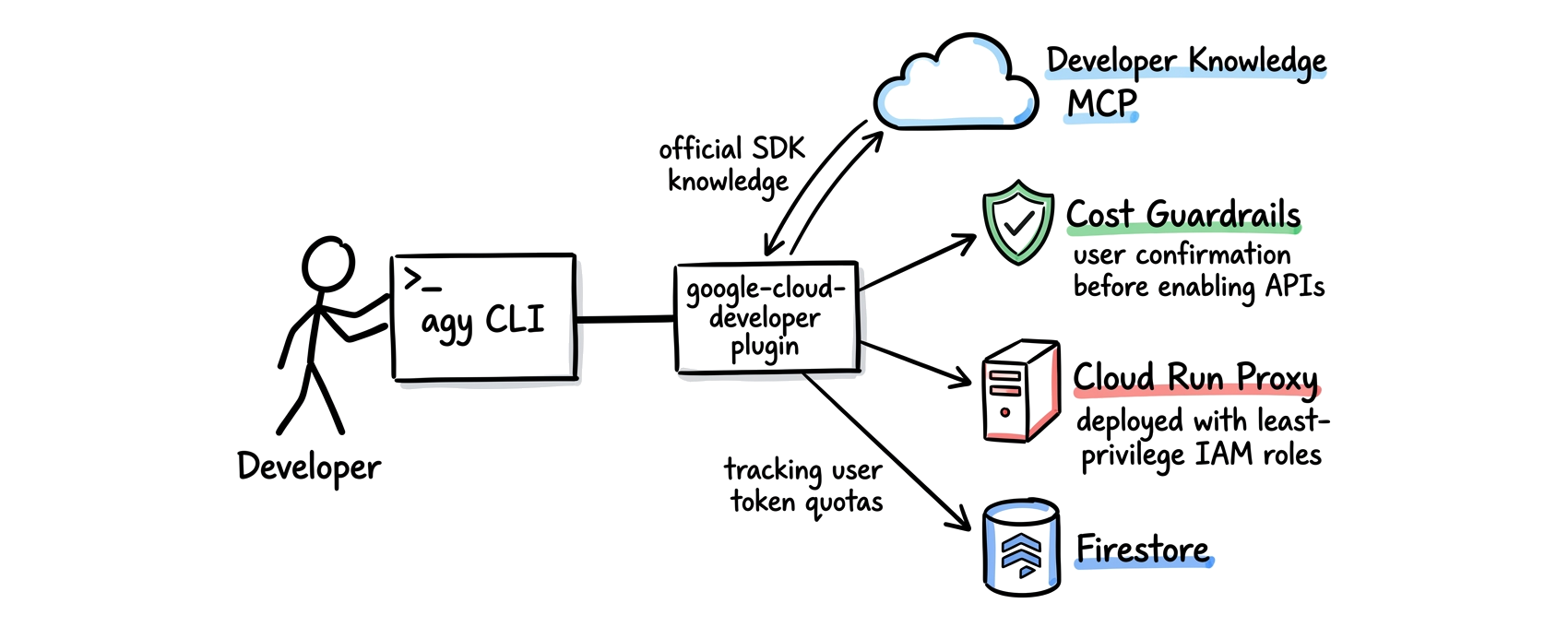
The google-cloud-developer plugin changes this dynamic. It equips your agent (such as Antigravity CLI, Claude Code, Codex CLI) with curated skills and the Developer Knowledge MCP server.
To evaluate the plugin in action, I tasked Antigravity CLI (agy) with building a complete, cloud-based solution from a fresh Google Cloud project. The scenario: scaffold, containerize, and deploy a secure Gemini API streaming proxy on Cloud Run, complete with Cloud IAM authentication and Firestore token tracking.
While the resulting Cloud Run proxy codebase works, the proxy itself is just an example. The real value is how the plugin guides the agent through every phase of the cloud development process:
- Application design and SDK code generation: Writing Gemini SDK code without hallucinations and selecting the right database.
- Project onboarding, billing verification, and API enablement: Auditing the project, linking a Cloud Billing account, and requesting explicit user approval before enabling billable APIs.
- Least-privilege IAM and Cloud Run deployment: Provisioning dedicated service accounts and deploying the container asynchronously.
- End-to-end verification: Testing streaming and token persistence against the live service.
Quick install: Five skills and an MCP server
Remember the scene in The Matrix where Trinity calls Tank for a helicopter pilot program and learns it in seconds? Adding the plugin to agy works the same way with one terminal command:
agy plugin install https://github.com/google/skills/plugins/cloud/google-cloud-developer
The CLI clones the plugin repository, registers its components, and makes them available immediately.
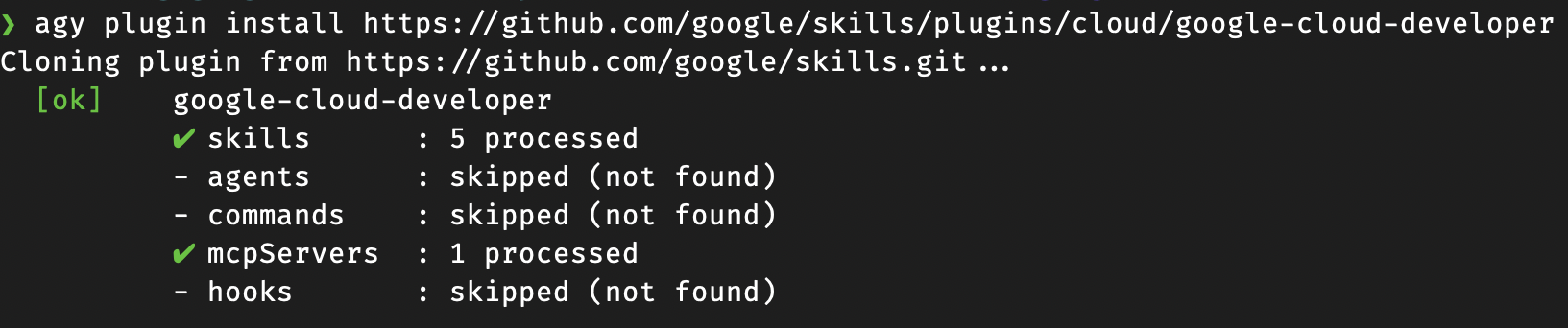
In seconds, agy configures:
- Five specialized skills covering Google Cloud CLI patterns and workflows.
- Developer Knowledge MCP server providing access to current API syntax and Google Cloud documentation.
With the plugin active, agy pairs its Gemini 3.8 Flash model with authoritative cloud instructions.
Note: As a heavy user of Google Cloud, I already have
gcloudinstalled and authenticated. I also enabled the Developer Knowledge API in my project. For new users and ones who use a different harness such as Claude Code CLI or Codex CLI, I recommend following the official documentation to get started.
Knowledge grounding: Writing modern SDK code without hallucinations
One frequent failure mode with AI coding assistants is API obsolescence. For example, older tutorials rely on deprecated libraries such as google-generativeai.
Because the google-cloud-developer plugin connects directly to the Developer Knowledge API, the agent checks the latest official syntax before writing a single line of code.
When scaffolding app/gemini_client.py, agy immediately used the current unified Google Gen AI SDK:
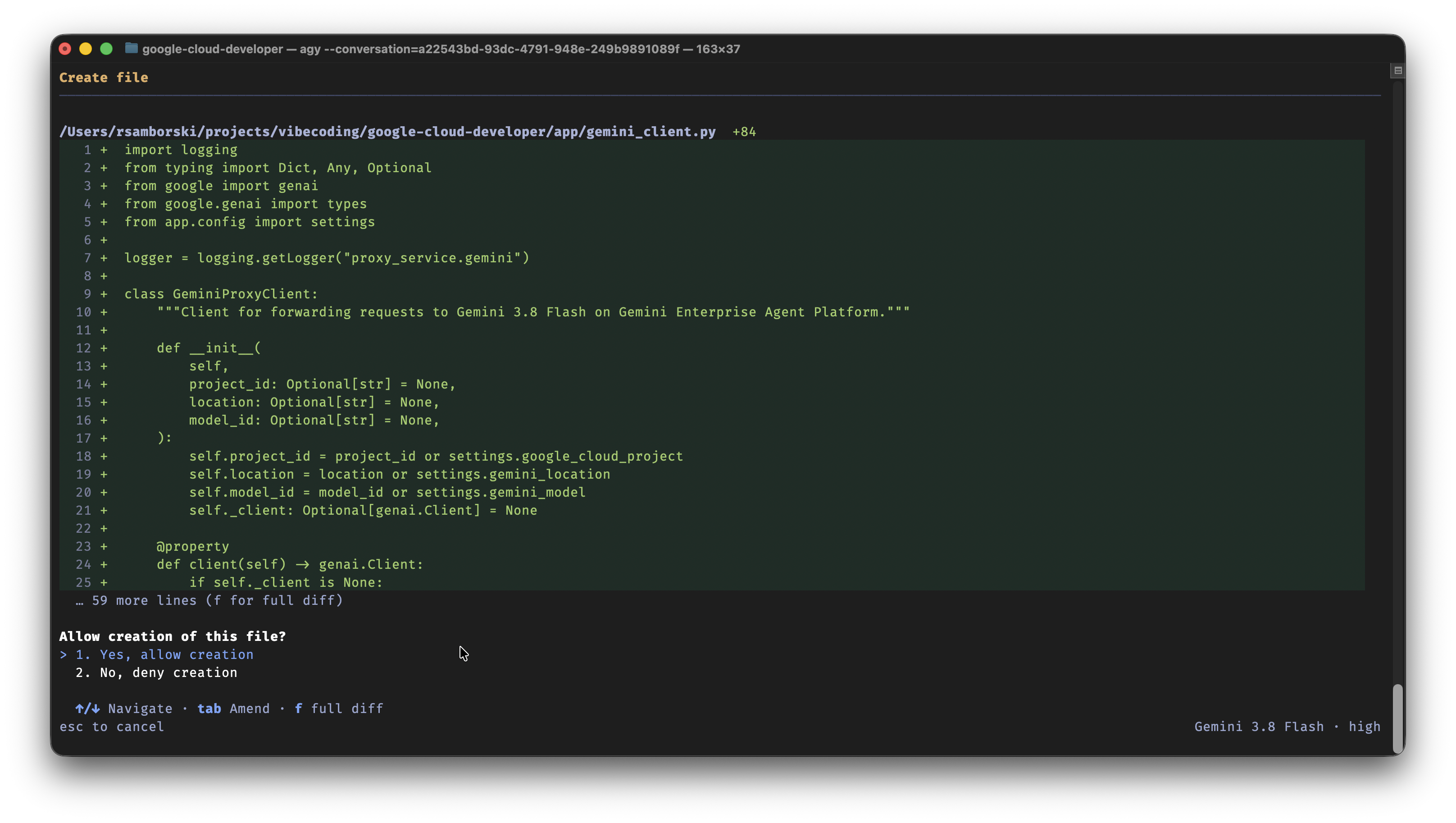
The agent produced clean Python code with Pydantic configuration, structured Cloud Logging formatters, and unit tests using pytest and FastAPI's TestClient.
Informed architecture: Evaluating database options with Developer Knowledge
Selecting the right database for a serverless proxy requires balancing latency, connection handling, concurrency, and cost. When I asked agy to track token usage per user and suggest the best database, the agent did not just pick one at random.
Backed by the Developer Knowledge API, the agent pulled real-time architectural guidance and evaluated Google Cloud database options:
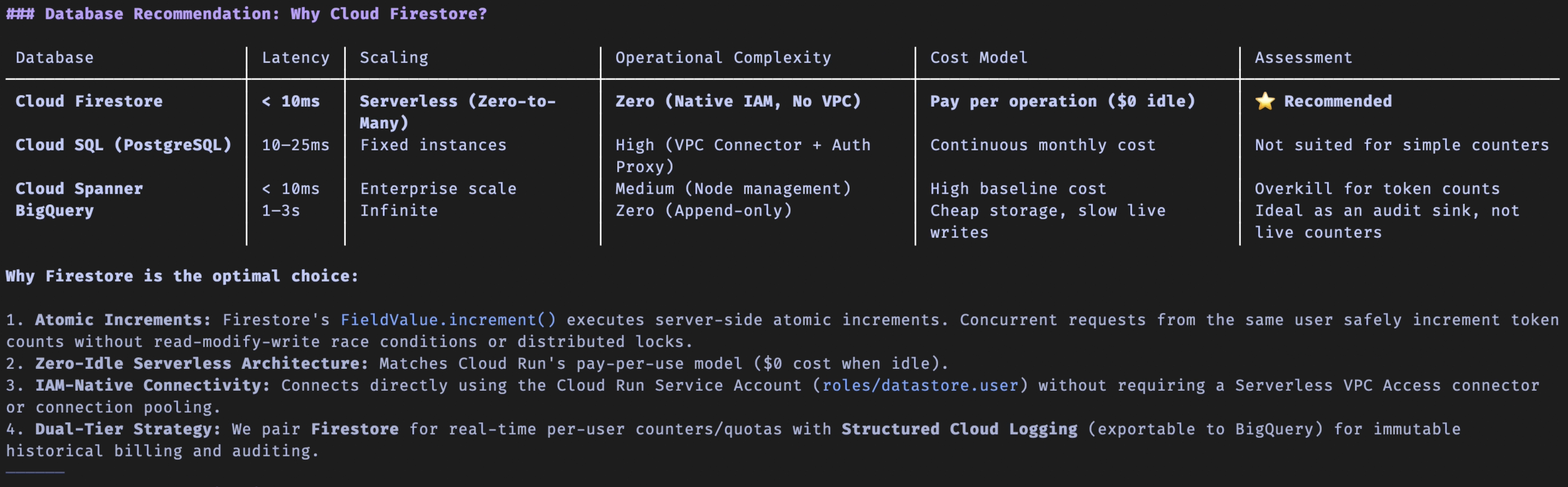
By grounding its analysis in the Developer Knowledge, the agent presented a clear comparison table directly in the terminal. It recommended Cloud Firestore as the most cost-effective and operationally simple fit for Cloud Run. You get an informed architectural decision based on official cloud patterns rather than guessing.
Cost guardrails and onboarding: Verifying billing before enabling APIs
Once the code and Firestore design were ready, the agent needed to enable the Gemini Enterprise, Cloud Run, and Firestore APIs in my project. Autonomous agents need strict boundaries here, because enabling an API or provisioning a managed resource can incur costs.
Two skills in the google-cloud-developer plugin coordinate this step:
- Pre-flight billing audit: Before enabling billable services, the
google-cloud-recipe-onboardingskill instructs the agent to verify that the target project is linked to an active Cloud Billing account (gcloud billing projects describe). - Explicit user consent: The
gcloudskill requires explicit user approval before runninggcloud services enableor any destructive action.
When agy identified the required APIs for the proxy, it first checked my project state and paused for explicit permission:
The system's guardrails require explicit user approval before enabling any API, specifically addressing potential security risks and unexpected costs.
This keeps you in the driver's seat and eliminates accidental spend.
How agy helps: Scheduling timers for billing propagation
During the onboarding skill's pre-flight check, I linked a new billing account to my test project so agy could enable the APIs. In Google Cloud, linking a billing account often takes a few minutes to propagate across backend systems.
While the google-cloud-developer plugin tells the agent how to validate billing status (gcloud billing projects describe checking for billingEnabled: true), agy complements the plugin with its native Schedule tool so the session does not fail or spin in a retry loop.
I typed:
"Ok. Let's wait now. I just enabled the billing and it needs to propagate. I'll check in 10 minutes."
The agent scheduled a 600-second timer and freed the terminal prompt:

Exactly 10 minutes later, the timer woke the agent up. It resumed the exact conversation context, checked the billing status with gcloud beta billing projects describe, verified that billingEnabled was true, and prompted to enable the required APIs:

You can walk away, grab a coffee, and let your agent resume right where you left off.
Security enforcement: Least-privilege IAM
With the APIs enabled, the next step before deployment was configuring authentication. Without guidance, agents often suggest creating a long-lived Gemini API key or downloading a service account JSON key file.
Instead, the google-cloud-recipe-auth skill explicitly forbids downloaded service account keys and steers the agent toward Google Cloud security best practices:
- Dedicated service identity: Creates a workload-specific service account (
gemini-proxy-sa). - Least-privilege IAM bindings: Grants only
roles/aiplatform.userfor Gemini invocation androles/datastore.userfor Firestore token logging. - Authenticated ingress: Protects the Cloud Run endpoint with
--no-allow-unauthenticatedso the Google Frontend validates Google-signed OpenID Connect (OIDC) ID tokens before traffic reaches your container.
No secrets live in plaintext, and permissions stay tightly scoped.
Cloud Run deployment
To deploy the container, agy used finding-google-skills to pull Cloud Run deployment patterns (cloud-run-basics) from the remote skill catalog and combined them with the gcloud skill's command formatting rules:
gcloud run deploy gemini-38-flash-proxy \
  --source . \
  --region=us-central1 \
  --service-account=gemini-proxy-sa@[PROJECT_ID].iam.gserviceaccount.com
How agy helps: Running long tasks in the background
Building a container image from source still takes a few minutes. agy helps by launching the deployment as a background task instead of locking up your interactive session:

Notice the task status bar in the terminal: [14:12:41] gcloud run deploy gemini-38-flash-proxy ... running (1 task(s) · /tasks)
You can continue chatting with the agent, ask questions, or inspect background jobs with /tasks while Cloud Build compiles your container image.
Live verification: Streaming and per-user token persistence
Once the background deployment completed, agy generated test commands to verify the end-to-end flow.
Calling the usage endpoint with an authenticated identity token:
curl -s -X GET https://gemini-38-flash-proxy-[PROJECT_NUMBER].us-central1.run.app/v1/users/me/usage \
  -H "Authorization: Bearer $(gcloud auth print-identity-token)"
Returns real-time Firestore persistence data:
{
  "user_id": "[EMAIL]",
  "total_input_tokens": 14,
  "total_output_tokens": 41,
  "total_tokens": 55,
  "last_active": "2026-09-21T12:21:21.567000+00:00",
  "models.gemini-3_8-flash.input_tokens": 14,
  "models.gemini-3_8-flash.output_tokens": 41,
  "models.gemini-3_8-flash.total_tokens": 55
}
Atomic increments in Firestore record prompt and completion token counts across requests, giving you immediate visibility into user consumption.
Summary
Pairing agy with the google-cloud-developer plugin creates a safer, smarter CLI workflow:
- Knowledge grounding: Developer Knowledge API prevents outdated SDK hallucinations and ensures accurate code generation.
- Human in the loop: Built-in skill guardrails require explicit permission before running commands that can incur cloud costs.
- Non-blocking workflow: Scheduled timers handle asynchronous cloud operations, while background tasks let long builds run without freezing your prompt.
- Enterprise security defaults: Encourages least-privilege service accounts and IAM authentication over hardcoded secrets.
Next steps
Check out more resources on google-cloud-developer plugin:
- google-cloud-developer plugin on GitHub
- Official announcement on the Google Cloud blog
- Hands-on codelab: Install and use Google Cloud Developer plugin in Antigravity
Connect with me
I am always eager to share what I've learned and hear how fellow developers and AI enthusiasts use Antigravity and Google Cloud. If you found this article helpful, feel free to share it and follow me on your favorite social platform:
Thanks for reading!
Comments
More Blog
View alleventsinyourcityClaude on Google Cloud workshop | NYC | 9/30
On Wednesday, September 30, Anthropic and Google Cloud are co-hosting a hands-on developer workshop...
J
Jen HarveyopensourceBuilding File4Base: The Modern, Open-Source Alternative to old file bases (Powered by Antigravity)
For decades, platforms like Claris FileMaker, Microsoft Access, and 4D enabled businesses to build...
M
Mario EzquerroaiThis video is about how this video was made
This video (the script, the voice timings, the source code, the storyboard, the briefs the subagents...
P
Peter Kim FrankdevchallengeCongrats to the Summer Bug Smash Winners!
We are thrilled to announce the winners of DEV's Big Summer Bug Smash powered by Sentry! This...
J
JemgemmaRunning a Jev-Style Decision Model on One TPU v6e: What Fits, What It Costs, and What Changes From a GPU
Gemma 4 E2B, E4B, 12B and a 26B-A4B fp8 build read by their label probabilities with vLLM on one TPU v6e chip, checked against the same read on an NVIDIA L4 and against Jev 1.13.0's published results. What fits one chip, how to read labels when vLLM on TPU returns only the top 32 log-probabilities, speed, cost, and why no 31B loads today.
X
xbillgemmaPlain Gemma 4 26B vs Jev on One EC2 L4: 2.1 Points Behind Overall, Level on Yes/No, 4.5 Behind on Multiple Choice
Plain Gemma 4 26B read by its label probabilities against DiffusionGemma's one-step read, both as community 4-bit (AWQ) builds on one EC2 L4, on 1,200 labelled examples and on the 3,880-record public suite where Jev 1.13.0 has published results. Pre-registered, with accuracy, calibration, calibration after 0 to 150 labels, latency and cost.
X
xbillReady-made automations for this
Workflows from the Neura Market marketplace related to this Perplexity resource
- Integrate Multi-Source AI Agent with OpenAI, Perplexity, and Google Sheetsn8n · $9.99 · Related topic
- Automate SEO-Optimized Blog Creation with GPT-4, Perplexity AI & Multi-Language Supportn8n · $24.99 · Related topic
- Automate SEO Blog Content Creation with GPT-4, Perplexity AI, and WordPressn8n · $24.99 · Related topic
- Automate SEO Blog Creation + Social Media with GPT-4, Perplexity, and WordPressn8n · $24.99 · Related topic