 Perplexity
Back to Blog ai
 devchallenge
 devchallenge
 career
 discuss
 ai
 devchallenge
Containing the Autonomous Mind: Sub-Second Zero-Trust Execution with GKE Agent Sandbox
Saurabh Mishra November 6, 2026
0 views
Why standard Kubernetes pods fail when AI agents start writing code and how to build a sub-second,...
Why standard Kubernetes pods fail when AI agents start writing code and how to build a sub-second, kernel-isolated execution plane using agents.x-k8s.io, gVisor, and GKE Pod Snapshots
Then, the paradigm shifted from chatbots to autonomous agents.
The problem: isolation and speed pull in opposite directions
Teams usually hit a dilemma when they first productionize code-executing agents.
Plain containers are fast but share the host kernel. One kernel exploit in agent-generated code and the blast radius is the node, and possibly your cluster.
Full micro-VMs are strongly isolated but heavy. Booting a guest kernel per tool call adds seconds of latency and a lot of memory overhead. Agents make hundreds of tool calls per session, so a few seconds each ruins the experience.
Standard Kubernetes also wasn’t built for this pattern. Typical provisioning on standard Kubernetes takes one to three seconds or more, and it lacks snapshotting capabilities
What Agent Sandbox is
Agent Sandbox started as a Kubernetes primitive for isolating and scaling agent workloads. It provides kernel-level separation built on gVisor, with support for Kata Containers. Google built it as an open-source project within the CNCF. On GKE it has since matured: it reached general availability.
- The Container Escape Problem: Why cgroups Aren't Enough
In a standard Kubernetes pod, your container shares the host node's Linux kernel. Isolation is enforced via Linux namespaces, cgroups, and seccomp profiles. While that works well for deterministic microservices that your engineering team wrote and scanned in CI/CD, it is dangerously inadequate for autonomous agents:
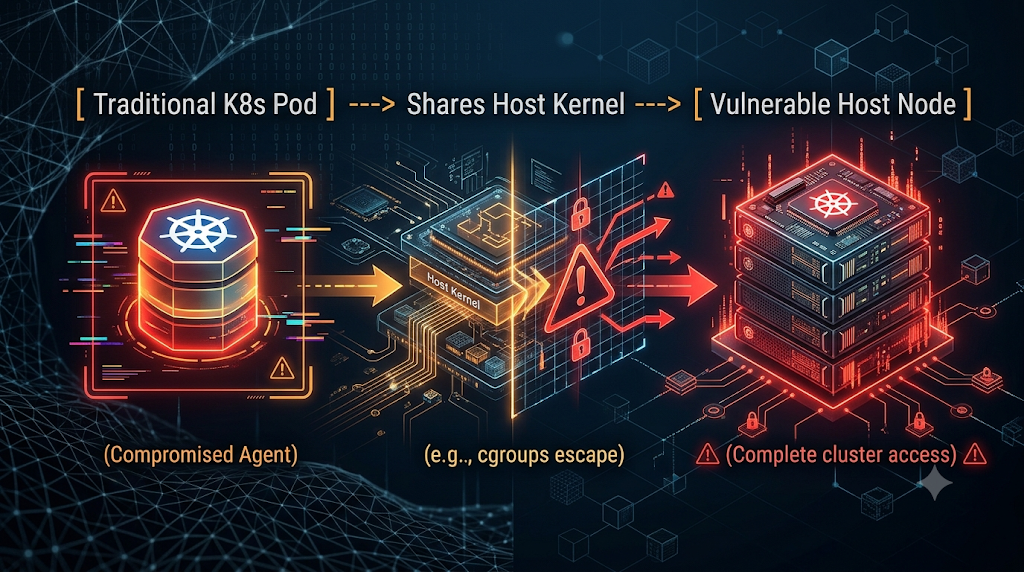
Indirect Prompt Injection & Hallucinated Syscalls: If an agent parses an external log file, GitHub issue, or web page containing an adversarial prompt injection, it can be tricked into executing a privilege-escalation payload or probing kernel vulnerabilities (io_uring, ebpf, or unpatched syscall paths).
State Bleed Across Sessions: Standard Deployments load-balance requests across shared replicas. If Agent Session A writes temporary credentials or mutates /var/tmp in a container, and Agent Session B lands on the same replica milliseconds later, you have cross-tenant data leakage.
The Cold-Start Tax: If you spin up a brand-new Kubernetes Pod (or worse, a dedicated VM) per agent task to guarantee isolation, waiting 15 to 45 seconds for container image pulls, Python environment initialization, and heavy package imports destroys the interactive loop of a multi-step agent.
To run autonomous agents safely in production, you need single-tenant, kernel-isolated sandboxes that spin up in milliseconds and preserve state across multi-turn reasoning loops without burning idle compute.
2. Enter GKE Agent Sandbox (agents.x-k8s.io)
Built on the open kubernetes-sigs/agent-sandbox specification and natively integrated into Google Kubernetes Engine, GKE Agent Sandbox introduces a declarative Kubernetes API purpose-built for isolated, stateful, single-replica agent execution
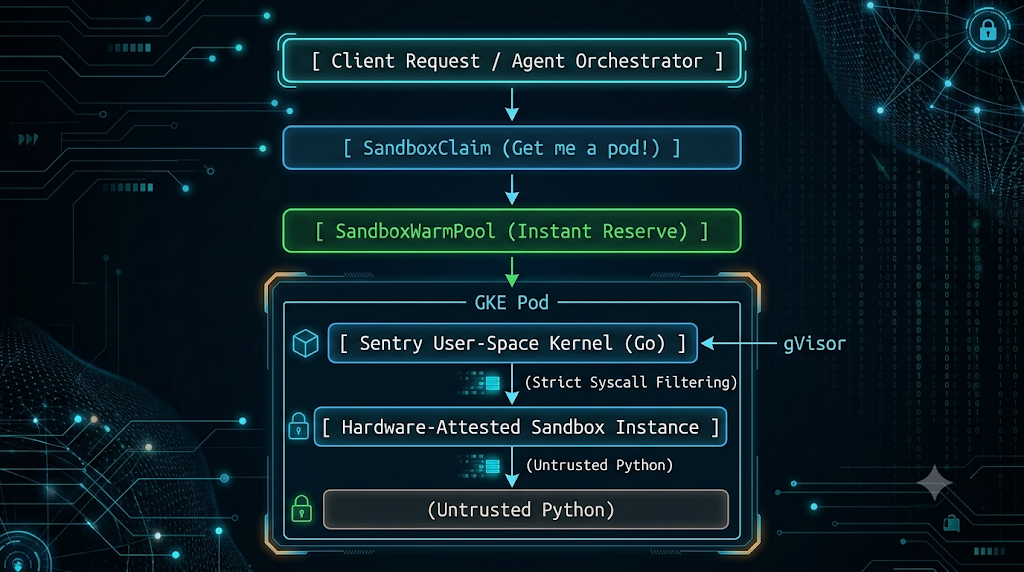
Instead of abusing ad-hoc Jobs or heavy StatefulSets, GKE Agent Sandbox introduces four core Custom Resource Definitions (CRDs) under the agents.x-k8s.io API group:
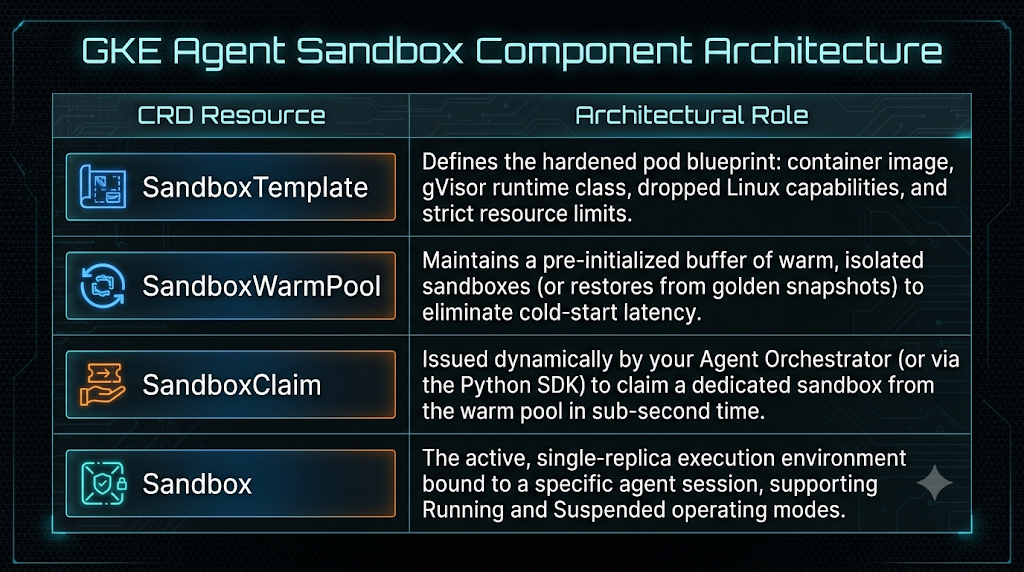
3. Defining a Zero-Trust SandboxTemplate & SandboxWarmPool
Let's look at the actual Kubernetes manifests required to stand up a hardened execution pool on a GKE Autopilot (or Standard with gVisor node pool) cluster.
Notice how GKE's admission controller strictly enforces security boundaries: hostNetwork, privileged: true, hostPath volumes, and added capabilities are explicitly prohibited.
apiVersion: agents.x-k8s.io/v1alpha1
kind: SandboxTemplate
metadata:
  name: python-agent-executor
  namespace: agent-workloads
spec:
  template:
    spec:
      # 1. Enforce gVisor User-Space Kernel Isolation
      runtimeClassName: gvisor
      nodeSelector:
        sandbox.gke.io/runtime: gvisor
      tolerations:
        - key: sandbox.gke.io/runtime
          operator: Equal
          value: gvisor
          effect: NoSchedule

      # 2. Zero-Trust Identity: Never mount K8s API credentials inside the sandbox
      automountServiceAccountToken: false

      containers:
        - name: code-runner
          image: us-central1-docker.pkg.dev/my-gcp-project/agent-repo/sandbox-runtime:v1.2
          securityContext:
            runAsNonRoot: true
            runAsUser: 10001
            allowPrivilegeEscalation: false
            capabilities:
              drop: ["ALL"]
          # 3. Hard Resource Quotas to prevent fork-bombs / DoS
          resources:
            requests:
              cpu: "500m"
              memory: "1Gi"
            limits:
              cpu: "1000m"
              memory: "2Gi"
---
apiVersion: agents.x-k8s.io/v1alpha1
kind: SandboxWarmPool
metadata:
  name: python-executor-warm-pool
  namespace: agent-workloads
spec:
  templateRef:
    name: python-agent-executor
  # Keep 20 pre-warmed gVisor sandboxes ready for instant claim
  minReady: 20
  maxSandboxes: 200
When you apply this manifest, the GKE Agent Sandbox Controller pre-provisions 20 gVisor-isolated pods. When your agent orchestrator needs to run untrusted code, it doesn't wait for image pulls or container creation—it claims a running instance from python-executor-warm-pool in milliseconds
4. Sub-Second "Park and Resume" with GKE Pod Snapshots
Warm pools solve the initial startup latency, but what happens during a multi-turn agent conversation?
Imagine a data-science or SRE agent that spends 8 seconds loading a 500MB dependency graph into memory, authenticating to a staging database, and building a local SQLite cache in /tmp. Then, the agent pauses and asks the human engineer: "I found 3 anomalous pods in payments-prod. Approve rollback?"
The human might take 15 minutes to reply on Slack.
If you keep the sandbox pod running for 15 minutes across 5,000 concurrent user sessions, your GKE compute bill explodes.
If you kill the pod to save money, the agent loses its in-memory state and filesystem cache, forcing a slow rebuild on the next turn.
How GKE Pod Snapshots Change the Game
Because GKE Agent Sandbox runs on gVisor, the entire process tree, CPU register state, heap memory, and virtual filesystem live inside gVisor's user-space memory. GKE Pod Snapshots _(podsnapshot.gke.io) _ can serialize this entire running state straight to a Google Cloud Storage (GCS) bucket, delete the underlying Pod (operatingMode: Suspended), and later restore the exact memory and filesystem state on demand (operatingMode: Running).
Here is how you orchestrate this lifecycle directly from your Python Agent Orchestrator using the k8s-agent-sandbox SDK with OpenTelemetry tracing enabled
# pip install "k8s-agent-sandbox[tracing]==0.4.6"
from k8s_agent_sandbox.gke_extensions.snapshots import PodSnapshotSandboxClient

def execute_stateful_agent_step():
    # 1. Initialize the GKE Snapshot-capable Sandbox Client
    client = PodSnapshotSandboxClient()

    # 2. Claim a pre-warmed gVisor sandbox in sub-second latency
    sandbox = client.create_sandbox("python-executor-warm-pool")
    print(f"Claimed isolated sandbox: {sandbox.name}")

    # 3. Execute untrusted, LLM-generated code inside the sandbox
    #    Here the agent initializes a heavy workspace and writes state to disk
    init_cmd = (
        "mkdir -p /tmp/agent_workspace && "
        "python3 -c \"import pandas as pd; "
        "df = pd.DataFrame({'pod': ['payment-7f8b', 'auth-9c2a'], 'restarts': [14, 0]}); "
        "df.to_pickle('/tmp/agent_workspace/cluster_state.pkl')\""
    )
    exec_result = sandbox.commands.run(init_cmd)
    print(f"Execution stdout: {exec_result.stdout}")

    # 4. Human-in-the-Loop Pause: Freeze memory & filesystem to GCS and release compute!
    #    snapshot_before_suspend=True automatically creates a PodSnapshot resource
    #    and sets the Sandbox's operatingMode to 'Suspended' (deleting the K8s Pod).
    print("Waiting for human approval... Suspending sandbox to zero compute.")
    suspend_result = sandbox.suspend(snapshot_before_suspend=True)
    assert suspend_result.success

    # --- [10 Minutes Later: User approves the action in Slack] ---

    # 5. Resume the Sandbox from the GKE Pod Snapshot
    #    Sets operatingMode back to 'Running' and restores memory/filesystem from GCS
    print("Approval received! Restoring sandbox from snapshot...")
    resume_result = sandbox.resume()
    assert resume_result.success and resume_result.restored_from_snapshot

    # 6. Continue execution immediately without re-initializing dependencies or data
    verify_cmd = (
        "python3 -c \"import pandas as pd; "
        "df = pd.read_pickle('/tmp/agent_workspace/cluster_state.pkl'); "
        "print(df[df['restarts'] > 5].to_dict(orient='records'))\""
    )
    final_output = sandbox.commands.run(verify_cmd)
    print(f"Restored state query result: {final_output.stdout}")
Golden-Snapshot Warm Pools: Eliminating Heavy Framework Cold Starts
You can take snapshots one step further with Golden-Snapshot Warm Pools. If your agents rely on heavy libraries—like PyTorch, Playwright headless browser or custom internal SDKs—importing those packages at the start of every session still takes several seconds of CPU time.
With GKE Pod Snapshots, you can boot a sandbox once, import all heavy Python modules into memory, warm up the JIT/interpreter caches, and trigger a PodSnapshotManualTrigger. You then configure your SandboxWarmPool to hydrate new sandboxes directly from that memory snapshot rather than booting from a cold container entrypoint. Your agents jump straight into an already-warmed Python heap in milliseconds.
5. Production Architecture Checklist for Agentic GKE
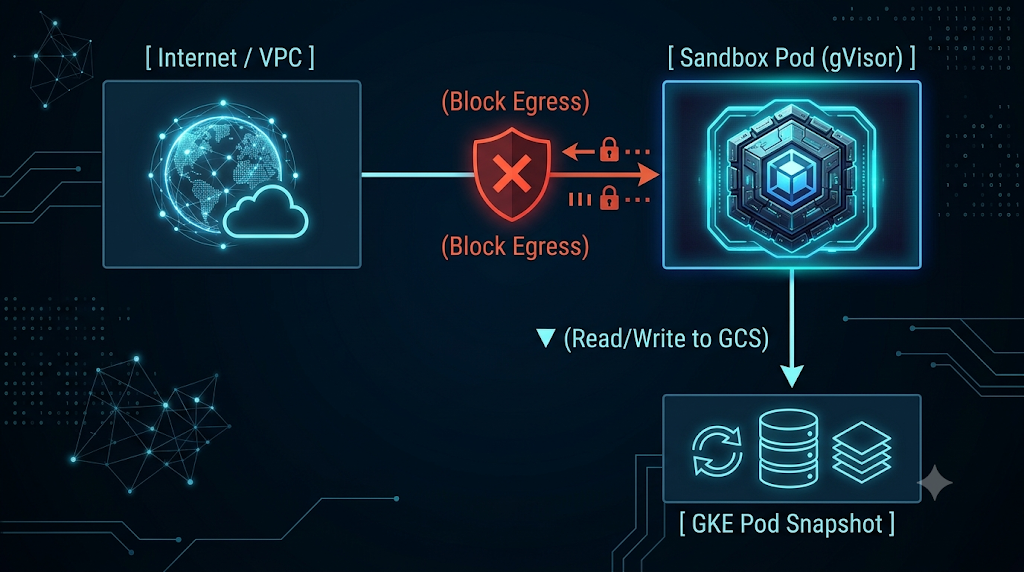
Enforce Egress Zero-Trust via ClusterNetworkPolicy: While GKE Agent Sandbox locks down ingress to the sandbox-router by default, an agent executing code might still attempt unauthorized egress (e.g., exfiltrating data to an external pastebin or scanning internal VPC subnets). Apply an explicit egress policy blocking 169.254.169.254 (the instance metadata server) and restricting outbound traffic exclusively to approved MCP tool endpoints or an inspected egress proxy.
Use Execution-Scoped Tokens: Never pass long-lived IAM keys or static database passwords into sandbox.commands.run(). Inject short-lived, execution-scoped OAuth/JWT tokens bound only to the specific resource the agent is authorized to touch during that single turn.
Separate the Brain from the Hands: Keep your Agent Orchestrator (running ADK, managing system prompts, and holding Vertex AI credentials) in a standard, locked-down GKE deployment. Treat the GKE Agent Sandbox strictly as the ephemeral "hands" where untrusted code and shell commands are dispatched over the sandbox-router HTTP proxy.
Enable OpenTelemetry Tracing Across the Boundary: By installing k8s-agent-sandbox[tracing], every sandbox claim, command execution, snapshot trigger, and resume event emits OpenTelemetry spans. Pipe these into Google Cloud Trace so your platform team can correlate LLM reasoning latency with sandbox execution latency in a single waterfall view
Conclusion
As AI systems evolve from passive text generators into autonomous actors capable of writing and executing code, Kubernetes must evolve with them. Relying on shared-kernel containers for agentic code execution exposes your cluster to lateral movement and container escape, while spinning up dedicated VMs per task ruins user experience and cloud economics.
By combining GKE Agent Sandbox's declarative lifecycle (SandboxTemplate, SandboxWarmPool, SandboxClaim), gVisor's user-space kernel boundary, and GKE Pod Snapshots' ability to freeze and resume memory state on demand, platform engineers can finally give autonomous agents the freedom to execute code—without handing them the keys to the cluster.
Comments
More Blog
View alldevchallengeAn Update on the Hacktoberfest Open-Source AI Challenge: Ghost in the Machine Winners
Hey all, we have a quick update for everyone who participated in the Hacktoberfest Open-Source AI...
J
Jem 1
devchallengeCongrats to October's MLH x DEV Writing Challenge Winner!
October's MLH x DEV Writing Challenge is a wrap! This is our way of celebrating MLH hackers who take...
J
JemcareerWant to make DEV your full-time job? We're hiring a Community Manager!
Hey friends 👋 Back in June, we posted about a Community Program Manager role. Thank you to everyone...
J
Jess Lee 1
discussWho is building solutions with documents?
Digital transformation, anyone?
A
Amara Graham 1
aiPrompt Pad: Show Your AI How to Respond with Few-Shot Examples
Want AI to answer in a specific way? Don't just tell it. Show it. In this episode of Prompt Pad,...
M
MLH TeamdevchallengeCongrats to the Kaggle Benchmarking Challenge Winners!
A few weeks ago we teamed up with Kaggle to ask a deceptively simple question: how do you actually...
J
JemReady-made automations for this
Workflows from the Neura Market marketplace related to this Perplexity resource
- Automate SEO-Optimized Blog Creation with GPT-4, Perplexity AI & Multi-Language Supportn8n · $24.99 · Related topic
- Automate SEO Blog Content Creation with GPT-4, Perplexity AI, and WordPressn8n · $24.99 · Related topic
- Automate SEO Blog Creation + Social Media with GPT-4, Perplexity, and WordPressn8n · $24.99 · Related topic
- Auto-Generate SEO Blog Posts with Perplexity, GPT, Leonardo & WordPressn8n · $14.99 · Related topic