
Back to Blog googlecloud
 ai
ai discuss
 agents
 agenticarchitect
 ai
ai antigravitycli
Parallel Compliance Engine: Drive-to-Sheets Multi-Agent Orchestration
Aryan Irani July 10, 2026
0 views
When building Generative AI applications, developers often encounter a massive bottleneck: sequential...
When building Generative AI applications, developers often encounter a massive bottleneck: sequential processing. If your LLM script takes 8 seconds to process a single PDF, scaling that script to process 100 documents using a standard for loop will take over 13 minutes.
To achieve true scale, we need to abandon sequential loops and embrace Multi-Agent Orchestration.
In this technical tutorial, we will build a Parallel Compliance Engine using the Google Antigravity SDK. Our architecture will read raw vendor compliance PDFs (like W-9s and ISO certificates) directly from a Google Drive folder, spawn parallel dynamic subagents to extract structured data using Gemini 3.5 reasoning, and output the aggregated results directly into Google Sheets.
Let’s break the sequential bottleneck.
Prerequisites & Environment Setup
Before we write the orchestrator, ensure you have Python 3.10+ installed and a Google Cloud Project with billing enabled (to handle concurrent API bursts without hitting Free Tier rate limits).
1.Install the Dependencies: You will need the Antigravity SDK, the Google Workspace APIs, and Pydantic for structured data validation.
pip install google-antigravity google-api-python-client google-auth-httplib2 google-auth-oauthlib pydantic
2.Configure Google Workspace APIs: In your Google Cloud Console, enable both the Google Drive API and Google Sheets API. Generate an OAuth Desktop Client ID, download the JSON file, rename it to credentials.json, and place it in your project root directory.
Architecture Overview
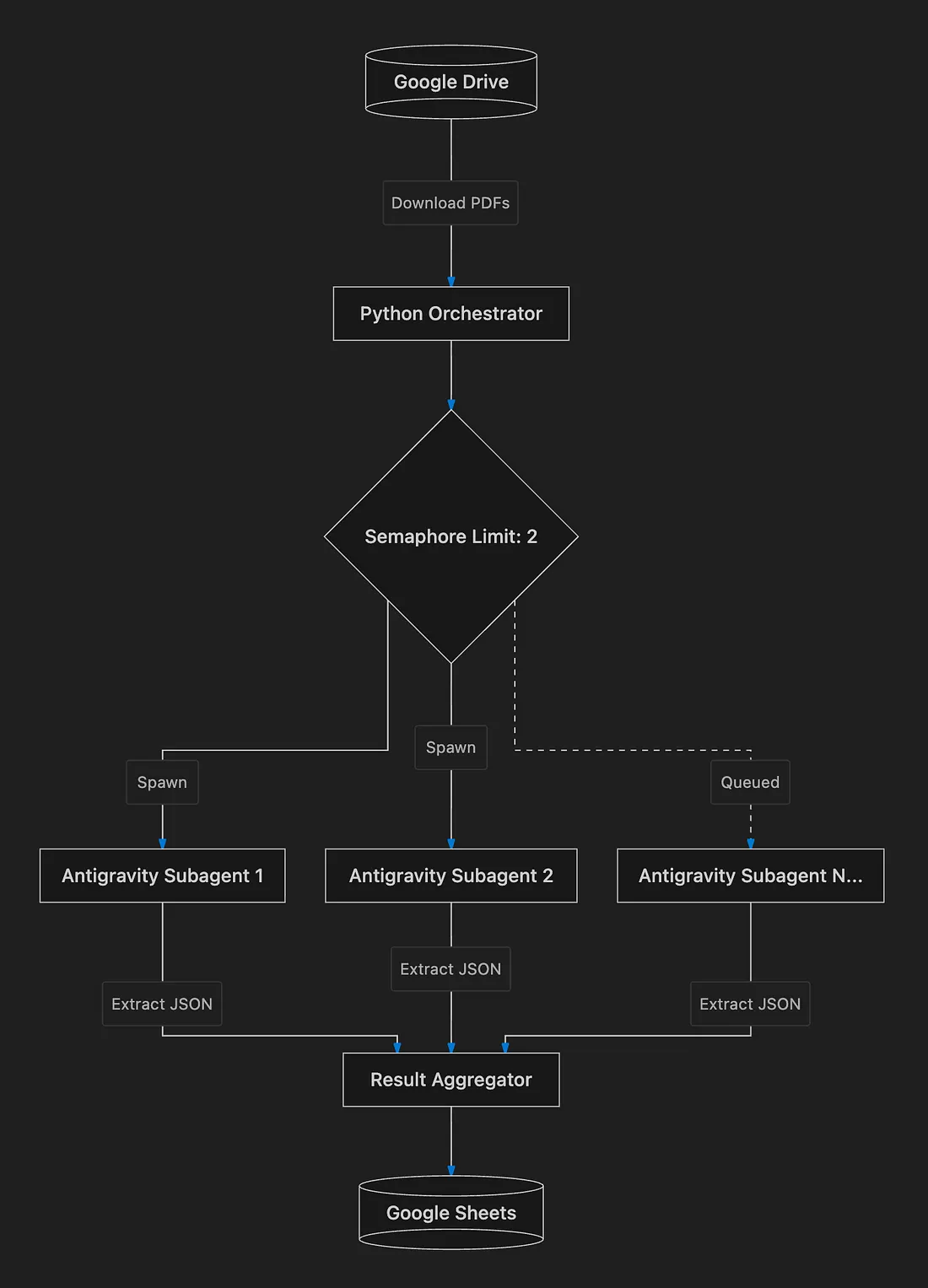
Our engine relies on two distinct layers:
1. The Orchestrator: A central Python script (main.py) responsible for handling Google Workspace authentication, fetching files from Drive, managing API rate limits, and pushing the final data to Sheets.
2. The Subagents: Independent Antigravity instances spawned dynamically by the Orchestrator. Each agent handles a single document, applies Gemini 3.5’s reasoning capabilities, and returns a strict JSON payload.
Step 1: Defining the Agent’s Brain
Large Language Models are inherently unpredictable, but for our pipeline to work, we need deterministic, structured JSON output that maps perfectly to our Google Sheet columns.
We achieve this using Pydantic and the Antigravity LocalAgentConfig.
import pydantic
from google.antigravity import Agent, LocalAgentConfig
from google.antigravity.types import Document

class ComplianceData(pydantic.BaseModel):
    vendor_name: str
    tax_id: str
    status: str
    iso_expiry: str
    notes: str

# Inside our processing function...
config = LocalAgentConfig(
    response_schema=ComplianceData,
    system_instruction="You are a strict compliance officer. Extract the required fields from the document. If a field is missing, use 'UNKNOWN'."
)
By passing our ComplianceData schema into the LocalAgentConfig, the Antigravity SDK guarantees that the Gemini 3.5 model will return a perfectly formatted JSON object containing exactly these five keys.
Step 2: Fetching the Input (Google Drive API)
We use the standard google-api-python-client to authenticate and fetch files from our target Drive folder.
A major advantage of the Antigravity SDK is its native multimodal capabilities. We don’t need to write complex OCR logic to extract text from our PDFs. Instead, we download the raw bytes from Drive and let the SDK handle the binary file natively using Document.from_file().
# Authenticate and build the Drive service
drive_service = build('drive', 'v3', credentials=creds)

# Fetch files from the specific folder
query = f"'{DRIVE_FOLDER_ID}' in parents and trashed=false"
results = drive_service.files().list(q=query, fields="nextPageToken, files(id, name)").execute()

# Download binary files locally for the Antigravity agents
os.makedirs("temp_downloads", exist_ok=True)
for item in results.get('files', []):
    content_bytes = drive_service.files().get_media(fileId=item['id']).execute()
    file_path = os.path.join("temp_downloads", item['name'])
    with open(file_path, 'wb') as f:
        f.write(content_bytes)
Step 3: The Multi-Agent Orchestrator
This is the core of our application. Instead of processing our downloaded documents one by one, we will use Python’s asyncio to spawn a unique Antigravity subagent for every single document simultaneously.
However, if we hit the Gemini API with 100 requests at the exact same millisecond, we will trigger HTTP 429 Rate Limit errors. To build a robust architecture, we implement an asyncio.Semaphore to throttle concurrency.
import asyncio

async def process_document(file_name: str, file_path: str, semaphore: asyncio.Semaphore) -> dict:
    """Spawns an agent to extract data. The semaphore throttles concurrency."""
    async with semaphore:
        async with Agent(config) as agent:
            prompt = f"Extract compliance data from this document named '{file_name}':"

            # Antigravity natively parses the binary PDF
            doc = Document.from_file(file_path)
            response = await agent.chat([prompt, doc])

            # The output is guaranteed to match our Pydantic schema
            data = await response.structured_output()
            data['source_file'] = file_name
            return data

# In our main() loop...
# Limit execution to 2 concurrent agents at a time to respect API limits
semaphore = asyncio.Semaphore(2)

# Create a massive list of asynchronous tasks (our subagents)
tasks = [process_document(doc["name"], doc["path"], semaphore) for doc in documents]

# Execute all subagents concurrently!
valid_results = await asyncio.gather(*tasks)
By setting the semaphore to 2, the Orchestrator safely executes the agents in overlapping “waves”. As soon as one agent finishes its PDF, the next agent in the queue immediately spins up.
Step 4: Aggregating the Output (Google Sheets API)
Once asyncio.gather resolves, valid_results contains a list of perfectly structured JSON dictionaries. We map these dictionaries into a list of lists (rows) and push them directly to Google Sheets using the spreadsheets().values().append method.
# Map our Pydantic keys to Sheets columns
keys = ["source_file", "vendor_name", "tax_id", "status", "iso_expiry", "notes"]

values = []
for res in valid_results:
    row = [res.get(k, "") for k in keys]
    values.append(row)

# Append rows to the spreadsheet instantly
body = {'values': values}
sheets_service.spreadsheets().values().append(
    spreadsheetId=SHEET_ID, range="Sheet1!A1",
    valueInputOption="RAW", body=body).execute()
Running the Engine & Results
With our orchestrator complete, it’s time to run the engine. We pointed the script to a Google Drive folder containing 5 complex compliance PDFs.
python3 main.py
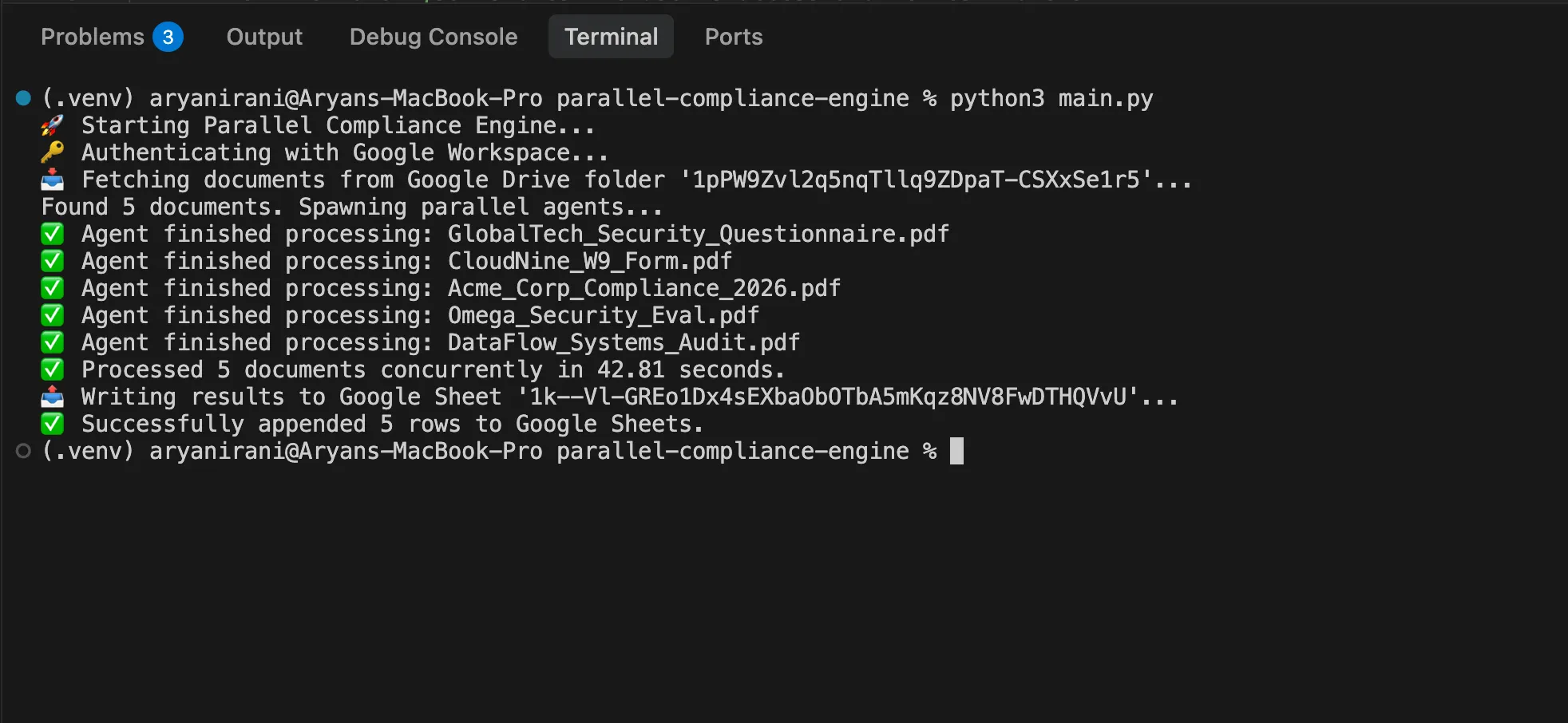
In just 42.81 seconds, the engine authenticated with Google Workspace, downloaded 5 binary PDFs, spawned 5 dynamic Antigravity subagents, applied Gemini 3.5 multimodal reasoning to extract structured data, and injected the aggregated results into a Google Sheet.
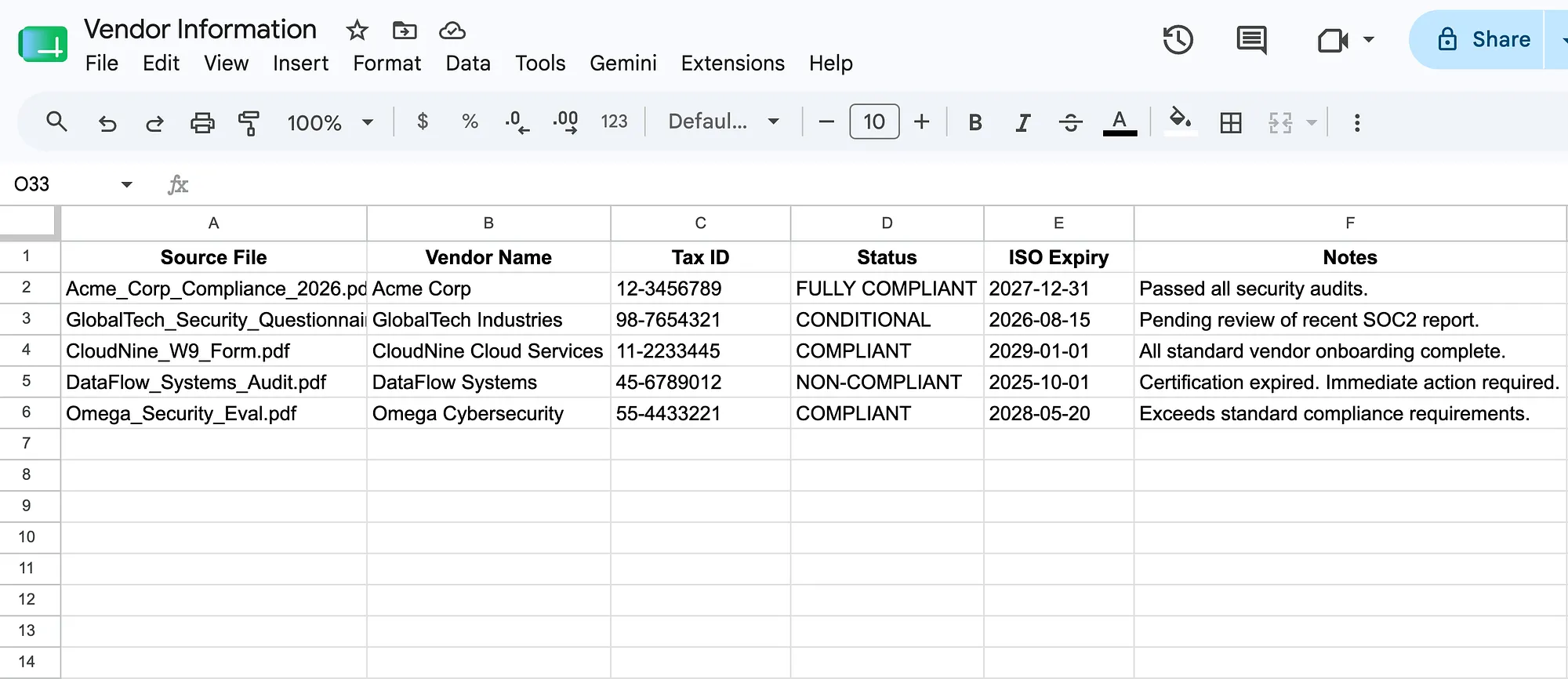
By offloading the heavy lifting to parallel subagents, we completely bypassed the sequential bottleneck, drastically reducing Time-to-Value.
Conclusion
The Google Antigravity SDK provides the architectural foundation needed to move beyond simple LLM chatbots and build robust, concurrent orchestration pipelines. By combining structured outputs, parallel execution, and Google Workspace integrations, you can automate your most complex data extraction workflows at scale.
Check out the Google Antigravity SDK documentation to start building your own multi-agent orchestrators today!
Comments
More Blog
View allaiContext bankruptcy: The case for strategic forgetting for AI Agents
Most of us have seen a coding agent fail to complete a task we know it can do. We just don't...
J
James O'ReillydiscussIs It Ethical to Post and Ask About Circuits on Dev.to?
I’ve been thinking about sharing some electronic circuit posts on Dev.to — small circuits, DIY...
C
codebunny20agentsThe One-Click Exporter: AI Studio Antigravity, Probed to Its Limits
What nobody tells you about exporting your multi-agent prototype to a local workspace. Every...
L
leslysandraagenticarchitectGuarding the till while autonomous data agents do the digging
Autonomous agents are genuinely good at answering messy business questions. Give one an LLM and a set...
S
Sireesha PulipatiaiReturn on Attention: Why AI Code Reviews Are Wearing Us Out
PR volume went up, ticket quality didn't, and the gap got filled with LLMs on both sides of the review: bots reviewing, bots replying, bots occasionally arguing with bots about priorities that only existed in a teammate's head. Our CEO named the actual problem, and it's bigger than code review.
C
christineantigravitycliDebugging Deployments with Gemma 4B, TPU v6e-1, MCP, and Antigravity CLI
This article provides a step by step debugging guide for deploying Gemma 4 to a Google Cloud TPU...
X
xbillReady-made automations for this
Workflows from the Neura Market marketplace related to this Stable Diffusion resource
- AI-Driven Handbook Generator with Multi-Agent Orchestrationn8n · $24.99 · Related topic
- Generate Collaborative Handbooks with GPT-4o: Multi-Agent Orchestration and Human Reviewn8n · $18.54 · Related topic
- Pyragogy AI-Driven Handbook Generator with Multi-Agent Orchestrationn8n · $27.99 · Related topic
- GDPR Violation Alert Workflow for Efficient Compliance Managementn8n · $24.99 · Related topic