100+ Production-Ready n8n AI Workflows: E-Commerce Fulfillment, Lifecycle & Customer Support
📋 HOW IT WORKS • Instant Order & Fulfillment Handling: Automatically ingests incoming e-commerce orders, manages warehouse routing, multi-channel inventory sync, and real-time shipping notifications. • AI-Powered Customer Support & WISMO: Uses AI agents (OpenAI/Anthropic) integrated with helpdesks (Zendesk, Gorgias) for automated sentiment analysis, order tracking lookups, and return/refund request routing. • End-to-End Customer Lifecycle: Triggers post-purchase onboarding series, review collection, VIP customer tiering, and win-back campaigns to increase lifetime value. ⚙️ SETUP STEPS • 15-to-30 minute setup: Import the JSON files into your n8n canvas (Self-Hosted or Cloud). • Configure Webhooks: Connect your e-commerce platform (Shopify, WooCommerce, Stripe) via webhook or API credentials. • Add API Keys: Plug in your AI models (OpenAI/Anthropic) and helpdesk/email marketing credentials in n8n environment variables. ℹ️ ADDITIONAL INFORMATION • Product Scope: Contains 100 production-ready n8n JSON workflows with built-in error handling and scalable routing. • Multi-Platform Support: Pre-built integrations for Shopify, WooCommerce, Stripe, Klaviyo, ActiveCampaign, Zendesk, Gorgias, Intercom, Slack, and Airtable. • Documentation & Updates: Includes full documentation, node setup guides, and free future workflow updates.

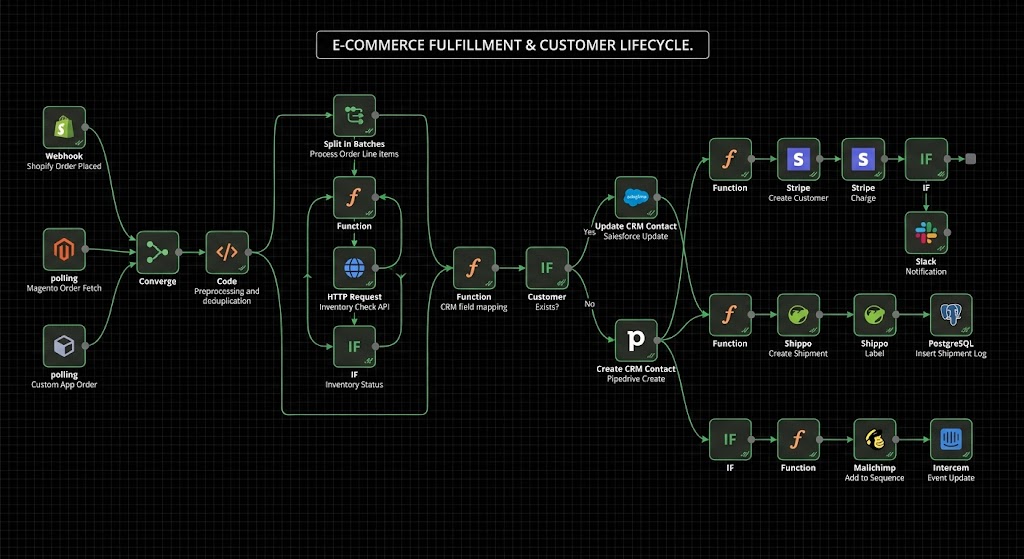
📋 HOW IT WORKS • Instant Order & Fulfillment Handling: Automatically ingests incoming e-commerce orders, manages warehouse routing, multi-channel inventory sync, and real-time shipping notifications. • AI-Powered Customer Support & WISMO: Uses AI agents (OpenAI/Anthropic) integrated with helpdesks (Zendesk, Gorgias) for automated sentiment analysis, order tracking lookups, and return/refund request routing. • End-to-End Customer Lifecycle: Triggers post-purchase onboarding series, review collection, VIP customer tiering, and win-back campaigns to increase lifetime value.
⚙️ SETUP STEPS • 15-to-30 minute setup: Import the JSON files into your n8n canvas (Self-Hosted or Cloud). • Configure Webhooks: Connect your e-commerce platform (Shopify, WooCommerce, Stripe) via webhook or API credentials. • Add API Keys: Plug in your AI models (OpenAI/Anthropic) and helpdesk/email marketing credentials in n8n environment variables.
ℹ️ ADDITIONAL INFORMATION • Product Scope: Contains 100 production-ready n8n JSON workflows with built-in error handling and scalable routing. • Multi-Platform Support: Pre-built integrations for Shopify, WooCommerce, Stripe, Klaviyo, ActiveCampaign, Zendesk, Gorgias, Intercom, Slack, and Airtable. • Documentation & Updates: Includes full documentation, node setup guides, and free future workflow updates.
New buyers can create an account from the cart to unlock a controlled $10 first-purchase credit on eligible orders of $25+.
Related bundle
Content Repurposing Engine
8 hand-picked workflows for $29.00.
That is $3.63 each, vs $25.00 for this one alone.
View bundleSecure checkout powered by Stripe
Support
How to import this workflow into n8n
- 1Purchase or download the workflow to get the n8n workflow JSON file.
- 2In your n8n instance, open Workflows and choose "Import from File" (or paste the JSON with Ctrl+V on the canvas).
- 3Open each node marked with a credential warning and connect your own accounts and API keys.
- 4Run the workflow once manually to verify the data flow, then toggle it to Active.
Related workflows
- Automate Personal Life Management with Telegram and Google Services$14.99
- Launch Your First AI-Powered Chatbot with Actionable Tools$9.99
- Automate Multilingual Customer Support with AI Voice Agent and Calendar Integration$9.99
- Nutrition Tracker & Meal Logger with Telegram, Gemini AI, and Google Sheets$24.99
- Automate AI Video Creation and Social Media Publishing$24.99
- Automate AI-Generated Virtual Try-On Images for WooCommerce$14.99
More from Community
Need this deployed? We'll set it up for you.
Our automation experts deploy this workflow in your stack, connect your accounts, and verify it works — or build a custom solution from scratch.