All-in-One LinkedIn & Instagram Lead Generation Automation System with Website Integration and Custom Workflow Support
🌐 Built for any custom website — no platform lock-in This automation plugs directly into your own website, landing page, or form using webhooks. If your site can send data, this system can run it. Linkedin || Instagram lead gen machine 💸 Designed to be cheap, efficient, and scalable No bloated SaaS fees. No per-seat pricing. You control lead volume, costs, and scale—without burning budget. 🔗 LinkedIn & Instagram lead generation, fully automated Pull targeted leads from LinkedIn and Instagram based on business type, location, and demand—hands-free. ⚙️ One workflow. Multiple platforms. Zero manual work. Select LinkedIn, Instagram, or both. The system routes, processes, and delivers leads automatically. 📊 Clean, structured lead data Profiles, names, and contact details (when available) are filtered, normalized, and ready to use. 🗂️ Auto-synced to Google Sheets or your system Leads are stored instantly and can be extended into CRMs, email tools, or internal dashboards. 🔄 Real-time response to your website Your site gets instant confirmation and data flow—no delays, no broken chains. 🎚️ Fully customizable logic Change niches, locations, and lead volume anytime. No rebuilds. No dev dependency. 🎯 Made for real operators Agencies, solopreneurs, SaaS founders, and developers who want owned lead infrastructure, not rented tools. 🧱 This is not a hack. It’s infrastructure. Set it once. Connect your custom website. Run cheap, consistent lead generation on autopilot. 🤖 Demo web link: https://follow-finder.lovable.app/ contact me for set it up : abuyousufmdjumman@gmail.com

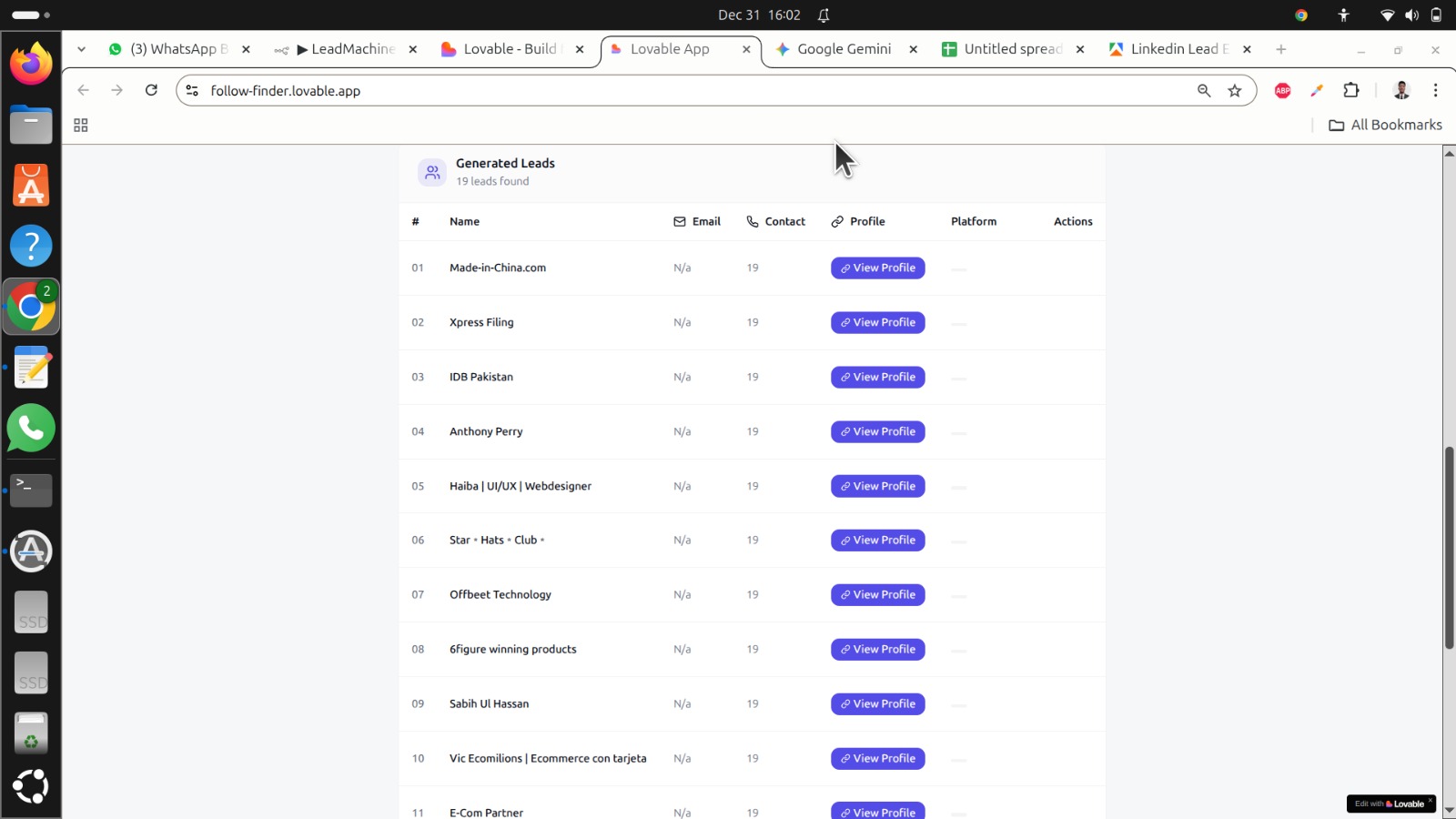
🌐 Built for any custom website — no platform lock-in This automation plugs directly into your own website, landing page, or form using webhooks. If your site can send data, this system can run it. Linkedin || Instagram lead gen machine
💸 Designed to be cheap, efficient, and scalable No bloated SaaS fees. No per-seat pricing. You control lead volume, costs, and scale—without burning budget.
🔗 LinkedIn & Instagram lead generation, fully automated Pull targeted leads from LinkedIn and Instagram based on business type, location, and demand—hands-free.
⚙️ One workflow. Multiple platforms. Zero manual work. Select LinkedIn, Instagram, or both. The system routes, processes, and delivers leads automatically.
📊 Clean, structured lead data Profiles, names, and contact details (when available) are filtered, normalized, and ready to use.
🗂️ Auto-synced to Google Sheets or your system Leads are stored instantly and can be extended into CRMs, email tools, or internal dashboards.
🔄 Real-time response to your website Your site gets instant confirmation and data flow—no delays, no broken chains.
🎚️ Fully customizable logic Change niches, locations, and lead volume anytime. No rebuilds. No dev dependency.
🎯 Made for real operators Agencies, solopreneurs, SaaS founders, and developers who want owned lead infrastructure, not rented tools.
🧱 This is not a hack. It’s infrastructure. Set it once. Connect your custom website. Run cheap, consistent lead generation on autopilot. 🤖
Demo web link: https://follow-finder.lovable.app/ contact me for set it up : abuyousufmdjumman@gmail.com
New buyers can create an account from the cart to unlock a controlled $10 first-purchase credit on eligible orders of $25+.
Secure checkout powered by Stripe
Support
How to import this workflow into n8n
- 1Purchase or download the workflow to get the n8n workflow JSON file.
- 2In your n8n instance, open Workflows and choose "Import from File" (or paste the JSON with Ctrl+V on the canvas).
- 3Open each node marked with a credential warning and connect your own accounts and API keys.
- 4Run the workflow once manually to verify the data flow, then toggle it to Active.
Related Marketing workflows
- Automate UGC Video Creation and Instagram Posting with Google Gemini and Veo 3$9.99
- Automate Lead Generation and Cold Email Outreach$14.99
- Automate Professional Video Ad Creation from Product Images$19.99
- Track SEO Keyword Rankings with Bright Data MCP and GPT-4o AI Analysis$14.99
- Automate Google Maps Data Scraping and Email Discovery for Local Business Outreach$14.99
- Automate AI-Driven Social Media Content for Auto Services$19.99
Need this deployed? We'll set it up for you.
Our automation experts deploy this workflow in your stack, connect your accounts, and verify it works — or build a custom solution from scratch.