Automate AWS SNS Notifications with N8N Workflow
This workflow enables users to automate the process of sending notifications through AWS Simple Notification Service (SNS) via N8N. By leveraging a manual trigger, users can initiate the workflow to send pre-defined messages to a specified SNS top...
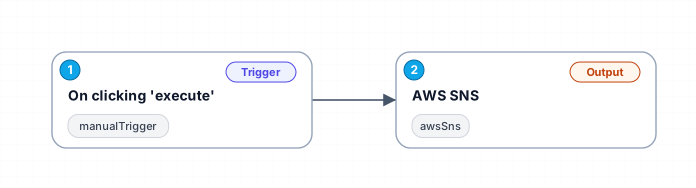
This workflow enables users to automate the process of sending notifications through AWS Simple Notification Service (SNS) via N8N. By leveraging a manual trigger, users can initiate the workflow to send pre-defined messages to a specified SNS topic. This is particularly useful for applications that require immediate notifications based on user actions or events.
The workflow consists of two primary nodes: a manual trigger and the AWS SNS integration. The manual trigger allows users to start the process with a simple click, which can be particularly beneficial for testing or on-demand notifications. The AWS SNS node is configured to send a test message along with a subject line, demonstrating how easily users can customize their notifications.
This automated workflow is ideal for teams and businesses that rely on timely communication, such as marketing teams sending alerts about new promotions or customer service teams notifying users about important updates. By automating these notifications, organizations can ensure that critical information reaches the intended audience promptly, enhancing overall operational efficiency.
In summary, this N8N workflow not only simplifies the notification process but also allows for scalability. Users can modify the message and subject parameters, making it adaptable for various scenarios, whether for testing purposes or real-time updates.
New buyers can create an account from the cart to unlock a controlled $10 first-purchase credit on eligible orders of $25+.
Secure checkout powered by Stripe
Support
How to import this workflow into n8n
- 1Purchase or download the workflow to get the n8n workflow JSON file.
- 2In your n8n instance, open Workflows and choose "Import from File" (or paste the JSON with Ctrl+V on the canvas).
- 3Open each node marked with a credential warning and connect your own accounts and API keys.
- 4Run the workflow once manually to verify the data flow, then toggle it to Active.
Related Productivity workflows
- Automate Personal Life Management with Telegram and Google Services$14.99
- Automate Google Sheets Cleanup by Removing Duplicates via Profile URLs$4.99
- Automate Google Sheets with AI-Driven Text Generation in n8n$9.99
- Automated Daily Briefing for Executive Communication Management$14.99
- Automate Salon Bookings with AI, Google Calendar, and Email Confirmations$14.99
- Automate Meeting Scheduling with AI via Telegram$9.99
More from Zainab Nair
Need this deployed? We'll set it up for you.
Our automation experts deploy this workflow in your stack, connect your accounts, and verify it works — or build a custom solution from scratch.