Automate Client Creation in Harvest with N8N
Streamline your client onboarding process by automating client creation in Harvest through a simple manual trigger.
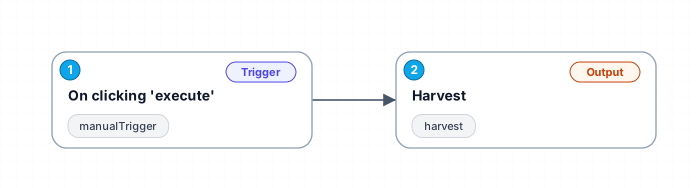
This workflow is designed to simplify the process of adding new clients to Harvest, a popular time tracking and invoicing tool. By utilizing a manual trigger within N8N, users can initiate the creation of a client with just a click. This automation not only saves time but also reduces the risk of errors that can occur during manual data entry.
The workflow begins with a manual trigger that allows users to execute the process whenever they are ready. Once triggered, the workflow communicates with the Harvest API to create a new client, ensuring that all relevant information is captured and stored correctly. This means that businesses can onboard clients more efficiently, allowing them to focus on providing quality services rather than getting bogged down by administrative tasks.
This workflow is particularly beneficial for marketing teams managing referral programs, as it allows for quick addition of clients who may be referred by existing customers. By automating this task, teams can more effectively manage their referrals and improve overall client relationship management.
Use cases for this workflow include onboarding new clients from referral programs, integrating with other marketing tools to enrich client data, and maintaining an up-to-date client list in Harvest without the need for manual entry. Overall, this automation enhances productivity and ensures that businesses can respond more swiftly to new opportunities.
New buyers can create an account from the cart to unlock a controlled $10 first-purchase credit on eligible orders of $25+.
Related bundle
Lead Generation Machine
8 hand-picked workflows for $49.00.
That is $6.13 each, vs $18.73 for this one alone.
View bundleSecure checkout powered by Stripe
Support
How to import this workflow into n8n
- 1Purchase or download the workflow to get the n8n workflow JSON file.
- 2In your n8n instance, open Workflows and choose "Import from File" (or paste the JSON with Ctrl+V on the canvas).
- 3Open each node marked with a credential warning and connect your own accounts and API keys.
- 4Run the workflow once manually to verify the data flow, then toggle it to Active.
Related Marketing workflows
- Automate UGC Video Creation and Instagram Posting with Google Gemini and Veo 3$9.99
- Automate Lead Generation and Cold Email Outreach$14.99
- Automate Professional Video Ad Creation from Product Images$19.99
- Track SEO Keyword Rankings with Bright Data MCP and GPT-4o AI Analysis$14.99
- Automate Google Maps Data Scraping and Email Discovery for Local Business Outreach$14.99
- Automate AI-Driven Social Media Content for Auto Services$19.99
More from Vera Cardoso
Need this deployed? We'll set it up for you.
Our automation experts deploy this workflow in your stack, connect your accounts, and verify it works — or build a custom solution from scratch.