Automate HelpScout Mailbox Retrieval with N8N Workflow
The '1034ManualHelpscoutAutomateTriggered' workflow offers a streamlined solution for users looking to automate their email retrieval from HelpScout. By leveraging N8N's capabilities, this workflow allows users to trigger the process manually and ...
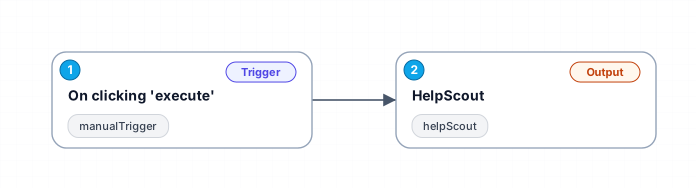
The '1034_Manual_Helpscout_Automate_Triggered' workflow offers a streamlined solution for users looking to automate their email retrieval from HelpScout. By leveraging N8N's capabilities, this workflow allows users to trigger the process manually and fetch all emails from their designated HelpScout mailbox. This can save valuable time for teams managing customer inquiries, allowing them to focus on responses rather than manual data collection.
In today's fast-paced business environment, the ability to automate repetitive tasks is crucial for enhancing productivity. This workflow embodies that principle, enabling teams to efficiently manage customer communication. With just a click of a button, users can initiate the retrieval process and instantly access important emails, ensuring no customer query goes unanswered.
Use cases for this workflow include customer support teams who need to regularly check their HelpScout mailboxes for new inquiries or updates. It can also benefit project managers who want to keep track of client communications without manually checking the mailbox. By automating this process, teams can improve their response times and maintain a high level of customer satisfaction.
Overall, the '1034_Manual_Helpscout_Automate_Triggered' workflow is an essential tool for any organization looking to enhance their email management process through automation.
New buyers can create an account from the cart to unlock a controlled $10 first-purchase credit on eligible orders of $25+.
Secure checkout powered by Stripe
Support
How to import this workflow into n8n
- 1Purchase or download the workflow to get the n8n workflow JSON file.
- 2In your n8n instance, open Workflows and choose "Import from File" (or paste the JSON with Ctrl+V on the canvas).
- 3Open each node marked with a credential warning and connect your own accounts and API keys.
- 4Run the workflow once manually to verify the data flow, then toggle it to Active.
Related Productivity workflows
- Automate Personal Life Management with Telegram and Google Services$14.99
- Automate Google Sheets Cleanup by Removing Duplicates via Profile URLs$4.99
- Automate Google Sheets with AI-Driven Text Generation in n8n$9.99
- Automated Daily Briefing for Executive Communication Management$14.99
- Automate Salon Bookings with AI, Google Calendar, and Email Confirmations$14.99
- Automate Meeting Scheduling with AI via Telegram$9.99
More from BestWorkflows
Need this deployed? We'll set it up for you.
Our automation experts deploy this workflow in your stack, connect your accounts, and verify it works — or build a custom solution from scratch.