Automate Incident Retrieval and Notification Every 5 Minutes
This workflow automatically retrieves incidents from ServiceNow every 5 minutes and notifies you of new incidents.
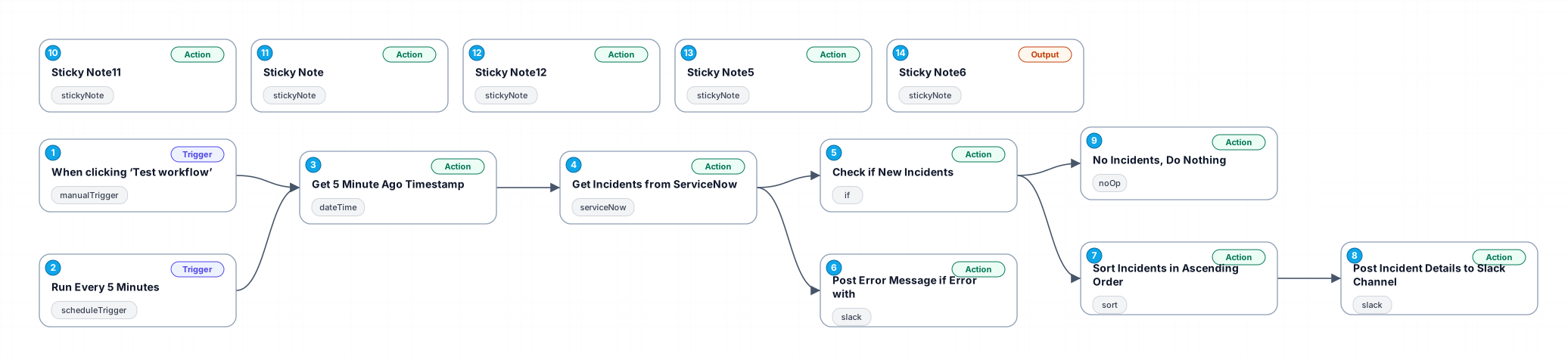
The '0682_Datetime_Schedule_Create_Scheduled' workflow is designed to streamline incident management by automatically pulling incident data from ServiceNow at regular intervals. Every 5 minutes, this workflow checks for new incidents created in the system and alerts users through a notification channel, ensuring that no critical issues are overlooked. The workflow leverages a manual trigger for testing and utilizes a date-time node to calculate the timestamp for querying recent incidents.
By implementing this automation, users can save significant time and effort that would otherwise be spent manually checking for new incidents. This eliminates the risk of human error and ensures a more efficient incident management process. The workflow is particularly beneficial for teams that rely on quick responses to incidents, allowing them to stay proactive in addressing issues as they arise.
Use cases for this workflow include IT support teams who need to monitor incoming incidents continuously, project managers overseeing service delivery, and any organization that utilizes ServiceNow for incident tracking. With this workflow, users can ensure timely updates and maintain high levels of service quality without additional manual overhead.
Overall, the '0682_Datetime_Schedule_Create_Scheduled' workflow exemplifies how automation can enhance operational efficiency, improve response times, and support better incident management practices.
New buyers can create an account from the cart to unlock a controlled $10 first-purchase credit on eligible orders of $25+.
Secure checkout powered by Stripe
Support
How to import this workflow into n8n
- 1Purchase or download the workflow to get the n8n workflow JSON file.
- 2In your n8n instance, open Workflows and choose "Import from File" (or paste the JSON with Ctrl+V on the canvas).
- 3Open each node marked with a credential warning and connect your own accounts and API keys.
- 4Run the workflow once manually to verify the data flow, then toggle it to Active.
Related Personal workflows
- SEO Data Analyst Workflow for E-commerce Insights$24.99
- Automated User Management and Data Processing Workflow$15.04
- AI Agent for Intelligent File Interaction in Supabase and Google Drive$19.99
- Automated Meditation Music Video Creation$19.99
- Instagram Reels Automation: Streamlined Content Creation & Publishing$19.99
- AI Powered Company Research Assistant for Competitive Analysis$19.99
More from Grace Dubois
Need this deployed? We'll set it up for you.
Our automation experts deploy this workflow in your stack, connect your accounts, and verify it works — or build a custom solution from scratch.