Automate LinkedIn Lead Generation with Browserflow in n8n
Streamline your LinkedIn outreach by automating lead generation, profile scraping, and connection requests using Browserflow with n8n.
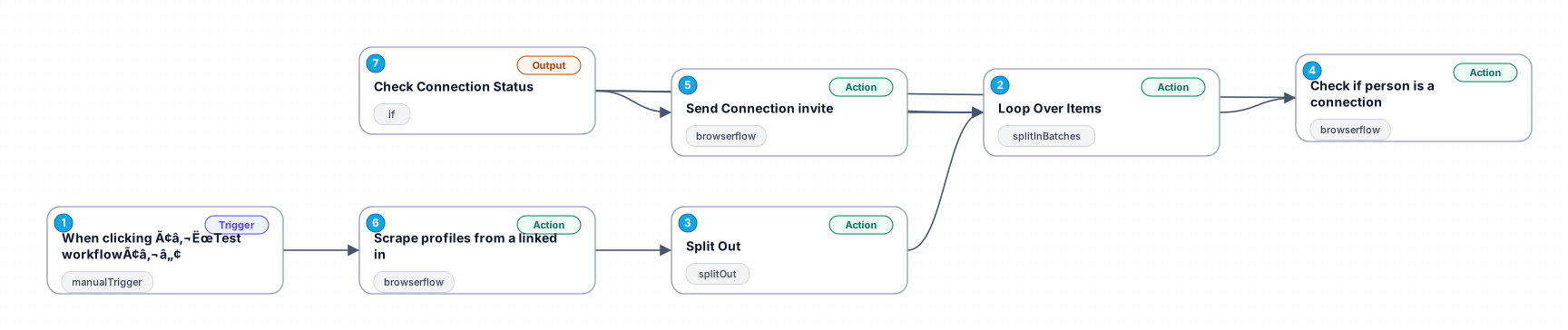
This workflow automates the process of generating LinkedIn leads by scraping profiles based on search criteria, checking connection status, and sending connection requests. It utilizes Browserflow for LinkedIn to perform these actions in a controlled sequence, ensuring that each profile is processed individually. This setup is ideal for recruitment, sales outreach, or any lead generation efforts where LinkedIn is a primary source of contacts.
New buyers can create an account from the cart to unlock a controlled $10 first-purchase credit on eligible orders of $25+.
Secure checkout powered by Stripe
Support
How to import this workflow into n8n
- 1Purchase or download the workflow to get the n8n workflow JSON file.
- 2In your n8n instance, open Workflows and choose "Import from File" (or paste the JSON with Ctrl+V on the canvas).
- 3Open each node marked with a credential warning and connect your own accounts and API keys.
- 4Run the workflow once manually to verify the data flow, then toggle it to Active.
Related Marketing workflows
- Automate UGC Video Creation and Instagram Posting with Google Gemini and Veo 3$9.99
- Automate Lead Generation and Cold Email Outreach$14.99
- Automate Professional Video Ad Creation from Product Images$19.99
- Track SEO Keyword Rankings with Bright Data MCP and GPT-4o AI Analysis$14.99
- Automate Google Maps Data Scraping and Email Discovery for Local Business Outreach$14.99
- Automate AI-Driven Social Media Content for Auto Services$19.99
More from Felix Mueller
Need this deployed? We'll set it up for you.
Our automation experts deploy this workflow in your stack, connect your accounts, and verify it works — or build a custom solution from scratch.