Automate Mattermost Notifications with n8n Trigger
This workflow automates notifications in Mattermost triggered by your n8n instance, enhancing team communication and productivity.
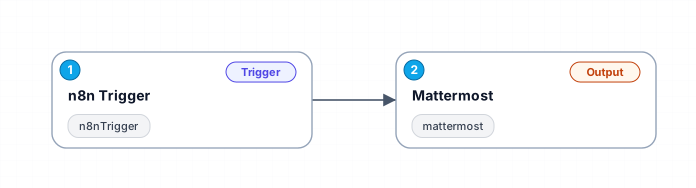
The 'Automate Mattermost Notifications with n8n Trigger' workflow is designed to streamline communications by sending automated messages to a designated Mattermost channel whenever an event is triggered in n8n. This integration allows teams to stay updated on important developments without manual intervention, significantly improving workflow efficiency.
At its core, the workflow consists of two primary components: an n8n trigger that initiates the process and a Mattermost node that sends out the notification. The trigger can be activated by a variety of events, making it versatile for different scenarios, from project updates to system alerts. By configuring the workflow to align with specific team needs, users can ensure that crucial information is communicated promptly.
One of the key benefits of this workflow is its ability to enhance team collaboration. By automating notifications, team members are instantly informed about important events or statuses, reducing the risk of miscommunication and ensuring everyone is on the same page. This is particularly useful in fast-paced environments where timely information is critical.
Use cases for this workflow include project management updates, system monitoring alerts, and automated reminders for important deadlines. By leveraging this workflow, teams can focus more on their core tasks rather than spending time on manual notifications, ultimately driving productivity forward.
New buyers can create an account from the cart to unlock a controlled $10 first-purchase credit on eligible orders of $25+.
Secure checkout powered by Stripe
Support
How to import this workflow into n8n
- 1Purchase or download the workflow to get the n8n workflow JSON file.
- 2In your n8n instance, open Workflows and choose "Import from File" (or paste the JSON with Ctrl+V on the canvas).
- 3Open each node marked with a credential warning and connect your own accounts and API keys.
- 4Run the workflow once manually to verify the data flow, then toggle it to Active.
Related Productivity workflows
- Automate Personal Life Management with Telegram and Google Services$14.99
- Automate Google Sheets Cleanup by Removing Duplicates via Profile URLs$4.99
- Automate Google Sheets with AI-Driven Text Generation in n8n$9.99
- Automated Daily Briefing for Executive Communication Management$14.99
- Automate Salon Bookings with AI, Google Calendar, and Email Confirmations$14.99
- Automate Meeting Scheduling with AI via Telegram$9.99
More from Priya Nasser
Need this deployed? We'll set it up for you.
Our automation experts deploy this workflow in your stack, connect your accounts, and verify it works — or build a custom solution from scratch.