Automate Slack Status and Philips Hue Based on Google Calendar Events
Streamline your workflow by automatically updating your Slack status and Philips Hue lights based on Google Calendar events, minimizing interruptions during focused work periods.
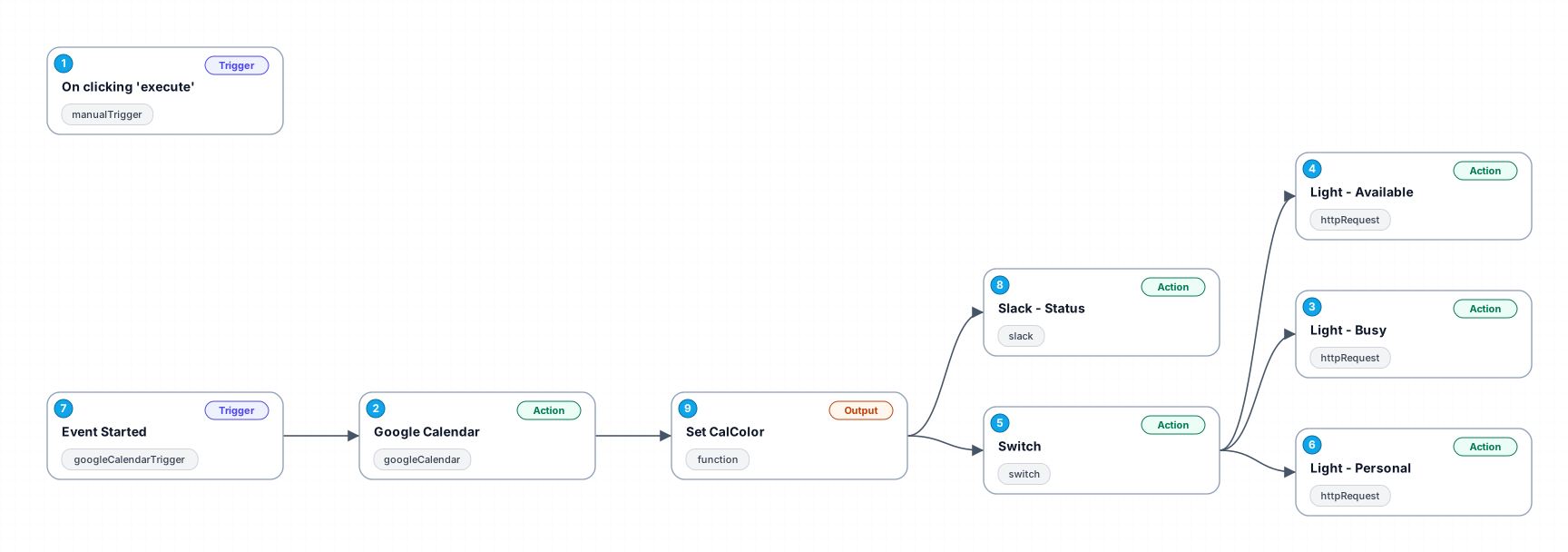
This workflow integrates Google Calendar with Slack and Philips Hue to enhance productivity by reducing interruptions. When a calendar event starts, it updates your Slack status with an emoji and event title, reflecting your availability. Simultaneously, it changes the color of a Philips Hue lamp to signal your status to others, using Home Assistant's local API for control. This setup is ideal for those experimenting with productivity methods like the Diary Detox system, as it visually communicates your working state to those around you.
New buyers can create an account from the cart to unlock a controlled $10 first-purchase credit on eligible orders of $25+.
Related bundle
YouTube Creator Pipeline
8 hand-picked workflows for $39.00.
That is $4.88 each, vs $9.99 for this one alone.
View bundleSecure checkout powered by Stripe
Support
How to import this workflow into n8n
- 1Purchase or download the workflow to get the n8n workflow JSON file.
- 2In your n8n instance, open Workflows and choose "Import from File" (or paste the JSON with Ctrl+V on the canvas).
- 3Open each node marked with a credential warning and connect your own accounts and API keys.
- 4Run the workflow once manually to verify the data flow, then toggle it to Active.
Related Internet of Things workflows
- Automated Weather Alerts and Analysis Using AI and Home Assistant$14.99
- AI-Driven Handbook Generator with Multi-Agent Orchestration$24.99
- Birthday and Ephemeris Notification (Google Contact, Telegram & Home Assistant)$14.99
- Automate Solar Energy Monitoring and Alerts with Gmail, Google Sheets, and Slack$9.99
- Vehicle Telematics Analyzer for Efficient Device Management$24.99
- Automate Network Disconnection Alerts with Omada, Gmail, and Pushover$14.99
More from Sophia Chow
Need this deployed? We'll set it up for you.
Our automation experts deploy this workflow in your stack, connect your accounts, and verify it works — or build a custom solution from scratch.