Automate Web Data Extraction Using Vision-Based AI with Google Sheets and ScrapingBee
Streamline your web scraping tasks with a vision-based AI agent that integrates with Google Sheets and ScrapingBee, enabling efficient data extraction from webpages.
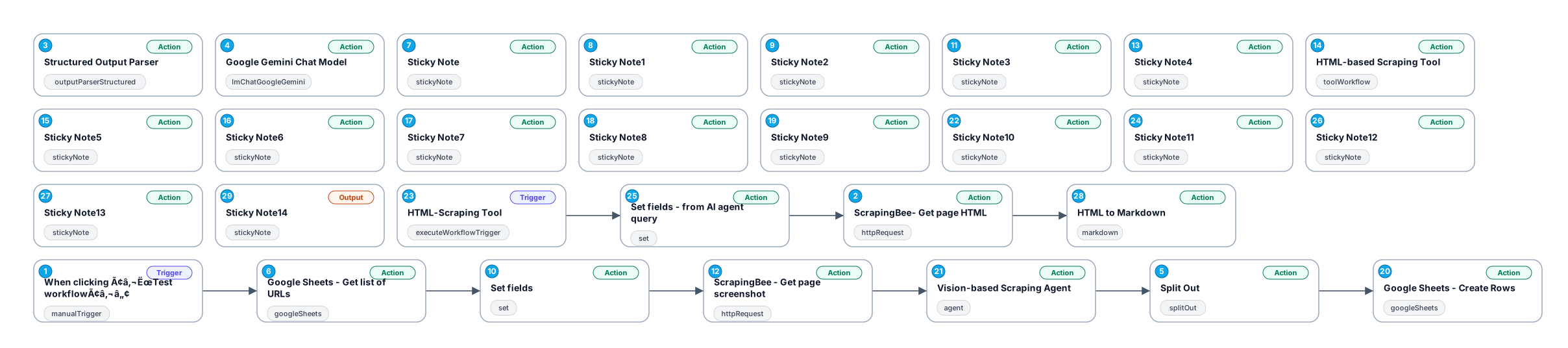
This workflow leverages a vision-based AI agent to extract structured data from webpages using screenshots and HTML scraping as a fallback. It integrates with Google Sheets to manage URLs and store results, and uses ScrapingBee for capturing page screenshots and HTML data. The AI agent, powered by the Gemini-1.5-Pro model, ensures high accuracy in data parsing, making it ideal for e-commerce and other use cases.
New buyers can create an account from the cart to unlock a controlled $10 first-purchase credit on eligible orders of $25+.
Part of a bundle
Web Scraping & Research Engine
This workflow is one of 8 in the bundle — $59.00 for all of them.
That is $7.38 each, vs $14.99 for this one alone.
View bundleSecure checkout powered by Stripe
Tags
Support
How to import this workflow into n8n
- 1Purchase or download the workflow to get the n8n workflow JSON file.
- 2In your n8n instance, open Workflows and choose "Import from File" (or paste the JSON with Ctrl+V on the canvas).
- 3Open each node marked with a credential warning and connect your own accounts and API keys.
- 4Run the workflow once manually to verify the data flow, then toggle it to Active.
Related AI workflows
- Launch Your First AI-Powered Chatbot with Actionable Tools$9.99
- Automate AI Video Creation and YouTube Upload with Google Sheets$14.99
- Build a WhatsApp Assistant with Memory, Google Suite, Multi-AI, Research, and Imaging$24.99
- Automate Blog Post Creation and Publishing with GPT, Leonardo AI, and WordPress$14.99
- Automate SEO Keyword Generation with ChatGPT from Google Sheets$3.99
- Email Agent$500.99
More from Ava Martin
Need this deployed? We'll set it up for you.
Our automation experts deploy this workflow in your stack, connect your accounts, and verify it works — or build a custom solution from scratch.