Automate Your Marketing Data with NetSuite Webhook Integration
This workflow automates the process of retrieving data from NetSuite using a manual webhook trigger, allowing marketing teams to efficiently analyze customer interactions and sales performance. By integrating NetSuite with this automation, busines...
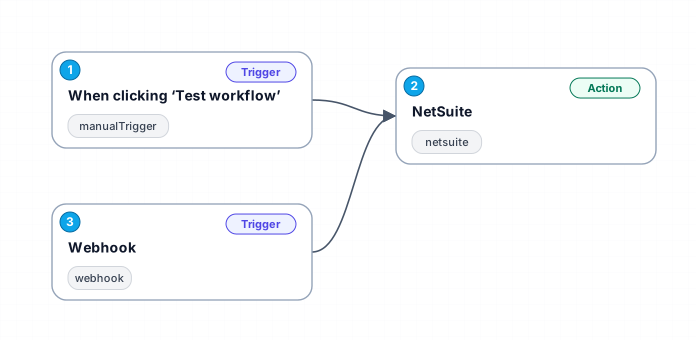
This workflow automates the process of retrieving data from NetSuite using a manual webhook trigger, allowing marketing teams to efficiently analyze customer interactions and sales performance. By integrating NetSuite with this automation, businesses can streamline their data collection processes, ensuring that critical information is readily available for analysis.
The primary benefit of this workflow is its ability to provide real-time insights into marketing metrics by executing SuiteQL queries directly from NetSuite. Users can trigger the workflow manually, ensuring that they fetch the most up-to-date information whenever needed. This flexibility is particularly useful for marketers who require immediate data to inform their strategies and campaigns.
Moreover, the workflow is designed to minimize the time spent on repetitive data entry tasks, allowing teams to focus on more strategic initiatives. By automating data retrieval, organizations can enhance their decision-making capabilities, leading to better-targeted marketing efforts and improved ROI.
Use cases for this workflow include generating reports on customer behavior, analyzing sales trends, and tracking marketing campaign effectiveness. Businesses can leverage the insights gained from this workflow to refine their marketing strategies and drive growth effectively.
New buyers can create an account from the cart to unlock a controlled $10 first-purchase credit on eligible orders of $25+.
Related bundle
Lead Generation Machine
8 hand-picked workflows for $49.00.
That is $6.13 each, vs $19.17 for this one alone.
View bundleSecure checkout powered by Stripe
Support
How to import this workflow into n8n
- 1Purchase or download the workflow to get the n8n workflow JSON file.
- 2In your n8n instance, open Workflows and choose "Import from File" (or paste the JSON with Ctrl+V on the canvas).
- 3Open each node marked with a credential warning and connect your own accounts and API keys.
- 4Run the workflow once manually to verify the data flow, then toggle it to Active.
Related Marketing workflows
- Automate UGC Video Creation and Instagram Posting with Google Gemini and Veo 3$9.99
- Automate Lead Generation and Cold Email Outreach$14.99
- Automate Professional Video Ad Creation from Product Images$19.99
- Track SEO Keyword Rankings with Bright Data MCP and GPT-4o AI Analysis$14.99
- Automate Google Maps Data Scraping and Email Discovery for Local Business Outreach$14.99
- Automate AI-Driven Social Media Content for Auto Services$19.99
More from Clara Hoffmann
Need this deployed? We'll set it up for you.
Our automation experts deploy this workflow in your stack, connect your accounts, and verify it works — or build a custom solution from scratch.