Automate Your Marketing with Code Noop Triggered Workflow
This workflow automates the extraction of information and updates Google Sheets in real-time, streamlining marketing processes.
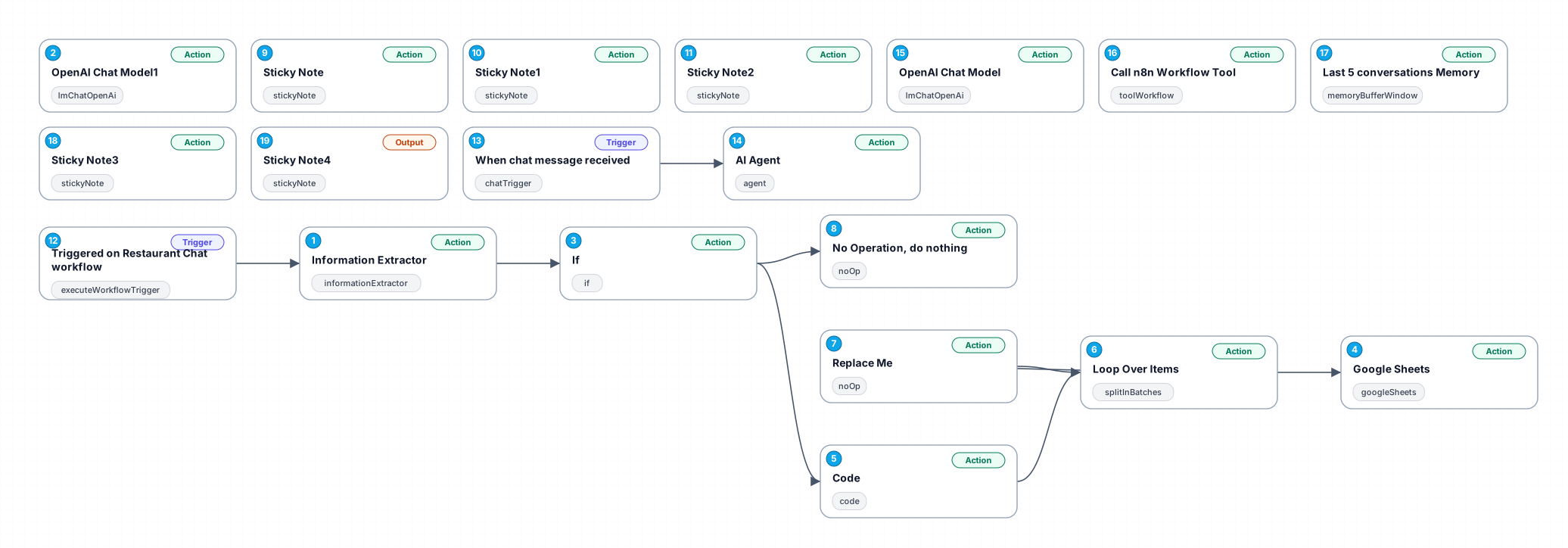
The '0918_Code_Noop_Send_Triggered' workflow is designed to enhance marketing automation by efficiently extracting relevant information from user queries and updating Google Sheets with the collected data. This automation is particularly beneficial for businesses that need to manage customer orders or inquiries effectively, allowing them to focus on strategic tasks rather than manual data entry.
In this workflow, an 'Information Extractor' node first processes incoming queries to identify essential elements such as items ordered, quantities, and table numbers. Leveraging advanced AI capabilities, specifically the OpenAI Chat Model, the workflow evaluates the extracted data to determine the next steps based on predefined conditions.
Once the data validation is complete, the workflow utilizes Google Sheets integration to log the extracted information in real-time, creating a seamless connection between customer interactions and data management. This ensures that all relevant data is captured accurately and promptly, minimizing the risk of errors associated with manual entry.
Overall, this workflow not only saves time and reduces operational overhead but also enhances data accuracy, providing businesses with valuable insights into customer preferences and trends. Use cases for this automation include cafes, restaurants, and retail businesses that require efficient order management and customer interaction tracking.
New buyers can create an account from the cart to unlock a controlled $10 first-purchase credit on eligible orders of $25+.
Secure checkout powered by Stripe
Support
How to import this workflow into n8n
- 1Purchase or download the workflow to get the n8n workflow JSON file.
- 2In your n8n instance, open Workflows and choose "Import from File" (or paste the JSON with Ctrl+V on the canvas).
- 3Open each node marked with a credential warning and connect your own accounts and API keys.
- 4Run the workflow once manually to verify the data flow, then toggle it to Active.
Related Marketing workflows
- Automate UGC Video Creation and Instagram Posting with Google Gemini and Veo 3$9.99
- Automate Lead Generation and Cold Email Outreach$14.99
- Automate Professional Video Ad Creation from Product Images$19.99
- Track SEO Keyword Rankings with Bright Data MCP and GPT-4o AI Analysis$14.99
- Automate Google Maps Data Scraping and Email Discovery for Local Business Outreach$14.99
- Automate AI-Driven Social Media Content for Auto Services$19.99
More from Vera Cardoso
Need this deployed? We'll set it up for you.
Our automation experts deploy this workflow in your stack, connect your accounts, and verify it works — or build a custom solution from scratch.