Automated Drink Water Reminder Workflow
The Automated Drink Water Reminder Workflow is designed to help individuals maintain proper hydration levels throughout their day. By utilizing advanced automation, this workflow ensures that users receive timely reminders to drink water, promotin...
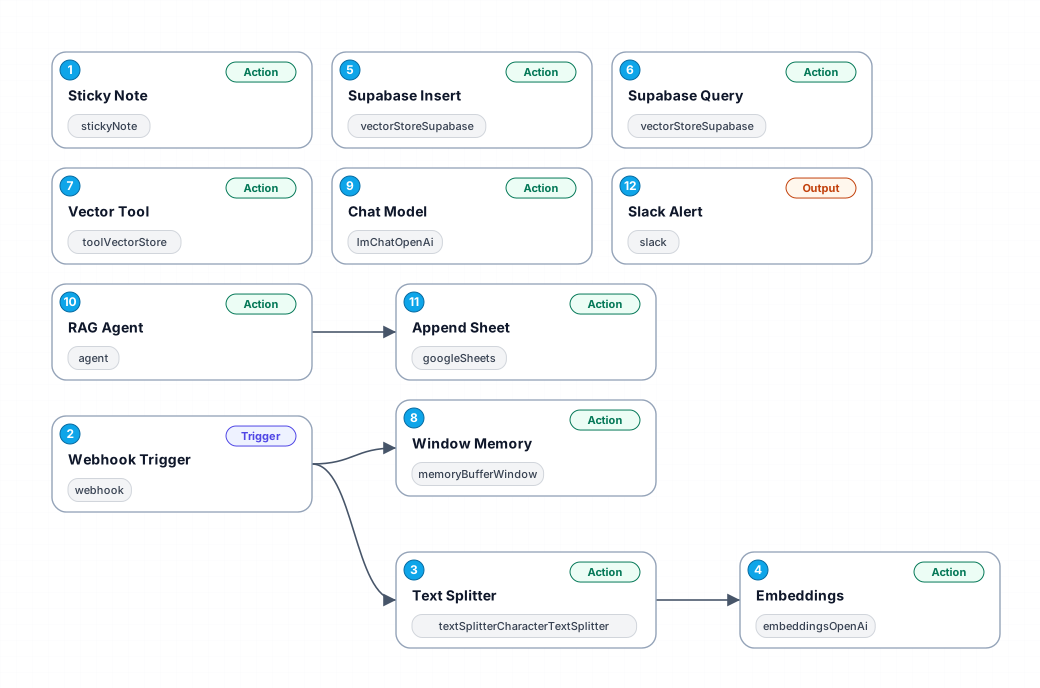
The Automated Drink Water Reminder Workflow is designed to help individuals maintain proper hydration levels throughout their day. By utilizing advanced automation, this workflow ensures that users receive timely reminders to drink water, promoting better health and wellness. It leverages powerful integrations with webhook triggers and database management tools to create a seamless experience.
At its core, the workflow employs a webhook trigger to initiate reminders based on user-defined schedules. This allows for personalization, as users can adjust the frequency of reminders according to their preferences. Once activated, the workflow utilizes sticky notes to display reminders visually, ensuring that the message is clear and noticeable.
The workflow also incorporates a text splitter to manage content effectively, making it easy to handle large sets of data or reminders. Additionally, it integrates with OpenAI's embeddings to enhance reminder relevance and context, ensuring that users receive not just prompts to drink water, but engaging messages that promote the importance of hydration.
With a Supabase integration, the workflow can store user preferences and reminders efficiently, allowing for future queries and adjustments. This setup not only simplifies the reminder process but also enables users to track their hydration habits over time, leading to improved health outcomes. Overall, this workflow is perfect for anyone looking to enhance their daily hydration habits through automation and smart technology.
New buyers can create an account from the cart to unlock a controlled $10 first-purchase credit on eligible orders of $25+.
Related bundle
YouTube Creator Pipeline
8 hand-picked workflows for $39.00.
That is $4.88 each, vs $19.31 for this one alone.
View bundleSecure checkout powered by Stripe
Support
How to import this workflow into n8n
- 1Purchase or download the workflow to get the n8n workflow JSON file.
- 2In your n8n instance, open Workflows and choose "Import from File" (or paste the JSON with Ctrl+V on the canvas).
- 3Open each node marked with a credential warning and connect your own accounts and API keys.
- 4Run the workflow once manually to verify the data flow, then toggle it to Active.
Related Personal workflows
- SEO Data Analyst Workflow for E-commerce Insights$24.99
- Automated User Management and Data Processing Workflow$15.04
- AI Agent for Intelligent File Interaction in Supabase and Google Drive$19.99
- Automated Meditation Music Video Creation$19.99
- Instagram Reels Automation: Streamlined Content Creation & Publishing$19.99
- AI Powered Company Research Assistant for Competitive Analysis$19.99
More from Adele Grabowski
Need this deployed? We'll set it up for you.
Our automation experts deploy this workflow in your stack, connect your accounts, and verify it works — or build a custom solution from scratch.