Automated GA Report Email Workflow for Enhanced Insights
Streamline your reporting process with this automated GA report email workflow, designed for personal use.
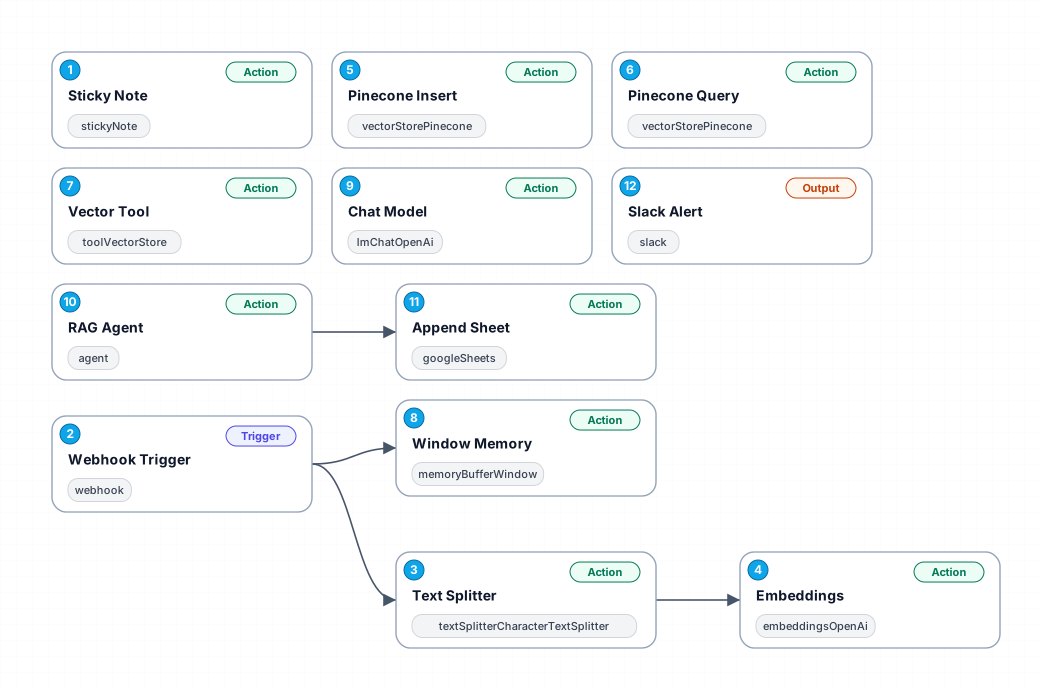
The Automated GA Report Email Workflow simplifies the process of generating and emailing Google Analytics reports. This workflow is particularly beneficial for individuals who require regular insights from their GA data without the manual hassle of compiling and sending reports. By automating this task, users can save time and ensure that reports are consistently delivered on schedule, allowing for informed decision-making based on up-to-date analytics.
This workflow begins with a webhook trigger that activates the process whenever needed. The data is then processed through a text splitter, which divides the report content into manageable chunks for further analysis. Utilizing advanced embedding techniques, the workflow transforms the data into a format suitable for storage and retrieval.
One of the key features of this automation is the integration with Pinecone, a vector database that stores and queries the generated embeddings. This allows users to efficiently manage large datasets and quickly retrieve relevant information when needed. The workflow also includes a vector tool that enhances the context of the stored data, making it more accessible for future queries.
Overall, this automated workflow not only boosts productivity by reducing manual tasks but also enhances the quality of insights derived from Google Analytics data. It is ideal for marketing professionals, business analysts, and anyone seeking to leverage data-driven insights to improve their strategies.
New buyers can create an account from the cart to unlock a controlled $10 first-purchase credit on eligible orders of $25+.
Related bundle
YouTube Creator Pipeline
8 hand-picked workflows for $39.00.
That is $4.88 each, vs $13.44 for this one alone.
View bundleSecure checkout powered by Stripe
Support
How to import this workflow into n8n
- 1Purchase or download the workflow to get the n8n workflow JSON file.
- 2In your n8n instance, open Workflows and choose "Import from File" (or paste the JSON with Ctrl+V on the canvas).
- 3Open each node marked with a credential warning and connect your own accounts and API keys.
- 4Run the workflow once manually to verify the data flow, then toggle it to Active.
Related Personal workflows
- SEO Data Analyst Workflow for E-commerce Insights$24.99
- Automated User Management and Data Processing Workflow$15.04
- AI Agent for Intelligent File Interaction in Supabase and Google Drive$19.99
- Automated Meditation Music Video Creation$19.99
- Instagram Reels Automation: Streamlined Content Creation & Publishing$19.99
- AI Powered Company Research Assistant for Competitive Analysis$19.99
More from Grace Dubois
Need this deployed? We'll set it up for you.
Our automation experts deploy this workflow in your stack, connect your accounts, and verify it works — or build a custom solution from scratch.