Automated Manual Update Scheduling for Enhanced Project Management
Streamline your project management with automated scheduling for manual updates in Neura Market Workflows.
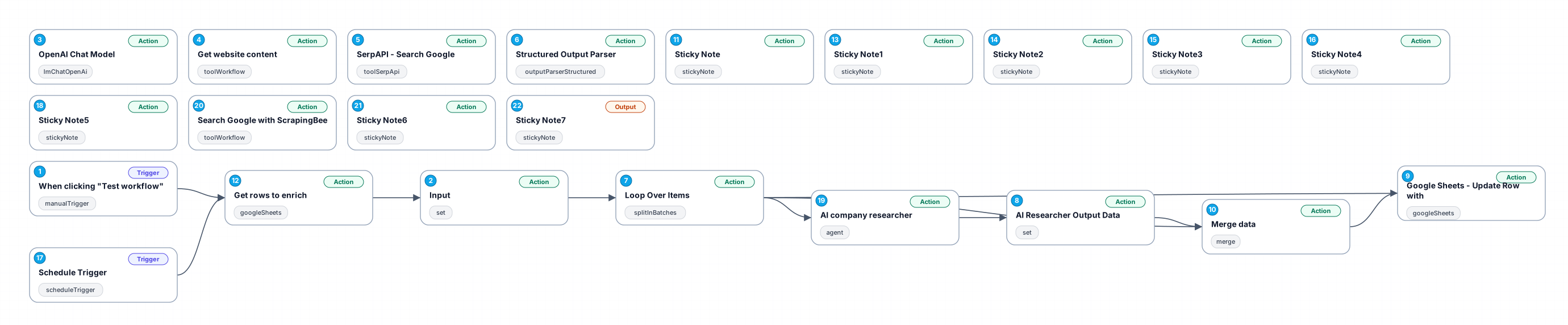
The '0527_Schedule_Manual_Update_Scheduled' workflow is designed to optimize project management by automating the process of scheduling manual updates. This workflow effectively reduces manual intervention and allows project managers to focus on more strategic tasks, enhancing overall productivity. By utilizing a combination of manual triggers and AI-driven content retrieval, this workflow ensures that updates are timely and relevant, keeping the project team informed and aligned.
At its core, this workflow leverages a manual trigger to initiate the process, allowing users to start updates at their convenience. It captures essential input data, including company information and row numbers, which are crucial for tracking project progress. Additionally, it integrates with OpenAI's chat model to generate intelligent responses, providing insights and facilitating decision-making based on real-time data.
The workflow also includes a specialized tool for fetching website content, ensuring that the most current information is accessible for updates. This feature is particularly beneficial for teams that rely on external data sources, as it automates the retrieval process and minimizes the potential for errors associated with manual data entry. The seamless integration of these components creates a robust solution for managing project updates efficiently.
Overall, this workflow is a valuable asset for any organization looking to enhance its project management capabilities. By embracing automation, teams can improve communication, reduce time spent on routine tasks, and ultimately drive better project outcomes.
New buyers can create an account from the cart to unlock a controlled $10 first-purchase credit on eligible orders of $25+.
Secure checkout powered by Stripe
Support
How to import this workflow into n8n
- 1Purchase or download the workflow to get the n8n workflow JSON file.
- 2In your n8n instance, open Workflows and choose "Import from File" (or paste the JSON with Ctrl+V on the canvas).
- 3Open each node marked with a credential warning and connect your own accounts and API keys.
- 4Run the workflow once manually to verify the data flow, then toggle it to Active.
Related Productivity workflows
- Automate Personal Life Management with Telegram and Google Services$14.99
- Automate Google Sheets Cleanup by Removing Duplicates via Profile URLs$4.99
- Automate Google Sheets with AI-Driven Text Generation in n8n$9.99
- Automated Daily Briefing for Executive Communication Management$14.99
- Automate Salon Bookings with AI, Google Calendar, and Email Confirmations$14.99
- Automate Meeting Scheduling with AI via Telegram$9.99
More from Ivan Nguyen
Need this deployed? We'll set it up for you.
Our automation experts deploy this workflow in your stack, connect your accounts, and verify it works — or build a custom solution from scratch.