Automated Order Shipped Notification Workflow
This workflow automates notifications for shipped orders, enhancing customer experience and operational efficiency.
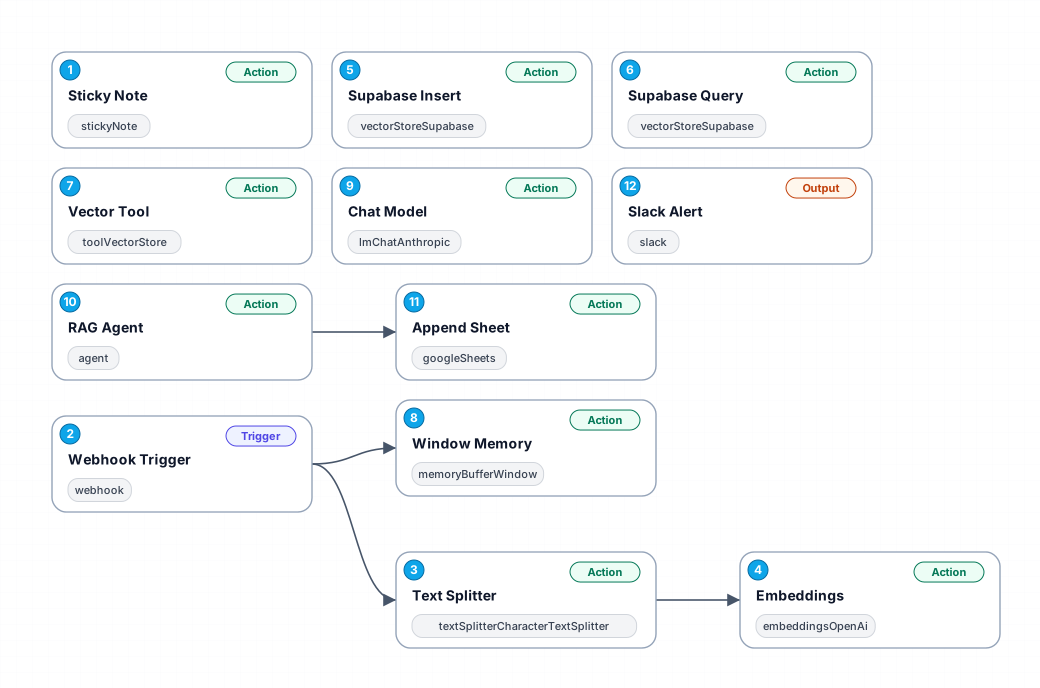
The 'Order Shipped Notification' workflow automates the process of notifying customers when their orders have been shipped. By integrating various nodes, this workflow ensures that timely updates are sent, minimizing customer anxiety and improving satisfaction. Utilizing a webhook trigger, the workflow activates upon an order being marked as shipped, streamlining the communication process.
At its core, this workflow employs a series of automated steps that manage the notification content effectively. It begins with capturing the order information via a webhook, followed by parsing and processing the data to prepare a customized message for the customer. The use of text splitting allows for efficient handling of long messages, ensuring that all necessary information is conveyed in a digestible format.
Additionally, the integration of OpenAI's embedding model enhances the quality of the notification content, making it more engaging and informative. This is followed by storing the processed information in Supabase, which acts as a reliable vector store for managing order notifications. The workflow also includes querying capabilities, enabling retrieval of past notifications for reference or analytics.
Overall, this automated workflow not only saves time but also improves the accuracy of order updates, leading to a better customer experience. It is ideal for e-commerce businesses looking to enhance their order management processes and maintain strong customer relationships through timely communication.
New buyers can create an account from the cart to unlock a controlled $10 first-purchase credit on eligible orders of $25+.
Secure checkout powered by Stripe
Support
How to import this workflow into n8n
- 1Purchase or download the workflow to get the n8n workflow JSON file.
- 2In your n8n instance, open Workflows and choose "Import from File" (or paste the JSON with Ctrl+V on the canvas).
- 3Open each node marked with a credential warning and connect your own accounts and API keys.
- 4Run the workflow once manually to verify the data flow, then toggle it to Active.
Related Personal workflows
- SEO Data Analyst Workflow for E-commerce Insights$24.99
- Automated User Management and Data Processing Workflow$15.04
- AI Agent for Intelligent File Interaction in Supabase and Google Drive$19.99
- Automated Meditation Music Video Creation$19.99
- Instagram Reels Automation: Streamlined Content Creation & Publishing$19.99
- AI Powered Company Research Assistant for Competitive Analysis$19.99
More from Sofia Nasser
Need this deployed? We'll set it up for you.
Our automation experts deploy this workflow in your stack, connect your accounts, and verify it works — or build a custom solution from scratch.