Automated SERP Analysis Workflow Using SerpAPI and Crawl4AI
Streamline your keyword research and SERP analysis with this automated workflow integrating SerpAPI and Crawl4AI.
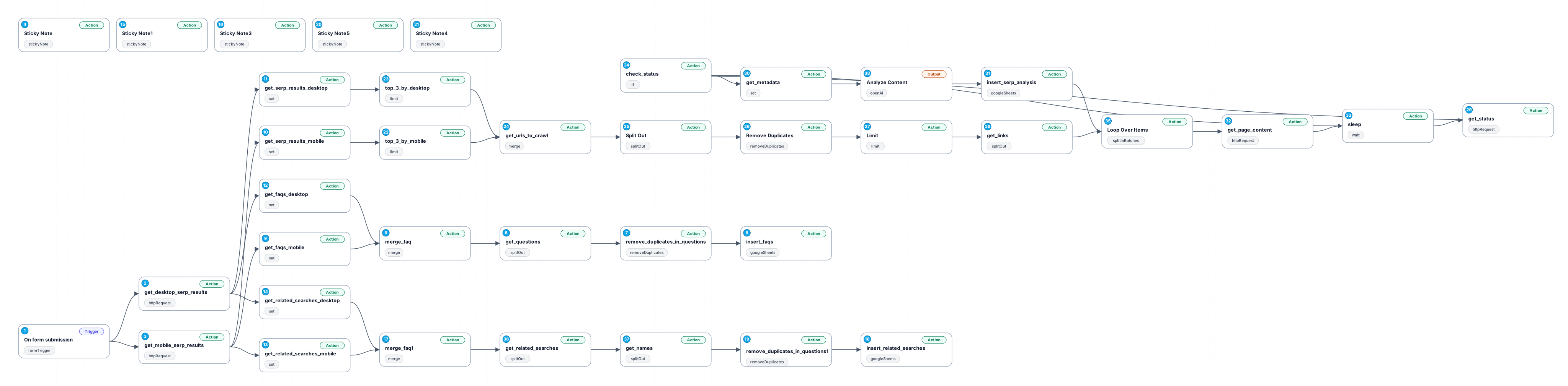
The 'Automated SERP Analysis Workflow' is designed to simplify the process of gathering Search Engine Results Pages (SERPs) for specific keywords across different devices and countries. This workflow utilizes the SerpAPI service for obtaining real-time data on search results, enabling users to gain insights into keyword performance and competition without manual effort.
By automating the keyword research process, this workflow saves valuable time and resources, allowing marketers and SEO professionals to focus on strategy and optimization rather than data collection. With its user-friendly form submission feature, users can easily input their target keywords and select the desired country, triggering the workflow to fetch relevant SERP data.
The integration of both desktop and mobile SERP results ensures that users have a comprehensive view of their keyword performance across devices. This is particularly beneficial in today's mobile-centric digital landscape, where search behaviors can differ significantly between desktop and mobile users.
Use cases for this workflow include digital marketing campaigns, SEO audits, and competitor analysis, making it an essential tool for professionals seeking to enhance their online visibility and search strategy. Whether you are a freelancer, an agency, or an in-house marketing team, this workflow provides a scalable solution for effective keyword analysis.
New buyers can create an account from the cart to unlock a controlled $10 first-purchase credit on eligible orders of $25+.
Secure checkout powered by Stripe
Support
How to import this workflow into n8n
- 1Purchase or download the workflow to get the n8n workflow JSON file.
- 2In your n8n instance, open Workflows and choose "Import from File" (or paste the JSON with Ctrl+V on the canvas).
- 3Open each node marked with a credential warning and connect your own accounts and API keys.
- 4Run the workflow once manually to verify the data flow, then toggle it to Active.
Related Productivity workflows
- Automate Personal Life Management with Telegram and Google Services$14.99
- Automate Google Sheets Cleanup by Removing Duplicates via Profile URLs$4.99
- Automate Google Sheets with AI-Driven Text Generation in n8n$9.99
- Automated Daily Briefing for Executive Communication Management$14.99
- Automate Salon Bookings with AI, Google Calendar, and Email Confirmations$14.99
- Automate Meeting Scheduling with AI via Telegram$9.99
More from Kaito Okafor
Need this deployed? We'll set it up for you.
Our automation experts deploy this workflow in your stack, connect your accounts, and verify it works — or build a custom solution from scratch.