Automated Unpaid Invoice Reminder Workflow for Enhanced Cash Flow
This workflow automates the reminder process for unpaid invoices, improving cash flow and reducing late payments.
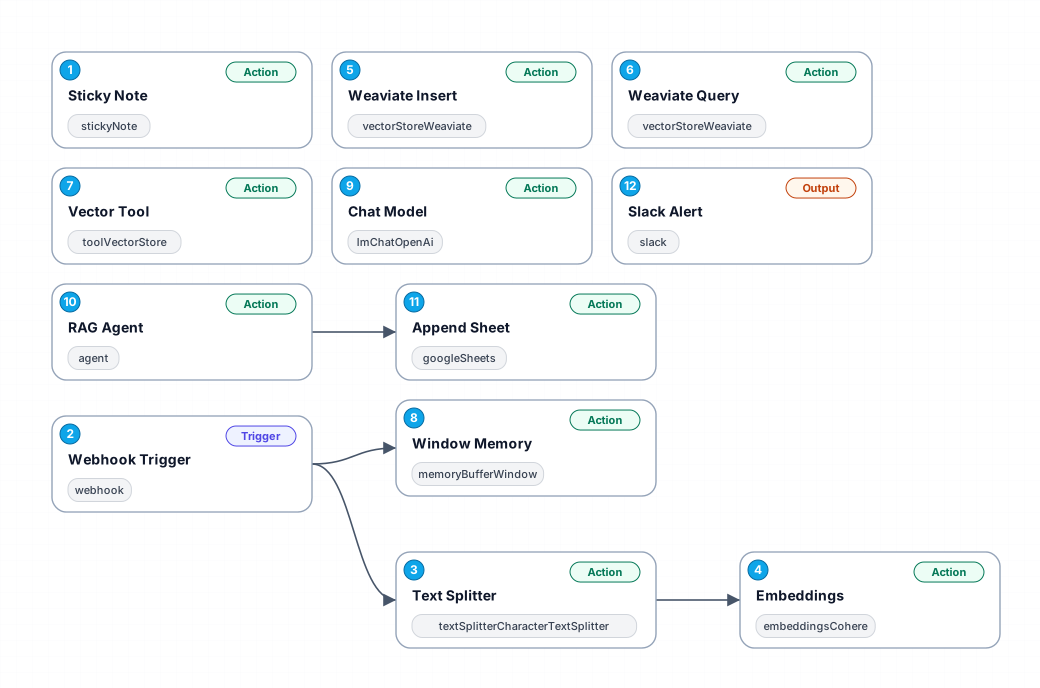
The Unpaid Invoice Reminder workflow is designed to streamline the process of sending reminders for outstanding invoices, ensuring that businesses receive timely payments. By automating this crucial task, the workflow saves time and minimizes the potential for human error in follow-ups. This is particularly beneficial for small to medium-sized enterprises who may not have the resources for dedicated accounts receivable staff.
The workflow begins with a webhook trigger that initiates the reminder process when an unpaid invoice is detected. As invoices can often be lengthy and detailed, the Text Splitter node breaks down the content into manageable chunks, ensuring that no important information is lost in communication. This is especially useful for invoices that contain detailed descriptions of services or products provided.
Next, the workflow utilizes advanced machine learning capabilities through the Embeddings node to analyze and understand the content of the invoices. This allows for personalized reminder messages to be crafted based on the context of the unpaid invoice. The Weaviate Insert node then stores these embeddings in a vector database, enabling quick retrieval and query capabilities.
With the Weaviate Query node, the workflow can efficiently query previously stored invoice data, helping to customize follow-up messages. Finally, the Vector Tool and Window Memory nodes enhance the workflow's ability to maintain context and streamline future interactions. Overall, this automated workflow not only enhances operational efficiency but also fosters better customer relationships through timely and relevant communication.
New buyers can create an account from the cart to unlock a controlled $10 first-purchase credit on eligible orders of $25+.
Related bundle
Lead Generation Machine
8 hand-picked workflows for $49.00.
That is $6.13 each, vs $11.71 for this one alone.
View bundleSecure checkout powered by Stripe
Support
How to import this workflow into n8n
- 1Purchase or download the workflow to get the n8n workflow JSON file.
- 2In your n8n instance, open Workflows and choose "Import from File" (or paste the JSON with Ctrl+V on the canvas).
- 3Open each node marked with a credential warning and connect your own accounts and API keys.
- 4Run the workflow once manually to verify the data flow, then toggle it to Active.
Related Marketing workflows
- Automate UGC Video Creation and Instagram Posting with Google Gemini and Veo 3$9.99
- Automate Lead Generation and Cold Email Outreach$14.99
- Automate Professional Video Ad Creation from Product Images$19.99
- Track SEO Keyword Rankings with Bright Data MCP and GPT-4o AI Analysis$14.99
- Automate Google Maps Data Scraping and Email Discovery for Local Business Outreach$14.99
- Automate AI-Driven Social Media Content for Auto Services$19.99
More from Ivan Volkov
Need this deployed? We'll set it up for you.
Our automation experts deploy this workflow in your stack, connect your accounts, and verify it works — or build a custom solution from scratch.