Automated Weather Data Retrieval with OpenWeatherMap Integration
This workflow is designed to simplify the process of obtaining real-time weather data for a specific city using the OpenWeatherMap API. By manually triggering the workflow, users can quickly access current weather conditions, including temperature...
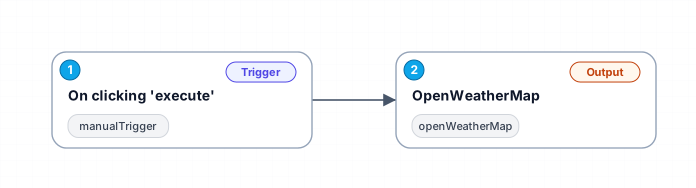
This workflow is designed to simplify the process of obtaining real-time weather data for a specific city using the OpenWeatherMap API. By manually triggering the workflow, users can quickly access current weather conditions, including temperature, humidity, and weather descriptions, directly from their workflow environment. This can be particularly beneficial for applications in fields such as travel planning, event management, or any scenario where knowing the current weather is essential.
The integration with OpenWeatherMap allows for seamless access to a wealth of meteorological data. Users simply input the name of the city they wish to query, and the workflow takes care of the rest, calling the API and processing the response in a structured format. Such automation not only saves time but also reduces the likelihood of human error in data retrieval.
This workflow can be utilized in various scenarios, such as integrating weather data into reports, applications, or even for personal use to check the weather before heading out. Additionally, it serves as a foundational component for more complex workflows that require real-time weather updates, making it a versatile tool in any productivity toolkit.
The simplicity of the manual trigger ensures that users have control over when the data is fetched, making it suitable for both occasional queries and more frequent updates as needed. With this workflow, users can enhance their productivity by integrating vital weather information into their daily operations effortlessly.
New buyers can create an account from the cart to unlock a controlled $10 first-purchase credit on eligible orders of $25+.
Secure checkout powered by Stripe
Support
How to import this workflow into n8n
- 1Purchase or download the workflow to get the n8n workflow JSON file.
- 2In your n8n instance, open Workflows and choose "Import from File" (or paste the JSON with Ctrl+V on the canvas).
- 3Open each node marked with a credential warning and connect your own accounts and API keys.
- 4Run the workflow once manually to verify the data flow, then toggle it to Active.
Related Productivity workflows
- Automate Personal Life Management with Telegram and Google Services$14.99
- Automate Google Sheets Cleanup by Removing Duplicates via Profile URLs$4.99
- Automate Google Sheets with AI-Driven Text Generation in n8n$9.99
- Automated Daily Briefing for Executive Communication Management$14.99
- Automate Salon Bookings with AI, Google Calendar, and Email Confirmations$14.99
- Automate Meeting Scheduling with AI via Telegram$9.99
More from Petra Novotny
Need this deployed? We'll set it up for you.
Our automation experts deploy this workflow in your stack, connect your accounts, and verify it works — or build a custom solution from scratch.