Convert PDF to PDFA Using ConvertAPI
This workflow is designed to facilitate the conversion of standard PDF files into PDFA format, ensuring compliance with archiving standards. It utilizes ConvertAPI to perform the file conversion, streamlining the process and saving time for users ...
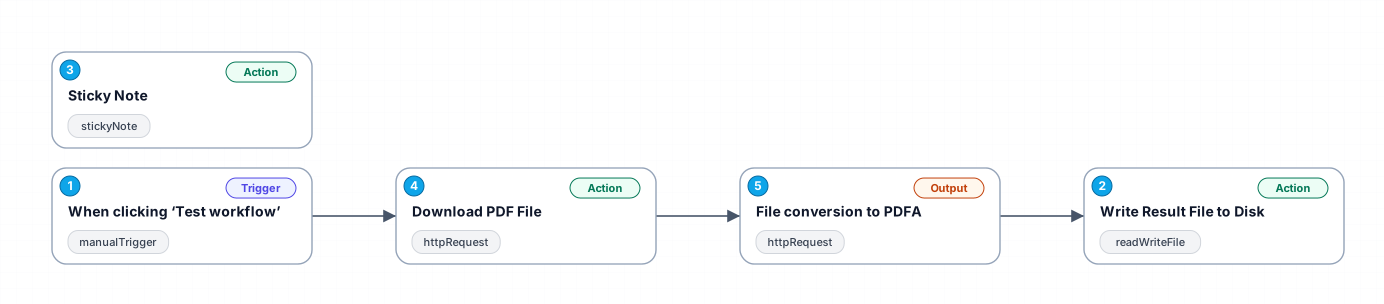
This workflow is designed to facilitate the conversion of standard PDF files into PDFA format, ensuring compliance with archiving standards. It utilizes ConvertAPI to perform the file conversion, streamlining the process and saving time for users who regularly handle PDF documents. By automating these tasks, the workflow enhances productivity and accuracy, reducing the likelihood of errors that can occur during manual processes.
The workflow begins with a manual trigger, allowing users to initiate the process at their convenience. Next, it downloads a sample PDF file from a predefined URL, which serves as the input for the conversion. Once the PDF is downloaded, it is sent to ConvertAPI, where the actual conversion to PDFA takes place.
Users benefit from this workflow by having an automated solution that requires minimal input while providing consistent results. It is particularly useful for professionals in industries such as legal, education, and archiving, where document preservation in compliant formats is critical.
In summary, this workflow not only simplifies the document conversion process but also integrates seamlessly with existing tools and platforms, making it a valuable asset for any organization handling digital documents.
New buyers can create an account from the cart to unlock a controlled $10 first-purchase credit on eligible orders of $25+.
Related bundle
Lead Generation Machine
8 hand-picked workflows for $49.00.
That is $6.13 each, vs $12.99 for this one alone.
View bundleSecure checkout powered by Stripe
Support
How to import this workflow into n8n
- 1Purchase or download the workflow to get the n8n workflow JSON file.
- 2In your n8n instance, open Workflows and choose "Import from File" (or paste the JSON with Ctrl+V on the canvas).
- 3Open each node marked with a credential warning and connect your own accounts and API keys.
- 4Run the workflow once manually to verify the data flow, then toggle it to Active.
Related Marketing workflows
- Automate UGC Video Creation and Instagram Posting with Google Gemini and Veo 3$9.99
- Automate Lead Generation and Cold Email Outreach$14.99
- Automate Professional Video Ad Creation from Product Images$19.99
- Track SEO Keyword Rankings with Bright Data MCP and GPT-4o AI Analysis$14.99
- Automate Google Maps Data Scraping and Email Discovery for Local Business Outreach$14.99
- Automate AI-Driven Social Media Content for Auto Services$19.99
More from Kaito Okafor
Need this deployed? We'll set it up for you.
Our automation experts deploy this workflow in your stack, connect your accounts, and verify it works — or build a custom solution from scratch.