Email Auto-Responder Workflow with IMAP and Webhook Integration
This workflow automates the process of reading emails from an IMAP server, summarizing their content using AI, and sending responses automatically. By leveraging the capabilities of IMAP, this workflow continuously monitors an inbox and triggers a...
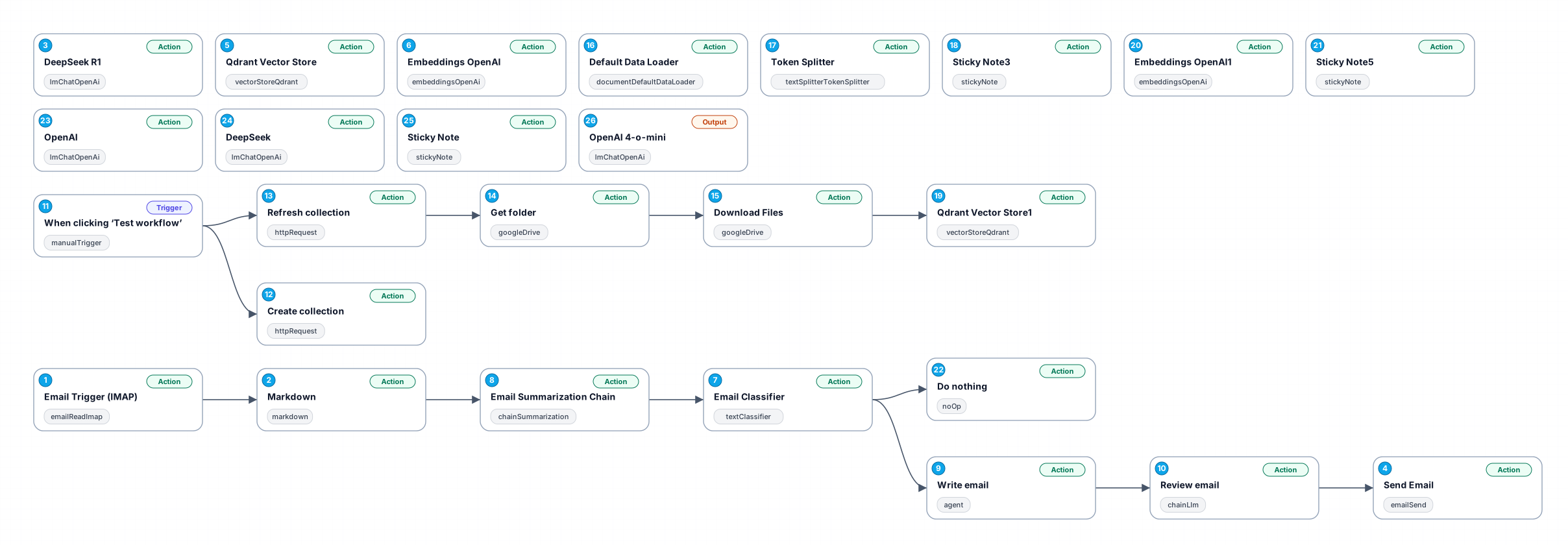
This workflow automates the process of reading emails from an IMAP server, summarizing their content using AI, and sending responses automatically. By leveraging the capabilities of IMAP, this workflow continuously monitors an inbox and triggers actions based on incoming emails. With the help of AI, the contents of the emails are summarized, allowing for quick and efficient responses that are tailored to the context of each message.
The benefits of this workflow include reduced manual email management, faster response times, and the ability to handle a greater volume of communications without compromising quality. By using a webhook, the workflow can integrate with other applications, enhancing its functionality and allowing for seamless data exchange. This makes it an ideal solution for busy professionals, support teams, and anyone seeking to improve their email efficiency.
Use cases for this workflow include managing customer inquiries, responding to client communications, and automating routine email correspondence. The integration with AI ensures that the responses are relevant and concise, providing a personalized touch even in automated replies. Moreover, the workflow can be customized further to include additional nodes for more complex logic or integrations with other services, making it a flexible tool for various scenarios.
New buyers can create an account from the cart to unlock a controlled $10 first-purchase credit on eligible orders of $25+.
Related bundle
YouTube Creator Pipeline
8 hand-picked workflows for $39.00.
That is $4.88 each, vs $18.81 for this one alone.
View bundleSecure checkout powered by Stripe
Support
How to import this workflow into n8n
- 1Purchase or download the workflow to get the n8n workflow JSON file.
- 2In your n8n instance, open Workflows and choose "Import from File" (or paste the JSON with Ctrl+V on the canvas).
- 3Open each node marked with a credential warning and connect your own accounts and API keys.
- 4Run the workflow once manually to verify the data flow, then toggle it to Active.
Related Personal workflows
- SEO Data Analyst Workflow for E-commerce Insights$24.99
- Automated User Management and Data Processing Workflow$15.04
- AI Agent for Intelligent File Interaction in Supabase and Google Drive$19.99
- Automated Meditation Music Video Creation$19.99
- Instagram Reels Automation: Streamlined Content Creation & Publishing$19.99
- AI Powered Company Research Assistant for Competitive Analysis$19.99
More from Karim Sharma
Need this deployed? We'll set it up for you.
Our automation experts deploy this workflow in your stack, connect your accounts, and verify it works — or build a custom solution from scratch.