Email Engagement Creation with AI Parsing
This workflow is designed to streamline the process of creating email engagements in HubSpot whenever an email is received. By integrating with HubSpot, it captures the essential details of the email including the sender, recipient, and content. T...
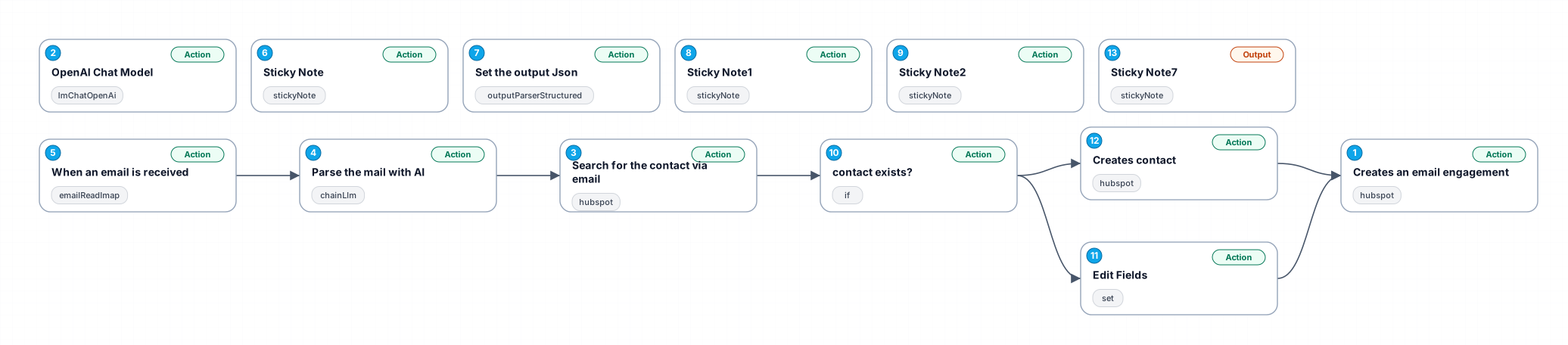
This workflow is designed to streamline the process of creating email engagements in HubSpot whenever an email is received. By integrating with HubSpot, it captures the essential details of the email including the sender, recipient, and content. The workflow utilizes OpenAI's capabilities to parse the email content and extract vital information such as names, email addresses, and contact details, making it easier for users to manage their communications effectively.
The workflow begins by listening for incoming emails. Upon receiving an email, it triggers the creation of an engagement in HubSpot, logging the email's content, subject, and sender information. This automated logging helps maintain a clean record of interactions with contacts, eliminating the need for manual entry and reducing the chances of errors.
Next, the workflow searches for the contact in HubSpot using the email address extracted from the incoming email. This allows users to quickly identify and connect with the correct contact without unnecessary searching. If the contact is found, the workflow can be configured to update their information or log the engagement accordingly.
Additionally, using AI, the workflow parses the email content to extract key details such as the sender's first name, last name, phone number, company name, and location. This information is returned in a structured JSON format, making it easy for users to utilize or further process the data as needed. This feature is particularly beneficial for sales and marketing teams looking to enhance their customer relationship management (CRM) processes.
Overall, this workflow enhances productivity by automating tedious tasks and ensuring that critical information is accurately captured and easily accessible, thus allowing users to focus on more strategic activities.
New buyers can create an account from the cart to unlock a controlled $10 first-purchase credit on eligible orders of $25+.
Secure checkout powered by Stripe
Support
How to import this workflow into n8n
- 1Purchase or download the workflow to get the n8n workflow JSON file.
- 2In your n8n instance, open Workflows and choose "Import from File" (or paste the JSON with Ctrl+V on the canvas).
- 3Open each node marked with a credential warning and connect your own accounts and API keys.
- 4Run the workflow once manually to verify the data flow, then toggle it to Active.
Related Productivity workflows
- Automate Personal Life Management with Telegram and Google Services$14.99
- Automate Google Sheets Cleanup by Removing Duplicates via Profile URLs$4.99
- Automate Google Sheets with AI-Driven Text Generation in n8n$9.99
- Automated Daily Briefing for Executive Communication Management$14.99
- Automate Salon Bookings with AI, Google Calendar, and Email Confirmations$14.99
- Automate Meeting Scheduling with AI via Telegram$9.99
More from Priya Nasser
Need this deployed? We'll set it up for you.
Our automation experts deploy this workflow in your stack, connect your accounts, and verify it works — or build a custom solution from scratch.