Engage Multiple AI Agents with Dynamic @Mentions
Facilitate dynamic conversations with multiple AI agents using @mentions to trigger specific responses or engage all agents randomly. Easily scalable through JSON configuration.
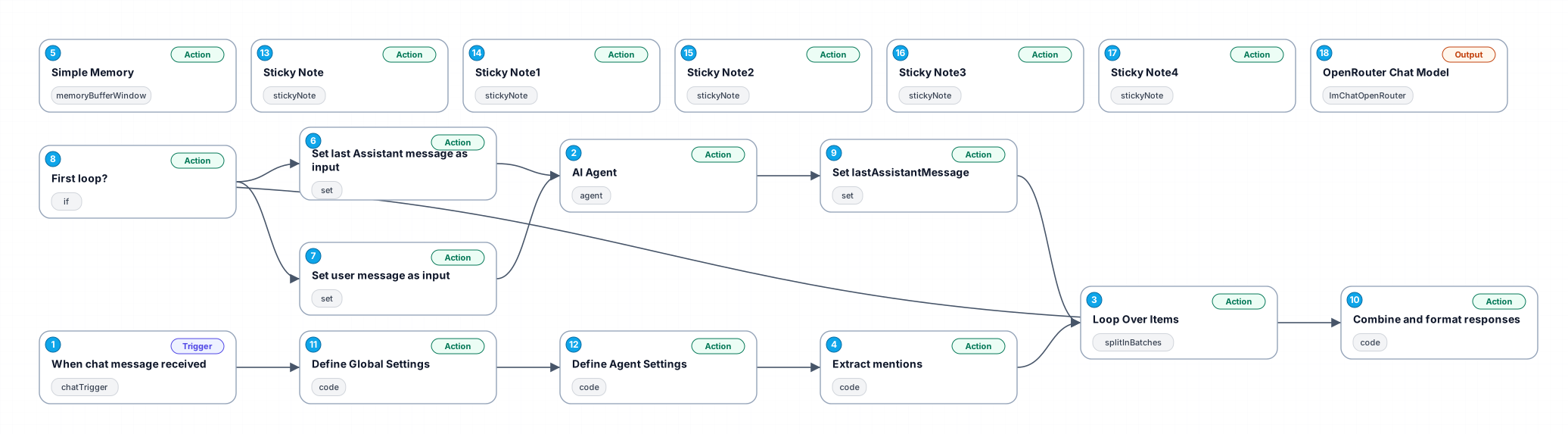
This workflow is designed for users looking to interact with multiple AI agents configured with distinct personalities and models. By using @mentions, users can direct questions to specific agents or allow all agents to respond in a random order. The setup is flexible, allowing for easy addition or modification of agents through JSON settings. This workflow is ideal for tasks such as brainstorming, comparative analysis, or role-playing scenarios, providing a seamless multi-agent interaction experience.
New buyers can create an account from the cart to unlock a controlled $10 first-purchase credit on eligible orders of $25+.
Related bundle
Content Repurposing Engine
8 hand-picked workflows for $29.00.
That is $3.63 each, vs $14.99 for this one alone.
View bundleSecure checkout powered by Stripe
Support
How to import this workflow into n8n
- 1Purchase or download the workflow to get the n8n workflow JSON file.
- 2In your n8n instance, open Workflows and choose "Import from File" (or paste the JSON with Ctrl+V on the canvas).
- 3Open each node marked with a credential warning and connect your own accounts and API keys.
- 4Run the workflow once manually to verify the data flow, then toggle it to Active.
Related AI workflows
- Launch Your First AI-Powered Chatbot with Actionable Tools$9.99
- Automate AI Video Creation and YouTube Upload with Google Sheets$14.99
- Build a WhatsApp Assistant with Memory, Google Suite, Multi-AI, Research, and Imaging$24.99
- Automate Blog Post Creation and Publishing with GPT, Leonardo AI, and WordPress$14.99
- Automate SEO Keyword Generation with ChatGPT from Google Sheets$3.99
- Email Agent$500.99
More from Gabriel Santos
Need this deployed? We'll set it up for you.
Our automation experts deploy this workflow in your stack, connect your accounts, and verify it works — or build a custom solution from scratch.