Gender Inclusive Language Automation for Mattermost
This workflow is designed to enhance communication in Mattermost by promoting gender-inclusive language. When a message is sent that contains certain gendered terms, this automation triggers a response suggesting alternatives that are more inclusi...
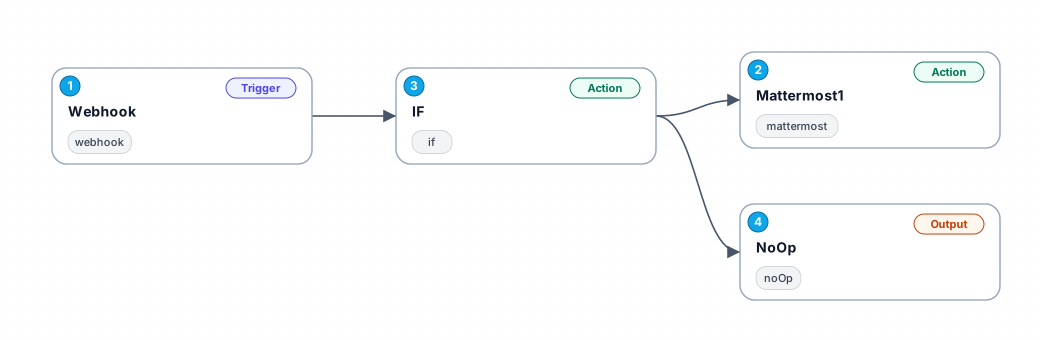
This workflow is designed to enhance communication in Mattermost by promoting gender-inclusive language. When a message is sent that contains certain gendered terms, this automation triggers a response suggesting alternatives that are more inclusive. The workflow utilizes a webhook to capture incoming messages and evaluates their content for specific keywords. If a match is found, it responds with a friendly suggestion, fostering a more inclusive environment in team communications.
The benefits of this automation are manifold. By automatically detecting gendered language, it saves time and encourages users to adopt more inclusive language without the need for manual intervention. This can be particularly useful in diverse teams where language sensitivity is paramount. It not only helps in maintaining inclusivity but also raises awareness among users about the importance of language in shaping workplace culture.
Use cases for this workflow include any team or organization using Mattermost that wishes to promote a culture of inclusivity. It can be particularly beneficial in settings like educational institutions, non-profits, and companies focused on diversity and inclusion. By integrating this automation, organizations can demonstrate their commitment to inclusive practices in communication.
In summary, this workflow serves as a proactive measure to ensure that teams communicate respectfully and inclusively, ultimately contributing to a positive workplace atmosphere.
New buyers can create an account from the cart to unlock a controlled $10 first-purchase credit on eligible orders of $25+.
Related bundle
YouTube Creator Pipeline
8 hand-picked workflows for $39.00.
That is $4.88 each, vs $7.37 for this one alone.
View bundleSecure checkout powered by Stripe
Support
How to import this workflow into n8n
- 1Purchase or download the workflow to get the n8n workflow JSON file.
- 2In your n8n instance, open Workflows and choose "Import from File" (or paste the JSON with Ctrl+V on the canvas).
- 3Open each node marked with a credential warning and connect your own accounts and API keys.
- 4Run the workflow once manually to verify the data flow, then toggle it to Active.
Related Personal workflows
- SEO Data Analyst Workflow for E-commerce Insights$24.99
- Automated User Management and Data Processing Workflow$15.04
- AI Agent for Intelligent File Interaction in Supabase and Google Drive$19.99
- Automated Meditation Music Video Creation$19.99
- Instagram Reels Automation: Streamlined Content Creation & Publishing$19.99
- AI Powered Company Research Assistant for Competitive Analysis$19.99
More from Sofia Nasser
Need this deployed? We'll set it up for you.
Our automation experts deploy this workflow in your stack, connect your accounts, and verify it works — or build a custom solution from scratch.