Optimize Your Social Media Insights with the Social Buzz Heatmap Workflow
Enhance your project management capabilities with the Social Buzz Heatmap, designed to visualize social media engagement data.
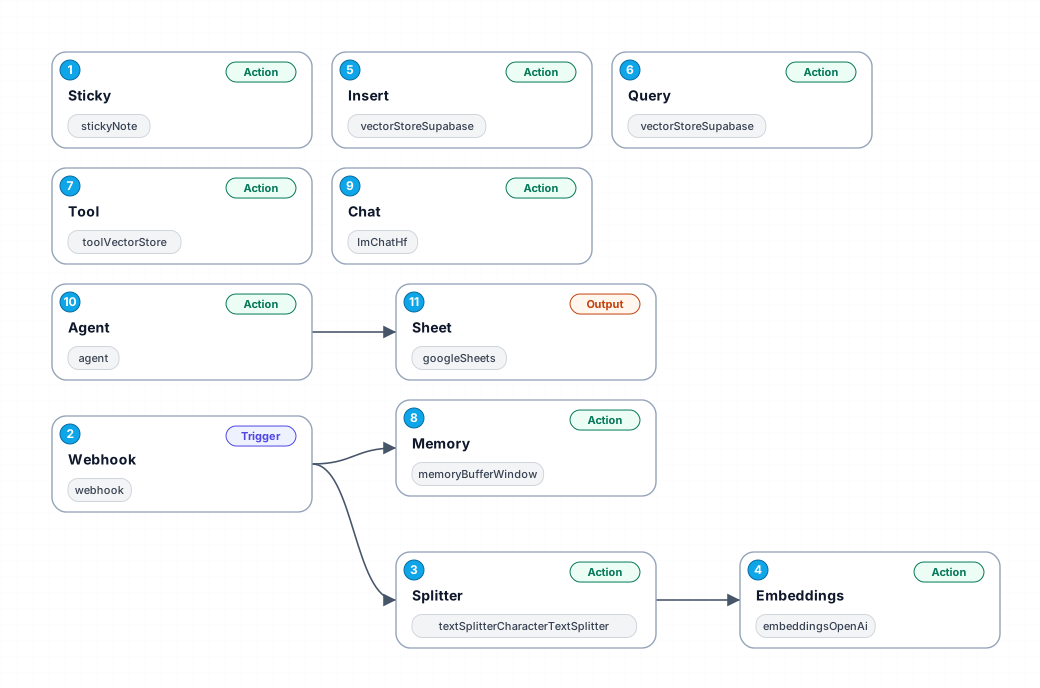
The Social Buzz Heatmap workflow streamlines the process of analyzing social media engagement by utilizing advanced tools to gather, process, and visualize data. This workflow enables users to automatically capture social media interactions, transforming raw engagement metrics into meaningful insights. By integrating with platforms such as Supabase and OpenAI, it efficiently stores and analyzes data, allowing users to understand trends and patterns in their social media performance.
One of the key benefits of this workflow is its ability to provide real-time insights. Users can set up a webhook to receive data instantly as it comes in, ensuring that they are always working with the most current information. The workflow also includes a text splitter to handle large volumes of data, chunking it into manageable pieces for analysis. This ensures that users can scale their analysis without losing sight of important details.
Furthermore, the Social Buzz Heatmap incorporates machine learning capabilities through embeddings and chat functionalities, enabling users to engage with their data in innovative ways. For instance, by using the chat feature, users can ask questions about their social media performance and receive immediate, data-driven answers. This interactive approach promotes a deeper understanding of social media metrics, aiding in more informed decision-making.
In summary, the Social Buzz Heatmap is an invaluable tool for project managers and digital marketers looking to enhance their social media strategy. Its robust functionalities not only save time but also provide insights that can lead to improved engagement and better overall performance on social platforms.
New buyers can create an account from the cart to unlock a controlled $10 first-purchase credit on eligible orders of $25+.
Secure checkout powered by Stripe
Support
How to import this workflow into n8n
- 1Purchase or download the workflow to get the n8n workflow JSON file.
- 2In your n8n instance, open Workflows and choose "Import from File" (or paste the JSON with Ctrl+V on the canvas).
- 3Open each node marked with a credential warning and connect your own accounts and API keys.
- 4Run the workflow once manually to verify the data flow, then toggle it to Active.
Related Productivity workflows
- Automate Personal Life Management with Telegram and Google Services$14.99
- Automate Google Sheets Cleanup by Removing Duplicates via Profile URLs$4.99
- Automate Google Sheets with AI-Driven Text Generation in n8n$9.99
- Automated Daily Briefing for Executive Communication Management$14.99
- Automate Salon Bookings with AI, Google Calendar, and Email Confirmations$14.99
- Automate Meeting Scheduling with AI via Telegram$9.99
More from Zainab Nair
Need this deployed? We'll set it up for you.
Our automation experts deploy this workflow in your stack, connect your accounts, and verify it works — or build a custom solution from scratch.