Seamless Spotify Control Automation
The 'Seamless Spotify Control Automation' workflow is designed to streamline the way users interact with their Spotify music service. This workflow allows users to automate playback actions such as playing the next song, resuming playback, and pau...
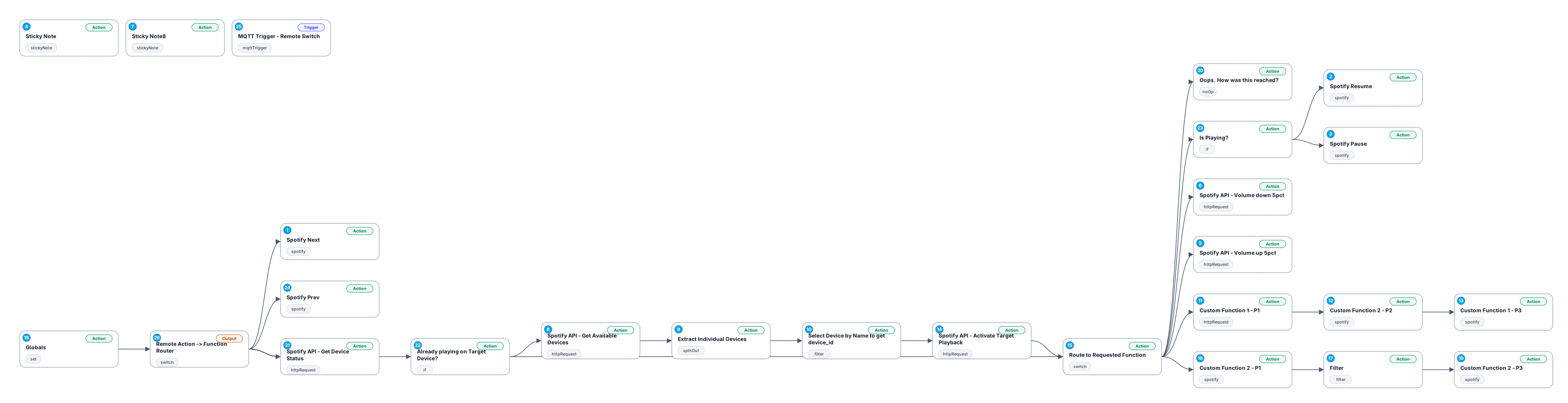
The 'Seamless Spotify Control Automation' workflow is designed to streamline the way users interact with their Spotify music service. This workflow allows users to automate playback actions such as playing the next song, resuming playback, and pausing music, all triggered by specific conditions or inputs. It integrates with Spotify's API to control volume, making it easy to adjust sound levels dynamically.
This workflow is particularly beneficial for users who want to enhance their music listening experience without manual intervention. Whether you're hosting a party, working in an office, or simply enjoying your music at home, this automation can help manage your Spotify playback seamlessly. By using MQTT messages, it can react to physical events, such as pressing a button on a smart device, to trigger specific actions in Spotify.
Use cases include smart home setups where users can control music playback with physical switches or integration with other applications that can send MQTT messages. This workflow not only saves time but also improves the overall user experience by allowing for hands-free control of Spotify, making it an essential tool for music lovers and tech enthusiasts alike.
By leveraging advanced integrations and providing a user-friendly interface, this workflow represents a significant value for anyone looking to automate their music listening experience effectively.
New buyers can create an account from the cart to unlock a controlled $10 first-purchase credit on eligible orders of $25+.
Secure checkout powered by Stripe
Support
How to import this workflow into n8n
- 1Purchase or download the workflow to get the n8n workflow JSON file.
- 2In your n8n instance, open Workflows and choose "Import from File" (or paste the JSON with Ctrl+V on the canvas).
- 3Open each node marked with a credential warning and connect your own accounts and API keys.
- 4Run the workflow once manually to verify the data flow, then toggle it to Active.
Related Productivity workflows
- Automate Personal Life Management with Telegram and Google Services$14.99
- Automate Google Sheets Cleanup by Removing Duplicates via Profile URLs$4.99
- Automate Google Sheets with AI-Driven Text Generation in n8n$9.99
- Automated Daily Briefing for Executive Communication Management$14.99
- Automate Salon Bookings with AI, Google Calendar, and Email Confirmations$14.99
- Automate Meeting Scheduling with AI via Telegram$9.99
More from Clara Hoffmann
Need this deployed? We'll set it up for you.
Our automation experts deploy this workflow in your stack, connect your accounts, and verify it works — or build a custom solution from scratch.