Transform PDFs into Engaging Blog Posts with Automated Ghost Publishing
This workflow automates the extraction of text from PDF files and creates blog posts in Ghost, enhancing productivity.
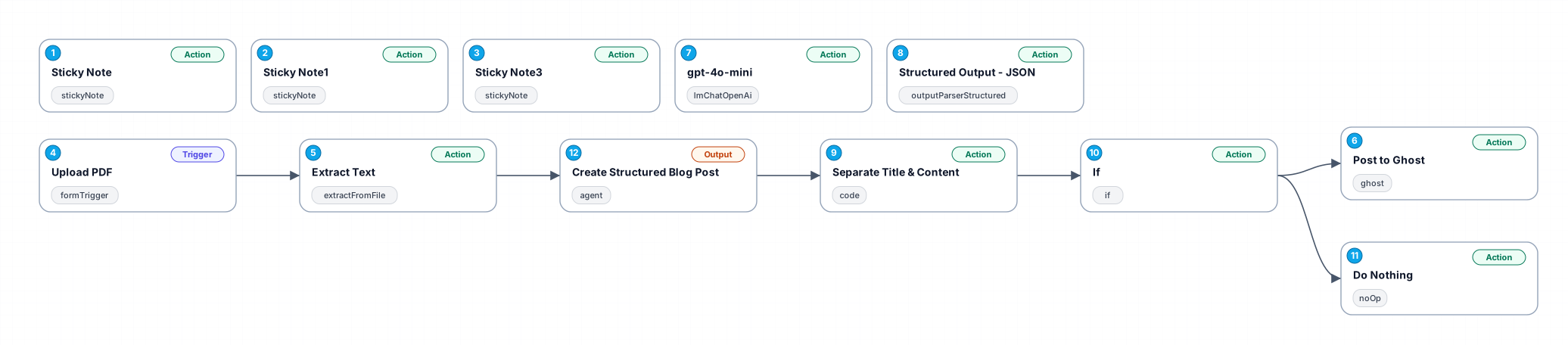
The 'Transform PDFs into Engaging Blog Posts with Automated Ghost Publishing' workflow is designed to streamline the process of converting PDF documents into captivating blog content. By utilizing a user-friendly form interface, users can easily upload their PDF files. The automation then extracts text from these documents, ensuring that the content is ready for publication without manual intervention. This workflow not only saves time but also reduces the likelihood of errors that can occur during manual text extraction and formatting.
One of the primary benefits of this workflow is its efficiency. Users can focus on creating high-quality content rather than getting bogged down in the technicalities of document processing. Additionally, the integration with Ghost allows for seamless publication, enabling users to maintain an active online presence without the hassle of manual entry.
This workflow is ideal for content creators, marketers, and businesses looking to repurpose existing materials into blog posts. It can be particularly useful for those who regularly produce reports, white papers, or other PDF content that can be transformed into engaging articles. By leveraging this automation, users can enhance their content strategy and reach a broader audience effortlessly.
New buyers can create an account from the cart to unlock a controlled $10 first-purchase credit on eligible orders of $25+.
Secure checkout powered by Stripe
Support
How to import this workflow into n8n
- 1Purchase or download the workflow to get the n8n workflow JSON file.
- 2In your n8n instance, open Workflows and choose "Import from File" (or paste the JSON with Ctrl+V on the canvas).
- 3Open each node marked with a credential warning and connect your own accounts and API keys.
- 4Run the workflow once manually to verify the data flow, then toggle it to Active.
Related Productivity workflows
- Automate Personal Life Management with Telegram and Google Services$14.99
- Automate Google Sheets Cleanup by Removing Duplicates via Profile URLs$4.99
- Automate Google Sheets with AI-Driven Text Generation in n8n$9.99
- Automated Daily Briefing for Executive Communication Management$14.99
- Automate Salon Bookings with AI, Google Calendar, and Email Confirmations$14.99
- Automate Meeting Scheduling with AI via Telegram$9.99
More from Jose Maurino
Need this deployed? We'll set it up for you.
Our automation experts deploy this workflow in your stack, connect your accounts, and verify it works — or build a custom solution from scratch.