Voice AI Receptionist: Smart Calendar Management
Automate your calendar management with an AI receptionist that books, checks, updates, and cancels appointments seamlessly.
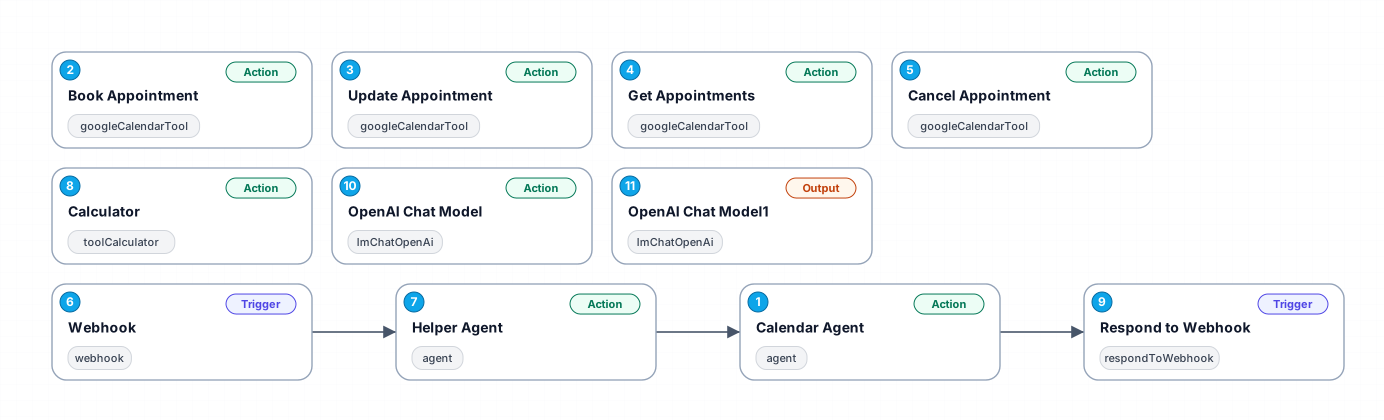
The 'Voice AI Receptionist' workflow is designed to streamline calendar management by utilizing advanced AI capabilities. This workflow allows users to interact with their calendar through natural language processing, making it easy to book, check, update, and cancel appointments based on user requests. By integrating AI into calendar management, users can save time and reduce the hassle of manual scheduling, ensuring they never miss an appointment again.
This workflow is particularly beneficial for busy professionals, small business owners, and anyone who relies heavily on appointments. With its ability to understand various categories of requests, the AI receptionist can efficiently handle tasks while adhering to specific rules for appointment management. This ensures that users can maintain an organized schedule without the stress of overlapping appointments or miscommunication.
The potential use cases for this workflow are vast, from personal scheduling to managing client appointments in a business setting. The AI receptionist can suggest alternative time slots when conflicts arise, enhancing user experience by providing flexibility. Furthermore, by automating these processes, users can focus on other important tasks, significantly increasing productivity.
In summary, the 'Voice AI Receptionist' is a powerful tool for anyone looking to optimize their calendar management. With its intelligent handling of appointment requests, this workflow not only saves time but also reduces the chances of human error, making it an invaluable asset for effective time management.
New buyers can create an account from the cart to unlock a controlled $10 first-purchase credit on eligible orders of $25+.
Related bundle
Lead Generation Machine
8 hand-picked workflows for $49.00.
That is $6.13 each, vs $19.99 for this one alone.
View bundleSecure checkout powered by Stripe
Support
How to import this workflow into n8n
- 1Purchase or download the workflow to get the n8n workflow JSON file.
- 2In your n8n instance, open Workflows and choose "Import from File" (or paste the JSON with Ctrl+V on the canvas).
- 3Open each node marked with a credential warning and connect your own accounts and API keys.
- 4Run the workflow once manually to verify the data flow, then toggle it to Active.
Related Marketing workflows
- Automate UGC Video Creation and Instagram Posting with Google Gemini and Veo 3$9.99
- Automate Lead Generation and Cold Email Outreach$14.99
- Automate Professional Video Ad Creation from Product Images$19.99
- Track SEO Keyword Rankings with Bright Data MCP and GPT-4o AI Analysis$14.99
- Automate Google Maps Data Scraping and Email Discovery for Local Business Outreach$14.99
- Automate AI-Driven Social Media Content for Auto Services$19.99
More from Zainab Nair
Need this deployed? We'll set it up for you.
Our automation experts deploy this workflow in your stack, connect your accounts, and verify it works — or build a custom solution from scratch.