Zalando Price Patrol Monitor with Email Notification
This workflow is designed to monitor the price evolution of products available on Zalando. By integrating with Google Sheets, the workflow logs historical prices and notifies users via email whenever there is a significant price change. It utilize...
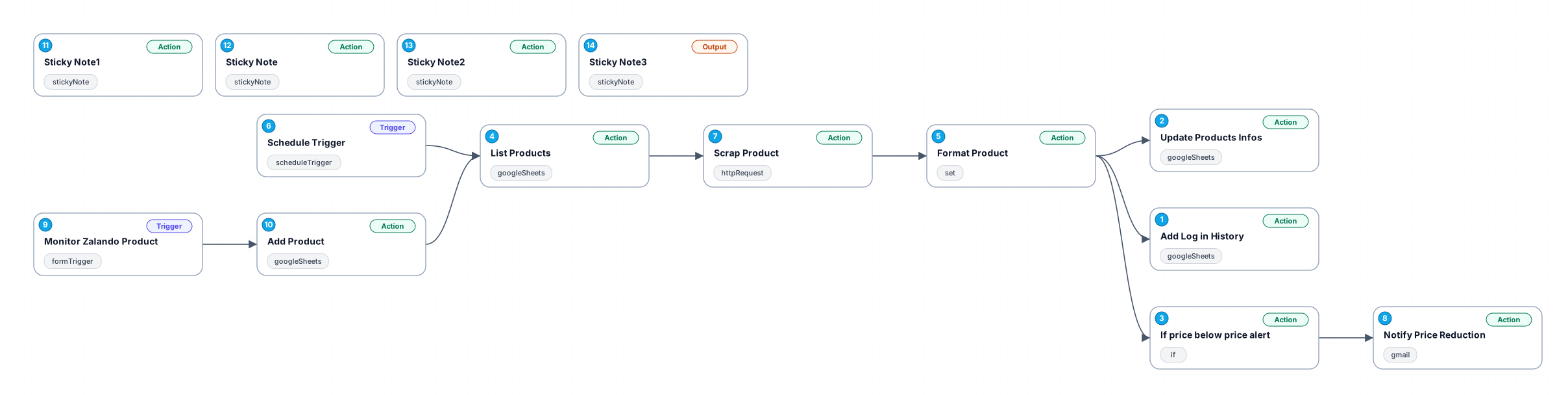
This workflow is designed to monitor the price evolution of products available on Zalando. By integrating with Google Sheets, the workflow logs historical prices and notifies users via email whenever there is a significant price change. It utilizes the Google Sheets API to append or update product information effectively, allowing users to maintain an up-to-date record of their tracked items.
The key benefit of this automation is that it saves time and effort by eliminating the need to manually check prices on Zalando. Users can set parameters for what constitutes a significant price change, ensuring they only receive alerts for the most impactful updates. This is especially useful for bargain hunters or individuals looking to purchase items at their lowest prices.
Use cases for this workflow include personal shopping, market research for e-commerce businesses, or tracking competitor pricing strategies. The integration with email notifications ensures that users are promptly informed, allowing them to act quickly when prices drop.
Overall, this workflow provides a seamless and efficient way to monitor price trends for Zalando products, making online shopping more strategic and informed.
New buyers can create an account from the cart to unlock a controlled $10 first-purchase credit on eligible orders of $25+.
Related bundle
YouTube Creator Pipeline
8 hand-picked workflows for $39.00.
That is $4.88 each, vs $12.99 for this one alone.
View bundleSecure checkout powered by Stripe
Support
How to import this workflow into n8n
- 1Purchase or download the workflow to get the n8n workflow JSON file.
- 2In your n8n instance, open Workflows and choose "Import from File" (or paste the JSON with Ctrl+V on the canvas).
- 3Open each node marked with a credential warning and connect your own accounts and API keys.
- 4Run the workflow once manually to verify the data flow, then toggle it to Active.
Related Personal workflows
- SEO Data Analyst Workflow for E-commerce Insights$24.99
- Automated User Management and Data Processing Workflow$15.04
- AI Agent for Intelligent File Interaction in Supabase and Google Drive$19.99
- Automated Meditation Music Video Creation$19.99
- Instagram Reels Automation: Streamlined Content Creation & Publishing$19.99
- AI Powered Company Research Assistant for Competitive Analysis$19.99
More from Karim Sharma
Need this deployed? We'll set it up for you.
Our automation experts deploy this workflow in your stack, connect your accounts, and verify it works — or build a custom solution from scratch.