
Group Chat Behavior Across Channels | OpenClaw
Learn how OpenClaw handles group chats on Discord, iMessage, Matrix, and more. This guide covers default restrictions, mention gating, and allowlisting for group access.
Read this when
- Changing group chat behavior or mention gating
- Scoping mentionPatterns to specific group conversations
OpenClaw enforces identical group rules on every channel that supports groups: Discord, iMessage, Matrix, Microsoft Teams, QQBot, Signal, Slack, Telegram, WhatsApp, and Zalo.
For rooms that stay on permanently and should remain unobtrusive unless the agent deliberately posts a visible message, check Ambient room events.
Beginner intro (2 minutes)
OpenClaw operates directly on your personal messaging accounts. No separate WhatsApp bot account exists: when you belong to a group, OpenClaw can access it and respond there.
What happens by default:
- Groups start restricted (
groupPolicy: "allowlist"); senders in groups are blocked until they get allowlisted. - A mention is required for replies unless mention gating gets turned off for that group.
- The final reply text is posted to the room automatically (
visibleReplies: "automatic").
In short: an allowlisted sender can activate OpenClaw by mentioning it.
Note
TL;DR
- DM access hinges on
*.allowFrom.- Group access hinges on
*.groupPolicyplus allowlists (*.groups,*.groupAllowFrom).- Reply triggering hinges on mention gating (
requireMention,/activation).
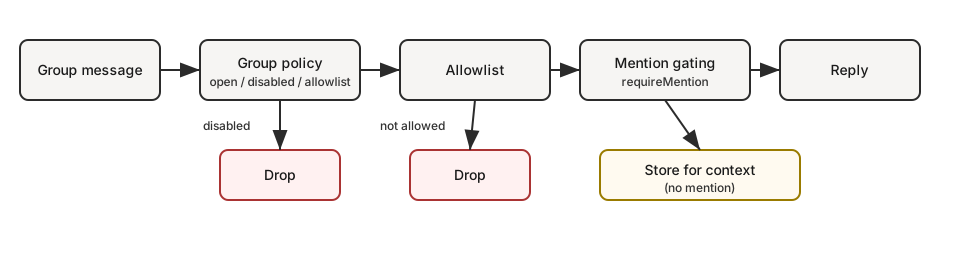
The path a group message takes:
groupPolicy? disabled -> drop
groupPolicy? allowlist -> group allowed? no -> drop
requireMention? yes -> mentioned? no -> store for context only
mention/reply/command/DM -> user request
always-on group chatter -> user request, or room event when configured
Visible replies
For standard group or channel requests, OpenClaw picks messages.groupChat.visibleReplies: "automatic" as its default: the assistant's final text lands in the room as the visible reply.
Reach for messages.groupChat.visibleReplies: "message_tool" when a shared room should let the agent choose when to speak by invoking message(action=send). Models that follow tools reliably, such as GPT-5.6 Sol, work best here. If the model skips the tool and produces meaningful final text, OpenClaw withholds that text from the room rather than posting it.
Use "automatic" for models or runtimes that cannot consistently honor tool-only delivery: ordinary text finals go straight to the room, and the agent can still call message(action=send) for files, images, or other attachments that cannot travel with the final text.
When the active tool policy blocks the message tool, OpenClaw switches to automatic visible replies instead of quietly dropping the response. openclaw doctor flags this mismatch.
For direct chats and every other source event, messages.visibleReplies: "message_tool" applies the same tool-only behavior globally; messages.groupChat.visibleReplies remains the narrower override for group and channel rooms. Internal WebChat direct turns default to automatic final-reply delivery, so Pi and Codex see the same visible-reply contract.
Tool-only mode replaces the older approach of forcing the model to answer NO_REPLY for most lurk-mode turns. In tool-only mode the prompt carries no NO_REPLY contract; staying silent simply means the message tool was never called.
Plugin-owned conversation bindings sit outside this rule. Once a plugin binds a thread and takes the inbound turn, the plugin's returned reply becomes the visible binding response; message(action=send) is not required. That reply comes from the plugin runtime, not from private model final text.
Typing indicators still fire for direct group requests. Ambient always-on room events, when switched on, remain strict and quiet unless the agent calls the message tool.
Sessions suppress verbose tool and progress summaries by default. Use /verbose on (or /verbose full) to surface them for the current session during debugging, and /verbose off to go back to final-reply-only behavior. Verbose state is tracked per session and behaves identically in direct chats, groups, channels, and forum topics.
To submit unmentioned always-on group chatter as quiet room context rather than user requests, use Ambient room events:
{
  messages: {
    groupChat: {
      unmentionedInbound: "room_event",
    },
  },
}
The default is unmentionedInbound: "user_request". Mentioned messages, commands, abort requests, and DMs continue to count as user requests.
To force visible output through the message tool for group or channel requests:
{
  messages: {
    groupChat: {
      visibleReplies: "message_tool",
    },
  },
}
To force it for every source chat:
{
  messages: {
    visibleReplies: "message_tool",
  },
}
The gateway picks up messages config changes without a restart once the file is saved. Restart only when config reload is off (gateway.reload.mode: "off").
Command turns bypass visibleReplies: "message_tool" and always reply visibly: native slash commands (Discord, Telegram, and other surfaces with native command support) and authorized text /... commands both post their response to the source chat. Unauthorized text /... turns in groups stay message-tool-only; ordinary chat turns follow the configured default.
Context visibility and allowlists
Group safety relies on two separate controls:
- Trigger authorization: who gets to activate the agent (
groupPolicy,groups,groupAllowFrom, channel-specific allowlists). - Context visibility: what supplemental context gets injected into the model (reply or quote text, thread history, forwarded metadata).
By default OpenClaw passes context through as received: allowlists decide who can trigger actions, not which quoted or historical snippets reach the model. To filter supplemental context as well, set contextVisibility:
| Mode | Behavior |
|---|---|
"all" (default) | Keep supplemental context as received. |
"allowlist" | Only inject history/thread/quote/forwarded context from allowlisted senders. |
"allowlist_quote" | allowlist, plus keep the explicitly quoted/replied-to message from any sender. |
Apply it per channel (channels.<channel>.contextVisibility), per account (channels.<channel>.accounts.<accountId>.contextVisibility), or globally (channels.defaults.contextVisibility). Channels that fetch supplemental context (Discord, Feishu, iMessage, Matrix, Mattermost, Microsoft Teams, QQBot, Signal, Slack, Telegram, WhatsApp) apply the policy when building inbound context; unknown policy combinations fail closed and omit the context.
These modes filter channel-supplied supplemental context only. Tool policy and the owner-only tool inventory are still selected from the current turn's originating requester, not every sender represented in the prompt. See Requester-scoped controls and prompt context.
If you want...
| Goal | What to set |
|---|---|
| Allow all groups but only reply on @mentions | groups: { "*": { requireMention: true } } |
| Disable all group replies | groupPolicy: "disabled" |
| Only specific groups | groups: { "<group-id>": { ... } } (no "*" key) |
| Only you can trigger in groups | groupPolicy: "allowlist", groupAllowFrom: ["+1555..."] |
| Reuse one trusted sender set across channels | groupAllowFrom: ["accessGroup:operators"] |
For reusable sender allowlists, see Access groups.
Session keys
- Group sessions default to
agent:<agentId>:<channel>:group:<id>session keys, whereas rooms and channels rely onagent:<agentId>:<channel>:channel:<id>. - Telegram forum topics append
:topic:<threadId>to the group id, giving each topic its own dedicated session. - Direct chats operate on the main session, or on per-sender sessions when
session.dmScopeis enabled. - Heartbeats execute in the designated heartbeat session, which defaults to the agent's main session; group sessions never run their own heartbeats.
When a trusted room should share the agent's main conversation, assign session.groupScope to "main" on that binding:
{
  bindings: [
    {
      agentId: "main",
      match: { channel: "slack", peer: { kind: "channel", id: "C0123TEAM" } },
      session: { groupScope: "main" },
    },
  ],
}
The global session.groupScope accepts either "per-group" (the default) or "main".
This setting has no effect on group admission, mention gating, or reply routing.
Pattern: personal DMs + public groups (single agent)
Absolutely, this setup suits you if your "personal" traffic consists of DMs and your "public" traffic is made up of groups.
Here's the reasoning: in single-agent mode, DMs typically land in the main session key (agent:main:main), while groups use non-main session keys (agent:main:<channel>:group:<id>) under the default groupScope: "per-group". Enabling sandboxing with mode: "non-main" routes those group sessions to the configured sandbox backend, leaving your main DM session on the host. If you don't specify a backend, Docker is used by default.
Warning
A room set with
groupScope: "main"counts as a main session and falls outside the sandbox'smode: "non-main"protection. Avoid merging untrusted or public rooms into main when you depend on that sandbox boundary.
The result is a single agent "brain" (shared workspace plus memory) operating in two distinct modes:
- DMs: full tool access on the host
- Groups: sandboxed with restricted tools
Note
For genuinely separate workspaces or personas, where "personal" and "public" must stay completely isolated, deploy a second agent with its own bindings. See Multi-Agent Routing.
DMs on host, groups sandboxed
{
  agents: {
    defaults: {
      sandbox: {
        mode: "non-main", // groups/channels are non-main -> sandboxed
        scope: "session", // strongest isolation (one container per group/channel)
        workspaceAccess: "none",
      },
    },
  },
  tools: {
    sandbox: {
      tools: {
        // If allow is non-empty, everything else is blocked (deny still wins).
        allow: ["group:messaging", "group:sessions"],
        deny: ["group:runtime", "group:fs", "group:ui", "nodes", "cron", "gateway"],
      },
    },
  },
}
Groups see only an allowlisted folder
Prefer "groups can only see folder X" over "no host access"? Retain workspaceAccess: "none" and mount only allowlisted paths into the sandbox:
{
  agents: {
    defaults: {
      sandbox: {
        mode: "non-main",
        scope: "session",
        workspaceAccess: "none",
        docker: {
          binds: [
            // hostPath:containerPath:mode
            "/home/user/FriendsShared:/data:ro",
          ],
        },
      },
    },
  },
}
Related:
- Configuration keys and defaults: Gateway configuration
- Debugging why a tool is blocked: Sandbox vs Tool Policy vs Elevated
- Bind mounts details: Sandboxing
Display labels
- UI labels prefer
displayNamewhen it's available, displayed as<channel>:<token>. #roomis set aside for rooms and channels; group chats useg-<slug>(lowercase, spaces become-, keep#@+._-). Very long opaque ids are condensed into a stable token, so full route ids never leak into the UI.
Group policy
Control per-channel handling of group and room messages:
{
  channels: {
    whatsapp: {
      groupPolicy: "disabled", // "open" | "disabled" | "allowlist"
      groupAllowFrom: ["+15551234567"],
    },
    telegram: {
      groupPolicy: "disabled",
      groupAllowFrom: ["123456789"], // numeric Telegram user id (setup resolves @username)
    },
    signal: {
      groupPolicy: "disabled",
      groupAllowFrom: ["+15551234567"],
    },
    imessage: {
      groupPolicy: "disabled",
      groupAllowFrom: ["chat_id:123"],
    },
    msteams: {
      groupPolicy: "disabled",
      groupAllowFrom: ["user@org.com"],
    },
    discord: {
      groupPolicy: "allowlist",
      guilds: {
        GUILD_ID: { channels: { help: { enabled: true } } },
      },
    },
    slack: {
      groupPolicy: "allowlist",
      channels: { "#general": { enabled: true } },
    },
    matrix: {
      groupPolicy: "allowlist",
      groupAllowFrom: ["@owner:example.org"],
      groups: {
        "!roomId:example.org": { enabled: true },
        "#alias:example.org": { enabled: true },
      },
    },
  },
}
| Policy | Behavior |
|---|---|
"open" | Groups skip allowlists, but mention-gating still applies. |
"disabled" | Reject all group messages outright. |
"allowlist" | Permit only groups or rooms that fit the configured allowlist. |
Per-channel notes
groupPolicyoperates independently of mention-gating, which only reacts to @mentions.- For WhatsApp, Telegram, Signal, iMessage, Microsoft Teams, and Zalo, rely on
groupAllowFrom(with explicitallowFromas the alternative). - Signal:
groupAllowFromcan match either the incoming group id from the inbound message or the sender's phone number/UUID. - DM pairing approvals, stored via
*-allowFrom, govern access solely for DMs; group sender authorization remains tied to explicit group allowlists. - Discord's allowlist is defined by
channels.discord.guilds.<id>.channels. - Slack's allowlist relies on
channels.slack.channels. - Matrix's allowlist uses
channels.matrix.groups. Room IDs work here (!room:server, or the suffixless!roomvariant on room version 12+), as do aliases (#alias:server); room-name keys only match withchannels.matrix.dangerouslyAllowNameMatching: true, and unresolved entries get ignored at runtime. To limit senders, applychannels.matrix.groupAllowFrom; per-roomusersallowlists are also an option. - Group DMs get their own controls (
channels.discord.dm.*,channels.slack.dm.*:groupEnabled,groupChannels). - Telegram: sender allowlists accept only numeric user IDs (
"123456789"; thetelegram:/tg:prefixes are removed case-insensitively).@usernameentries never match at runtime and trigger a warning log; setup converts@usernameinto IDs. Negative chat IDs fall underchannels.telegram.groups, not sender allowlists. - The default is
groupPolicy: "allowlist"; an empty group allowlist results in blocked group messages. - Runtime safety: if a provider block is entirely absent (no
channels.<provider>), group policy fails closed toallowlistrather than adoptingchannels.defaults.groupPolicy, and the gateway logs this fallback once per account.
Quick mental model (evaluation order for group messages):
groupPolicy
groupPolicy (open/disabled/allowlist).
Group allowlists
Group allowlists (*.groups, *.groupAllowFrom, channel-specific allowlist).
Mention gating
Mention gating (requireMention, /activation).
Mention gating (default)
Group messages need a mention unless a per-group override exists. Defaults are set per subsystem under *.groups."*".
Supported implicit mention facts vary by channel:
| Fact | Current built-in producers |
|---|---|
| Reply to the bot | Discord, Microsoft Teams, QQBot, Slack, Telegram |
| Quote of the bot | LINE, WhatsApp, Zalo personal |
| Bot joined the thread | Mattermost, Slack, Tlon |
Each fact is enabled by default when the channel produces it. Among bundled channels, LINE, Mattermost, Slack, and Tlon check the implicitMentions flag; setting it to false prevents that fact from bypassing mention gating. LINE only reads this from the shared channels.defaults.implicitMentions block; it does not accept a channel- or account-scoped implicitMentions block of its own. Native explicit mentions are unaffected. The other bundled producers listed do not currently read implicitMentions, so their facts always count as mentions and the flag cannot disable them. A flag also has no effect on channels that do not produce that fact.
{
  channels: {
    whatsapp: {
      groups: {
        "*": { requireMention: true },
        "123@g.us": { requireMention: false },
      },
    },
    telegram: {
      groups: {
        "*": { requireMention: true },
        "123456789": { requireMention: false },
      },
    },
    imessage: {
      groups: {
        "*": { requireMention: true },
        "123": { requireMention: false },
      },
    },
  },
  agents: {
    entries: {
      main: {
        default: true,
        groupChat: {
          mentionPatterns: ["@openclaw", "openclaw", "\\+15555550123"],
          historyLimit: 50,
        },
      },
    },
  },
}
Scope configured mention patterns
Configured mentionPatterns act as regex fallback triggers. Use them when the
platform lacks a native bot mention, or when plain text like
openclaw: should be treated as a mention. Native platform mentions are distinct:
when Discord, Slack, Telegram, Matrix, Signal, or another channel can confirm the message
explicitly mentioned the bot, that native mention still fires even if
configured regex patterns are disallowed.
By default, configured mention patterns apply everywhere the channel passes provider and conversation facts into mention detection. To stop broad patterns from triggering the agent in every group, scope them per channel with channels.<channel>.mentionPatterns.
Apply mode: "deny" when regex mention patterns should be disabled by default for a channel, then enable specific rooms with allowIn:
{
  messages: {
    groupChat: {
      mentionPatterns: ["\\bopenclaw\\b", "\\bops bot\\b"],
    },
  },
  channels: {
    slack: {
      mentionPatterns: {
        mode: "deny",
        allowIn: ["C0123OPS"],
      },
    },
  },
}
Use the default mode: "allow" (or omit mode) when regex mention patterns should apply widely, then disable them in noisy rooms with denyIn:
{
  messages: {
    groupChat: {
      mentionPatterns: ["\\bopenclaw\\b"],
    },
  },
  channels: {
    telegram: {
      mentionPatterns: {
        denyIn: ["-1001234567890", "-1001234567890:topic:42"],
      },
    },
  },
}
Policy resolution:
| Field | Effect |
|---|---|
mode: "allow" | Regex mention patterns stay active by default, except when the conversation ID appears in denyIn. |
mode: "deny" | Regex mention patterns remain off unless the conversation ID is listed in allowIn. |
allowIn | Conversation IDs that enable regex mention patterns while in deny mode. |
denyIn | Conversation IDs that turn off regex mention patterns. If an ID shows up in both, denyIn takes priority over allowIn. |
Here is the currently supported scoped regex policy:
| Channel | IDs used in allowIn / denyIn |
|---|---|
| Discord | Discord channel IDs. |
| Matrix | Matrix room IDs. |
| Slack | Slack channel IDs. |
| Telegram | Group chat IDs, or chatId:topic:threadId for forum topics. |
WhatsApp conversation IDs such as 123@g.us. |
When a channel handles multiple accounts, the same policy can be applied at the account level under channels.<channel>.accounts.<accountId>.mentionPatterns. For that account, the account-level policy overrides the top-level channel policy.
Mention gating notes
mentionPatternsare case-insensitive safe regex patterns; invalid patterns and unsafe nested-repetition forms are ignored (with a warning).- Pattern precedence:
agents.entries.*.groupChat.mentionPatterns(useful when multiple agents share a group) overridesmessages.groupChat.mentionPatterns; when neither is set, patterns are derived from the agent identity name/emoji. - Mention gating is only enforced when mention detection is possible (native mentions or
mentionPatternsare configured). - Allowlisting a group or sender does not disable mention gating; set that group's
requireMentiontofalsewhen all messages should trigger. - Automatic group chat prompt context carries the resolved silent-reply instruction every turn; workspace files should not duplicate
NO_REPLYmechanics. - Groups where automatic silent replies are allowed treat clean empty or reasoning-only model turns as silent, equivalent to
NO_REPLY. Direct chats never receiveNO_REPLYguidance, and message-tool-only group replies stay quiet by not callingmessage(action=send). - Ambient always-on group chatter uses user-request semantics by default. Set
messages.groupChat.unmentionedInbound: "room_event"to submit it as quiet context instead. See Ambient room events for setup examples. - Room events are not stored as fake user requests, and private assistant text from no-message-tool room events is not replayed as chat history.
- Discord defaults live in
channels.discord.guilds."*"(overridable per guild/channel). - Group history context is wrapped uniformly across channels. Mention-gated groups keep pending skipped messages; always-on groups may also retain recent processed room messages when the channel supports it. Use
messages.groupChat.historyLimitfor the global default andchannels.<channel>.historyLimit(orchannels.<channel>.accounts.*.historyLimit) for overrides. Set0to disable.
Group/channel tool restrictions (optional)
Certain channel configurations let you limit which tools are usable within a specific group, room, or channel.
tools: allow or deny tools for the entire group (allow,alsoAllow,deny; deny wins).toolsBySender: per-sender overrides inside the group. Use explicit key prefixes:channel:<channelId>:<senderId>,id:<senderId>,e164:<phone>,username:<handle>,name:<displayName>, and"*"wildcard. Channel ids use canonical OpenClaw channel ids; aliases such asteamsnormalize tomsteams. Legacy unprefixed keys are still accepted, matched asid:only, and log a deprecation warning.
Resolution order (most specific wins):
Group toolsBySender
Group/channel toolsBySender match.
Group tools
Group/channel tools.
Default toolsBySender
Default ("*") toolsBySender match.
Default tools
Default ("*") tools.
Example (Telegram):
{
  channels: {
    telegram: {
      groups: {
        "*": { tools: { deny: ["exec"] } },
        "-1001234567890": {
          tools: { deny: ["exec", "read", "write"] },
          toolsBySender: {
            "id:123456789": { alsoAllow: ["exec"] },
          },
        },
      },
    },
  },
}
Note
Group/channel tool restrictions are applied in addition to global/agent tool policy (deny still wins). Some channels use different nesting for rooms/channels (e.g., Discord
guilds.*.channels.*, Slackchannels.*, Microsoft Teamsteams.*.channels.*).
Group allowlists
When channels.whatsapp.groups, channels.telegram.groups, or channels.imessage.groups is set, the keys function as a group allowlist. To permit every group while still establishing default mention behavior, use "*".
Note
A frequent misunderstanding: approving DM pairing differs from authorizing groups. On channels that support DM pairing, the pairing store only unlocks direct messages. Group commands still need explicit group sender authorization from config allowlists like
groupAllowFromor the documented config fallback for that channel.
Common intents (copy/paste):
Disable all group replies
{
  channels: { whatsapp: { groupPolicy: "disabled" } },
}
Allow only specific groups (WhatsApp)
{
  channels: {
    whatsapp: {
      groups: {
        "123@g.us": { requireMention: true },
        "456@g.us": { requireMention: false },
      },
    },
  },
}
Allow all groups but require mention
{
  channels: {
    whatsapp: {
      groups: { "*": { requireMention: true } },
    },
  },
}
Owner-only triggers (WhatsApp)
{
  channels: {
    whatsapp: {
      groupPolicy: "allowlist",
      groupAllowFrom: ["+15551234567"],
      groups: { "*": { requireMention: true } },
    },
  },
}
Activation (owner-only)
Group owners can toggle per-group activation with a standalone message:
/activation mention/activation always
/activation is a core owner-gated command and only applies in group chats. Owner means the sender matches commands.ownerAllowFrom; channel allowFrom lists only control ordinary channel and command access. The stored mode overrides that group's requireMention on channels that consult it (Google Chat, QQBot, Telegram, WhatsApp), and the group system-prompt intro reflects the active mode everywhere.
Context fields
Group inbound payloads set:
ChatType=groupGroupSubject(if known)GroupMembers(if known)WasMentioned(mention gating result)- Telegram forum topics also include
MessageThreadIdandIsForum.
The agent system prompt includes a group intro on the first turn of a new group session (and after /activation changes). It reminds the model to respond like a human, minimize empty lines and follow normal chat spacing, and avoid typing literal \n sequences. Channels whose declared table mode does not preserve native or raw tables also discourage Markdown tables. Channel-sourced group names and participant labels are rendered as fenced untrusted metadata, not inline system instructions.
iMessage specifics
- Prefer
chat_id:<id>when routing or allowlisting. - List chats:
imsg chats --limit 20. - Group replies always go back to the same
chat_id.
WhatsApp system prompts
See WhatsApp for the canonical WhatsApp system prompt rules, including group and direct prompt resolution, wildcard behavior, and account override semantics.
WhatsApp specifics
See Group messages for WhatsApp-only behavior (history injection, mention handling details).