
Manage Facebook Pages, posts, comments, messages, and insights via the Facebook Graph API. Use this skill when users want to post content, read engagement metrics, moderate comment…

Jay
@hith3sh
What This Skill Does
Manages Facebook Pages through the Graph API, enabling posting, comment moderation, message handling, and insight retrieval directly from chat. Uses ClawLink for OAuth authentication, eliminating manual API configuration.
Replaces manual Facebook Page management and custom API integrations by providing a chat-driven interface for posting, moderating, and analyzing Page activity.
When to Use It
- Schedule and publish new posts to a Facebook Page from chat
- Read and respond to comments on Page posts
- Send and receive messages through Facebook Page inbox
- View Page engagement metrics like reach, likes, and shares
- Moderate comments by hiding, deleting, or replying to specific ones
- Automate recurring Page updates without logging into Facebook directly
Install
$ openclaw skills install @hith3sh/facebook-pages
Access Facebook Pages via the Graph API with managed OAuth authentication. Post content, read engagement, manage comments and messages, and view insights from chat.
This skill uses ClawLink for hosted connection flows and credentials so you do not need to configure Facebook API access yourself.
Setup in 3 Steps
| Step 1: Install | Step 2: Pair Account | Step 3: Connect Facebook |
|---|---|---|
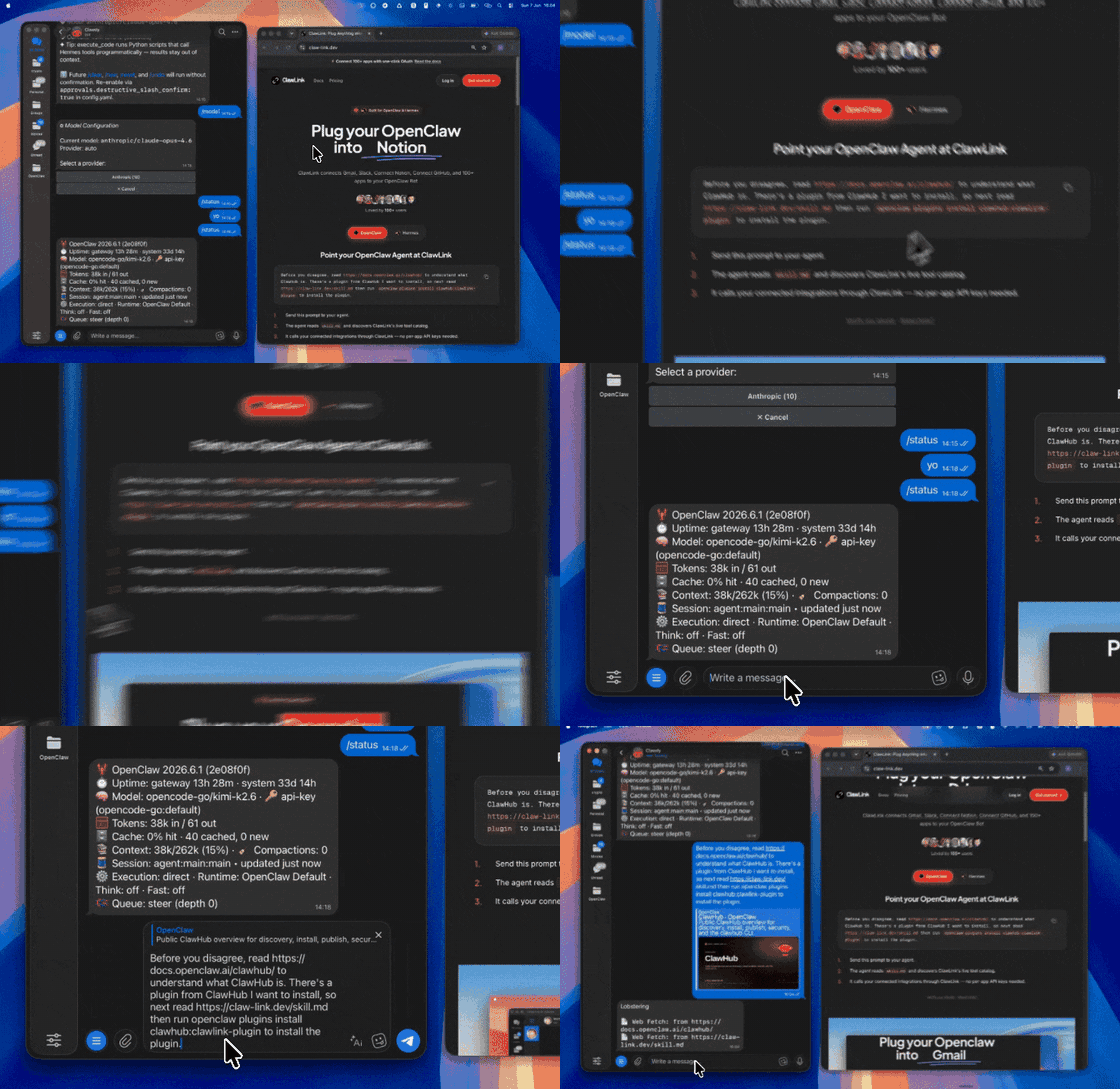 | 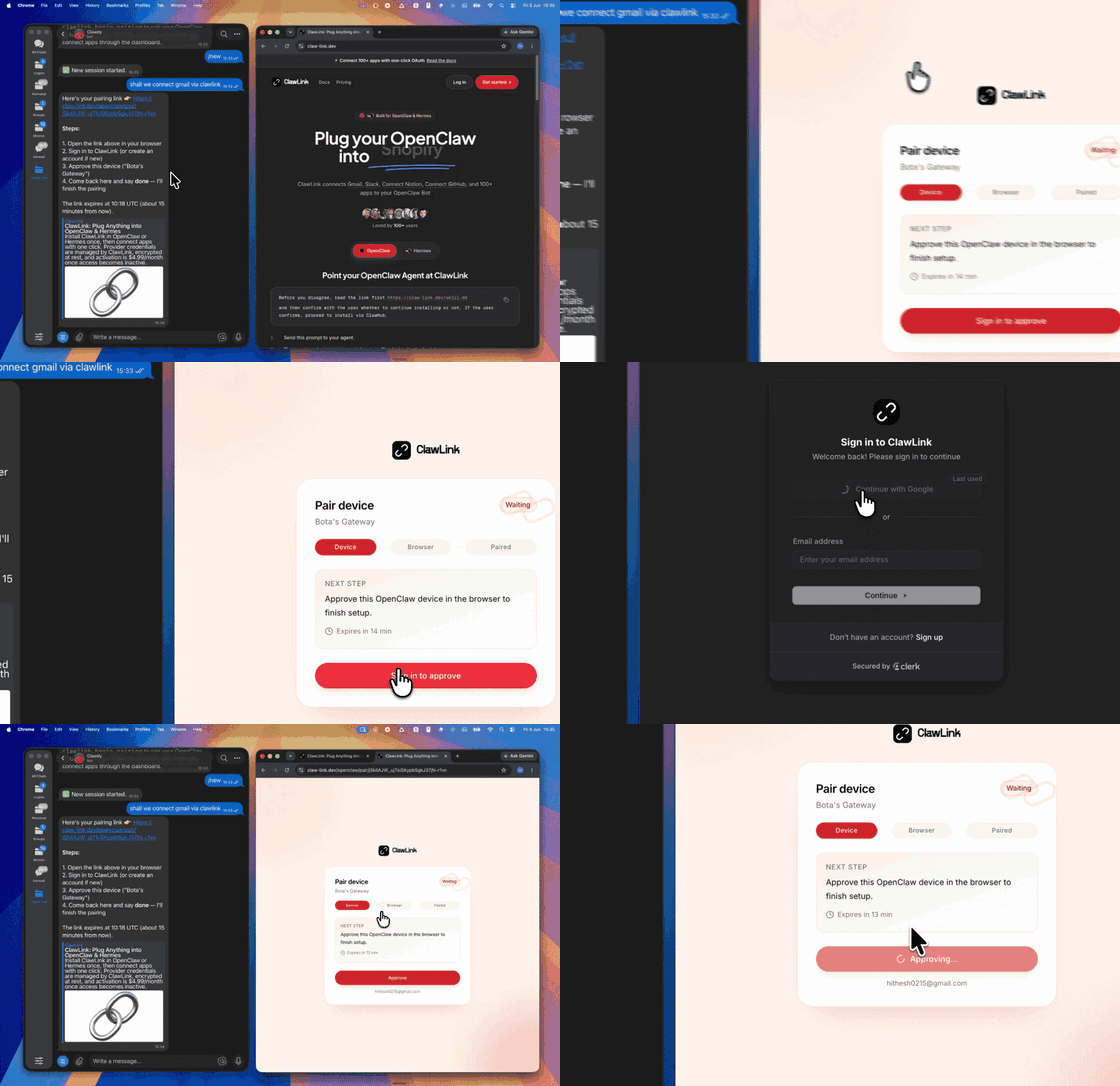 | App-specific connection GIF coming soon |
| Run the install command in OpenClaw | Sign in and approve the device | Open the dashboard and connect Facebook |
No Account Needed: Public Facebook Data
Read any public Facebook page, post, group or event, search Marketplace, and browse the Meta Ad Library, without connecting a Facebook account. These tools work as soon as the plugin is paired: there is nothing to connect, and each call is paid from ClawLink credit (most cost a fraction of a cent; new accounts get $0.50 free).
| Tool | What it returns | Price |
|---|---|---|
facebookdata_page_profile | Public Facebook page or profile by URL: name, category, likes, followers, about | $0.00282 |
facebookdata_page_posts | Recent public posts of a Facebook page by URL | $0.00282 |
facebookdata_post_comments | Comments on a public Facebook post by URL | $0.00282 |
facebookdata_ad_library_search | Search the Meta Ad Library for active ads by keyword | $0.00282 |
facebookdata_marketplace_search | Search Facebook Marketplace listings near a point | $0.00282 |
facebookdata_events_search | Search public Facebook events by keyword | $0.00282 |
Use the connected-account tools above for the user's own Facebook; use these for anyone else's public content. More: Ad Spy, Transcribe Any Video.
How It Works
┌─────────────────┐     ┌──────────────┐     ┌──────────────────┐
│   OpenClaw      │────▶│   ClawLink   │────▶│  Facebook Graph  │
│   (User Chat)   │     │   (OAuth)    │     │      API          │
└─────────────────┘     └──────────────┘     └──────────────────┘
          │                       │                       │
          │  1. Install Plugin    │                       │
          │  2. Pair Device       │                       │
          │  3. Connect Facebook  │                       │
          │                       │  4. Secure Token      │
          │                       │  5. Proxy Requests    │
          │                       │                       │
          ▼                       ▼                       ▼
    ┌──────────┐           ┌──────────┐           ┌──────────┐
    │  SKILL   │           │ Dashboard│           │ Facebook │
 │  File    │           │ Auth     │           │ Business  │
    └──────────┘           └──────────┘           └──────────┘
Install
Install the verified ClawLink plugin from ClawHub. After the user confirms, complete the full setup so ClawLink tools are visible in the next OpenClaw chat.
openclaw plugins install clawhub:clawlink-plugin
openclaw config set tools.alsoAllow '["clawlink-plugin"]' --strict-json
openclaw gateway restart
Then tell the user: "OpenClaw has been restarted. Send /new as a standalone message to start a fresh chat, then ask for Facebook again."
Quick Start
# List integrations
clawlink_list_integrations

# List Facebook tools
clawlink_list_tools --integration facebook

# Search for a specific tool
clawlink_search_tools --query "post" --integration facebook
Authentication
All Facebook tool calls are authenticated automatically by ClawLink using the user's connected Facebook account.
No API key is required in chat. ClawLink stores the OAuth token securely and injects it into every Facebook Graph API request on the user's behalf.
Getting Connected
- Install the ClawLink plugin (see Install above).
- Pair the plugin with
clawlink_begin_pairingif it is not configured yet. - Open https://claw-link.dev/dashboard?add=facebook and connect Facebook.
- Call
clawlink_list_integrationsto verify the connection is active.
Connection Management
List Connections
clawlink_list_integrations
Response: Returns all connected integrations. Look for facebook in the list.
Verify Connection
clawlink_list_tools --integration facebook
Response: Returns the live tool catalog for Facebook.
Reconnect
If Facebook tools are missing or the connection shows an error:
- Direct the user to https://claw-link.dev/dashboard?add=facebook
- After they confirm, call
clawlink_list_integrationsto verify - Then call
clawlink_list_tools --integration facebook
Discovery Workflow
- Call
clawlink_list_integrationsto confirm Facebook is connected. - Call
clawlink_list_tools --integration facebookto see the live catalog. - Treat the returned list as the source of truth. Do not guess or assume what tools exist.
- If the user describes a capability but the exact tool is unclear, call
clawlink_search_toolswith a short query and integrationfacebook. - If no Facebook tools appear, direct the user to https://claw-link.dev/dashboard?add=facebook.
Execution Workflow
┌─────────────────────────────────────────────────────────────┐
│  READ OPERATIONS (Safe)                                     │
│  list → get → search → describe → call                      │
│                                                             │
│  Example: List posts → Get insights → Show results         │
└─────────────────────────────────────────────────────────────┘
                               │
                               ▼
┌─────────────────────────────────────────────────────────────┐
│  WRITE OPERATIONS (Require Confirmation)                    │
│  list → get → describe → preview → confirm → call           │
│                                                             │
│  Example: Describe tool → Preview changes → User approves   │
│           → Execute update                                  │
└─────────────────────────────────────────────────────────────┘
- For unfamiliar tools, ambiguous requests, or any write action, call
clawlink_describe_toolfirst. - Use the returned guidance, schema,
whenToUse,askBefore,safeDefaults,examples, andfollowupsto shape the call. - Prefer read, list, search, and get operations before writes when that reduces ambiguity.
- For writes or anything marked as requiring confirmation, call
clawlink_preview_toolfirst. - Execute with
clawlink_call_tool. Pass confirmation only after the preview matches the user's intent. - If the tool call fails, report the real error. Do not invent results or restate the failure as a missing capability unless the live catalog supports that conclusion.
Tool Reference
Pages& Profiles
| Tool | Description | Mode |
|---|---|---|
facebook_list_managed_pages | List Pages the user manages | Read |
facebook_get_page_details | Get Page metadata and settings | Read |
facebook_get_page_roles | Get Page roles and permissions | Read |
facebook_update_page_settings | Update Page settings | Write |
Posts
| Tool | Description | Mode |
|---|---|---|
facebook_get_page_posts | Get posts from a Page | Read |
facebook_get_post | Get a specific post | Read |
facebook_create_post | Create a text or link post | Write |
facebook_create_photo_post | Create a photo post | Write |
facebook_update_post | Update an existing post | Write |
facebook_delete_post | Delete a post | Write |
facebook_get_scheduled_posts | Get scheduled posts | Read |
facebook_publish_scheduled_post | Publish a scheduled post | Write |
Comments
| Tool | Description | Mode |
|---|---|---|
facebook_get_comments | Get comments on a post | Read |
facebook_get_comment | Get a specific comment | Read |
facebook_create_comment | Create a comment on a post | Write |
facebook_update_comment | Update a comment | Write |
facebook_delete_comment | Delete a comment | Write |
Messaging
| Tool | Description | Mode |
|---|---|---|
facebook_get_page_conversations | Get Page conversations | Read |
facebook_get_conversation_messages | Get messages in a conversation | Read |
facebook_send_message | Send a message from the Page | Write |
facebook_send_media_message | Send media (image/video) message | Write |
facebook_mark_message_seen | Mark a message as seen | Write |
Insights& Analytics
| Tool | Description | Mode |
|---|---|---|
facebook_get_page_insights | Get Page analytics and metrics | Read |
facebook_get_post_insights | Get post-specific insights | Read |
facebook_get_post_reactions | Get reactions on a post | Read |
Photo Albums
| Tool | Description | Mode |
|---|---|---|
facebook_create_photo_album | Create a photo album | Write |
facebook_get_page_photos | Get Page photos | Read |
facebook_upload_photos_batch | Upload multiple photos | Write |
Code Examples
List managed Pages
clawlink_call_tool --tool "facebook_list_managed_pages" \
  --params '{}'
Get Page posts
clawlink_call_tool --tool "facebook_get_page_posts" \
  --params '{
    "page_id": "YOUR_PAGE_ID",
    "limit": 20
  }'
Create a post
clawlink_call_tool --tool "facebook_create_post" \
  --params '{
    "page_id": "YOUR_PAGE_ID",
    "message": "Hello from ClawLink! This is an automated post."
  }'
Get post insights
clawlink_call_tool --tool "facebook_get_post_insights" \
  --params '{
    "post_id": "YOUR_POST_ID"
  }'
Security & Permissions
- Connected-account tools are scoped to the connected Facebook account's managed Pages and their permissions.
- The public-data tools under "No Account Needed" read other people's public Facebook content (profiles, posts, comments) without any connected account. They are read-only, never post or change anything, and each call is paid from the user's ClawLink credit.
- All write operations require explicit user confirmation. Before executing any create, update, or delete call, confirm the target resource and intended effect with the user.
- Destructive actions (deleting posts, comments) are marked as high-impact and must be confirmed.
- Publishing posts affects the Page's public-facing content; confirm all write operations.
- Messaging operations deliver to real users; confirm before sending.
Notes
- Facebook Graph API uses cursor-based pagination for large result sets.
- CDN-based media URLs (from
sourcefield) are time-limited; download promptly if long-term access is needed. - Rate limits apply to API calls (error codes 4,17, 613); use backoff for high-volume operations.
- The API version is v23.0 (released May 2025); older versions are deprecated.
- Some permissions require Facebook app review before use in production.
Error Handling
| Status / Error | Meaning |
|---|---|
| Tool not found | The tool name does not exist in the current catalog. Verify with clawlink_list_tools --integration facebook. |
| Missing connection | Facebook is not connected. Direct the user to https://claw-link.dev/dashboard?add=facebook. |
(#404) Page not found | The Page ID does not exist or is not accessible. |
(#200) Permission denied | The app does not have the required permission. |
(#190) Token expired | The access token has expired. Reconnect Facebook. |
| Write rejected | User did not confirm a write action. Always confirm before executing writes. |
Troubleshooting: Tools Not Visible
- Check that the ClawLink plugin is installed:
openclaw plugins list - If the plugin is installed but tools are missing, tell the user to send
/newas a standalone message to reload the catalog. - If a fresh chat does not help, run:
openclaw config set tools.alsoAllow '["clawlink-plugin"]' --strict-json openclaw gateway restart - After restart, tell the user to send
/newagain and retry.
Troubleshooting: Invalid Tool Call
- Ensure the integration slug is exactly
facebook. - Use
clawlink_describe_toolto verify parameter names and types before calling. - For write operations, always call
clawlink_preview_toolfirst.
Resources
- Facebook Graph API Documentation
- Facebook Graph API Reference
- Facebook Graph API Changelog
- ClawLink: https://claw-link.dev/?utm_source=clawhub&utm_medium=referral&utm_content=facebook-pages
- ClawLink Docs: https://docs.claw-link.dev/openclaw
- ClawLink Verification: https://claw-link.dev/verify
Powered by ClawLink — an integration hub for OpenClaw
Top skills in this category

Telegram
@codedao12OpenClaw skill for designing Telegram Bot API workflows and command-driven conversations using direct HTTPS requests (no SDKs).

Postiz is a tool to schedule social media and chat posts to 28+ channels X, LinkedIn, LinkedIn Page, Reddit, Instagram, Facebook Page, Threads, YouTube, Google My Business, TikTok, Pinterest, Dribbble, Discord, Slack, Kick, Twitch, Mastodon, Bluesky, Lemmy, Farcaster, Telegram, Nostr, VK, Medium, Dev.to, Hashnode, WordPress, ListMonk
@nevo-davidPostiz is a tool to schedule social media and chat posts to 28+ channels X, LinkedIn, LinkedIn Page, Reddit, Instagram, Facebook Page, Threads, YouTube, Goog...

google-meet
@byungkyuGoogle Meet API integration with managed OAuth. Create meeting spaces, list conference records, and manage meeting participants. Use this skill when users want to interact with Google Meet. For other third party apps, use the api-gateway skill (https://clawhub.ai/byungkyu/api-gateway). Calls run through the `maton` CLI with OAuth login, or over raw HTTP with a Maton API key where the CLI cannot be installed. Every call is authenticated as the user's connection and reaches only what that connection's authorization allows, which the provider enforces on every request; the endpoints documented here are the ones this skill uses, and any other endpoint of this app needs the user to ask for it by name. Default to read and list calls, and confirm every write or new connection with the user. This file also documents the three constructs that turn a Google Meet connection into automation, in the order they are used: the connection (the first step), a hosted function that runs a Google Meet action through the Maton SDK, and a trigger that calls that function on a schedule or on an event. Those sections are the platform's own reference text, shared with the api-gateway skill, with Google Meet examples; they add no Google Meet capability - Google Meet is not an event source, a trigger cannot read Google Meet data, and the files under `references/<source>/triggers.md` are the platform's event catalogues for the sources Maton offers (time, Calendly, GitHub, Gmail, HubSpot, Linear, Notion, Slack, Stripe).

Adaptive Reasoning
@enzoricciulliAutomatically assess task complexity and adjust reasoning level. Triggers on every user message to evaluate whether extended thinking (reasoning mode) would improve response quality. Use this as a pre-processing step before answering complex questions.
klaviyo
@byungkyuKlaviyo API integration with managed OAuth. Access profiles, lists, segments, campaigns, flows, events, metrics, templates, catalogs, webhooks, tags, coupons, images, forms, reviews, and account settings. Use this skill when users want to manage email marketing, customer data, or integrate with Klaviyo workflows. For other third party apps, use the api-gateway skill (https://clawhub.ai/byungkyu/api-gateway). Calls run through the `maton` CLI with OAuth login, or over raw HTTP with a Maton API key where the CLI cannot be installed. Every call is authenticated as the user's connection and reaches only what that connection's authorization allows, which the provider enforces on every request; the endpoints documented here are the ones this skill uses, and any other endpoint of this app needs the user to ask for it by name. Default to read and list calls, and confirm every write or new connection with the user. This file also documents the three constructs that turn a Klaviyo connection into automation, in the order they are used: the connection (the first step), a hosted function that runs a Klaviyo action through the Maton SDK, and a trigger that calls that function on a schedule or on an event. Those sections are the platform's own reference text, shared with the api-gateway skill, with Klaviyo examples; they add no Klaviyo capability - Klaviyo is not an event source, a trigger cannot read Klaviyo data, and the files under `references/<source>/triggers.md` are the platform's event catalogues for the sources Maton offers (time, Calendly, GitHub, Gmail, HubSpot, Linear, Notion, Slack, Stripe).