
OpenClaw Dashboard
OpenClaw operations dashboard for sessions, usage and cost, cron runs, gateway health, DGX Spark work, Local API Hub, and opt-in meeting Copilot. Use when installing, operating, au…

Jonathan Jing
@jonathanjing
What This Skill Does
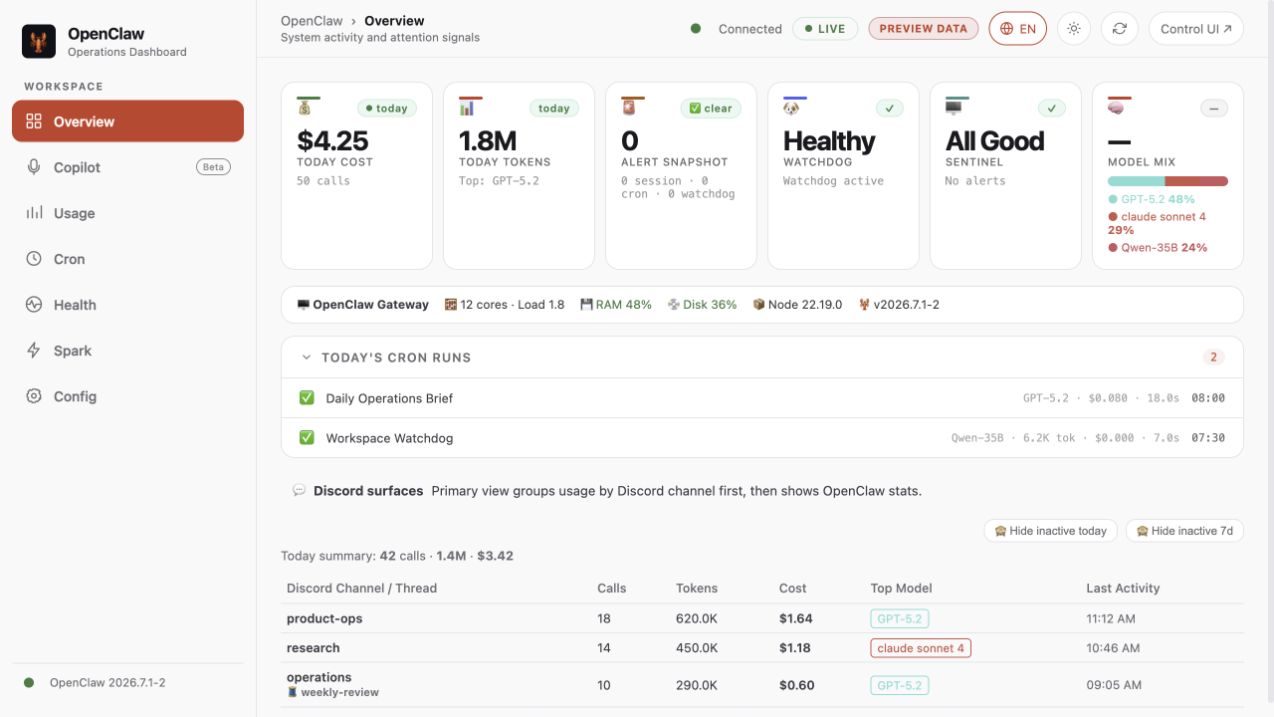
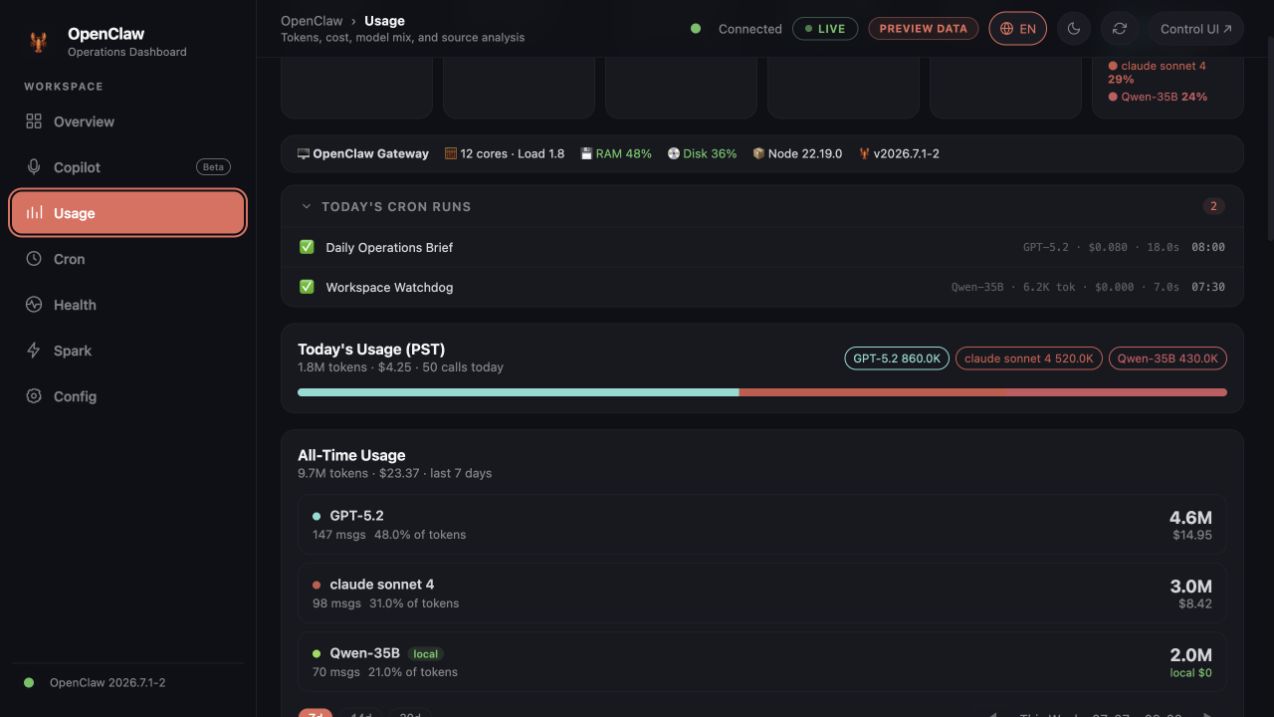
Real-time operations dashboard for OpenClaw that monitors sessions, costs, cron jobs, and gateway health. Includes a language toggle (EN/中文), watchdog 24h uptime bar, and cost analysis.
Replaces manually checking multiple OpenClaw logs and metrics by consolidating all operational data into a single web dashboard.
When to Use It
- Monitor active OpenClaw sessions and their associated costs
- View cron job execution history and status
- Check gateway health and uptime via the watchdog bar
- Toggle dashboard language between English and Chinese
- Add new backend routes to the api-server.js file
- Update frontend behavior in agent-dashboard.html
Install
$ openclaw skills install @jonathanjing/openclaw-dashboardOpenClaw Dashboard Skill
Preview
The published screenshots use deterministic ?preview=1 sample data, never local host or workspace data.
🛠️ Installation
1. Ask OpenClaw (Recommended)
Tell OpenClaw: "Install the openclaw-dashboard skill." The agent will handle the installation and configuration automatically.
2. Manual Installation (CLI)
openclaw skills install @jonathanjing/openclaw-dashboard
Mission
Keep this repository public-safe and easy to run. Prioritize:
- Secret sanitization
- Minimal setup steps
- Stable API/UI behavior
Architecture (v2.0)
The dashboard uses a modular backend + tab-based frontend architecture.
Backend entry point: backend/server.js
Business logic: backend/providers/ — one file per data domain
Frontend: frontend/tabs/ + frontend/shared/ — one JS file per tab
Runtime data: stored in ~/.openclaw/dashboard/ (outside skill dir, not Git-tracked)
Provider map
| Provider | Routes | Responsibility |
|---|---|---|
sessions.js | /ops/sessions, /api/sessions | Session stats + model |
ledger.js | /ops/ledger/*, /api/cost/* | SQLite token/cost data |
cron.js | /ops/cron, /ops/cron-costs, /cron/today | Cron jobs + run history + cost breakdown |
watchdog.js | /ops/watchdog | Watchdog state + timeline |
spark.js | /ops/dgx-status, /api/spark/* | DGX Spark inference node |
system.js | /ops/system | Host metrics (CPU/RAM/disk) |
local-api-hub.js | /ops/local-api-hub/* | Unified local control-plane status |
spark-tasks.js | /api/spark/tasks/* | DGX task history and PR Hunter output |
copilot.js | /api/copilot/status, /api/copilot/ws | Opt-in realtime transcript/RAG/insights |
ground-truth.js | /api/ground-truth/*, /ops/models | Model registry + colors |
tasks.js | /tasks, /tasks/:id, /logs | Read-only task/history views |
config.js | /ops/config, /files, /skills | Read-only config, file, and skill views |
ops-legacy.js | /ops/channels, /ops/alltime, /ops/audit, /memory | Read-only compatibility views |
Frontend tab map
| Tab | File | Key functions |
|---|---|---|
| Overview | tabs/overview.js | loadSessions(), loadTasks() |
| Cost | tabs/cost.js | loadOpsChannels(), loadOpsAlltime() |
| Cron | tabs/cron.js | loadCronEnhanced(), loadCronCosts(), loadCronRuns() |
| Health | tabs/health.js | renderAgentMonitor(), loadSystemInfo(), renderWatchdogStatus() |
| Spark | tabs/spark-monitor.js | loadSparkMonitor(), task history, GPU activity |
| Copilot | tabs/copilot.js | capability check, microphone stream, transcript/RAG/insights |
| Config | tabs/config.js | loadConfig(), loadSkills(), loadFileList() |
| Shared | shared/api.js | Auth, apiFetch(), watchdog renderers, toast, markdown |
| Shared | shared/ui-utils.js | timeSince(), task state |
| Shared | shared/boot.js | Init, week nav, chart renderers, confirm dialog |
Apply when
Use this skill for:
- Dashboard feature requests (sessions, cost, cron, watchdog, operations)
- Backend route additions/fixes in
backend/providers/ - Frontend behavior updates in
frontend/tabs/orfrontend/shared/ - README, setup, and environment simplification
- Public release checks for accidental sensitive data
Key rules for agents editing this codebase
- No duplicate function definitions across
api.jsandui-utils.js. Shared utilities belong inapi.js(loaded first).ui-utils.jsonly holdstimeSince()and task state. - Cross-tab function calls are implicit — JS shares the same
windowscope. Keep shared helpers inshared/files. - Runtime data goes to
~/.openclaw/dashboard/, not skill root. Path is set inbackend/lib/config.jsviaOPENCLAW_DASHBOARD_TASKSenv or default. /ops/modelsreturns{ registry: {...object...}, colors, displayNames, models }—registrymust be an object keyed by alias, not an array./ops/cron-costsreturns{ summary, jobs, dailyTrend, review, rows }— all five keys required for Cron tab to render correctly.hideStalequery param on/ops/sessionsfilters sessions with no activity for 7+ days.- Frontend API calls are same-origin. Never reintroduce a hardcoded dashboard/gateway port list.
- Copilot is opt-in. Require
OPENCLAW_ENABLE_COPILOT=1, an API key, authenticated WebSocket upgrade, and safe dependency failure states. - Parse request URLs against a fixed internal base. Never build a URL from the request
Hostheader. - Treat query-token login as a compatibility handoff only. Set the cookie and redirect before serving HTML; never accept query tokens on API routes.
- Parse cookies per fragment. Split on the first
=, catch percent-decoding errors, and encode cookie values when setting them. - Keep the shipped dashboard read-only. Do not add task/file mutations, restart/doctor actions, model changes, package updates, backup/restore, or legacy proxying.
- Scope Copilot Redis events by meeting ID. Permit unscoped legacy channels only for the first active meeting.
- Track the launcher and test harness. Keep
start.shandscripts/test-dashboard.jsin both Git andpackage.json#files. - Use theme tokens in canvas rendering. Never hardcode light-only chart text or borders.
OpenClaw design alignment
- Reuse the current Control UI tokens: Inter/system typography, layered neutral surfaces, thin borders, 10–14px radii, red primary accent, semantic green/yellow/red/blue.
- Keep the desktop shell as left navigation + sticky topbar; use bottom navigation on narrow screens.
- Prefer flat cards and strong information hierarchy over gradients, glow, or decorative motion.
- Support dark and light modes, visible focus states, reduced motion, and responsive layouts.
- Keep IDs and
data-tabcontracts stable when changing navigation or visual structure.
Public-safety guardrails
- Never hardcode tokens, API keys, cookies, or host-specific secrets.
- Require
OPENCLAW_AUTH_TOKEN; do not start the dashboard without authentication. - Never commit machine-specific absolute paths.
- Prefer
process.env.*and safe defaults based onHOME. - Keep examples as placeholders (
your_token_here,/path/to/...). - If uncertain, redact first and ask the user before exposing details.
- Keep sensitive behaviors opt-in (do not silently load local secret files).
Runtime access declaration
The bundled server can access local OpenClaw files for dashboard views:
- Sessions, cron runs, watchdog state under
~/.openclaw/... - Local workspace files under
OPENCLAW_WORKSPACE - Task data in
~/.openclaw/dashboard/tasks.json - Task attachments in
~/.openclaw/dashboard/attachments/
High-sensitivity features are disabled by default and require explicit env flags:
OPENCLAW_ENABLE_CONFIG_ENDPOINT=1to expose/ops/configOPENCLAW_ENABLE_COPILOT=1plusALIBABA_CLOUD_API_KEYto enable meeting Copilot
Network security:
- CORS restricted to loopback by default.
- Auth via HttpOnly cookie (
ds) orAuthorization: Bearerheader. - Set
DASHBOARD_COOKIE_SECURE=1only when the dashboard origin uses HTTPS. - Set
OPENCLAW_CONTROL_UI_URLto the complete runtime URL when Gateway TLS orgateway.controlUi.basePathis enabled. - Set
DASHBOARD_CORS_ORIGINS(comma-separated) for external origins.
Default implementation workflow
- Identify which provider or tab file owns the feature.
- Implement the smallest change that preserves behavior.
- Check: does any other tab/shared file also define the same function? If yes, deduplicate.
- Run a sensitive-string scan before finalizing.
- Run
npm test,git diff --check, andnpm pack --dry-run --json. - Ensure docs match the actual runtime defaults.
Sensitive-data checks
Before final response, scan for:
token=,OPENCLAW_AUTH_TOKEN,OPENCLAW_HOOK_TOKENAPI_KEY,SECRET,PASSWORD,COOKIE- absolute paths like
/Users/,C:\\, machine names, personal emails
If found: replace with env-based values or placeholders, and mention what was sanitized.
Files to touch most often
backend/providers/*.js— server behavior and API routesfrontend/tabs/*.js— tab-specific UI logicfrontend/shared/api.js— auth, fetch, shared renderersbackend/lib/config.js— path and env configurationREADME.md— quick start and operator docsenv.example.txt— ClawHub-compatible public-safe environment templateenv.example— compatibility mirror for Git/npm workflows
Top skills in this category

claude-code-usage
@azaidi94Check Claude Code OAuth usage limits (session & weekly quotas). Use when user asks about Claude Code usage, remaining limits, rate limits, or how much Claude usage they have left. Includes automated monitoring to notify when quotas reset.

Skill Vetter
@spclaudehomeSecurity-first skill vetting for AI agents. Use before installing any skill from ClawdHub, GitHub, or other sources. Checks for red flags, permission scope, and suspicious patterns.

Free Ride - Unlimited free AI
@shaivpidadiManages free AI models from OpenRouter for OpenClaw. Automatically ranks models by quality, configures fallbacks for rate-limit handling, and updates opencla...

Playwright (Automation + MCP + Scraper)
@ivangdavilaAutomates, tests, and debugs browsers with Playwright: locators, auto-waiting, traces, CI runs, and MCP browser control. Use when a test is flaky, times out, or fails only in CI or headless; when a locator matches multiple elements or the wrong one (strict mode violation); when clicks need force, waits become sleeps, or networkidle never settles; for storageState and login setup, request mocking and HAR replay, uploads and downloads, iframes and shadow DOM, popups and dialogs, screenshot diffs that change per machine, trace and report artifacts, sharding a slow suite, device and permission emulation, accessibility checks, driving a real browser through Playwright MCP, extracting data from JS-rendered pages, or porting a Cypress, Puppeteer, or Selenium suite to Playwright. Not for maintaining an existing Cypress or Puppeteer suite (cypress, puppeteer) or for work a plain HTTP request answers (http).

n8n
@thomasansemsManage n8n workflows and automations via API. Use when working with n8n workflows, executions, or automation tasks - listing workflows, activating/deactivating, checking execution status, manually triggering workflows, or debugging automation issues.