 Claude
Back to Guides api
api
 claude-code
 agents
 productivity
 api
api mcp
mcp claude-code
Claude Code: Installation, Quickstart, and Essential Workflows
Neura Market Research July 21, 2026
0 views
Learn how to install Claude Code, log in, run your first session, and use it for real development tasks including code changes, Git operations, and automation.
This guide covers everything you need to install Claude Code, log in, run your first session, and start using it for real development tasks. It is written for developers who want a practical, step-by-step introduction to Anthropic's agentic coding tool, including setup on multiple surfaces, essential commands, and pro tips for getting the best results.
What You Need
Before you begin, make sure you have the following:
- A terminal or command prompt open. If you have never used the terminal before, review the terminal guide linked in the official documentation.
- A code project to work with. This can be any existing project on your machine.
- A Claude subscription (Pro, Max, Team, or Enterprise), a Claude Console account, or access through a supported cloud provider such as Amazon Bedrock, Google Cloud's Agent Platform, or Microsoft Foundry. A self-hosted Claude apps gateway also works if your organization runs one.
Installing Claude Code
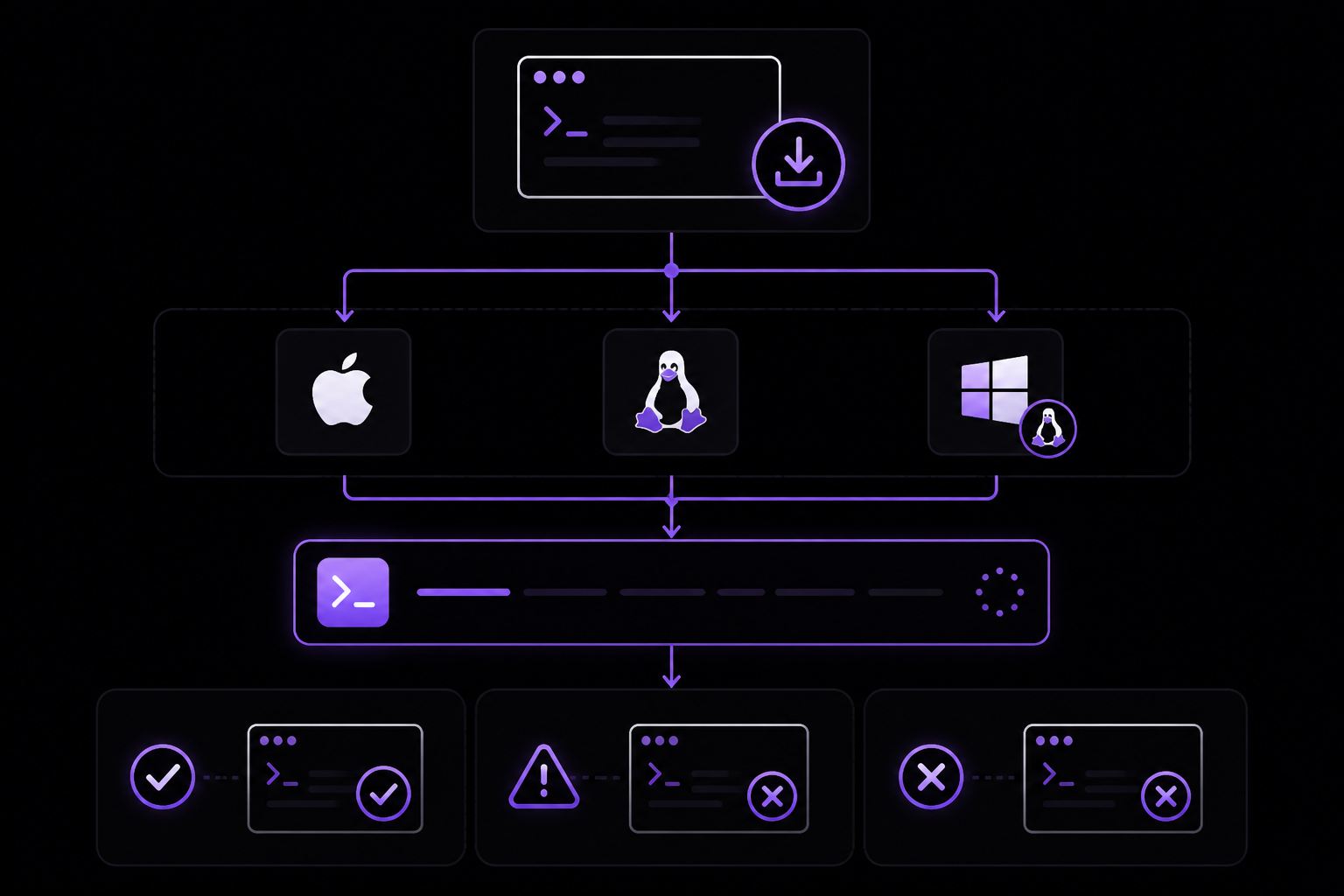
Claude Code can be installed on multiple operating systems using several methods. The official documentation recommends the native install method for most users because it automatically updates in the background to keep you on the latest version.
Native Install (Recommended)
For macOS, Linux, and Windows Subsystem for Linux (WSL), run the following command in your terminal:
curl -fsSL https://claude.ai/install.sh | bash
For Windows PowerShell, use:
irm https://claude.ai/install.ps1 | iex
For Windows Command Prompt (CMD), use:
curl -fsSL https://claude.ai/install.cmd -o install.cmd && install.cmd && del install.cmd
If you see the error The token '&&' is not a valid statement separator, you are in PowerShell, not CMD. If you see 'irm' is not recognized as an internal or external command, you are in CMD, not PowerShell. Your prompt shows PS C:\ when you are in PowerShell and C:\ without the PS when you are in CMD. If the install command fails with syntax error near unexpected token, consult the installation troubleshooting guide to match the error to a fix and for alternative install methods.
Git for Windows is recommended on native Windows so Claude Code can use the Bash tool. If Git for Windows is not installed, Claude Code uses PowerShell as the shell tool instead. WSL setups do not need Git for Windows.
Homebrew (macOS)
If you use Homebrew, you can install Claude Code with:
brew install --cask claude-code
Homebrew offers two casks. claude-code tracks the stable release channel, which is typically about a week behind and skips releases with major regressions. claude-code@latest tracks the latest channel and receives new versions as soon as they ship. Homebrew installations do not auto-update. Run brew upgrade claude-code or brew upgrade claude-code@latest, depending on which cask you installed, to get the latest features and security fixes.
WinGet (Windows)
For Windows users who prefer the WinGet package manager:
winget install Anthropic.ClaudeCode
WinGet installations do not auto-update. Run winget upgrade Anthropic.ClaudeCode periodically to get the latest features and security fixes.
Alternative Package Managers
You can also install with apt, dnf, or apk on Debian, Fedora, RHEL, and Alpine Linux distributions.
Verify Installation
To confirm the installation worked, run:
claude --version
The command prints a version number followed by (Claude Code).
Logging In
Claude Code requires an account to use. Start an interactive session with the claude command and you will be prompted to log in on first use:
claude
For Claude subscription or Console accounts, follow the prompts to complete authentication in your browser. To switch accounts later or re-authenticate, type /login inside the running session:
/login
You can log in using any of these account types:
- Claude Pro, Max, Team, or Enterprise (recommended)
- Claude Console (API access with pre-paid credits). On first login, a "Claude Code" workspace is automatically created in the Console for centralized cost tracking.
- Amazon Bedrock, Google Cloud's Agent Platform, or Microsoft Foundry (enterprise cloud providers)
- A self-hosted Claude apps gateway, if your organization runs one: your admin pre-configures the gateway URL, and
/loginopens directly on the Cloud gateway screen for you to sign in with corporate SSO
Once logged in, your credentials are stored and you will not need to log in again.
Starting Your First Session
Open your terminal in any project directory and start Claude Code:
cd /path/to/your/project
claude
Replace /path/to/your/project with the path to the project you want to work on. You will see the Claude Code prompt with the version, current model, and working directory shown above it. Type /help for available commands or /resume to continue a previous conversation.
Asking Your First Question
Start by understanding your codebase. Try one of these commands:
what does this project do?
Claude will analyze your files and provide a summary. You can also ask more specific questions:
what technologies does this project use?
where is the main entry point?
explain the folder structure
You can also ask Claude about its own capabilities:
what can Claude Code do?
how do I create custom skills in Claude Code?
can Claude Code work with Docker?
Claude Code reads your project files as needed. You do not have to manually add context.
Making Your First Code Change
Now let Claude Code do some actual coding. Try a simple task:
add a hello world function to the main file
Claude Code will:
- Find the appropriate file
- Show you the proposed changes
- Ask for your approval before changing files, depending on your permission mode
- Make the edit
Whether Claude Code asks before changing files depends on your permission mode. In default mode, Claude asks for approval before each change. Press Shift+Tab to cycle through modes: acceptEdits auto-approves file edits, and plan lets Claude propose changes without editing. Some accounts also have an auto mode that runs a background safety check and blocks risky actions, returning to prompts only after repeated blocks.
Using Git with Claude Code
Claude Code makes Git operations conversational:
what files have I changed?
commit my changes with a descriptive message
You can also prompt for more complex Git operations:
create a new branch called feature/quickstart
show me the last 5 commits
help me resolve merge conflicts
Fixing a Bug or Adding a Feature
Claude is proficient at debugging and feature implementation. Describe what you want in natural language:
add input validation to the user registration form
Or fix existing issues:
there's a bug where users can submit empty forms - fix it
Claude Code will:
- Locate the relevant code
- Understand the context
- Implement a solution
- Run tests if available
Testing Out Other Common Workflows
There are a number of ways to work with Claude:
Refactor Code
refactor the authentication module to use async/await instead of callbacks
Write Tests
write unit tests for the calculator functions
Update Documentation
update the README with installation instructions
Code Review
review my changes and suggest improvements
Talk to Claude like you would a helpful colleague. Describe what you want to achieve, and it will help you get there.
Essential Commands
Here are the most important commands for daily use. Shell commands run from your terminal to start or resume Claude Code. Session commands run inside Claude Code after it starts.
Shell Commands
| Command | What it does | Example |
|---|---|---|
claude | Start interactive mode | claude |
claude "task" | Run a one-time task | claude "fix the build error" |
claude -p "query" | Run one-off query, then exit | claude -p "explain this function" |
claude -c | Continue most recent conversation in current directory | claude -c |
claude -r | Resume a previous conversation | claude -r |
Session Commands
| Command | What it does | Example |
|---|---|---|
/clear | Clear conversation history | /clear |
/help | Show available commands | /help |
/exit or Ctrl+D twice | Exit Claude Code | /exit |
See the CLI reference for the complete list of shell commands and the commands reference for the complete list of session commands.
Pro Tips for Beginners
For more, see best practices and common workflows.
Be Specific with Your Requests
Instead of: "fix the bug" Try: "fix the login bug where users see a blank screen after entering wrong credentials"
Use Step-by-Step Instructions
Break complex tasks into steps:
1. create a new database table for user profiles
2. create an API endpoint to get and update user profiles
3. build a webpage that allows users to see and edit their information
Let Claude Explore First
Before making changes, let Claude understand your code:
analyze the database schema
build a dashboard showing products that are most frequently returned by our UK customers
Save Time with Shortcuts
- Type
/to see all commands and skills - Use Tab for command completion
- Press Up arrow for command history
- Press
Shift+Tabto cycle permission modes
What You Can Do with Claude Code
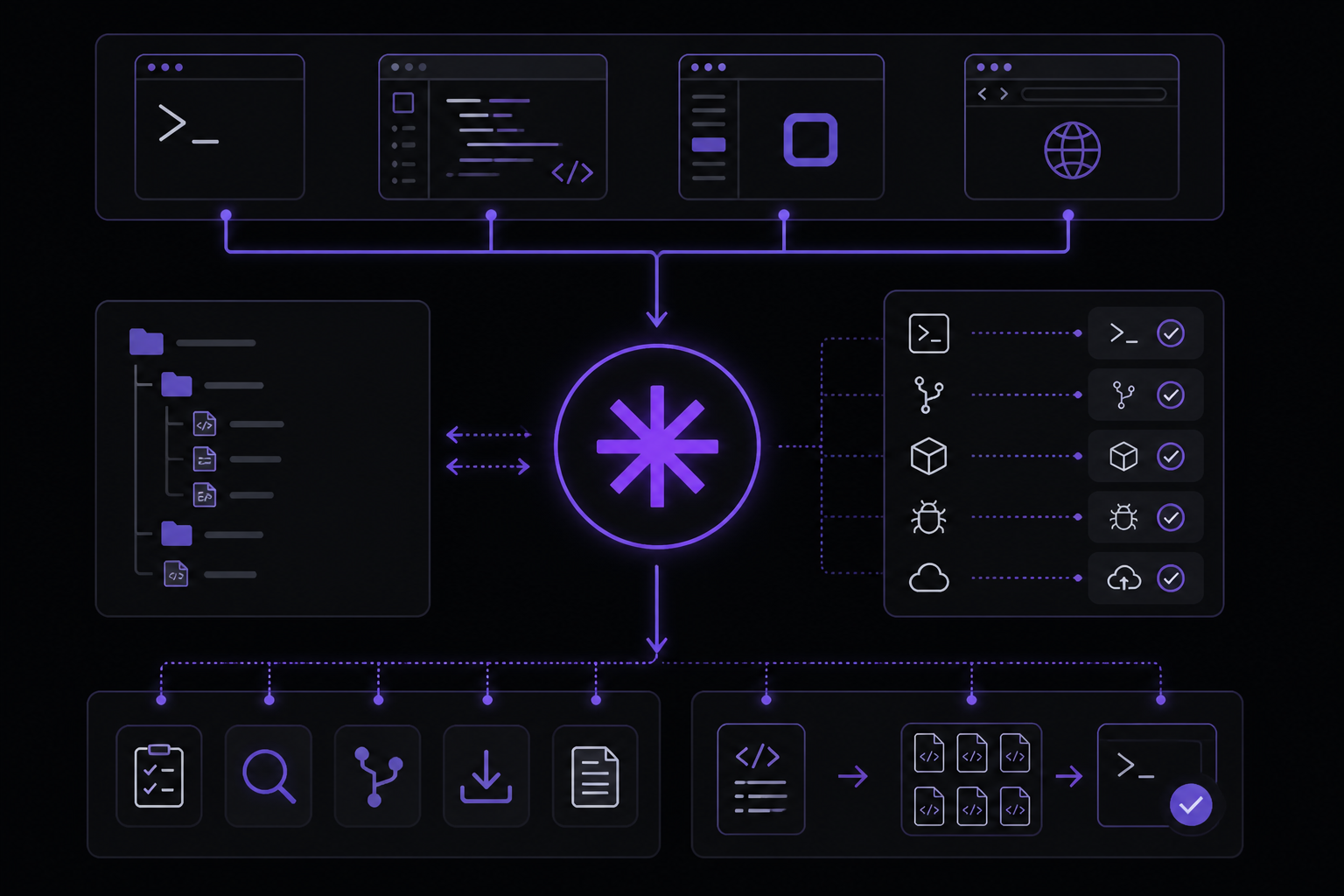
Claude Code is an agentic coding tool that reads your codebase, edits files, runs commands, and integrates with your development tools. It is available in your terminal, IDE, desktop app, and browser.
Automate Tedious Tasks
Claude Code handles the tedious tasks that eat up your day: writing tests for untested code, fixing lint errors across a project, resolving merge conflicts, updating dependencies, and writing release notes.
claude "write tests for the auth module, run them, and fix any failures"
Build Features and Fix Bugs
Describe what you want in plain language. Claude Code plans the approach, writes the code across multiple files, and verifies it works. For bugs, paste an error message or describe the symptom. Claude Code traces the issue through your codebase, identifies the root cause, and implements a fix.
Create Commits and Pull Requests
Claude Code works directly with git. It stages changes, writes commit messages, creates branches, and opens pull requests.
claude "commit my changes with a descriptive message"
In CI, you can automate code review and issue triage with GitHub Actions or GitLab CI/CD.
Connect Your Tools with MCP
The Model Context Protocol (MCP) is an open standard for connecting AI tools to external data sources. With MCP, Claude Code can read your design docs in Google Drive, update tickets in Jira, pull data from Slack, or use your own custom tooling. The MCP quickstart connects your first server end to end.
Customize with Instructions, Skills, and Hooks
CLAUDE.md is a markdown file you add to your project root that Claude Code reads at the start of every session. Use it to set coding standards, architecture decisions, preferred libraries, and review checklists. Claude also builds auto memory as it works, saving learnings like build commands and debugging insights across sessions without you writing anything. Create skills to package repeatable workflows your team can share, like /review-pr or /deploy-staging. Hooks let you run shell commands before or after Claude Code actions, like auto-formatting after every file edit or running lint before a commit.
Run Agent Teams and Build Custom Agents
Spawn multiple Claude Code agents that work on different parts of a task simultaneously. A lead agent coordinates the work, assigns subtasks, and merges results. To run several full sessions in parallel and watch them from one screen, use background agents. For fully custom workflows, the Agent SDK lets you build your own agents powered by Claude Code's tools and capabilities, with full control over orchestration, tool access, and permissions.
Pipe, Script, and Automate with the CLI
Claude Code is composable and follows the Unix philosophy. Pipe logs into it, run it in CI, or chain it with other tools:
# Analyze recent log output
tail -200 app.log | claude -p "Slack me if you see any anomalies"

# Automate translations in CI
claude -p "translate new strings into French and raise a PR for review"

# Bulk operations across files
git diff main --name-only | claude -p "review these changed files for security issues"
Schedule Recurring Tasks
Run Claude on a schedule to automate work that repeats: morning PR reviews, overnight CI failure analysis, weekly dependency audits, or syncing docs after PRs merge.
- Routines run on Anthropic-managed infrastructure, so they keep running even when your computer is off. They can also trigger on API calls or GitHub events. Create them from the web, the Desktop app, or by running
/schedulein the CLI. - Desktop scheduled tasks run on your machine, with direct access to your local files and tools.
/looprepeats a prompt within a CLI session for quick polling.
Work from Anywhere
Sessions are not tied to a single surface. Move work between them as your context changes:
- Step away from your desk and keep working from your phone or any browser with Remote Control.
- Message Dispatch a task from your phone and open the Desktop session it creates.
- Kick off a long-running task on the web or the Claude mobile app, then pull it into your terminal with
claude --teleport. Teleport requires a claude.ai subscription. - Run
/desktopto continue your current terminal session in the Desktop app, where you can review diffs visually. Available on macOS and x64 Windows. - Route tasks from team chat: mention
@Claudein Slack with a bug report and get a pull request back.
Troubleshooting
If you encounter issues during installation, the official documentation provides a troubleshooting guide. Common problems include:
- Running the wrong shell command for your operating system. Check your prompt to confirm whether you are in PowerShell or CMD on Windows.
- Missing dependencies like Git for Windows. Install Git for Windows if you are on native Windows and want Claude Code to use the Bash tool.
- Authentication failures. Run
/logininside a session to re-authenticate or switch accounts.
Going Further
Once you have installed Claude Code and completed the quickstart, explore these advanced features:
- How Claude Code works: Understand the agentic loop, built-in tools, and how Claude Code interacts with your project.
- Best practices: Get better results with effective prompting and project setup.
- Common workflows: Step-by-step guides for common tasks.
- Extend Claude Code: Customize with CLAUDE.md, skills, hooks, MCP, and more.
- Settings: Customize Claude Code for your workflow.
- code.claude.com: Demos, pricing, and product details.
For help, type /help inside Claude Code, browse the documentation, or join the community Discord for tips and support.
Comments
More Guides
View allclaude-codeRunning Claude Code in CI Pipelines Without Interactive Prompts
Learn how to run Claude Code in CI/CD pipelines without interactive prompts. Covers authentication, permission configuration, GitHub Actions and GitLab CI integration, and troubleshooting common issues.
N
Neura Market Research 2
agentsClaude Code Quickstart: Install, Setup, and Automate Desktop Tasks
Learn how to install, configure, and start using Claude Code to automate desktop tasks, fix bugs, manage Git workflows, and build features directly from your terminal, IDE, or desktop app.
N
Neura Market Research 1
productivityClaude Code: Complete Guide to Settings, Permissions, and Configuration
Complete guide to Claude Code settings, permissions, and configuration scopes. Learn how to manage user, project, local, and managed settings, use the /config command, and handle invalid entries.
N
Neura Market Research 4
apiBatch Processing with the Claude Message Batches API
Learn to use the Claude Message Batches API for cost-effective, high-throughput processing of multiple prompts. Covers setup, batch creation, monitoring, result retrieval, and troubleshooting with practical examples.
N
Neura Market ResearchmcpConnecting Claude to Your Database with MCP: A Complete Guide
Learn how to connect Claude Code to your database using the Model Context Protocol (MCP). This guide covers setup, configuration, querying, and advanced usage with real-world examples.
N
Neura Market Research 6
claude-codeClaude Code with GitHub Actions: Automated Code Review Setup Guide
Learn how to set up Claude Code with GitHub Actions for automated code review, issue triage, and CI/CD workflows. Covers workflow configuration, authentication, CLI flags, and best practices.
N
Neura Market ResearchReady-made automations for this
Workflows from the Neura Market marketplace related to this Claude resource
- AI Real Estate Agent: End-to-End Operations Automation (Web, Data, Voice)n8n · $24.99 · Related topic
- Learn Workflow Logic with Merge, IF & Switch Operationsn8n · $14.99 · Related topic
- Sentry.io Tool MCP Server - All 25 Operationsn8n · $24.99 · Related topic
- AI Agent Managed Tables and Views with Coda Tool MCP Server - 18 Operationsn8n · $14.99 · Related topic