 Perplexity
Back to Blog angular
2. Building
2.2 Implementing
 devchallenge
 devchallenge
 career
 ai
 discuss
 ai
Securing an Angular Firebase AI App with Email/Password Authentication (Part 2: Signal Forms Sign-In Modal) [GDE]
Connie Leung November 4, 2026
0 views
In this blog post, we build a Sign-In modal component (SignInModalComponent) using the stable Angular...
In this blog post, we build a Sign-In modal component (SignInModalComponent) using the stable Angular Signal Forms API (@angular/forms/signals) to handle email and password authentication.
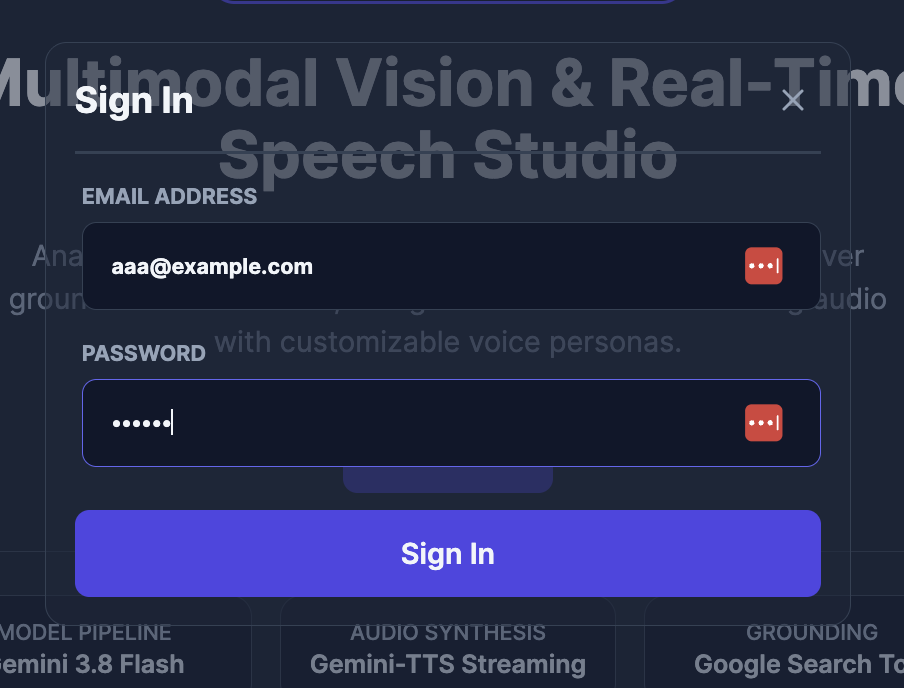 Caption: Sign-In Dialog with email and password fields.
Architecture & Mental Model
The sign-in flow works as follows:
- Signal Form Validation: We build a Signal Form with required
emailandpasswordfields. When validation fails on submit,onInvalidautomatically focuses the first invalid control. - Firebase Authentication: When a user submits valid form fields,
SignInModalComponentcallsAuthService.signIn()to verify that the submitted email and password match an existing account in Firebase Authentication. - Route Redirection or Error Handling:
- Valid credentials: When authentication succeeds (
AuthService.isAuthenticated()istrue), the modal closes and redirects the user to the/dashboardroute, where they can perform AI tasks. - Invalid credentials / error thrown: When authentication fails,
SignInModalComponent.signIn()updates itserrorMessagesignal ('Failed to sign in. Please check your credentials and try again.') and returns{ kind: 'serverError', message: 'Failed to submit form' }.
- Valid credentials: When authentication succeeds (
flowchart TD
    Submit["User Submits Email & Password"] --> Validate{"signInSchemaValidation()"}
    Validate -- "Invalid" --> Focus["onInvalid: focusBoundControl() on 1st error"]
    Validate -- "Valid" --> Action["submission.action: signIn(field)"]
    Action --> Auth["AuthService.signIn(formValues)"]
    Auth --> Check{"AuthService.isAuthenticated()?"}
    Check -- "true" --> Close["DialogRef.close() + Router.navigate(['/dashboard'])"]
    Check -- "false / throws" --> Error["Set errorMessage signal & return serverError"]
1. Defining the Signal Form Validation Schema
We start by importing the required and email validators from @angular/forms/signals to define signInSchemaValidation(), which returns a SchemaOrSchemaFn<AuthCredentials, PathKind.Root>:
- Required fields (
required): Therequiredvalidator marks both theemailandpasswordfields as required with custom error messages ({ message: 'Email is required' }and{ message: 'Password is required' }). - Email format validation (
email): Theemailvalidator checks that the entered email value is a well-formed email address and returns{ message: 'Invalid email format' }when the format is invalid.
// src/app/shared/ui/sign-in-modal/schemas/sign-in.schema.ts
import type { AuthCredentials } from '@/core/auth';
import type { PathKind, SchemaOrSchemaFn } from '@angular/forms/signals';
import { email, required } from '@angular/forms/signals';

export function signInSchemaValidation(): SchemaOrSchemaFn<AuthCredentials, PathKind.Root> {
  return (schemaPath) => {
    required(schemaPath.email, { message: 'Email is required' });
    email(schemaPath.email, { message: 'Invalid email format' });
    required(schemaPath.password, { message: 'Password is required' });
  };
}
2. Building SignInModalComponent with Signal Forms and AuthService
2.1 Injecting Dependencies and Initializing the Signal Form
In SignInModalComponent, we inject the required services and initialize the reactive form model:
AuthServiceandRouter: Handle Firebase email/password authentication and route navigation after signing in.DialogRef: Closes the modal via@angular/cdk/dialog(inject(DialogRef, { optional: true })) when the user clicks the close button or when sign-in succeeds.errorMessage: Stores and displays an alert message (signal<string | undefined>(undefined)) when authentication fails.signInModel: Backs the Signal Form (signal<AuthCredentials>({ email: '', password: '' })) and initializes theemailandpasswordfields to empty strings.
[!NOTE] Why
@angular/cdk/dialoginstead of a native<dialog>element? If you only need a single modal in an app without@angular/cdk, the native HTML<dialog>element is the better, zero-dependency choice. However, this repository already includes@angular/cdk, and@angular/cdk/dialogprovides comprehensive accessibility (a11y) out of the box—including focus trapping, focus restoration,Escape-key dismissal, and ARIA attributes. Because we also dynamically import@angular/cdk/dialogwhen opening the modal, so it never increases the initial bundle size, it is a practical choice here.
// src/app/core/auth/auth-credentials.interface.ts
export interface AuthCredentials {
  email: string;
  password: string;
}
// src/app/shared/ui/sign-in-modal/sign-in-modal.component.ts (Part 1a: Dependencies & Model)
@Component({
  imports: [FormField, FormRoot, CloseIconComponent, SpinnerIconComponent],
  selector: 'app-sign-in-modal',
})
export class SignInModalComponent {
  readonly #authService = inject(AuthService);
  readonly #dialogRef = inject(DialogRef, { optional: true });
  readonly #router = inject(Router);

  errorMessage = signal<string | undefined>(undefined);

  signInModel = signal<AuthCredentials>({
    email: '',
    password: '',
  });
Next, we pass this.signInModel and signInSchemaValidation() to the form() function to create signInForm. The form() function validates signInModel against the validation schema and configures form submission behavior:
- Valid submission (
submission.action): When validation succeeds, form submission executes theactioncallback, which invokesthis.signIn(field). - Invalid submission (
submission.onInvalid): When validation fails, form submission executes theonInvalidcallback to locate the first validation error (field().errorSummary()[0]) and automatically focus its bound form control (firstError?.fieldTree().focusBoundControl()).
// src/app/shared/ui/sign-in-modal/sign-in-modal.component.ts (Part 1b: Signal Form)
  signInForm = form(this.signInModel, signInSchemaValidation(), {
    submission: {
      action: async (field) => this.signIn(field),
      onInvalid: (field) => {
        const firstError = field().errorSummary()[0];
        firstError?.fieldTree().focusBoundControl();
      },
    },
  });
2.2 Implementing onClose() and signIn()
Next, let's implement the onClose() and signIn() methods in SignInModalComponent:
onClose(): Callsthis.#dialogRef?.close()when the user clicks the top-right close button to dismiss the modal.signIn(): Callsthis.#authService.signIn(field().value())to authenticate the submitted form credentials with Firebase Authentication:- Successful authentication: When
this.#authService.isAuthenticated()evaluates totrue, we close the modal (this.#dialogRef?.close()), navigate to the/dashboardroute (await this.#router.navigate([APP_LINKS.DASHBOARD])), and returnundefined. - Unsuccessful authentication: When authentication fails, we update
this.errorMessage.set('Failed to sign in. Please check your credentials and try again.')and return a generic submission error ({ kind: 'serverError', message: 'Failed to submit form' }) so the Signal Form records the failed submission state.
- Successful authentication: When
// src/app/shared/ui/sign-in-modal/sign-in-modal.component.ts (Part 2: onClose & signIn)
  onClose(): void {
    this.#dialogRef?.close();
  }

  async signIn(field: FieldTree<AuthCredentials, string | number>): Promise<SignInSubmissionError | undefined> {
    this.errorMessage.set(undefined);
    await this.#authService.signIn(field().value());
    if (this.#authService.isAuthenticated()) {
      this.#dialogRef?.close();
      await this.#router.navigate([APP_LINKS.DASHBOARD]);
      return undefined;
    }
    this.errorMessage.set('Failed to sign in. Please check your credentials and try again.');
    return { kind: 'serverError', message: 'Failed to submit form' };
  }
}
3. Binding the Signal Form in the Template
Now let's wire signInForm to the component template in src/app/shared/ui/sign-in-modal/sign-in-modal.component.html:
- Closing the modal: When a user clicks the top-right close button,
onClose()closes the modal viathis.#dialogRef?.close(). - Displaying authentication errors: When
errorMessage()holds a message (@if (errorMessage(); as msg)), the template renders<div role="alert">{{ msg }}</div>above the form. - Binding the form root (
[formRoot]): The[formRoot]directive binds the<form>element directly to thesignInFormform model, connecting form submission to thesubmissionconfiguration we defined in the component. - Binding form fields (
[formField]): The[formField]directive bindssignInForm.emailto the email input field andsignInForm.passwordto the password input field. - Rendering validation errors: When the user interacts with a field (
touched()) and it isinvalid(), we iterate over itserrors()array with@forto output each validation error message ({{ error.message }}). - Handling the submission state: While the form's async
submission.actionis running,signInForm().submitting()evaluates totrue. We bind[disabled]="signInForm().submitting()"on the submit button to disable it during authentication and prevent concurrent submissions.
<!-- src/app/shared/ui/sign-in-modal/sign-in-modal.component.html (Signal Form excerpt) -->
@if (errorMessage(); as msg) {
  <div role="alert">{{ msg }}</div>
}

<form [formRoot]="signInForm">
  <label for="sign-in-email">
    EMAIL ADDRESS
    <input id="sign-in-email" type="email" autocomplete="username" [formField]="signInForm.email" />
    @if (signInForm.email().touched() && signInForm.email().invalid()) {
      @for (error of signInForm.email().errors(); track error) {
        <span>{{ error.message }}</span>
      }
    }
  </label>

  <label for="sign-in-password">
    PASSWORD
    <input id="sign-in-password" type="password" autocomplete="current-password" [formField]="signInForm.password" />
    @if (signInForm.password().touched() && signInForm.password().invalid()) {
      @for (error of signInForm.password().errors(); track error) {
        <span>{{ error.message }}</span>
      }
    }
  </label>

  <button type="submit" [disabled]="signInForm().submitting()">
    @if (signInForm().submitting()) {
      <app-spinner-icon />
      <span>Signing in...</span>
    } @else {
      <span>Sign In</span>
    }
  </button>
</form>
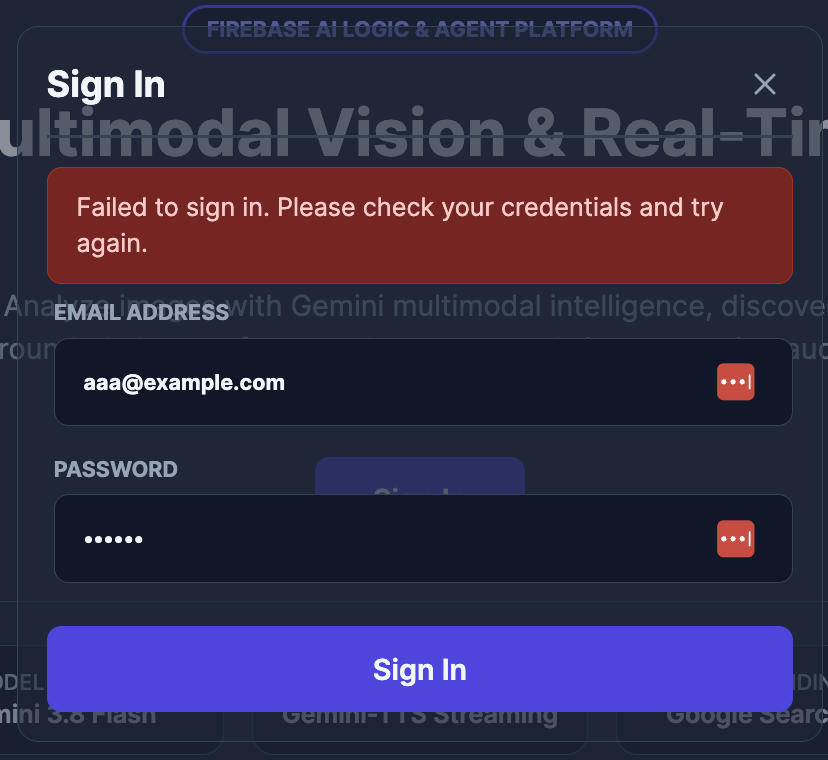 Caption: Sign-In Dialog with an invalid authentication attempt.
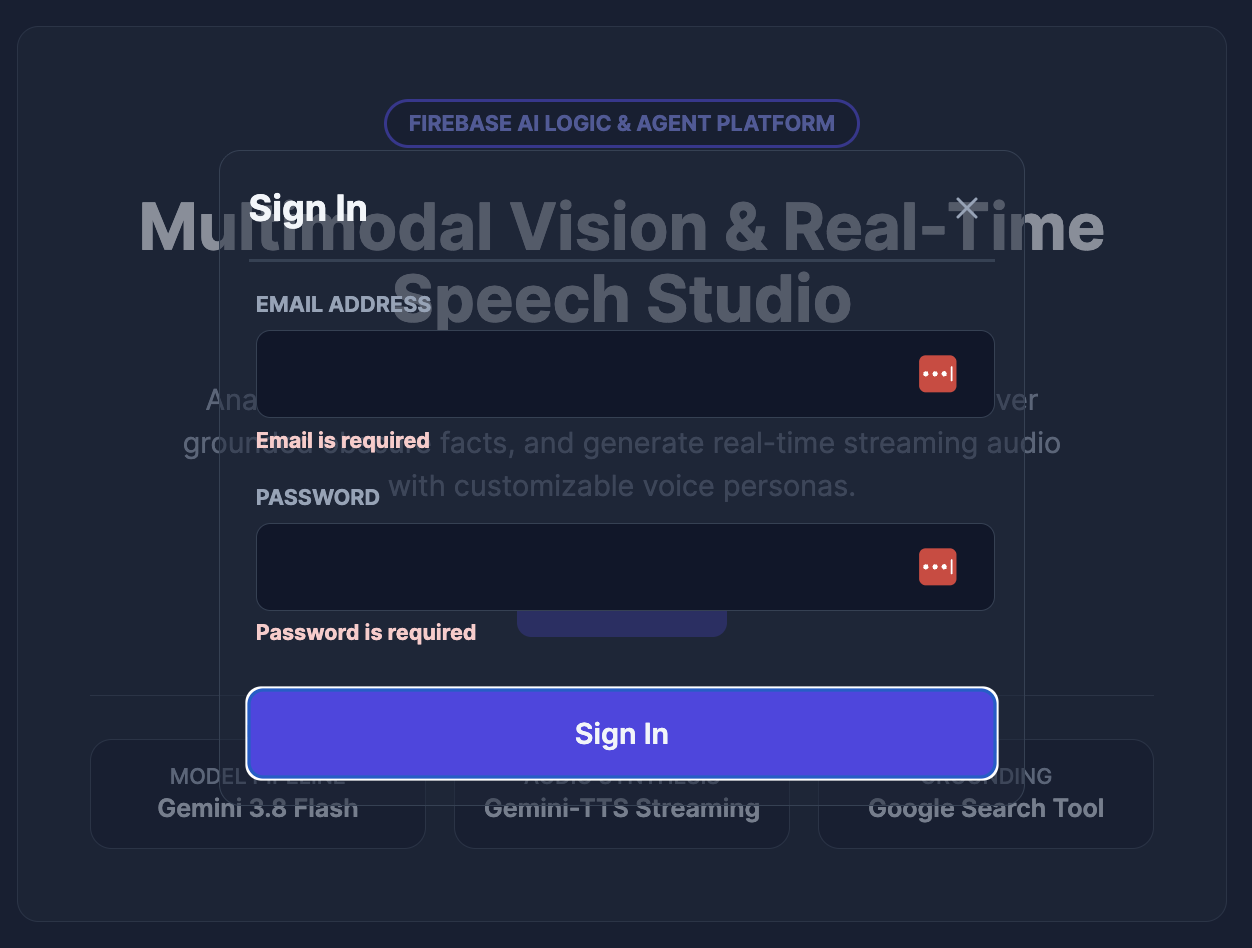 Caption: Sign-In Dialog when the form fields violate the required field validation rules.
Takeaways & What's Next
In Part 2, we built SignInModalComponent and connected it to AuthService:
- Angular Signal Forms Integration:
SignInModalComponentuses Angular Signal Forms to define the form model and bind each field to its corresponding HTML<input>element.signInSchemaValidation()validates the form fields. When validation passes,submission.actioncallsAuthService.signIn()to authenticate the user's credentials; when validation fails,submission.onInvalidautomatically focuses the first field with an error. - Lean Initial Bundles with Dynamic Imports: Even though
@angular/cdkis not a lightweight library, we will dynamically import bothSignInModalComponentand@angular/cdk/dialogwhen opening the modal from the Home component. This keepsmain.jsand our initial bundles lean.
In Part 3, we will build a lightweight Home screen with a Sign In button that opens the CDK Dialog. We will also update the Header component to provide icons for navigating home and logging out. Finally, we will use the AuthService.isAuthenticated() computed signal to conditionally display the Sign In and Launch Studio buttons on the Home screen, and reuse the same signal to show or hide the logout button in the Header component.
Resources
Comments
More Blog
View alldevchallengeAn Update on the Hacktoberfest Open-Source AI Challenge: Ghost in the Machine Winners
Hey all, we have a quick update for everyone who participated in the Hacktoberfest Open-Source AI...
J
Jem 1
devchallengeCongrats to October's MLH x DEV Writing Challenge Winner!
October's MLH x DEV Writing Challenge is a wrap! This is our way of celebrating MLH hackers who take...
J
JemcareerWant to make DEV your full-time job? We're hiring a Community Manager!
Hey friends 👋 Back in June, we posted about a Community Program Manager role. Thank you to everyone...
J
Jess Lee 1
aiContaining the Autonomous Mind: Sub-Second Zero-Trust Execution with GKE Agent Sandbox
Why standard Kubernetes pods fail when AI agents start writing code and how to build a sub-second,...
S
Saurabh MishradiscussWho is building solutions with documents?
Digital transformation, anyone?
A
Amara Graham 1
aiPrompt Pad: Show Your AI How to Respond with Few-Shot Examples
Want AI to answer in a specific way? Don't just tell it. Show it. In this episode of Prompt Pad,...
M
MLH TeamReady-made automations for this
Workflows from the Neura Market marketplace related to this Perplexity resource
- Automate SEO-Optimized Blog Creation with GPT-4, Perplexity AI & Multi-Language Supportn8n · $24.99 · Related topic
- Automate SEO Blog Content Creation with GPT-4, Perplexity AI, and WordPressn8n · $24.99 · Related topic
- Automate SEO Blog Creation + Social Media with GPT-4, Perplexity, and WordPressn8n · $24.99 · Related topic
- Auto-Generate SEO Blog Posts with Perplexity, GPT, Leonardo & WordPressn8n · $14.99 · Related topic